
WINGBO SYCF7202
WINGBO 72 Inch DC Ceiling Fan User Manual
Model: SYCF7202 | Brand: WINGBO
Introduction
Thank you for choosing the WINGBO 72 Inch DC Ceiling Fan. This modern ceiling fan is designed to provide efficient air circulation and integrated lighting for various indoor and covered outdoor spaces. Featuring a noiseless DC motor and reversible carved wood blades, it offers comfort and style year-round. This manual provides detailed instructions for safe installation, operation, maintenance, and troubleshooting to ensure optimal performance and longevity of your fan.
The fan is ETL Listed, ensuring it meets rigorous safety standards.

Image: WINGBO 72 Inch DC Ceiling Fan in white finish, shown with its remote control.
Important Safety Information
Please read and understand all instructions before beginning installation. Failure to follow these instructions could result in electric shock, fire, or personal injury.
- All electrical wiring must be in accordance with national and local electrical codes.
- Installation must be performed by a qualified licensed electrician.
- Before installation, disconnect power by turning off the circuit breakers at the main fuse box.
- The mounting structure must be capable of supporting a minimum of 35 lbs (15.9 kg).
- Ensure the fan blades are at least 7 feet (2.1 meters) from the floor.
- Do not operate the fan if any part is damaged.
Package Contents
Verify that all parts listed below are included in your package before beginning assembly.
- Fan Motor Assembly
- 5 Carved Wood Blades
- LED Light Kit
- Remote Control with Wall Holder
- 3 Downrods (4.5", 12", and 24" long)
- Mounting Bracket
- Hardware Pack (screws, wire nuts, etc.)

Image: Diagram showing fan dimensions, including the 72-inch blade span and the three included downrod lengths (4.5", 12", and 24").
Specifications
| Feature | Detail |
|---|---|
| Brand | WINGBO |
| Model Name | 72 Inch DC Ceiling Fan with Lights |
| Item Model Number | SYCF7202 |
| Color | White |
| Size | 72" |
| Number of Blades | 5 |
| Blade Material | Wood |
| Motor Type | DC Motor |
| Speeds | 6 RPM |
| Light Type | Integrated LED (24W, 3000K/4500K/6000K) |
| Control Method | Remote |
| Indoor/Outdoor Usage | Outdoor, Indoor (suitable for damp places) |
| Certification | ETL Listed, FSC-Certified Wood Blades |
Setup and Installation
Follow these steps carefully for proper installation. It is recommended to have a second person assist during installation.
1. Pre-Installation Checklist
- Ensure power is disconnected at the circuit breaker.
- Gather all necessary tools: screwdriver, wire strippers, ladder.
2. Mounting Bracket Installation
Secure the mounting bracket to the ceiling junction box. Ensure the bracket is firmly attached and can support the fan's weight.
Video: Step-by-step guide on installing the WINGBO Ceiling Fan with Lights. This video demonstrates securing the mounting bracket and connecting wires.
3. Assembling the Fan
Attach the fan blades to the motor assembly. Then, select the appropriate downrod length (4.5", 12", or 24") for your ceiling height and attach it to the motor. The fan is compatible with both flat and sloped ceilings.

Image: Visual representation of the fan's compatibility with flat and sloped ceilings, illustrating the use of different downrod lengths.
4. Wiring
Carefully connect the fan's wiring to the household wiring according to the provided wiring diagram in the installation instructions. Ensure all connections are secure using wire nuts.
Video: Detailed instructions on how to replace a ceiling fan, including electrical wiring steps. This video is for a 64-inch model but the installation principles are similar.
5. Final Assembly
Once wiring is complete, carefully lift the fan assembly and hang it onto the mounting bracket. Secure the canopy to cover the wiring connections. Finally, install the integrated LED light kit by connecting the light wires and securing the light cover.

Image: The integrated LED light kit offers three color temperature options: Warm Light (3000K), Natural Light (4500K), and Day Light (6000K).
Operation
Your WINGBO ceiling fan is operated using the included handheld remote control.
Remote Control Functions
- Fan Speed: Adjust between 6 forward speeds for optimal airflow.
- Light Control: Turn the LED light on/off and cycle through the 3 color temperature options (3000K, 4500K, 6000K).
- Reversible Motor: Switch between summer mode (downward airflow) and winter mode (upward airflow) to optimize air circulation.
- Timer: Set a timer for 1, 2, 4, or 8 hours to automatically turn off the fan.
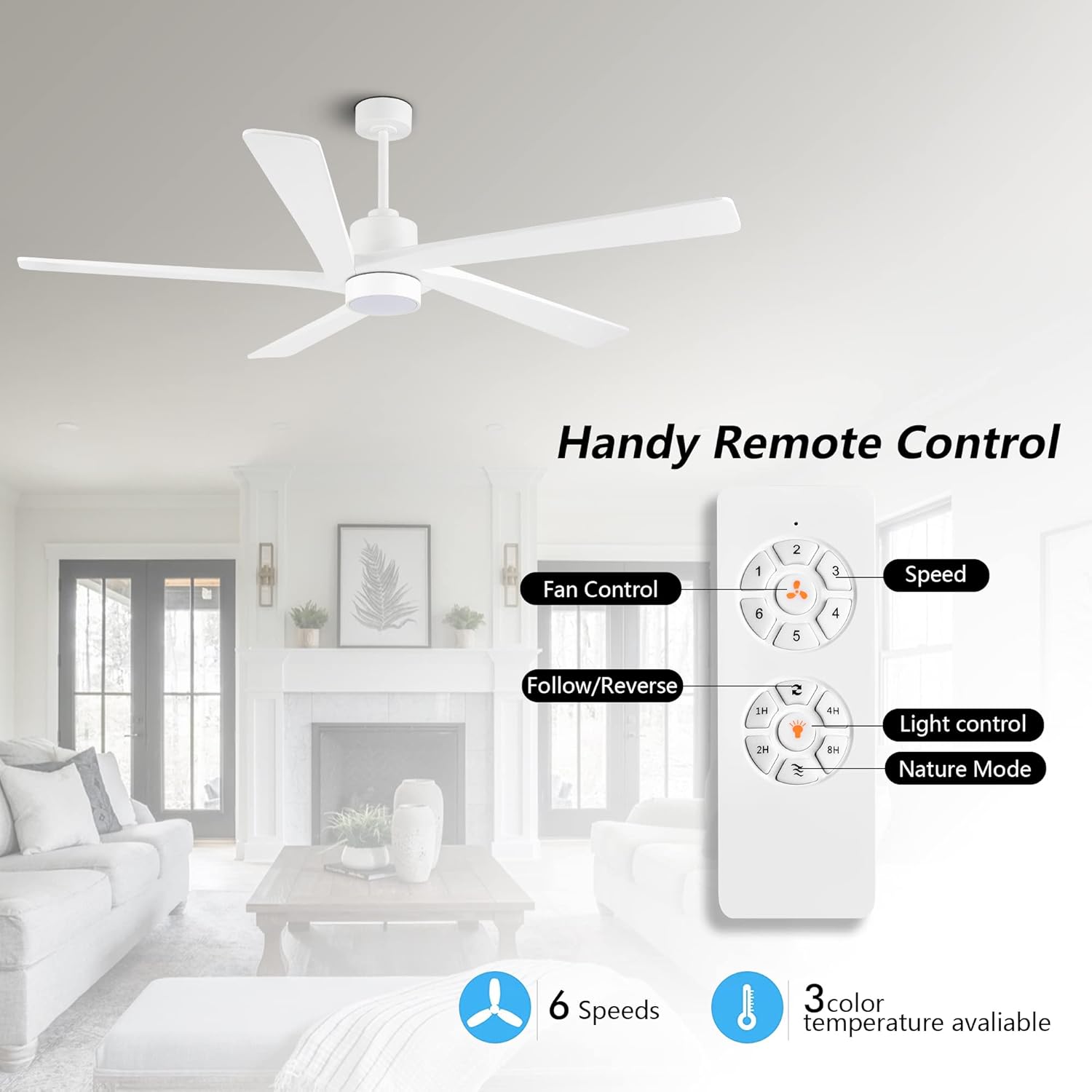
Image: The remote control features dedicated buttons for fan speed adjustment, light control, and fan direction (forward/reverse).

Image: Illustration of the 6-speed reversible function, demonstrating how summer mode forces air down for cooling and winter mode gently draws air up for warmth.
Maintenance
Regular maintenance will help prolong the life and performance of your ceiling fan.
- Cleaning: To avoid scratching the finish, clean the fan with a soft, damp cloth. Do not use abrasive cleaners or solvents.
- Blade Balancing: If the fan wobbles, check that all blade screws are tightened. Minor wobbling can often be corrected by balancing the blades using a balancing kit (not included).
- Motor: The DC motor is designed for quiet operation and requires no lubrication.
Video: Instructions on how to fix a noisy ceiling fan, which can be a common maintenance issue.
Troubleshooting
If you experience issues with your fan, consult the following common problems and solutions:
- Fan does not start: Check circuit breakers and wall switches. Ensure all wire connections are secure. Verify remote control batteries are working.
- Fan is noisy: Ensure all screws on the motor housing and blade attachments are tight. Check if the blades are properly balanced.
- Light does not work: Check wire connections to the light kit. Ensure the light function on the remote is activated.
- Excessive wobbling: Verify the mounting bracket is securely fastened. Check that all blade screws are tight and blades are balanced.
Warranty and Support
For warranty information or technical support, please contact WINGBO customer service. Keep your purchase receipt as proof of purchase for any warranty claims.
Contact information can typically be found on the product packaging or the official WINGBO website.
Related documentsSYCF7202


Ask a question about this manual
Ask about setup, troubleshooting, compatibility, parts, safety, or missing instructions. Manuals+ will review the question and use this page’s manual context to help answer it.