
1. Introduction
The dotmod DotAIO V2 LITE is a clear color version of the popular DotAIO V2 device, offering the same advanced specifications at a more accessible price point. This versatile vaping device features a maximum output of 75W with stepless adjustment, an integrated LCD panel for easy information display, and a variety of operating modes including Wattage, Bypass, Temperature Control (TC), and an intelligent Automatic mode (Very Soft, Soft, Medium, Strong). All panels, cartridges, and coils from the previous DotAIO V2 version are fully compatible, ensuring seamless integration with existing accessories.

Image: The dotmod DotAIO V2 LITE device shown in multiple transparent color options, highlighting its sleek design.
2. Package Contents
Please verify that all items listed below are included in your package:
- One (1) dotAIO V2 Lite Device
- One (1) 2.0 ml e-juice tank (PCTG)
- One (1) Airflow Control Base
- One (1) Tank Plug
- One (1) Silicone Bumper Replacement
- One (1) 0.3 ohm Coil
- One (1) 0.7 ohm Coil
- Two (2) Drip Tips
- Six (6) O-rings
- One (1) Type-C Charging Cable

Image: Close-up view of the included 0.3 ohm and 0.7 ohm coils, essential components for vapor production.
3. Setup Guide
3.1 Battery Installation
The DotAIO V2 LITE requires an external 18650 battery (not included).
- Remove the magnetic side panel to access the battery compartment.
- Insert one (1) 18650 battery according to the polarity indicators (+/-) inside the compartment.
- Replace the magnetic side panel securely.

Image: The device with its side panel removed, revealing the battery compartment and internal structure, along with the display showing various output modes.
3.2 Tank and Coil Installation
Install the tank and coil before filling with e-liquid.
- Remove the magnetic side panel to access the tank slot.
- Attach the desired coil (0.3 ohm or 0.7 ohm) to the airflow control base.
- Insert the assembled coil and airflow control base into the 2.0 ml e-juice tank.
- Slide the filled tank into the device's tank slot until it clicks into place.
- Replace the magnetic side panel.
3.3 E-liquid Filling
Ensure the tank is properly installed before filling.
- Locate the silicone tank plug on the side of the tank.
- Gently pull the plug open.
- Carefully fill the tank with your preferred e-liquid through the filling port. Avoid overfilling.
- Securely close the silicone tank plug.
- Allow the coil to prime for 5-10 minutes after the first fill to saturate the cotton. This prevents dry hits.
4. Operating Instructions
4.1 Power On/Off
- To turn the device ON: Press the fire button 5 times rapidly.
- To turn the device OFF: Press the fire button 5 times rapidly.
4.2 Adjusting Settings and Modes
The DotAIO V2 LITE features an LCD screen and control buttons for easy navigation.
- To access the Menu: Press the fire button 3 times rapidly.
- Use the +/- buttons (located below the screen) to navigate through options and adjust values.
- Press the fire button to confirm selections.
Available Modes:
- Wattage (W) Mode: Allows stepless adjustment of power output up to 75W.
- Bypass Mode: Delivers raw battery voltage to the coil, mimicking a mechanical mod.
- Temperature Control (TC) Mode: For use with specific coil materials (e.g., Ni, Ti, SS) to prevent dry hits and ensure consistent vapor.
- Automatic Mode: Automatically adjusts power based on coil resistance, with options for Very Soft, Soft, Medium, and Strong output.

Image: The device's side panel showing the integrated LCD screen and the plus/minus control buttons, enabling easy mode and wattage adjustments.
4.3 Vaping
Once the device is set up and powered on, press and hold the fire button while inhaling from the drip tip. Release the button when you finish inhaling.
4.4 Charging
The DotAIO V2 LITE supports Type-C charging.
- Connect the included Type-C charging cable to the charging port located at the bottom of the device.
- Connect the other end of the cable to a suitable USB power source (e.g., wall adapter, computer USB port).
- The LCD screen will display the charging status.
- Disconnect the cable once fully charged.

Image: The device highlighting the discreetly placed Type-C charging port at the bottom, designed to maintain the device's aesthetic.
5. Maintenance
5.1 Cleaning the Tank
Regular cleaning helps maintain optimal flavor and device longevity.
- Remove the tank from the device.
- Remove the coil and discard it if it's at the end of its lifespan.
- Rinse the tank thoroughly with warm water. Avoid using harsh detergents.
- Allow all components to air dry completely before reassembling.
5.2 Coil Replacement
Coils are consumable parts and should be replaced when flavor diminishes or vapor production decreases.
- Ensure the tank is empty or nearly empty of e-liquid.
- Remove the tank from the device.
- Unscrew the old coil from the airflow control base.
- Screw in a new coil firmly.
- Reinstall the tank and fill with e-liquid, allowing time for priming.
5.3 General Care
- Keep the device clean and dry. Wipe down any e-liquid condensation regularly.
- Store the device in a cool, dry place away from direct sunlight and extreme temperatures.
- Avoid dropping the device or subjecting it to strong impacts.
6. Troubleshooting
| Problem | Possible Cause | Solution |
|---|---|---|
| No vapor production | Low battery; Coil not installed correctly; Coil burnt out; No e-liquid; Device off. | Charge battery; Reinstall coil; Replace coil; Refill tank; Turn device on (5 clicks). |
| Burnt taste | Coil not primed; Coil burnt out; E-liquid level too low; Wattage too high. | Prime new coil; Replace coil; Refill tank; Lower wattage setting. |
| Leaking | Coil not tightened; Damaged O-rings; Overfilled tank; Incorrect e-liquid viscosity. | Ensure coil is snug; Replace O-rings; Do not overfill; Use appropriate e-liquid. |
| Device not charging | Faulty cable/adapter; Dirty charging port; Device issue. | Try different cable/adapter; Clean charging port; Contact support if issue persists. |
7. Specifications
| Feature | Detail |
|---|---|
| Model Name | DotAIO V2 LITE |
| Dimensions | Approx. 78 x 45 x 22.5 mm |
| Weight | Approx. 88.8 g |
| Max Output Wattage | 75W |
| Battery Type | 1 x 18650 (external, not included) |
| Tank Capacity | 2.0 ml (PCTG) |
| Coil Compatibility | dotmod DotAIO V2 Coils (0.3 ohm, 0.7 ohm included) |
| Charging Port | Type-C USB |
| Display | LCD Screen |
| Operating Modes | Wattage, Bypass, Temperature Control (TC), Automatic (Very Soft/Soft/Medium/Strong) |
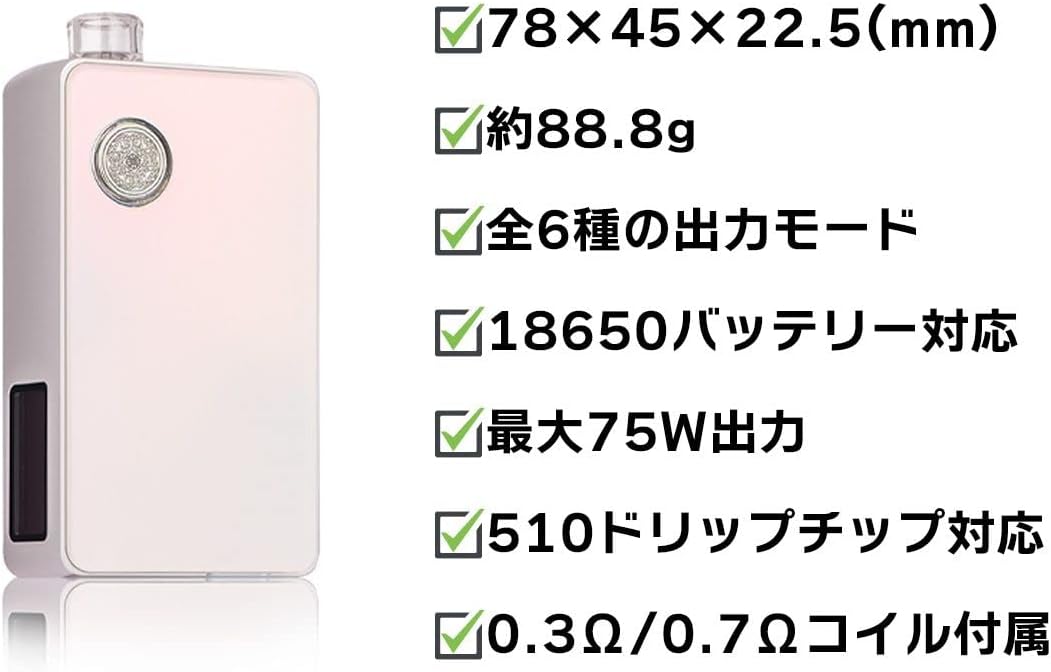
Image: Visual representation of key specifications including dimensions, weight, output, and battery compatibility.
8. Warranty and Support
For warranty information and technical support, please refer to the official dotmod website or contact your authorized retailer. Keep your proof of purchase for any warranty claims.
Important Note: This product is intended for adult users only. Keep out of reach of children and pets.


