
MCombo 6160-7890PU
MCombo Dual Motor Power Lift Recliner Chair Instruction Manual
Model: 6160-7890PU | Brand: MCombo
Introduction
This manual provides comprehensive instructions for the assembly, operation, maintenance, and troubleshooting of your MCombo Dual Motor Power Lift Recliner Chair. Please read this manual thoroughly before assembly and use to ensure safe and proper operation of your chair.

Figure 1: MCombo Dual Motor Power Lift Recliner Chair (Dark Brown, Medium)
Important Safety Information
Please observe the following safety guidelines to prevent injury or damage to the product:
- Do not exceed the maximum weight recommendation of 320 Pounds.
- Ensure proper assembly before use. Improper assembly may result in safety risks.
- Use the chair within the recommended height range of 5'3"-6' for optimal comfort and safety.
- Keep children and pets away from the chair's moving parts.
- Always ensure the power cord is not pinched or damaged.
- Unplug the chair from the power outlet before cleaning or maintenance.
Setup and Assembly
Your MCombo Power Lift Recliner Chair is designed for easy assembly, typically requiring no tools and taking approximately 20 minutes for a novice. The chair comes in two boxes.
Included Components:
- Backrest
- Armrests (Right Armrest with USB, Left Armrest)
- Base
- Parts box
- Manual
- Pillow (if applicable)
Assembly Steps:
- Install Anti-Back-Tipping Device: Locate the anti-back-tipping device and attach it to the chair's base as per the instructions. Ensure it is securely fastened to prevent the chair from tipping backward during operation.
- Armrests Assembly: Remove any protective foam/material from the armrest brackets. Insert the two brackets on each armrest downwards into the corresponding slots on the chair's base. Press firmly to secure.
- Backrest Assembly: Align the backrest brackets with the base brackets. Carefully slide the backrest down until it locks securely into place. Press down to ensure a firm connection.
- Wire Connections:
- Connect the main chair wiring (red and white connectors).
- Connect the USB charge wire to its designated port.
- Connect the lift remote control wire.
- Connect the massage remote control wire.
- Tie up any excess wires to prevent tangling or damage.
- Connect the power adapter to the chair's power input and then to a wall outlet. Ensure the power switch is in the 'ON' position.
For a visual guide on assembly, please refer to the official assembly video:
Video: Assembly Guide for Lift Recliner 7890. This video demonstrates the step-by-step assembly process for the MCombo lift recliner chair, including attaching the anti-back-tipping device, armrests, backrest, and connecting all necessary wires.
Operating Instructions
Your MCombo Dual Motor Power Lift Recliner Chair offers multiple functionalities for enhanced comfort and convenience.
Dual Motor System:
The chair features a dual motor system, allowing independent adjustment of the backrest and footrest. This enables you to find an infinite number of positions, including lift, TV, and lay-flat (up to 165° reclining angle).

Figure 2: Chair Positions (Upright, TV, Lay-Flat) and Dimensions. This diagram illustrates the various reclining positions and key dimensions of the chair, including the lay-flat position at 165 degrees.

Figure 3: Infinite Position Capability. This image shows the chair in a lay-flat position, highlighting its ability to adjust the backrest and footrest independently for an infinite number of comfortable positions.
Remote Controls:
The chair comes with two remote controls for different functions:
- Lift and Recline Remote: This remote controls the chair's lift and recline functions. It features a "HOME" button that returns the chair to the upright position within approximately 16 seconds. When reclining, the backrest moves first to ensure user safety.

Figure 4: Lift and Recline Remote Control. This image displays the remote control used for adjusting the chair's lift and recline positions, including the prominent "HOME" button for quick return to upright.
- Massage and Heat Remote: This remote activates the full-body vibration massage (8 points) and lumbar heating (1 point). You can set the massage function to turn off automatically after 10, 20, or 30 minutes. The heating function operates independently of the vibration.

Figure 5: Massage and Heat Remote Control. This image shows the remote control for the chair's massage and heating features, detailing the various settings for intensity, mode, and timer.
Convenience Features:
- USB Charging Ports: Dual USB ports are integrated into the chair, allowing you to conveniently charge your mobile devices while relaxing.
- Cup Holders: Two cup holders are provided for your beverages.
- Side Pockets: The chair includes side and front pockets for storing remotes, magazines, or other small items.
- Extended Footrest: A 4.7-inch extended footrest provides full body stretch and proper foot support, preventing circulation cutoff.
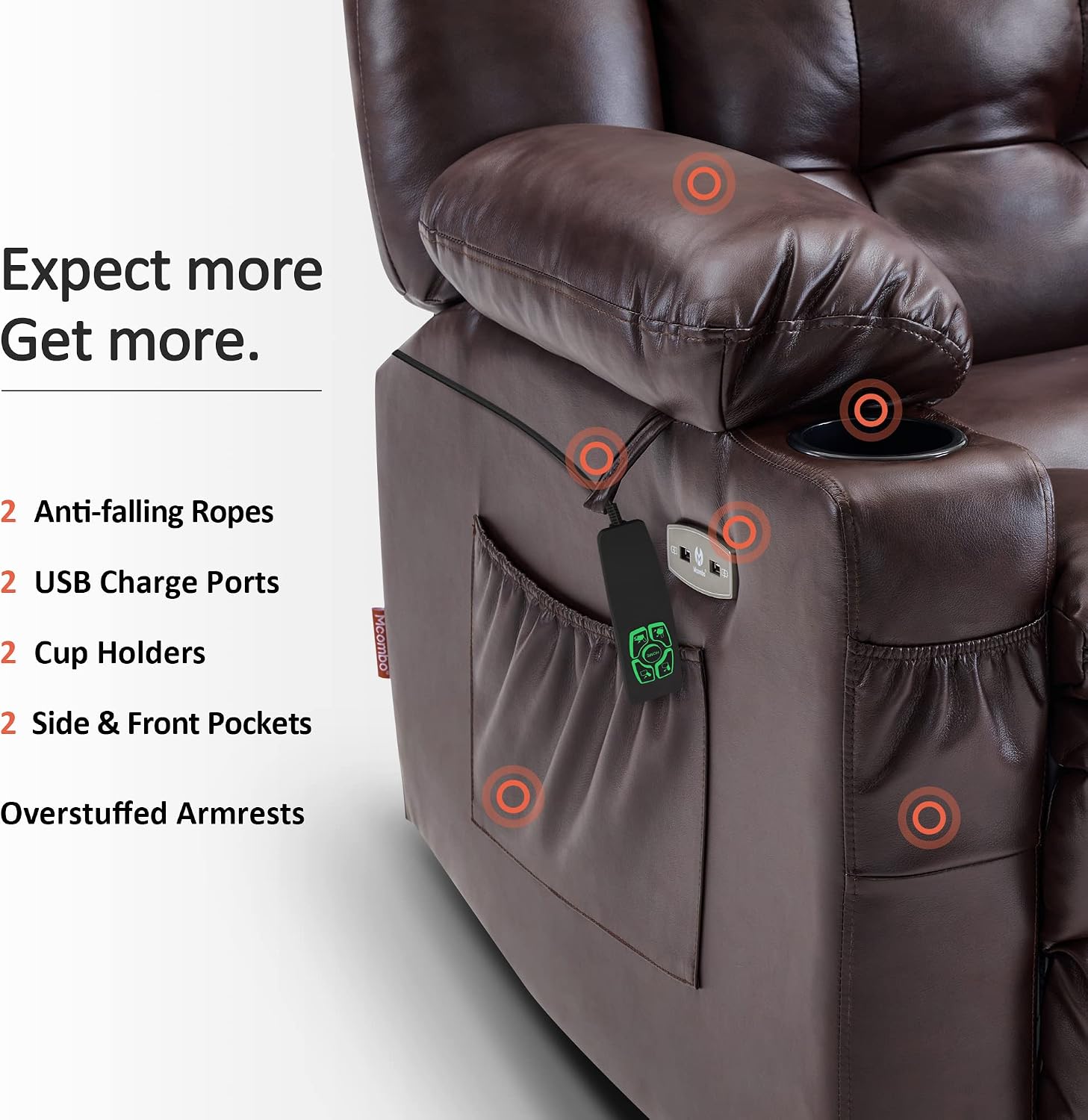
Figure 6: Convenience Features. This image highlights the integrated USB charging ports, cup holders, and side pockets for user convenience.
Maintenance
Proper maintenance ensures the longevity and optimal performance of your MCombo recliner chair.
- Cleaning: The faux leather upholstery should be spot cleaned. Use a soft, damp cloth with mild soap and water for spills or stains. Avoid harsh chemicals or abrasive cleaners.
- General Care: Regularly inspect all connections and moving parts to ensure they are secure. Keep the chair away from direct sunlight and heat sources to prevent material degradation.
- Power Cord: Periodically check the power cord for any signs of wear or damage. If damage is found, discontinue use and contact customer support.

Figure 7: Faux Leather Upholstery. This image provides a close-up view of the faux leather material, emphasizing its texture and finish.
Troubleshooting
If you encounter issues with your MCombo Power Lift Recliner Chair, refer to the following common troubleshooting steps:
| Problem | Possible Cause | Solution |
|---|---|---|
| Chair does not move or respond to remote. | Power cord disconnected, power switch off, or remote battery issue. | Ensure power cord is securely plugged into the wall and chair. Check if the power switch (usually located near the power input) is ON. If remote uses batteries, replace them. |
| Massage or heat function not working. | Massage/heat remote not connected or power issue. | Verify the massage remote is properly connected to the chair's wiring. Check main power connection. |
| Chair movement is noisy or jerky. | Loose connections or obstruction in mechanism. | Inspect all assembly connections for tightness. Check for any objects obstructing the chair's mechanism underneath. |
| Chair does not fully recline or lift. | Obstruction or mechanism issue. | Ensure there are no obstructions behind or under the chair. If the issue persists, contact customer support. |
Specifications
| Feature | Detail |
|---|---|
| Brand | MCombo |
| Model Name | 6160-7890PU |
| Color | Dark Brown |
| Product Dimensions | 37.4"D x 34.6"W x 41.7"H |
| Size | Medium |
| Maximum Weight Recommendation | 320 Pounds |
| Recommended Height | 5'3"-6' |
| Special Features | Dual Motor Power Recliner, Lay Flat, Heat, Massage, Power Lift, Adjustable Backrest, USB Ports, Cup Holders |
| Material | Faux Leather (Upholstery), Foam (Fill Material) |
| Reclining Angle (Max) | 165° |
| Item Weight | 121.3 pounds |
| Number of Cup Holders | 2 |
| Country of Origin | China |
Warranty and Support
Limited Warranty:
Your MCombo Dual Motor Power Lift Recliner Chair comes with a 2-Year Limited Warranty covering the following components:
- Reclining and Lift Mechanism
- Electrical Parts
- Upholstery Material
- Cushions
- Wood and Metal Frame
For detailed warranty terms and conditions, please refer to the warranty card included in your product packaging.
Customer Support:
Should you require assistance with assembly, operation, maintenance, or warranty claims, please contact MCombo Customer Support. Have your model number (6160-7890PU) and purchase information ready when contacting support for faster service.
For more information, you may visit the MCombo Store on Amazon.
Ask a question about this manual
Ask about setup, troubleshooting, compatibility, parts, safety, or missing instructions. Manuals+ will review the question and use this page’s manual context to help answer it.