
Focket Focket0p6q5rdnhx
Focket 3-in-1 Smart Vacuum Robot Cleaner User Manual
Model: Focket0p6q5rdnhx
Brand: Focket
Introduction
This manual provides detailed instructions for the setup, operation, and maintenance of your Focket 3-in-1 Smart Vacuum Robot Cleaner. This versatile device is designed to simplify your cleaning routine by combining sweeping, vacuuming, and mopping functionalities into one compact unit. Please read this manual thoroughly before using the product to ensure safe and efficient operation.
Product Overview
The Focket Smart Vacuum Robot Cleaner is engineered for comprehensive floor cleaning across various surfaces. Its intelligent design allows for efficient navigation and thorough cleaning.

Figure 1: Top view of the Focket 3-in-1 Smart Vacuum Robot Cleaner.
This image displays the sleek, circular design of the Focket Smart Vacuum Robot Cleaner from a top-down perspective, highlighting its compact form factor and the central 'AUTO' button for operation.
Key Features:
- 3-in-1 Functionality: Supports sweeping, vacuuming, and mopping for a complete cleaning solution.
- Efficient Cleaning: One-button start for automatic cleaning, equipped with brushes and a wiping rag for thorough results.
- Intelligent Navigation: Features intelligent turning and smooth edges to protect furniture, effectively avoiding obstacles and preventing falls.
- Compact and Low Noise: Round design suitable for whole-house cleaning with minimal operational sound.
- Long Battery Life: Equipped with a 1200mAh polymer lithium battery, supporting USB charging for extended use.

Figure 2: The robot cleaner performing its sweeping function.
This image illustrates the robot cleaner in action, highlighting its sweeping capability on a hard floor surface. The text overlay indicates its 3-in-1 household smart sweeper functionality.

Figure 3: Integrated vacuuming, sweeping, and mopping for efficient cleaning.
This image shows the robot cleaner positioned under furniture, emphasizing its ability to perform integrated vacuuming, sweeping, and mopping for comprehensive and efficient cleaning.

Figure 4: Compatibility with different floor types.
This image demonstrates the robot cleaner's adaptability to various floor types, including marble, blanket (carpet), and wood board, showcasing its versatility for different home environments.
Setup
1. Unboxing and Components
Carefully remove all components from the packaging. Ensure all items listed below are present.

Figure 5: Robot cleaner and accessories.
This image shows the main robot unit along with its accessories: a cleaning cloth, two side brushes, a USB charging cable, and a small cleaning brush.
- Robot Vacuum Cleaner Unit
- Side Brushes (2 pairs)
- USB Charging Cable
- Cleaning Cloth
- Small Cleaning Brush
2. Charging the Robot
Before first use, fully charge the robot. Connect the USB charging cable to the robot's charging port and plug the other end into a compatible USB power adapter (not included) or a computer USB port. The charging indicator light will provide status.
- Charging Voltage: 3.7 Volts
- Battery Life: Approximately 75 minutes per charge
3. Attaching Side Brushes and Mopping Cloth
Attach the side brushes to their designated posts on the underside of the robot. Ensure they click into place. If using the mopping function, attach the cleaning cloth to the designated area on the bottom of the robot.

Figure 6: Underside of the robot cleaner.
This image shows the bottom of the robot, detailing the placement of the side brushes, the central wheel, and the suction inlet/mopping cloth attachment area.
Operating Instructions
1. Starting and Stopping
To start the robot, press the "AUTO" button located on the top surface of the unit (refer to Figure 1). The robot will begin its automatic cleaning cycle. To stop the robot at any time, press the "AUTO" button again.
2. Cleaning Modes and Navigation
The robot operates in an automatic cleaning mode, intelligently navigating your home. It uses sensors to detect obstacles and prevent falls, ensuring comprehensive coverage while protecting your furniture.
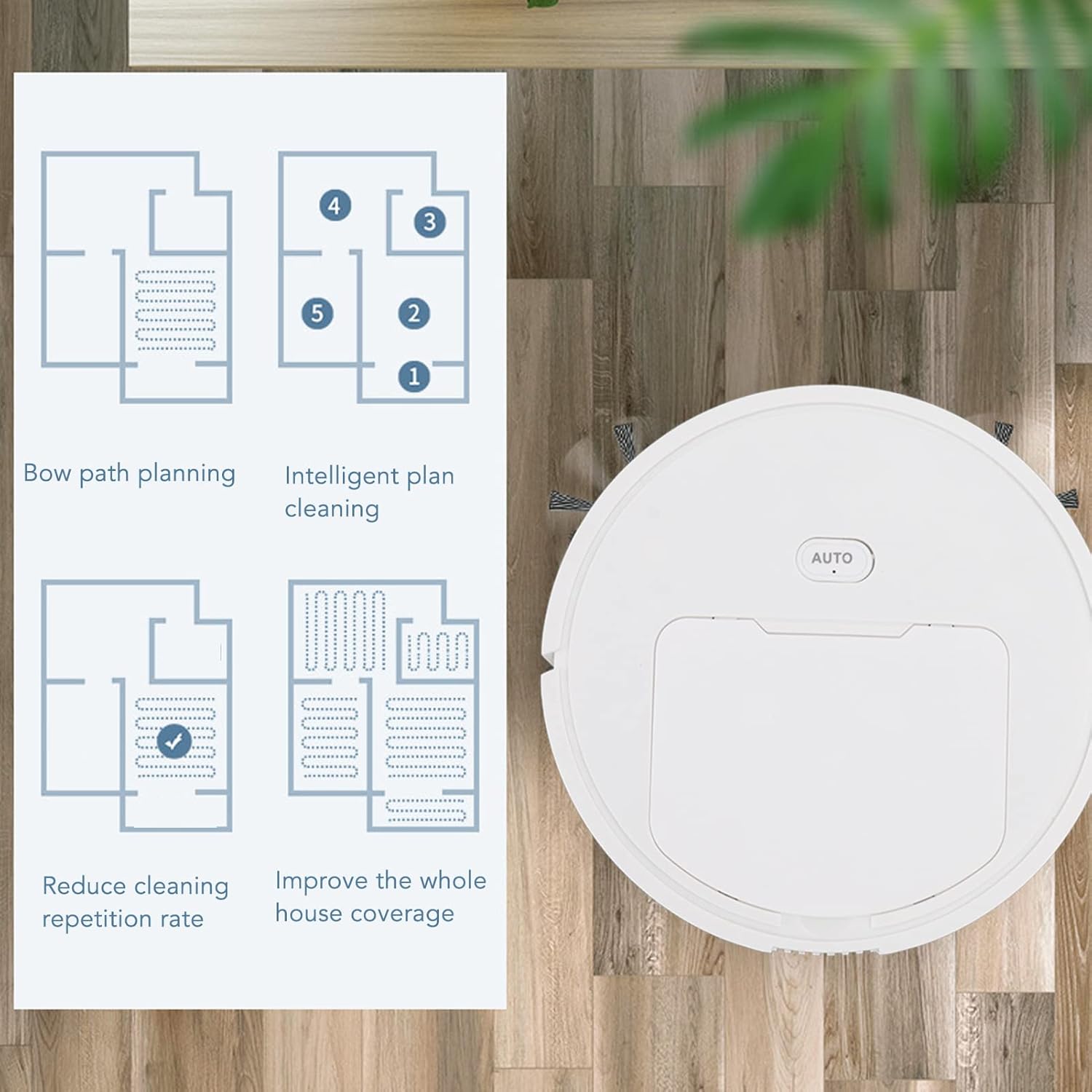
Figure 7: Intelligent path planning.
This diagram illustrates the robot's intelligent cleaning path planning, showing how it covers areas efficiently to reduce repetition and improve overall house coverage.
Maintenance
Regular maintenance ensures optimal performance and extends the lifespan of your robot cleaner.
1. Emptying the Dustbin
After each cleaning cycle, or when the dustbin is full, open the dustbin compartment and empty its contents into a trash receptacle. Close the dustbin securely before next use.
2. Cleaning Brushes and Filter
Periodically inspect and clean the side brushes to remove any tangled hair or debris. Use the provided small cleaning brush for this purpose. The internal filter should also be cleaned regularly to maintain suction efficiency. Tap out dust or gently brush clean. Do not wash the filter with water unless specified.

Figure 8: Close-up of the filter compartment.
This close-up image shows the filter compartment of the robot cleaner, indicating where the filter is located for cleaning or replacement.
3. Mopping Cloth Care
If you use the mopping function, remove the cleaning cloth after each use and wash it with water. Allow it to air dry completely before reattaching or storing.
Troubleshooting
If you encounter issues with your Focket Smart Vacuum Robot Cleaner, refer to the following common problems and solutions:
| Problem | Possible Cause | Solution |
|---|---|---|
| Robot does not start | Low battery; Power button not pressed correctly. | Ensure robot is fully charged. Press the "AUTO" button firmly. |
| Reduced suction power | Full dustbin; Clogged filter; Blocked suction inlet. | Empty dustbin. Clean or replace filter. Clear any obstructions from the suction inlet. |
| Robot gets stuck frequently | Obstacles in cleaning path; Uneven surfaces. | Clear small objects, cables, and loose rugs from the cleaning area. |
| Side brushes not rotating | Hair or debris tangled in brushes; Brushes not installed correctly. | Remove and clean brushes. Reinstall them securely. |
Specifications
| Feature | Detail |
|---|---|
| Brand | Focket |
| Model Name | Focket0p6q5rdnhx |
| Special Feature | Automatic Dust Collection |
| Color | Default (White) |
| Filter Type | Cloth |
| Battery Life | 75 minutes |
| Voltage | 3.7 Volts |
| Power Source | Battery Powered |
| Form Factor | Robotic |
| Item Weight | 2.05 pounds |
| Package Dimensions | 15.43 x 12.2 x 3.62 inches |
| Country of Origin | China |
| Date First Available | December 11, 2022 |
Safety Information
Please observe the following safety precautions:

Figure 9: Packaging disposal warning.
This image displays a multi-language warning, emphasizing the importance of properly disposing of packaging materials after use to avoid choking hazards.
- Dispose of packaging materials properly after use to avoid choking hazards, especially for children.
- Do not operate the robot in wet environments or near liquids.
- Keep fingers, hair, and loose clothing away from moving parts.
- Do not allow children to operate the robot unsupervised.
- Use only the provided charging cable and recommended power source.
Warranty and Support
The manufacturer provides a 1-year warranty for this product. For any product-related inquiries, technical support, or warranty claims, please contact the seller or manufacturer directly. They are committed to providing professional and detailed replies within 24 hours.
For further assistance, please refer to the contact information provided at the point of purchase or on the product packaging.
Ask a question about this manual
Ask about setup, troubleshooting, compatibility, parts, safety, or missing instructions. Manuals+ will review the question and use this page’s manual context to help answer it.