
Introduction
The R2B Tilburg Adjustable Foldable Laptop Stand is designed to enhance your comfort and productivity by providing an ergonomic setup for your laptop or tablet. Crafted from high-quality aluminum and plastic, this stand is robust, lightweight, and highly versatile. Its 360-degree adjustable joints allow for precise positioning, ensuring an optimal viewing angle and posture in various environments.
This manual provides detailed instructions for the setup, operation, maintenance, and troubleshooting of your R2B Tilburg laptop stand. Please read it carefully to ensure safe and effective use of your product.
Product Features
- Adjustable & Foldable Design: Features 360-degree rotating joints for customizable height and angle, and folds compactly for portability.
- High-Quality Materials: Constructed from durable aluminum and plastic, capable of supporting up to 15 kg.
- Integrated Ventilation: Perforated main tray design promotes airflow to prevent laptop overheating.
- Multi-functional Use: Suitable for various settings including bed, sofa, desk, or floor.
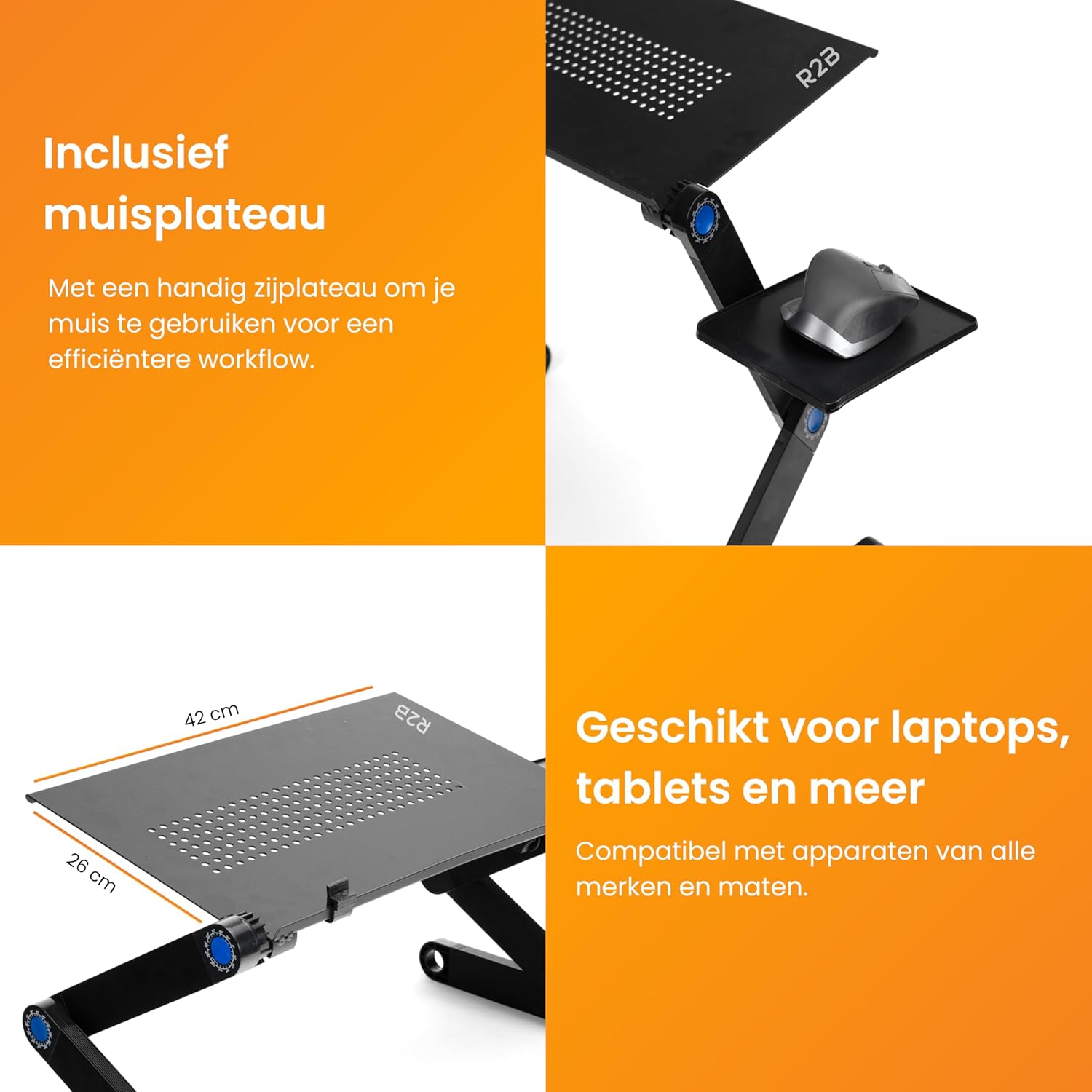
- Detachable Mouse Platform: Includes a side platform for convenient external mouse usage.
- Wide Compatibility: Compatible with all major laptop and tablet brands.
Setup Instructions
The R2B Tilburg laptop stand comes pre-assembled. Follow these steps to prepare it for use:
- Unfold the Stand: Gently unfold the legs of the stand until they are extended.
- Adjust Angles: Press the central button on each 360-degree joint, rotate the leg segment to your desired angle, and release the button to lock it. Repeat this process for all six joints (three on each side) to achieve your preferred height and tilt.
- Secure Joints: Ensure all joints are firmly locked in place before placing any device on the stand. This prevents accidental collapse and ensures stability.
- Attach Mouse Platform (Optional): If using an external mouse, slide the provided mouse platform into the designated slot on the side of the main tray until it clicks securely into place.

This image highlights the adjustable joints of the R2B Tilburg stand, demonstrating how the angles can be precisely set for optimal viewing and posture.
Operating Instructions
Adjusting Height and Angle
The R2B Tilburg stand offers extensive adjustability for ergonomic comfort. Each leg features three segments connected by 360-degree rotating joints. To adjust:
- Press and hold the central button on the joint you wish to adjust.
- Rotate the leg segment to the desired angle, indicated by the degree markings around the button.
- Release the button to lock the joint firmly in place.
- Repeat for all necessary joints to achieve your ideal height and viewing angle for your laptop or tablet.
Using the Mouse Platform
The detachable mouse platform provides an extended surface for your external mouse, improving your workspace ergonomics.
- Ensure the mouse platform is securely attached to the side of the main tray.
- Place your mouse on the platform. The platform is designed to hold standard computer mice.

This image displays the R2B Tilburg laptop stand with its convenient side mouse platform, designed to accommodate an external mouse for improved productivity.
Ventilation System
The main tray of the R2B Tilburg stand features a perforated design to facilitate passive cooling for your laptop. These ventilation holes allow hot air to dissipate, preventing your device from overheating and potentially extending its lifespan. No active cooling fans are integrated; the design relies on natural airflow.
This image focuses on the integrated ventilation holes on the R2B Tilburg laptop stand, designed to facilitate airflow and prevent laptop overheating.
Versatile Usage
The R2B Tilburg stand is designed for adaptability, allowing you to create an ergonomic workspace almost anywhere:
- In Bed: Enjoy working or watching media comfortably from your bed.
- On a Sofa: Use it as a stable surface while relaxing on your couch.
- At a Desk: Elevate your laptop to eye level for improved posture at your workstation.
- On the Floor: Create a comfortable setup for floor seating.

This collage illustrates the versatility of the R2B Tilburg laptop stand, showing its adaptability for use in multiple locations such as a bed, desk, or living room.
Maintenance
Proper care will ensure the longevity of your R2B Tilburg laptop stand:
- Cleaning: Wipe the stand with a soft, slightly damp cloth. Avoid using harsh chemicals, abrasive cleaners, or solvents, as these can damage the finish and materials.
- Joint Care: Keep the adjustable joints free from dust and debris to ensure smooth operation. If a joint becomes stiff, a small amount of silicone-based lubricant can be applied to the mechanism.
- Storage: When not in use, fold the stand compactly and store it in a dry place away from extreme temperatures or direct sunlight.

This image visually compares the R2B Tilburg laptop stand in its unfolded and folded states, emphasizing its portability and ease of storage.
Troubleshooting
If you encounter any issues with your R2B Tilburg laptop stand, please refer to the following common solutions:
- Stand is unstable or wobbly:
- Ensure all 360-degree adjustable joints are securely locked after setting your desired angles. Press the button firmly until it clicks into place.
- Verify that the stand is placed on a flat, stable, and even surface. Uneven surfaces can affect stability. - Difficulty adjusting joints:
- Make sure you are pressing the central button on the joint firmly before attempting to rotate it.
- If the joint feels stiff, it may have accumulated dust or debris. Clean the joint area. A small amount of silicone-based lubricant can be applied to the mechanism to improve movement. - Laptop overheating despite ventilation:
- While the stand provides passive ventilation, ensure your laptop's own cooling vents are not obstructed by the stand or other objects.
- Check that your laptop's internal fans are functioning correctly.
- Ensure the room temperature is not excessively high. - Mouse platform is loose or detaches:
- Ensure the mouse platform is fully inserted into its designated slot on the main tray until it is securely fastened. Check for any obstructions in the slot.
Specifications
| Feature | Detail |
|---|---|
| Brand | R2B |
| Model Name | Tilburg |
| Model Number | Tilburg |
| Material | Aluminum, Plastic |
| Product Weight | 1.39 Kilogram (1393 Gram) |
| Package Dimensions | 53.5 x 27.5 x 5.5 cm |
| Maximum Load Capacity | 15 kg |
| Assembly Required | No |
| Compatibility | All laptop and tablet brands |
Warranty and Support
For warranty information, product support, or to inquire about replacement parts, please refer to the retailer where you purchased your R2B Tilburg laptop stand. You may also visit the official R2B website for additional resources and contact information.