
1. Safety Information
Use the grass trimmer with care and wear protective equipment to protect yourself from flying parts and cuts. Always hold the device with both hands and use it only on firm, flat ground.
Important: Read all safety warnings and instructions before operating this product. Failure to follow the warnings and instructions may result in electric shock, fire, and/or serious injury.
2. Product Overview
The Total Tools P20S 20V Electric Edge Cutter TGTLI20018 is a portable, battery-powered tool designed for trimming and shaping hedges and shrubs in your garden. It offers efficient performance and user comfort for various landscaping tasks.
- Power Source: P20S 20V Battery (not included)
- Cutting Speed: 8200 revolutions per minute (RPM)
- Cutting Diameter: 300 mm
- Telescopic Shaft: Adjustable from 50 mm to 80 mm extension
- Adjustable Handle: Ergonomic handle adjustable up to 180 degrees
- Protection Bar: Helps protect plants and cutting line
- Weight: Approximately 2.5 kg (without battery)

Figure 2.1: Total Tools P20S 20V Electric Edge Cutter TGTLI20018
3. Package Contents
Upon unpacking, ensure all items are present and undamaged. The standard package includes:
- 1 x Total Tools P20S 20V Electric Edge Cutter (main unit)
- 1 x Auxiliary Handle
- 1 x Safety Guard
- Necessary fasteners for assembly
Note: The P20S 20V battery and charger are NOT included and must be purchased separately.

Figure 3.1: Overview of product components and key specifications. Note that battery and charger are not included.
4. Setup
4.1 Assembly
- Attach the Safety Guard: Secure the safety guard to the trimmer head using the provided fasteners. Ensure it is firmly attached to prevent debris from being thrown towards the user.
- Install the Auxiliary Handle: Slide the auxiliary handle onto the main shaft. Adjust its position for comfortable operation and tighten the locking mechanism.
4.2 Battery Installation
This tool operates with a P20S 20V battery (sold separately).
- Ensure the trimmer is switched off.
- Align the battery pack with the battery port on the tool handle.
- Slide the battery into the port until it clicks securely into place.
- To remove the battery, press the release button and slide the battery out.
5. Operating Instructions
5.1 Starting and Stopping
- Ensure a charged battery is installed.
- To start, press and hold the safety lock button, then squeeze the trigger switch.
- To stop, release the trigger switch.
5.2 Adjustments
- Telescopic Shaft: To adjust the length of the shaft, loosen the locking collar, extend or retract the shaft to the desired length (up to 48cm extension), and then tighten the collar securely. This allows for comfortable use by users of different heights.
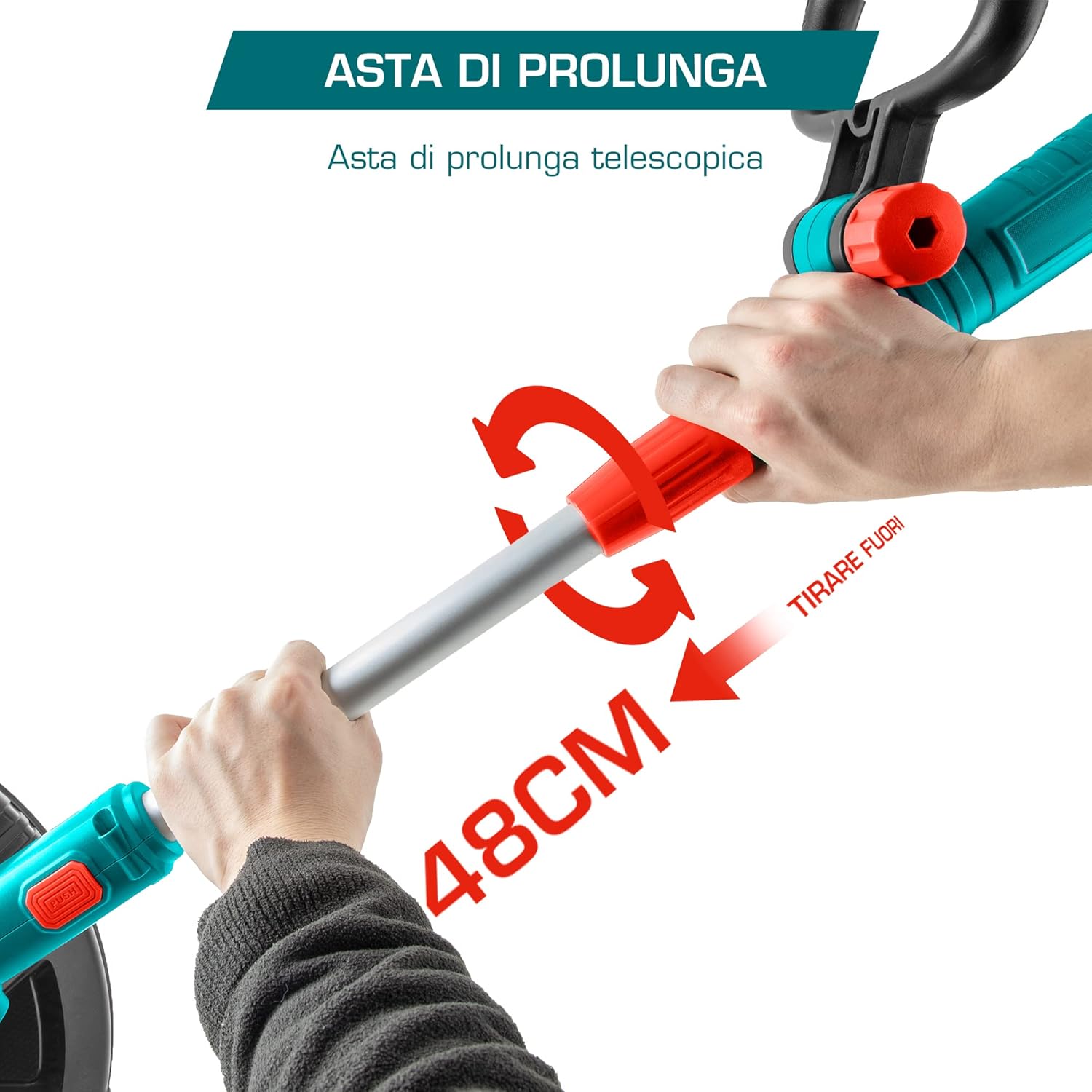
Figure 5.1: Illustration of adjusting the telescopic shaft for extended reach.
- Handle Angle: The ergonomic handle can be adjusted up to 180 degrees. Press the pivot button and rotate the handle to one of the 5 available positions (e.g., 30 or 60 degrees as shown in image) for optimal comfort and control during different cutting angles.

Figure 5.2: Demonstrating the flexible handle adjustment for various working angles.
- Cutting Diameter: The trimmer features a 300mm cutting diameter, suitable for various edging tasks.

Figure 5.3: Visual representation of the cutting diameter for efficient trimming.
5.3 General Usage Tips
- Always wear appropriate personal protective equipment, including eye protection, gloves, and sturdy footwear.
- Keep bystanders and pets at a safe distance from the working area.
- Avoid cutting near hard objects that could damage the cutting line.
- Move the trimmer steadily and evenly for a consistent cut.

Figure 5.4: Example of the edge cutter in use for garden maintenance.
6. Maintenance
6.1 Cleaning
- Always remove the battery before cleaning.
- Wipe the tool with a damp cloth. Do not use harsh chemicals or abrasive cleaners.
- Remove any grass clippings or debris from the cutting head and guard.
6.2 Storage
- Store the tool in a dry, secure place, out of reach of children.
- Remove the battery from the tool before long-term storage.
7. Troubleshooting
If you encounter issues with your Total Tools Electric Edge Cutter, consider the following:
- Tool not starting: Ensure the battery is fully charged and correctly installed. Check that the safety lock button is pressed before squeezing the trigger.
- Poor cutting performance: The cutting line may be worn or too short. Replace the cutting line as needed. Ensure the cutting head is free of debris.
- Excessive vibration: Check for any loose parts or damage to the cutting head. Ensure the cutting line is properly installed and balanced.
For persistent issues, contact Total Tools customer support.
8. Specifications
| Feature | Specification |
|---|---|
| Manufacturer | Total Tools |
| Model Number | TGTLI20018 |
| Item Weight | 3 Kilograms |
| Product Dimensions | 103 x 13 x 20 cm |
| Color | Multicoloured |
| Material | Plastic |
| Power Source Type | Battery Powered |
| Item Package Quantity | 1 |
| Number Of Pieces | 1 |
| Speed | 8200 RPM |
| Batteries Included? | No |
| Batteries Required? | Yes |
| Cutting Width | 300 Millimeters |
| Required Assembly | No (referring to complex assembly, basic user assembly is required) |
| EU Spare Part Availability Duration | 10 Years |
9. Warranty and Support
Total Tools products are manufactured to high-quality standards. For information regarding warranty coverage, spare parts, or technical support, please refer to the warranty card included with your purchase or visit the official Total Tools website. Please retain your proof of purchase for any warranty claims.


