
Introduction
Thank you for choosing the BOFON Y-Series Fingerprint Smart Safe Box. This manual provides essential information for the proper setup, operation, and maintenance of your new safe. Please read these instructions carefully before use to ensure optimal performance and security.

Image: BOFON Y-Series Smart Safe Box in a home setting.
Safety Information
- Always keep backup keys in a secure location away from the safe. Do not store them inside the safe.
- Ensure the safe is installed on a stable surface. For enhanced security, consider anchoring the safe using the pre-drilled holes.
- Do not expose the safe to extreme temperatures or high humidity.
- Regularly check battery levels to prevent unexpected lockouts.
Product Overview
The BOFON Y-Series Smart Safe Box features a robust design with advanced security functionalities.
- Biometric Lock: Equipped with a sensitive biometric fingerprint module for quick and secure access.
- Digital Touchscreen Keypad: Illuminated keypad for easy operation in low-light conditions, featuring an anti-peek function.
- Solid Locking Bolts: Features large, solid locking bolts and an enforced door frame for enhanced anti-burglary performance.
- Automatic Opening Door: The door automatically opens upon successful authentication.
- Carpeted Interior: Fully carpeted interior protects contents from scratches.
- Backup Access: Includes backup keys and a backup battery port for emergency access.

Image: Close-up of the advanced fingerprint module and anti-peek touchscreen keypad.
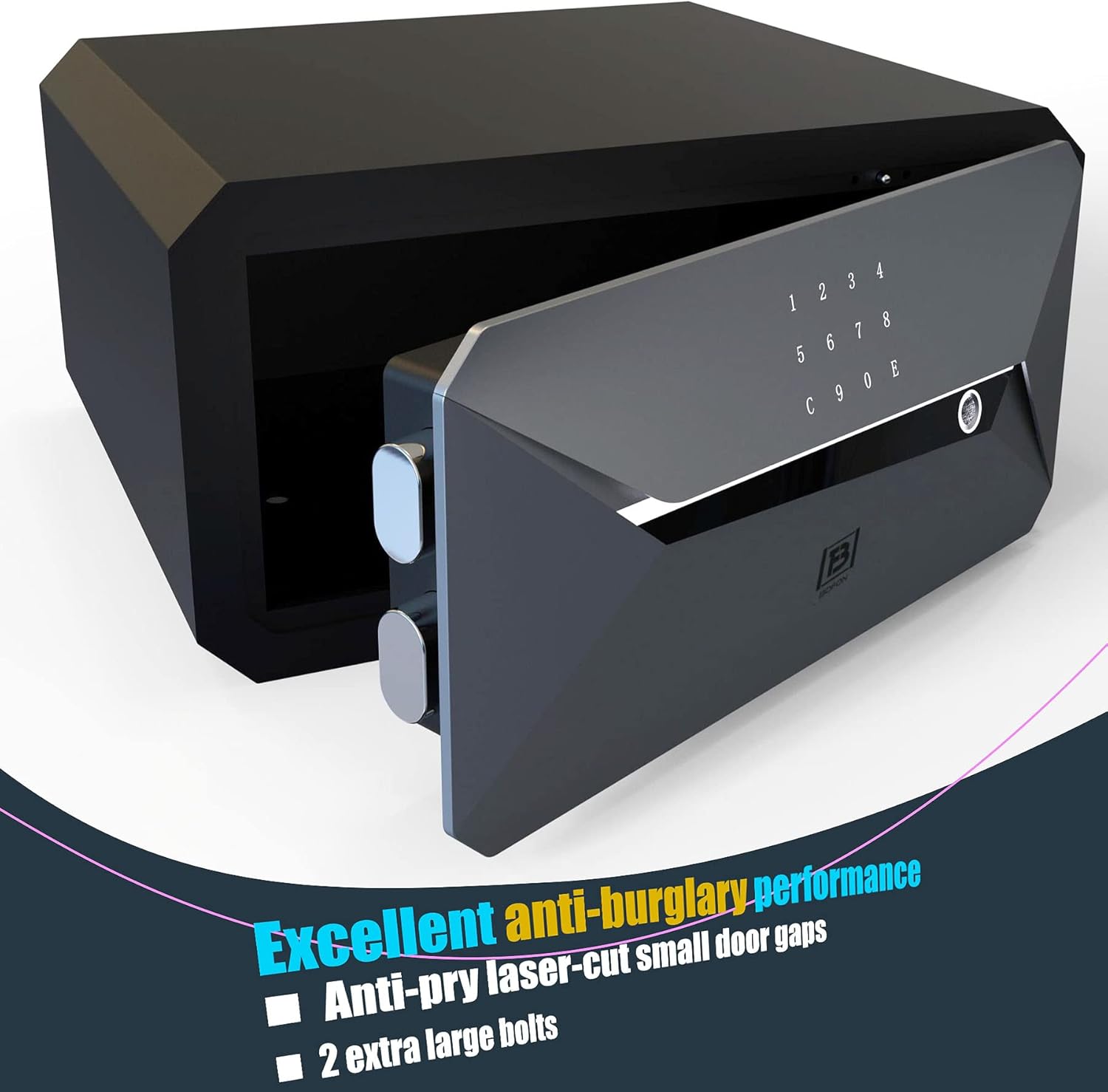
Image: Interior view of the safe door showing solid locking bolts and anti-pry design.
Setup
1. Initial Power-up and Battery Installation
Open the safe using the backup key. Locate the battery compartment on the inside of the door. Insert the required batteries (typically 4 AA batteries, not included) ensuring correct polarity. Close the battery compartment.
2. Setting up Fingerprints
With the door open, press the internal reset button (usually a small button near the battery compartment). The keypad will illuminate. Place your finger on the fingerprint sensor. Lift and repeat several times until the safe confirms successful registration (e.g., a green light or audible beep). You can register multiple fingerprints (up to 10).
3. Setting up Passcode
With the door open, press the internal reset button. Enter your desired passcode (4-8 digits) on the touchscreen keypad, then press 'E' to confirm. Re-enter the passcode and press 'E' again to verify. The safe will confirm successful registration. You can set up to 5 different passcodes.
4. Anchoring the Safe (Optional)
For maximum security, the safe can be anchored to a floor or wall. Use the pre-drilled holes at the back or bottom of the safe. Mark the drilling points, drill pilot holes, and secure the safe using appropriate mounting hardware (not included).
Operating Instructions
1. Opening with Fingerprint
Touch the fingerprint sensor with a registered finger. The safe will verify the fingerprint, and the door will automatically open.

Image: Illustration of quick access via fingerprint recognition.
2. Opening with Passcode
Touch the keypad to activate it. Enter your registered passcode, then press 'E'. The safe will verify the passcode, and the door will automatically open. The anti-peek function allows you to enter random digits before or after your actual code to prevent others from guessing your entry.
3. Using Backup Keys (Emergency Access)
If batteries are depleted or electronic access fails, use the backup key. Locate the keyhole cover (usually hidden on the front panel). Remove the cover, insert the backup key, and turn it to unlock the safe. The door can then be opened manually.
4. Closing the Safe
Close the safe door firmly. The safe will automatically lock after a few seconds, indicated by an audible beep or light confirmation.
Maintenance
1. Battery Replacement
When the battery indicator light flashes or the safe emits low battery warnings, replace all batteries immediately. Use high-quality alkaline batteries for best performance. Refer to the "Initial Power-up" section for battery compartment location.
2. Cleaning
Wipe the exterior of the safe with a soft, damp cloth. Do not use abrasive cleaners or solvents, as these can damage the finish or electronic components. Keep the fingerprint sensor and keypad clean and dry for optimal functionality.
Troubleshooting
| Problem | Possible Cause | Solution |
|---|---|---|
| Safe does not open with fingerprint. | Finger not registered; finger is dirty/wet; sensor is dirty; low batteries. | Ensure finger is clean and dry, and placed correctly on the sensor. Re-register fingerprint if necessary. Clean sensor. Replace batteries. |
| Safe does not open with passcode. | Incorrect passcode entered; low batteries; keypad malfunction. | Re-enter passcode carefully. Replace batteries. Use backup key if keypad is unresponsive. |
| Door does not close or lock automatically. | Obstruction in door frame; door not fully closed; low batteries. | Check for obstructions. Ensure door is pushed firmly shut. Replace batteries. |
| Keypad is unresponsive. | Low batteries; internal connection issue. | Replace batteries. If issue persists, use backup key and contact customer support. |
Specifications
| Feature | Detail |
|---|---|
| Brand | BOFON |
| Model Number | BGX-X2-23Y |
| Lock Type | Biometric |
| Color | Grey |
| Capacity | 1.45 cubic feet |
| Material | Alloy Steel |
| Product Dimensions (External) | 16.15"D x 17.52"W x 8.86"H |
| Interior Dimensions | 8.66"H x 17.33"W x 14.37"D |
| Item Weight | 34 pounds |
| Water Resistance Level | Not Water Resistant |

Image: Diagram showing the external dimensions of the BOFON Y-Series Smart Safe Box.
Warranty Information
This BOFON product is covered by a limited manufacturer's warranty. Please refer to the warranty card included with your purchase for specific terms and conditions, including coverage duration and claim procedures. Keep your proof of purchase for warranty service.
Customer Support
If you encounter any issues or have questions regarding your BOFON Y-Series Fingerprint Smart Safe Box, please contact our customer support team. For the most up-to-date contact information, visit the official BOFON website or refer to the contact details provided in your product packaging.