1. Introduction
This manual provides instructions for the Allimity BN59-01315N BN59-01483C replacement remote control. This remote is designed to function as a direct replacement for various Samsung Smart QLED TV models without requiring any programming.
Compatible TV Models:
- QN55S95B, QE65S95BATXXU, QN55S95BAFXZA, QN65S95BAFXZA
- QE55S95B, QN65S95B, QE65S95B, QE55S95BATXXU
- UE58U8000FK, UE60DU7100K, UE65CU7100K, UE65CU7110K, UE65CU71A0K
2. Setup
2.1 Battery Installation
- Locate the battery compartment on the back of the remote control.
- Slide the battery cover downwards or press the latch and lift to open.
- Insert two (2) 1.5V AAA alkaline batteries, ensuring the positive (+) and negative (-) terminals align correctly with the markings inside the compartment.
- Replace the battery cover by sliding it back into position until it clicks securely.
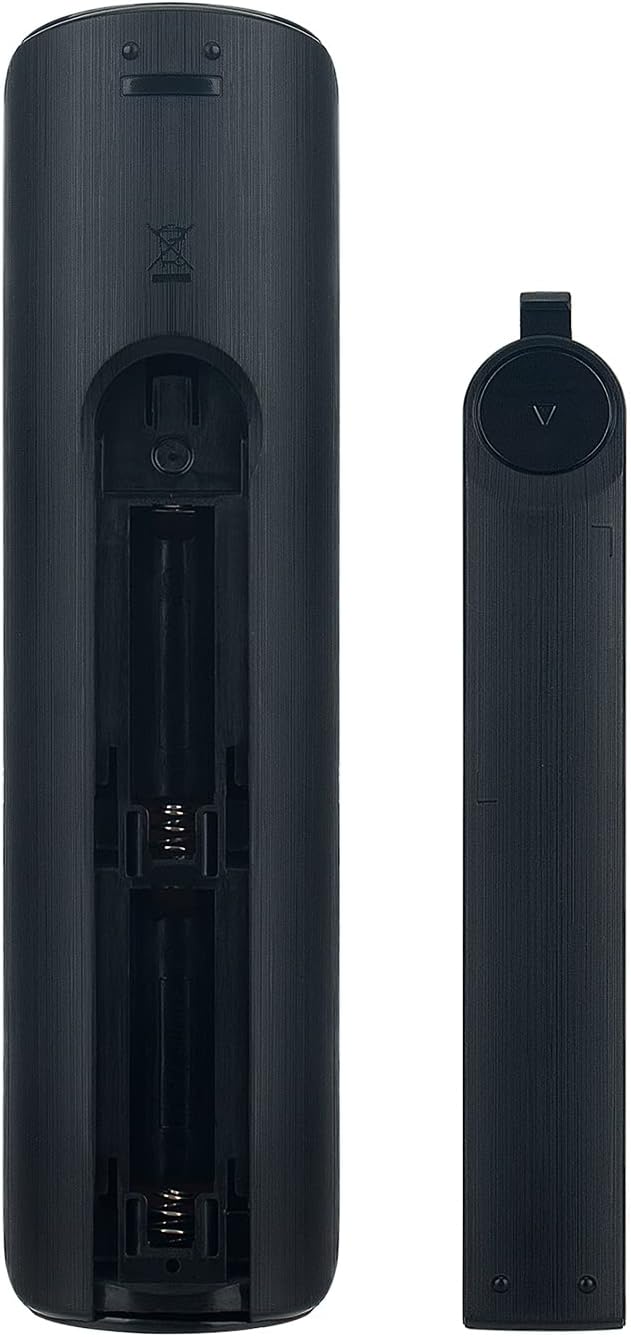
Image: Back of the remote control with the battery compartment open, illustrating the correct orientation for AAA battery insertion.
2.2 Initial Use
This remote control requires no programming. Once batteries are correctly installed, it is ready for immediate use with compatible Samsung Smart QLED TV models. Simply point the remote control towards your television and begin operation.
3. Operating Instructions
The Allimity BN59-01315N BN59-01483C remote control features a standard layout for intuitive operation of your Samsung TV. Ensure a clear line of sight between the remote's infrared emitter and your TV's IR receiver for optimal performance.
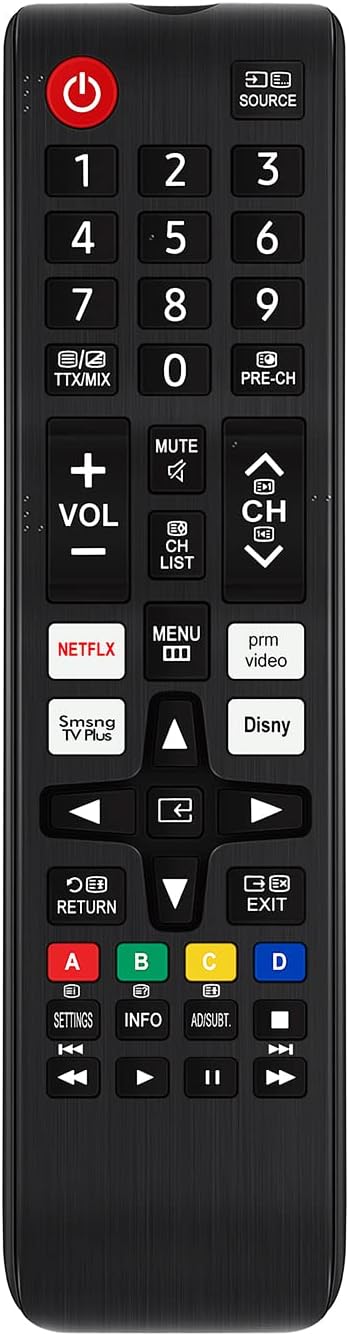
Image: Front view of the remote control, displaying the full button layout including power, number pad, volume, channel, navigation, and dedicated app buttons.
3.1 Key Functions
- Power Button (U): Turns the TV on or off.
- Number Pad (0-9): Direct channel selection.
- SOURCE: Changes the input source (HDMI, AV, etc.).
- VOL (+/-): Adjusts the volume level.
- CH (Up/Down): Changes TV channels.
- MUTE: Mutes or unmutes the TV audio.
- Navigation Pad (Up/Down/Left/Right/Enter): Navigates menus and selects options.
- RETURN: Returns to the previous screen or menu.
- EXIT: Exits the current menu or application.
- MENU: Accesses the TV's main menu.
- Dedicated App Buttons (NETFLIX, SmSng TV Plus, Disny, prm video): Provides quick access to streaming services.
- Color Buttons (A, B, C, D): Perform specific functions within certain applications or menus, as indicated on the TV screen.
4. Maintenance
4.1 Cleaning
To clean the remote control, use a soft, dry cloth. For stubborn dirt, lightly dampen the cloth with water or a mild, non-abrasive cleaner. Avoid using harsh chemicals or abrasive materials, as these can damage the remote's surface or internal components.
4.2 Battery Replacement
Replace batteries when the remote's response becomes sluggish or stops working. Always replace both batteries simultaneously with new 1.5V AAA alkaline batteries. Do not mix old and new batteries, or different types of batteries.
4.3 Storage
When not in use for extended periods, it is recommended to remove the batteries to prevent leakage, which can damage the remote control.
5. Troubleshooting
- Remote not responding:
- Ensure batteries are inserted correctly with the correct polarity.
- Replace old batteries with new ones.
- Check for any obstructions between the remote and the TV's IR receiver.
- Ensure you are within the effective operating range and pointing the remote directly at the TV.
- Specific buttons not working:
- Clean the remote control, especially around the unresponsive buttons, to remove any dirt or debris that might be preventing proper contact.
- If only certain buttons are affected, and battery replacement does not resolve the issue, the remote may require replacement.
6. Specifications
| Model Number | BN59-01315N BN59-01483C |
| Brand | ALLIMITY |
| Product Dimensions | 5.5 x 1.8 x 0.6 inches |
| Item Weight | 2 ounces |
| Power Supply | 2 x 1.5V AAA Alkaline Batteries (Not Included) |
| Connectivity Technology | Infrared |
| Special Feature | No Programming Required |
| Compatible Devices | Television |
7. Warranty and Support
Specific warranty information for this product is not provided in this manual. Please refer to the product packaging, the seller's website, or contact the manufacturer directly for details regarding warranty coverage and customer support.


