
1. Introduction
The Daytech Wireless Caregiver Pager Call Button System is designed to provide a reliable and efficient way for individuals needing assistance to alert their caregivers. This system enhances independence for the user while offering peace of mind to family members and caregivers. It is suitable for use in private households, hospitals, nursing homes, and other care environments.
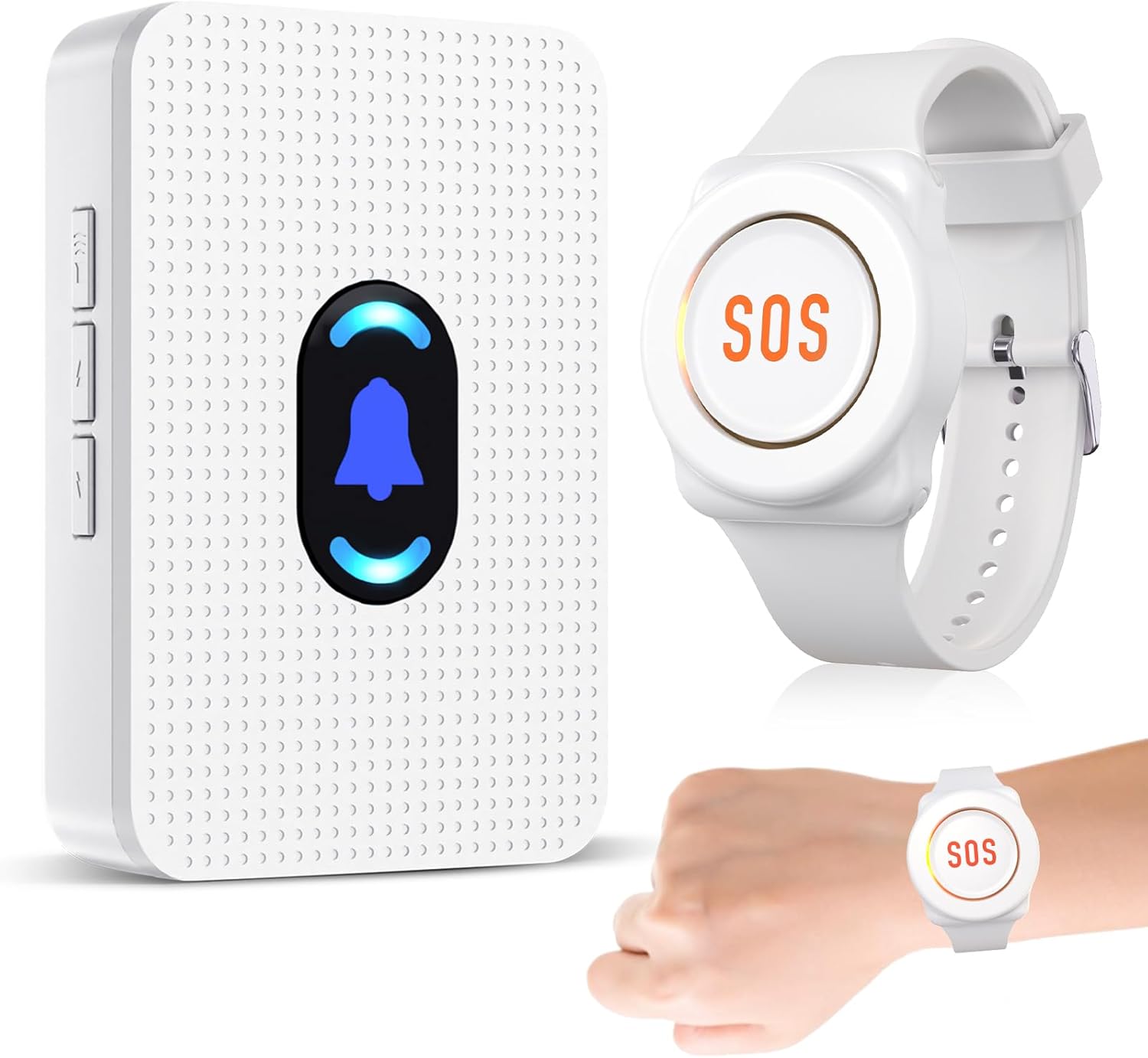
Figure 1: Daytech Wireless Caregiver Pager System components.
2. Package Contents
Please verify that all items are present and in good condition upon opening the package. The standard package for model E-01W includes:
- 1 x Wireless Receiver Unit
- 1 x Watch-style Call Button
- 1 x 12V Battery (pre-installed in watch-style call button)
- 1 x User Manual (this document)
3. Product Components Overview
Familiarize yourself with the main components of the Daytech Wireless Caregiver Pager System:
3.1. Receiver Unit
The receiver unit plugs into a standard wall outlet and emits an audible alert when a call button is pressed. It features controls for volume and ringtone selection.
3.2. Watch-style Call Button
The watch-style call button is worn by the individual needing assistance. It features a prominent SOS button that, when pressed, sends a signal to the receiver unit. This button is designed for ease of use, even for individuals with limited hand function. The watch-style call button is IP55 waterproof, making it resistant to splashes but not suitable for immersion.

Figure 2: Receiver and Watch-style Call Button features.
Video 1: Demonstration of the Daytech Caregiver Pager System in use, highlighting how assistance is provided with a simple button press.
4. Setup Guide
4.1. Powering the Receiver
- Plug the receiver unit into a standard electrical wall socket.
- Ensure the socket is easily accessible and the receiver is within the desired operating range of the call button.
4.2. Pairing the Watch-style Call Button
The watch-style call button and receiver typically come pre-paired from the factory. If re-pairing is needed or if you are adding additional call buttons, follow these steps:
- Plug in the receiver unit.
- Press and hold the Volume Control button on the receiver until it makes a "ding-dong" sound. This indicates the receiver is in pairing mode.
- Immediately press the SOS button on the watch-style call button.
- The receiver will make another "ding-dong" sound, confirming successful pairing.
4.3. Adjusting Ringtones and Volume
The receiver offers 20 ringtones and 5 volume levels.
- Ringtone Selection: Press the Forward or Backward buttons on the receiver to cycle through the available ringtones.
- Volume Adjustment: Press the Volume Control button (short press) to adjust the volume level. There are 5 levels, including a silent mode.
5. Operating Instructions
5.1. Initiating a Call
To alert your caregiver, simply press the large SOS button on the watch-style call button. The signal will be sent wirelessly to the paired receiver unit.
5.2. Understanding Alerts
Upon receiving a signal, the receiver unit will:
- Emit the selected ringtone at the chosen volume level.
- Illuminate its LED light melody display.
The caregiver will hear the alert and can respond accordingly.
5.3. Placement and Range
The system has an operating range of up to 100ft (30m) indoors, allowing caregivers to move freely around the house while remaining alert. For optimal performance, place the receiver in a central location or where the caregiver spends most of their time.

Figure 3: Illustrative diagram of the system's effective range within a home environment.
5.4. Versatile Use
The watch-style call button can be worn on the wrist for constant accessibility. Its compact design also allows for discreet placement or carrying in a pocket.

Figure 4: Various methods of wearing or placing the call button for convenience.
6. Maintenance
6.1. Cleaning
To clean the receiver and call button, wipe them gently with a soft, dry cloth. Do not use abrasive cleaners or immerse the units in water. Ensure the units are unplugged before cleaning.
6.2. Battery Information
The watch-style call button is powered by a 12V battery, which is included and pre-installed. When the battery needs replacement, the signal strength or reliability may decrease. Refer to the product packaging or contact customer support for specific battery replacement instructions if not detailed in this manual.
Important: The watch-style call button is IP55 waterproof, meaning it is protected against dust and low-pressure water jets from any direction. It is not designed for full immersion in water, such as during bathing or showering. Please remove the watch before engaging in activities that involve submersion.

Figure 5: Key features including IP55 water resistance.
7. Troubleshooting
| Problem | Possible Cause | Solution |
|---|---|---|
| Receiver does not sound when button is pressed. |
|
|
| Receiver volume is too low or silent. |
|
|
| Interference or inconsistent signal. |
|
|
8. Specifications
| Feature | Detail |
|---|---|
| Model Number | E-01W |
| Brand | Daytech |
| Operating Range | Up to 100ft (30m) indoors / 300ft (90m) in open area |
| Ringtone Options | 20 |
| Volume Levels | 5 (including silent) |
| Call Button Battery | 1 x 12V battery (included) |
| Water Resistance | IP55 (Call Button) |
| Receiver Power Source | AC Plug-in |
| Color | White |
| Item Weight | 6.4 ounces (total package) |
9. Warranty and Support
Daytech provides a full year's warranty for this product. If you encounter any issues or require assistance, please contact Daytech customer service. They offer round-the-clock support to ensure your peace of mind.
For further assistance, please refer to the contact information provided with your purchase or visit the official Daytech website.
