
Introduction
This manual provides essential information for the safe and effective use of your Mellif 20V Corded Adapter, Model DW Voltage Regulator 22. This adapter converts AC power to DC 20V, allowing you to power compatible Dewalt 20V max cordless tools directly from a standard 110V AC outlet, eliminating the need for batteries during extended use. Please read this manual thoroughly before operating the device and retain it for future reference.
Important Safety Instructions
To reduce the risk of injury, always follow these basic safety precautions when using this product:
- Read all instructions: Familiarize yourself with the product's features and operation before use.
- Electrical Safety: Ensure the power source matches the adapter's requirements (110V AC). Do not use in wet conditions or expose to rain.
- Overheat Protection: The adapter is equipped with overheat protection. If it becomes too hot, it may shut down automatically. Allow it to cool before resuming use.
- Overload Protection: Avoid overloading the adapter. Using it with tools that draw excessive power may trigger overload protection.
- Ventilation: Ensure adequate ventilation around the power box to prevent overheating. Do not cover the unit during operation.
- Compatibility: This adapter is designed for Dewalt 20V max tools. Compatibility may vary with specific tool models, especially XR tools. Test with your tool before critical applications.
- Damage Inspection: Regularly inspect the adapter, cables, and power box for any signs of damage. Do not use if damaged.
- Children and Pets: Keep the adapter and connected tools out of reach of children and pets.
Package Contents
Verify that all items listed below are included in your package:
- 1 x Mellif AC/DC Power Box
- 1 x Tools Adapter (20V)
- 1 x DC Cable
- 1 x AC Cable
Product Overview
Familiarize yourself with the components of your Mellif 20V Corded Adapter:

Image 1: Overview of the Mellif 20V Corded Adapter components, including the AC/DC Power Box, Tools Adapter, DC Cable, AC Cable, Portable Handle, and Indicator Lamp.
- AC/DC Power Box: The main unit that converts AC power to DC power for your tools.
- Tools Adapter: Connects to your Dewalt 20V max tool, replacing the battery.
- DC Cable: Connects the AC/DC Power Box to the Tools Adapter.
- AC Cable: Connects the AC/DC Power Box to a standard 110V AC outlet.
- Portable Handle: For easy transport of the power box.
- Indicator Lamp: Provides status feedback (e.g., power on, error).
Setup Instructions
Follow these steps to set up your Mellif 20V Corded Adapter:
- Connect Cables to Power Box:
Connect the DC cable to the DC output port on the AC/DC Power Box. Then, connect the AC cable to the AC input port on the AC/DC Power Box.
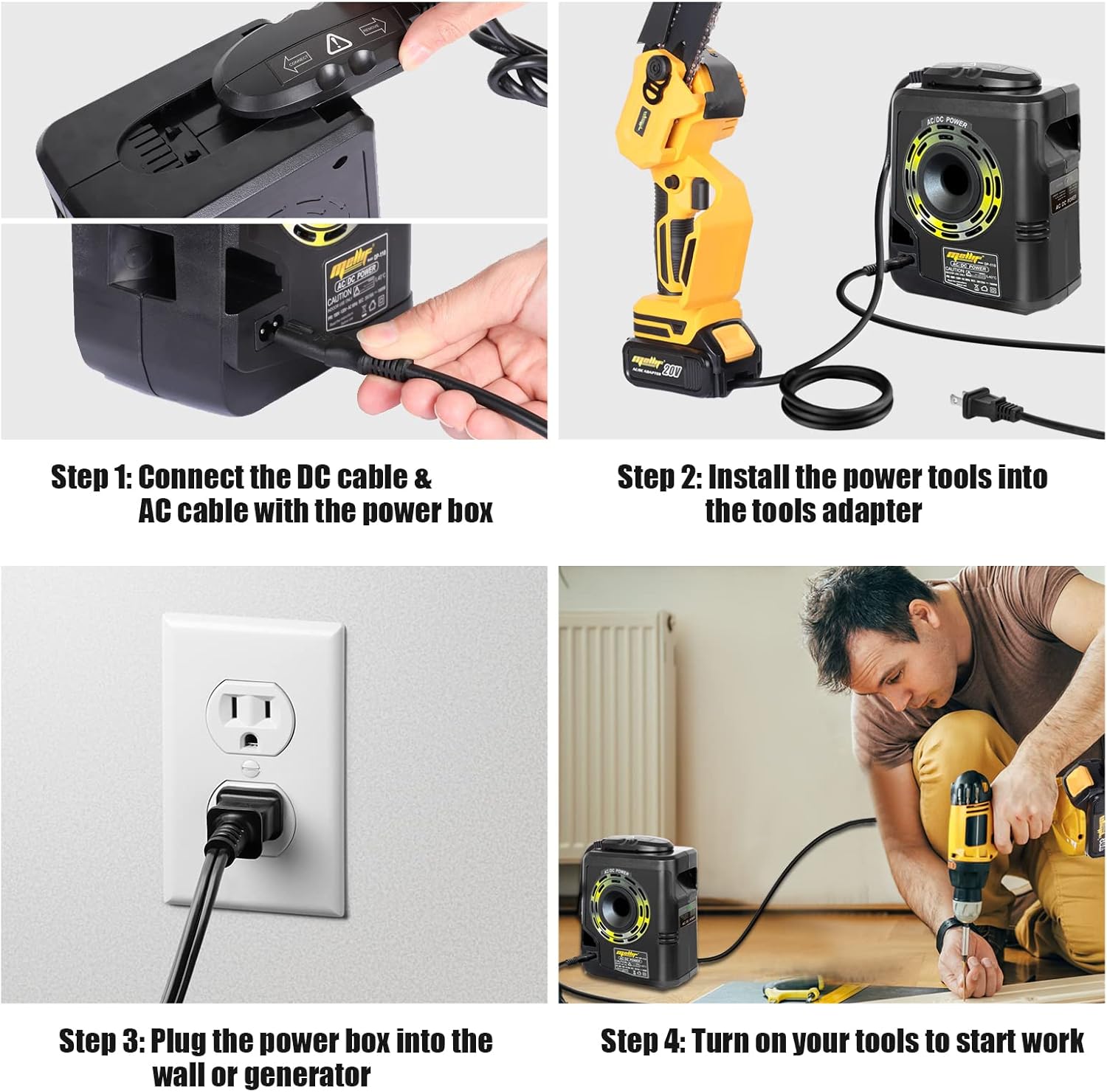
Image 2: Illustration of connecting the DC cable and AC cable to the Mellif power box.
- Install Tools Adapter:
Insert the Tools Adapter into your Dewalt 20V max tool, just as you would a standard battery. Ensure it clicks securely into place.
Image 2 (continued): Shows the tools adapter inserted into a Dewalt power tool.
- Plug into Power Source:
Plug the AC cable from the power box into a standard 110V wall outlet or a compatible generator. The indicator lamp on the power box should illuminate.
Image 2 (continued): Depicts the power box plugged into a wall outlet.
Operating Instructions
Once the adapter is set up, you can operate your Dewalt 20V max tools:
- Activate Tool:
With the adapter connected and powered, turn on your tool as you normally would. The tool should now operate using AC power.
Image 2 (continued): Shows a user operating a drill connected to the power box.
- Continuous Power:
The Mellif 20V Corded Adapter provides up to 1000W of continuous working power, suitable for various tasks without battery limitations.

Image 4: A Dewalt drill being used with the Mellif adapter, demonstrating continuous power for tasks like drilling.
- Mobility:
The adapter features a 180° pivoting long cable (61in/155cm DC cable, 73in/185cm AC cable) to allow for mobility and comfortable operation while connected to a power source.

Image 5: Diagram illustrating the 180° pivoting long cable design for enhanced mobility and operational comfort.
Key Features and Protections
The Mellif 20V Corded Adapter is designed with safety and durability in mind:

Image 3: Close-up of the Mellif power box, detailing its built-in safety features.
- Overheat Protection: Automatically shuts down the unit if internal temperatures exceed safe limits.
- Overload Protection: Prevents damage to the adapter and connected tools by cutting power if the current draw is too high.
- Short Circuit Protection: Safeguards against electrical shorts.
- Fan Cooling Technology: Integrated fan helps dissipate heat during operation, contributing to longevity and stable performance.
- Metal Housing: Durable construction for enhanced protection and heat dissipation.
Specifications
| Feature | Detail |
|---|---|
| Model Number | DW Voltage Regulator 22 |
| Product Dimensions | 11.02 x 8.27 x 5.91 inches |
| Item Weight | 8.49 pounds |
| Input Voltage | 110 Volts |
| Output Voltage | 20 Volts |
| Output Current | 50 Amps |
| Wattage | 100 watts |
| Special Feature | Short Circuit Protection |
| Compatible Devices | Dewalt 20V max tools (adapter) |
| Connector Type | Barrel Connector |
Troubleshooting
If you encounter issues with your Mellif 20V Corded Adapter, refer to the following common problems and solutions:
- Adapter does not power the tool:
- Ensure all cables (AC and DC) are securely connected to the power box and the power box is plugged into a live 110V outlet.
- Verify the Tools Adapter is fully seated in the tool's battery slot.
- Check if the indicator lamp on the power box is illuminated. If not, check the power source.
- Some Dewalt XR tools or specific models may have compatibility issues or protection mechanisms that prevent operation with this adapter. Test with a different compatible tool if available.
- Adapter shuts off during use:
- This may indicate the overheat or overload protection has been activated.
- Allow the unit to cool down for several minutes before attempting to use it again.
- Ensure the power box has adequate ventilation and is not covered.
- Reduce the load on the tool or use it for shorter durations, especially in warm environments.
- Confirm the tool's power requirements do not exceed the adapter's wattage rating.
- Tool operates intermittently or with reduced power:
- Check for loose cable connections.
- Ensure the power outlet is providing stable voltage.
- The tool might be drawing close to the adapter's maximum wattage, causing fluctuations.
Maintenance
Proper maintenance ensures the longevity and safe operation of your adapter:
- Cleaning: Disconnect from power before cleaning. Wipe the exterior with a dry, soft cloth. Do not use harsh chemicals or abrasive cleaners.
- Storage: Store the adapter in a cool, dry place away from direct sunlight and moisture when not in use.
- Cable Care: Avoid kinking, pinching, or stretching the cables. Do not wrap cables tightly around the unit.
- Inspection: Periodically inspect the power box, cables, and connectors for any signs of wear, cuts, or damage.
Warranty and Support
For warranty information or technical support, please refer to the documentation included with your purchase or contact Mellif customer service through their official channels. Keep your purchase receipt as proof of purchase.