
1. Introduction
This manual provides instructions for the Beyution AH81-15047A replacement remote control. This remote is designed to function as a direct replacement for various Samsung Soundbar models, offering infrared control without requiring programming or setup. Please refer to the compatibility list for supported soundbar models.
2. Product Overview
The Beyution AH81-15047A remote control features an ergonomic design for comfortable handling and sensitive buttons for responsive operation. It utilizes infrared technology for signal transmission.
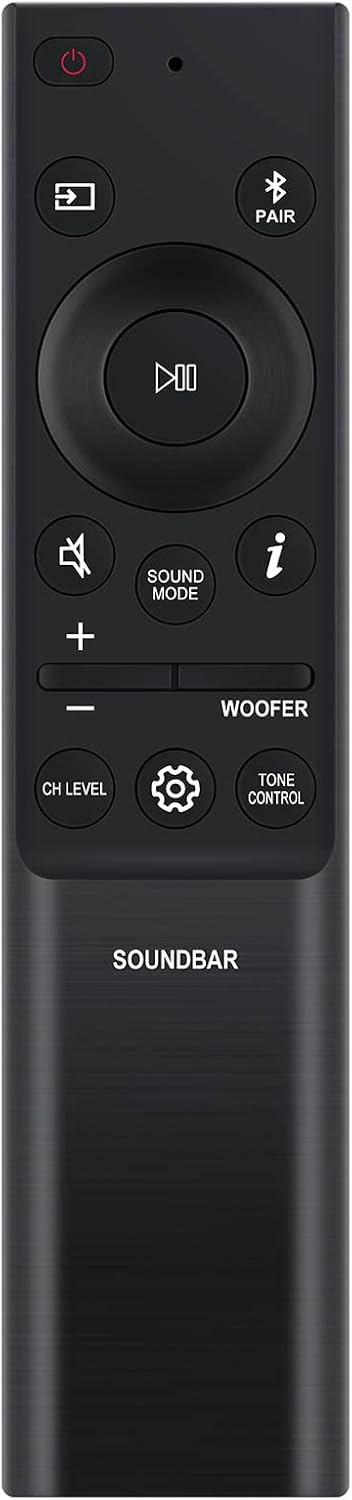
Image 1: Front view of the Beyution AH81-15047A replacement remote control. This image displays the layout of the buttons, including power, input, play/pause, volume, sound mode, woofer control, channel level, settings, and tone control.

Image 2: Angled view of the Beyution AH81-15047A replacement remote control. This perspective highlights the ergonomic shape and textured finish of the remote.
3. Setup
3.1 Battery Installation
- Locate the battery compartment on the back of the remote control.
- Slide the battery cover downwards to open it.
- Insert two (2) AAA batteries, ensuring the positive (+) and negative (-) terminals align correctly with the markings inside the compartment.
- Slide the battery cover back into place until it clicks securely.

Image 3: View of the battery compartment with the cover removed, showing the slots for two AAA batteries.
3.2 Initial Use
This remote control is pre-programmed and does not require any additional setup or pairing for compatible Samsung Soundbar models. Once batteries are installed, it is ready for use.
4. Operating Instructions
Point the remote control directly at your Samsung Soundbar. Ensure there are no obstructions between the remote and the soundbar's infrared receiver.
4.1 Basic Functions
- Power Button (⏻): Turns the soundbar on or off.
- Input Button (⊞): Cycles through available input sources.
- Play/Pause Button (▷‖): Controls media playback.
- Volume Up/Down (+ / -): Adjusts the main volume level.
- Mute Button (🔇): Mutes or unmutes the sound.
4.2 Advanced Functions
- Sound Mode Button: Cycles through different sound modes (e.g., Standard, Surround, Game).
- Woofer Control (WOOFER): Adjusts the woofer level.
- CH LEVEL Button: Adjusts the level of individual channels (if supported by your soundbar).
- Settings Button (⚙️): Accesses soundbar settings menu.
- TONE CONTROL Button: Adjusts bass and treble settings.
- PAIR Button (Ⓟ PAIR): Initiates Bluetooth pairing mode for the soundbar.
- Info Button (ⓘ): Displays information about the current soundbar status or input.
4.3 Compatible Soundbar Models
This remote control is compatible with various Samsung Soundbar models, including but not limited to:
- HW-S60B, HW-S61B, HW-Q600B, HW-Q60B, HW-Q930B, HW-Q800B, HW-Q700B
- HW-B430, HW-B550, HW-B650, HW-B43M, HW-B450, HW-C450, HW-B57C
- HW-B440, HW-B43C, HW-B47M, HW-B45E, HW-Q60C, HW-Q750B, HW-Q67CB
- HW-Q710B, HW-Q810B, HW-Q910B, HW-Q935B, HW-Q990B
- For a comprehensive list, please refer to the product listing or contact customer support.
5. Maintenance
5.1 Cleaning
To clean the remote control, use a soft, dry cloth. Do not use liquid cleaners, abrasive materials, or chemical solvents, as these may damage the surface or internal components.
5.2 Battery Replacement
Replace batteries when the remote's responsiveness decreases or if it stops functioning. Always replace both batteries simultaneously with new AAA batteries. Do not mix old and new batteries, or different types of batteries.
6. Troubleshooting
- Remote not responding:
- Check if the batteries are inserted correctly with the correct polarity.
- Replace the batteries with new ones.
- Ensure there is a clear line of sight between the remote control and the soundbar's infrared receiver.
- Verify that the soundbar is powered on.
- Limited range or intermittent response:
- Ensure the batteries are fresh.
- Remove any obstructions between the remote and the soundbar.
- Avoid strong light sources (e.g., direct sunlight, fluorescent lights) that may interfere with the infrared signal.
- Remote does not control specific soundbar functions:
- Confirm that your soundbar model is listed as compatible.
- Some advanced functions may vary depending on the specific soundbar model.
7. Specifications
- Model Number: AH81-15047A (Manufacturer's internal model: WY-AH81-15047ABF)
- Power Source: 2 x AAA Batteries (not included)
- Dimensions: 6.3 x 1.57 x 0.39 inches (16 x 4 x 1 cm)
- Item Weight: 2.12 ounces (60 grams)
- Connectivity Technology: Infrared (IR)
- Special Features: Ergonomic design, No programming required
8. Support
If you encounter issues not covered in this manual, or if your specific soundbar model is not listed as compatible, please contact Beyution customer service. Provide your product model number and a detailed description of the issue for assistance. Customer service aims to provide a resolution within 24 hours.