
Introduction
This manual provides comprehensive instructions for the GENGQIANSI replacement remote control, designed for use with Altra Flame and AltraFlame electric fireplace heaters. Please read this manual thoroughly before operating the remote control to ensure proper function and safety. This remote is compatible with models including FA30V60L, FA30V60L-1, FA30V60L-2, FA30V60L-3, FA30V60L-4, FA30V60L-5, FA30V60L-6, FA30V60L-7, FA30V60L-8, and FA30V60L-9.
Product Overview
The GENGQIANSI replacement remote control offers a convenient way to operate your Altra Flame electric fireplace heater. It features essential functions for power, flame effects, heat settings, timer, and temperature/fan control. Before use, verify that your fireplace model is listed as compatible or that your original remote matches the appearance of this replacement.
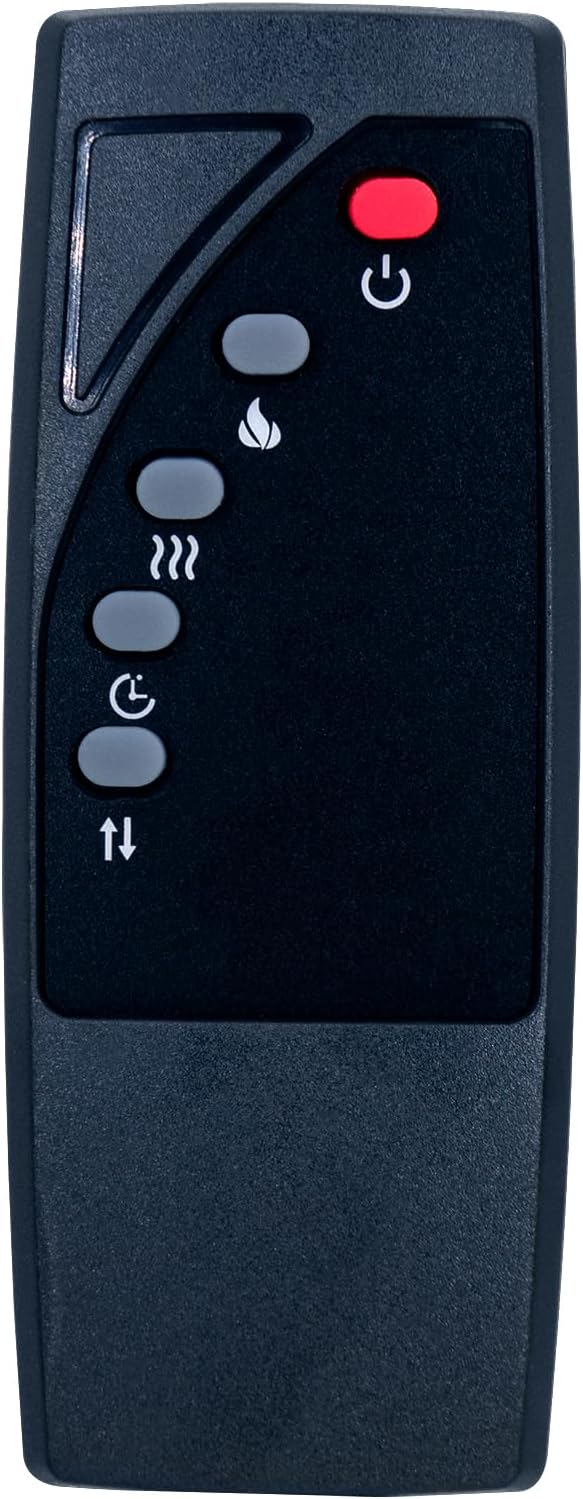
Figure 1: Front view of the remote control with button layout.
Setup
Battery Installation
- Locate the battery compartment on the back of the remote control.
- Slide the battery compartment cover downwards to open it.
- Insert two (2) AAA 1.5V batteries, ensuring the correct polarity (+ and -) as indicated inside the compartment.
- Slide the battery compartment cover back into place until it clicks securely.

Figure 2: Remote control with open battery compartment, showing AAA 1.5V battery requirement.

Figure 3: Remote control with closed battery compartment.
Operating Instructions
Point the remote control directly at the electric fireplace heater's receiver. Ensure there are no obstructions between the remote and the fireplace.
- Power Button (⏻): Press to turn the fireplace ON or OFF.
- Flame Button (🔥): Adjusts the flame brightness or effect settings. Multiple presses may cycle through different flame options.
- Heat Button (♨): Activates or deactivates the heating function. May also cycle through heat levels (e.g., low, high).
- Timer Button (⏱): Sets a timer for automatic shutdown of the fireplace. Press repeatedly to cycle through available timer durations.
- Temperature/Fan Control Buttons (↕): Adjusts the desired temperature setting or fan speed. Use the up and down arrows to increase or decrease the setting.
Maintenance
Battery Replacement
Replace batteries when the remote control's range decreases or if it stops responding. Always replace both batteries simultaneously with new AAA 1.5V batteries. Do not mix old and new batteries or different battery types.
Cleaning
Wipe the remote control with a soft, dry cloth. Do not use abrasive cleaners, solvents, or wet cloths, as these can damage the remote's surface or internal components.
Troubleshooting
- Remote not responding:
- Check if the batteries are inserted correctly and are not depleted. Replace if necessary.
- Ensure there is a clear line of sight between the remote and the fireplace's receiver. Remove any obstructions.
- Confirm that the remote is compatible with your specific Altra Flame fireplace model. Refer to the 'Product Overview' section.
- Limited range:
- Replace the batteries.
- Ensure no strong light sources (like direct sunlight) are interfering with the infrared signal.
Specifications
| Brand | GENGQIANSI |
| Model Number | A520221125B09 |
| Compatible Devices | Altra Flame Electric Fireplace Heater (FA30V60L series) |
| Connectivity Technology | Infrared |
| Controller Type | Button Control |
| Color | Black |
| Power Source | 2 x AAA 1.5V Batteries (not included) |
Warranty Information
This product comes with a 1-year warranty from the date of purchase. This warranty covers manufacturing defects under normal use. It does not cover damage resulting from misuse, accidents, unauthorized modifications, or improper battery installation. For warranty claims or service, please contact the seller directly with your purchase details.
Support
If you encounter any issues not covered in this manual or require further assistance, please refer to your product's purchase platform for seller contact information. Provide your product model number (A520221125B09) and a detailed description of the issue for efficient support.