
1. Introduction
The GODOX MoveLink Mini LT Kit2 is a compact and high-performance 2.4G wireless microphone system designed for clear audio recording. It features omnidirectional microphones with noise reduction, a portable charging case, and broad compatibility with various devices, especially iPhones. This manual provides essential information for setting up, operating, and maintaining your MoveLink Mini LT Kit2.
2. What's in the Box
- 2 x Transmitter
- 1 x Receiver
- 1 x Charging Case (ML-C2)
- 1 x Lightning Adapter
- 1 x 3.5mm TRS Audio Adapter
- 1 x 3.5mm TRRS Audio Adapter
- 1 x USB to Type-C Data Cable
- 2 x Wind foam

Image: All components included in the Godox MoveLink Mini LT Kit2 package.
3. Setup
3.1 Initial Preparation
- Before first use, ensure to remove the clear tape from the charging contacts on the back of the transmitters and receiver.
- Fully charge the charging case and all units. The charging case has a 1370mAh built-in battery, providing up to 24 hours of continuous use for the transmitters (6 hours per full charge) and receiver (8 hours per full charge).

Image: The charging case with units, illustrating the charging process and battery indicators.
3.2 Pairing
The units are designed for easy pairing:
- Place the transmitters and receiver into the charging case.
- Click the 'PAIR' button located in the charging box. The indicator lights on the units will turn blue when pairing is complete.

Image: Demonstrating the one-click pairing process within the charging case.
3.3 Connecting to Devices
The MoveLink Mini LT Kit2 offers flexible connectivity:
- For iPhone (Lightning devices): Attach the Lightning Adapter to the receiver. Plug the receiver directly into your iPhone's Lightning port.
- For Cameras/Recorders (3.5mm TRS): Attach the 3.5mm TRS Audio Adapter to the receiver. Connect the receiver to your camera's microphone input using a 3.5mm TRS cable (not included, but adapter is).
- For Smartphones/Tablets (3.5mm TRRS): Attach the 3.5mm TRRS Audio Adapter to the receiver. Connect the receiver to your device's headphone/microphone jack using a 3.5mm TRRS cable (not included, but adapter is).

Image: Illustrates the versatility of adapters for connecting to different devices.
4. Operating Instructions
4.1 Power On/Off
- Transmitter: Long press the power button for 3 seconds to turn on or off.
- Receiver: Long press the power button for 3 seconds to turn on or off.
4.2 Mute/Unmute
- Transmitter: Short press the on-off button to mute. The indicator stays red constantly. Short press again to unmute.
4.3 Noise Cancellation
- Transmitter: Double press the on-off button quickly to activate noise reduction. The indicator flashes twice in purple. Double press again to turn off noise cancellation (indicator flashes twice in green).

Image: The transmitter with visual cues for noise cancellation and gain adjustment.
4.4 Gain Setting
- Receiver: Short press the on-off button to adjust the gain level.
- Level one is -33dB (indicator flashes green).
- Level two is -43dB (indicator flashes purple).
4.5 Omnidirectional Microphone
The MoveLink Mini LT Kit2 features a 360-degree omnidirectional microphone with enhanced pickup and excellent noise reduction technology, providing clear and natural sound quality. The attached foam windscreen effectively reduces unwanted noise, such as friction between skin and clothes.
4.6 Dual-Channel Function
The dual-channel design allows for simultaneous recording from two people, making it suitable for interviews, podcasts, and other multi-person recording scenarios.
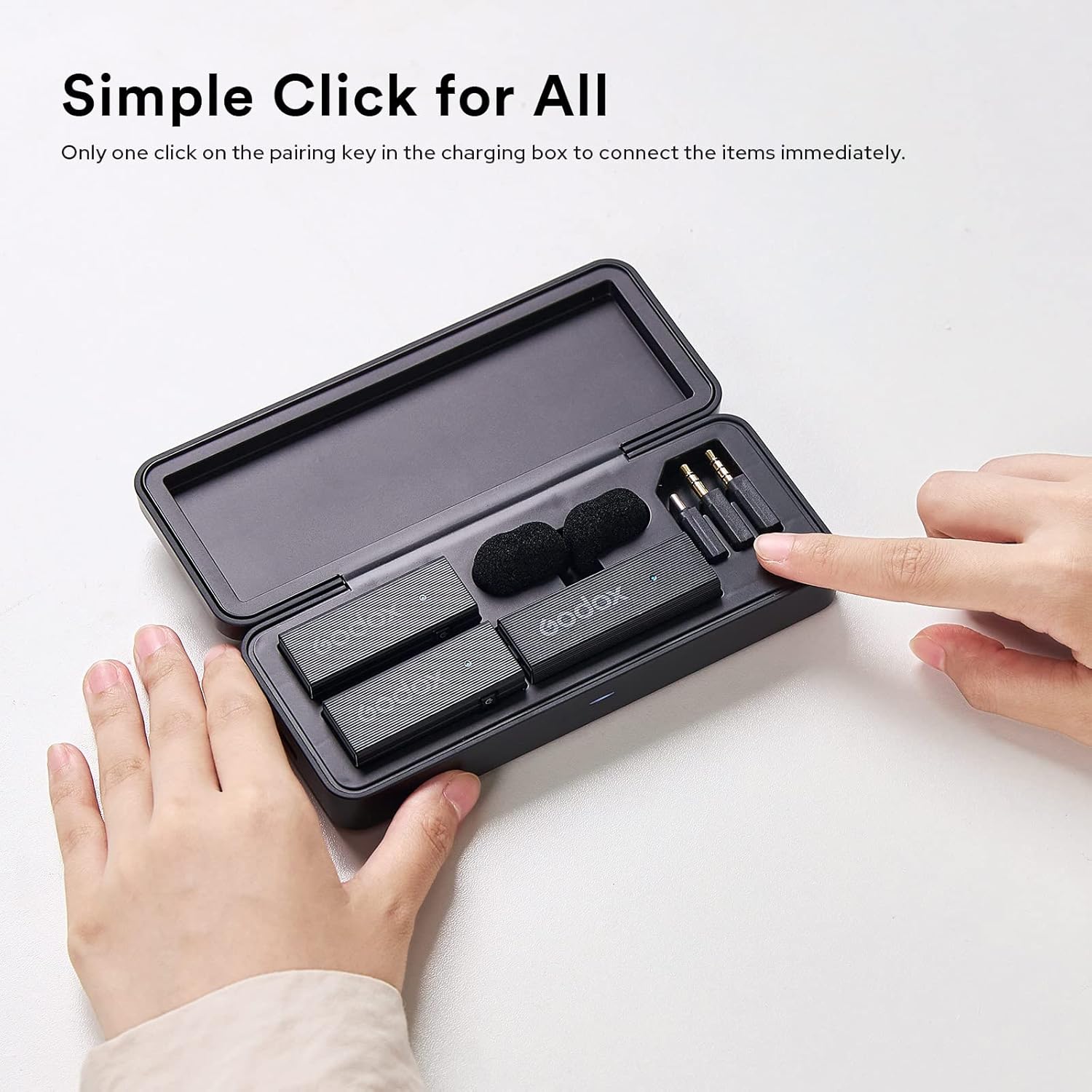
Image: Two users demonstrating the dual-channel recording feature in an outdoor setting.
5. Media Gallery
5.1 Product Overview and Features
Video: A detailed overview of the Godox MoveLink Mini LT Kit2, demonstrating its features, setup, and use cases with various devices. This video highlights the compact design, ease of pairing, noise cancellation, and versatile connectivity options.
5.2 Quick Start Guide
Video: A concise guide to quickly set up and use the Godox MoveLink Mini LT Kit2, covering pairing, power functions, mute, noise cancellation, and gain settings. This video is a helpful visual aid for new users.
5.3 Compatibility and Usage
Video: This video demonstrates the high compatibility of the Godox MoveLink Mini LT/UC with various devices, including smartphones, cameras, and laptops, showcasing its plug-and-play operation and two-level gain setting.
6. Maintenance
6.1 Cleaning
- Wipe the units and charging case with a soft, dry cloth.
- Do not use harsh chemicals or abrasive materials.
- Ensure charging contacts are clean and free of debris for optimal charging.
6.2 Storage
- Store the MoveLink Mini LT Kit2 in its charging case when not in use to protect the units and keep them charged.
- Avoid storing in extreme temperatures or high humidity.
7. Troubleshooting
- No Audio: Ensure all units are powered on and properly paired. Check device connections and adapter compatibility. Verify the transmitter is not muted.
- Poor Audio Quality: Check for obstructions between transmitter and receiver. Ensure the foam windscreen is properly attached to reduce wind noise. Adjust gain settings on the receiver. Activate noise cancellation if in a noisy environment.
- Not Charging: Ensure clear tape is removed from contacts. Verify the charging cable is securely connected to the case and a power source. Check for debris on charging contacts.
- Pairing Issues: Ensure units are placed correctly in the charging case and press the 'PAIR' button. If issues persist, try resetting the units (refer to manufacturer's full manual for specific reset procedures if available).
8. Specifications
| Feature | Specification |
|---|---|
| Brand | GODOX |
| Connectivity Technology | 2.4G Wireless |
| Connector Type | Lightning |
| Special Feature | 3.5mm jack, Portable, Wireless |
| Compatible Devices | Lightning Device, iPhone |
| Color | Black |
| Polar Pattern | Omnidirectional |
| Audio Sensitivity | 30 Decibels |
| Item Weight | 400 Grams |
| Microphone Form Factor | Microphone System |
| Power Source | Battery Powered |
| Number of Batteries | 1 Lithium Ion batteries required. (included) |
| Signal-to-Noise Ratio | 60 dB |
| Hardware Platform | Smartphone |
| Number of Channels | 2 |
| Frequency Range | 50Hz-16KHz |
| Model Number | GODOX MoveLink Mini LT |
| Manufacturer | Godx |
| Enclosure Material | Foam |
9. Warranty & Support
This product comes with a 1-year warranty. For support or further inquiries, please refer to the official GODOX website or contact your retailer.


