F11L

Logic F11L 4G Flip Phone User Manual

Model: F11L

Introduction

This user manual provides comprehensive instructions for the Logic F11L 4G Flip Phone. It covers setup, operation, maintenance, and troubleshooting to ensure you get the most out of your device. The F11L is designed for clear communication and ease of use, featuring fast 4G LTE connectivity, a compact and durable design, and essential functions like an SOS button and FM radio.

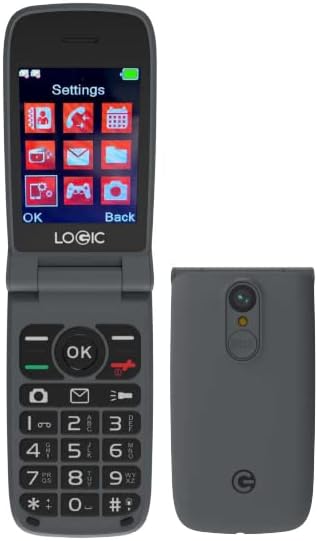
Logic F11L 4G Flip Phone, open and closed views

Image: The Logic F11L 4G Flip Phone shown in both its open state, displaying the screen and keypad, and its closed state, highlighting its compact form factor and rear camera.

What's in the Box

Upon opening your Logic F11L package, please verify that all the following items are included:

  • Logic F11L 4G Flip Phone
  • Wall Charger
  • USB Cable
  • Quick Guide
Contents of Logic F11L retail box

Image: A visual representation of the Logic F11L retail box contents, including the phone, wall charger, USB cable, and quick guide.

Setup

1. SIM Card Installation

The Logic F11L supports Dual Nano SIM cards. Ensure your SIM card is activated by your carrier before installation.

  1. Open the back cover of the phone.
  2. Carefully remove the battery.
  3. Locate the SIM card slots. Insert your Nano SIM card(s) into the designated slots with the gold contacts facing down.
  4. Ensure the SIM card(s) are securely seated.

2. Battery Installation

The phone comes with a 1000 mAh Lithium Ion battery.

  1. After installing the SIM card(s), align the battery contacts with the phone's contacts.
  2. Gently press the battery into place until it clicks.
  3. Replace the back cover, ensuring it is securely closed.

3. Charging the Device

Before first use, fully charge the phone's battery.

  1. Connect the USB cable to the phone's charging port (USB Type-C).
  2. Connect the other end of the USB cable to the wall charger.
  3. Plug the wall charger into a power outlet.
  4. The charging indicator on the phone will show the charging status. Disconnect the charger once the battery is full.

Operating Instructions

Power On/Off

  • To Power On: Press and hold the Power/End Call button until the screen lights up.
  • To Power Off: Press and hold the Power/End Call button until the power options appear, then select "Power Off".

Making and Receiving Calls

  • To Make a Call: Enter the phone number using the keypad and press the Call button (green button).
  • To Receive a Call: When the phone rings, press the Call button (green button) to answer.
  • To End a Call: Press the Power/End Call button (red button).

Key Features

Logic F11L features infographic

Image: An infographic detailing various features of the Logic F11L, including Multimedia (Music and Video Player, FM Radio), Connectivity (Bluetooth V5.0, GPRS), Processor (Spreadtrum), Screen (2.8" TFT TN, 240x320 resolution), Memory (256MB ROM, 48MB RAM), 4G LTE Bands, Camera (VGA + Flash), LED Flashlight/Torchlight, Battery (800mAh Li-ion), SOS Button, and USB Type-C port.

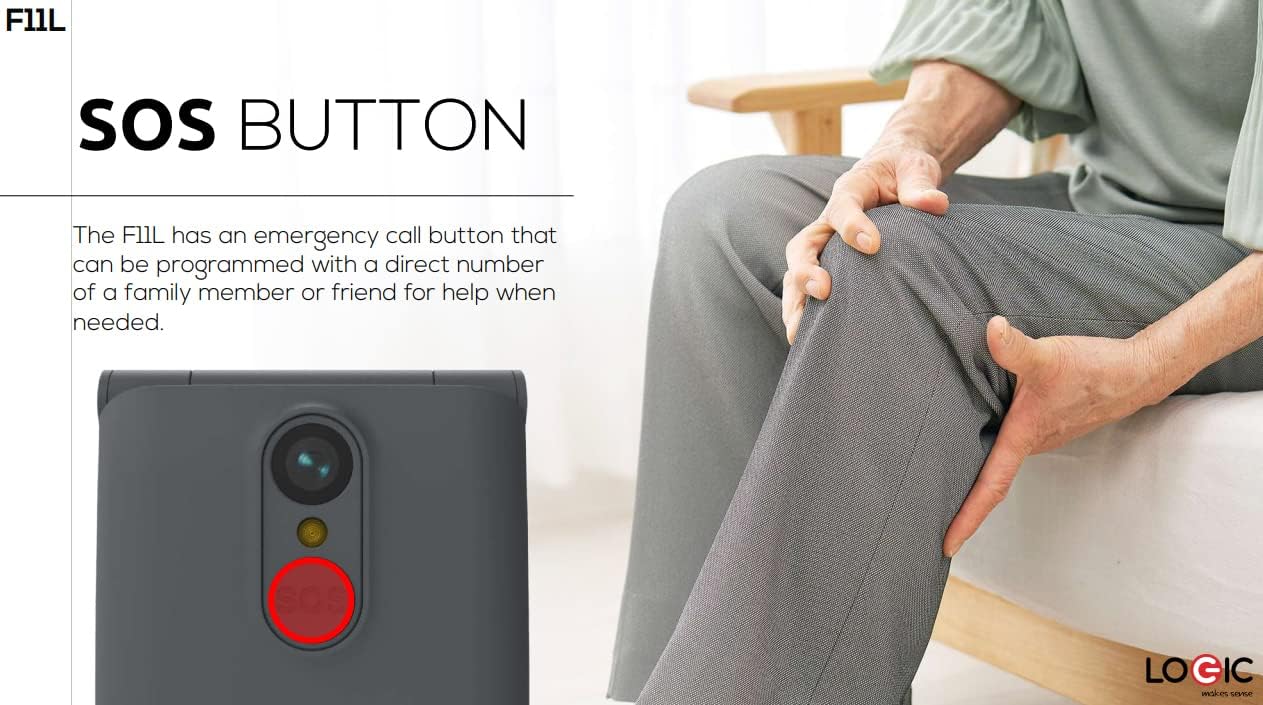
  • SOS Button: The F11L features an emergency call button located on the back of the device. This button can be programmed with a direct number of a family member or friend for quick access to help when needed.
    Close-up of SOS button on Logic F11L

    Image: A close-up view of the Logic F11L's rear, highlighting the red SOS button, with a person in the background suggesting its use for assistance.

  • FM Radio: Enjoy listening to your favorite FM radio stations directly on your phone. Access the FM Radio application from the main menu.
  • Flashlight: The phone's flash also functions as a convenient torchlight. This feature can be activated from the phone's shortcuts or menu.
  • Compact and Durable Design: The flip design protects the screen and keypad when closed, making it ideal for carrying in a bag, purse, or pocket.
    Logic F11L in hand, showing compact design

    Image: The Logic F11L flip phone held in a hand, emphasizing its compact and resistant design when closed.

Maintenance

Proper maintenance ensures the longevity and optimal performance of your Logic F11L phone.

  • Cleaning: Use a soft, dry cloth to clean the phone's exterior. Avoid using liquid cleaners or aerosols, as they may damage the device.
  • Battery Care:
    • Avoid extreme temperatures, as they can reduce battery life.
    • Do not leave the phone charging for excessively long periods after it is fully charged.
    • If the phone will not be used for an extended period, charge it to about 50% before storing.
  • Storage: Store the phone in a cool, dry place away from direct sunlight and moisture.
  • Protection: While the phone has a durable design, avoid dropping it or subjecting it to strong impacts.

Troubleshooting

If you encounter issues with your Logic F11L, refer to the following common problems and solutions:

ProblemPossible CauseSolution
Phone does not power onLow battery; Battery not installed correctly; Software issueCharge the battery; Reinstall the battery; Perform a soft reset (remove and reinsert battery)
Cannot make/receive callsNo network signal; SIM card not installed or activated; Incorrect network settingsMove to an area with better signal; Reinstall SIM card; Contact your carrier to verify SIM activation and network settings
Poor call qualityWeak signal; Obstructions; Speaker/microphone issuesMove to an open area; Ensure nothing is blocking the speaker/microphone; Restart the phone
Battery drains quicklyExcessive usage; Background apps; Old batteryReduce screen brightness; Close unused applications; Consider replacing the battery if it's old

If the problem persists after trying these solutions, please contact customer support.

Specifications

FeatureDetail
ModelF11L
Form FactorFlip Phone
Dimensions4.93 x 2.13 x 0.57 inches
Item Weight0.423 ounces (approx. 12 grams)
Display Size2.4 Inches
Resolution320 x 240
Operating SystemOther
Cellular Technology4G LTE (Bands: 2/4/12/17/28AB), 3G H+ (850/1700/1900), 2G Quad Band
Wireless ConnectivityBluetooth, Cellular
SIM TypeDual Nano SIM
Battery1000 mAh Lithium Ion (included)
Phone Talk TimeUp to 5.63 Hours
Special FeaturesDual SIM, SOS Button, FM Radio, Flashlight
Whats in the BoxUSB Cable

Warranty and Support

For warranty information and customer support, please refer to the documentation included with your purchase or visit the official Logic website. Keep your proof of purchase for any warranty claims.

If you require further assistance or have questions not covered in this manual, please contact Logic customer service.

© 2024 Logic. All rights reserved.

Related Documents - F11L

Preview LOGIC F11L 4G Flip Phone Quick Guide | Setup, Features, and Warranty
Get started with your LOGIC F11L 4G Flip Phone. This guide covers setup, SIM card installation, charging, connecting to a computer, transferring music, FCC compliance, SAR information, and warranty details.
Preview LOGIC F11L 4G Flip Phone Quick Guide and Warranty Information
A quick guide for the LOGIC F11L 4G Flip Phone, covering installation, charging, computer connection, and music transfer. Includes FCC statement, SAR information, and warranty details.
Preview LOGIC F11L 4G Flip Phone: Simple, Accessible, and Reliable Mobile Communication
Explore the LOGIC F11L, a user-friendly 4G flip phone designed for simplicity and reliability. This device offers crystal-clear calls with VoLTE, an emergency SOS button, a bright LED torchlight, built-in FM radio, and hearing aid compatibility. Its compact and durable design makes it perfect for everyday use. Key specs include a 2.8-inch screen, 128MB ROM, 48MB RAM, and an 800mAh battery.
Preview LOGIC F11L 4G Flip Phone - Features, Specifications, and Overview
Discover the LOGIC F11L, a durable and accessible 4G flip phone designed for simple, reliable communication. Explore its features including VoLTE, SOS button, FM radio, and compact design.