1. Introduction
Thank you for choosing the NiPoGi Mini PC GK3PRO. This compact desktop computer is designed for various applications, from business work and home theater to educational tasks and meetings. It features an Intel Celeron N5105 processor, 12GB RAM, and a 256GB M.2 SSD, running on Windows 11 Pro. This manual provides essential information for setting up, operating, maintaining, and troubleshooting your device. Please read it carefully to ensure proper use and to maximize the lifespan of your Mini PC.
2. Product Overview
The NiPoGi Mini PC GK3PRO offers a variety of ports for diverse connectivity needs. Familiarize yourself with the layout below.

Image 2.1: Port Layout. This image illustrates the various ports available on the NiPoGi Mini PC GK3PRO. On the front, you will find the power button and an indicator light. The side panels feature multiple USB ports (2x USB 3.0 + 2x USB 2.0), two HDMI ports, a LAN port, a DC power input, and a MIC-IN port. A VGA port is also present for older display connections.
The Mini PC supports up to three screen displays simultaneously via its 2x HDMI and 1x VGA outputs, offering 4K@60Hz resolution for a striking visual experience.
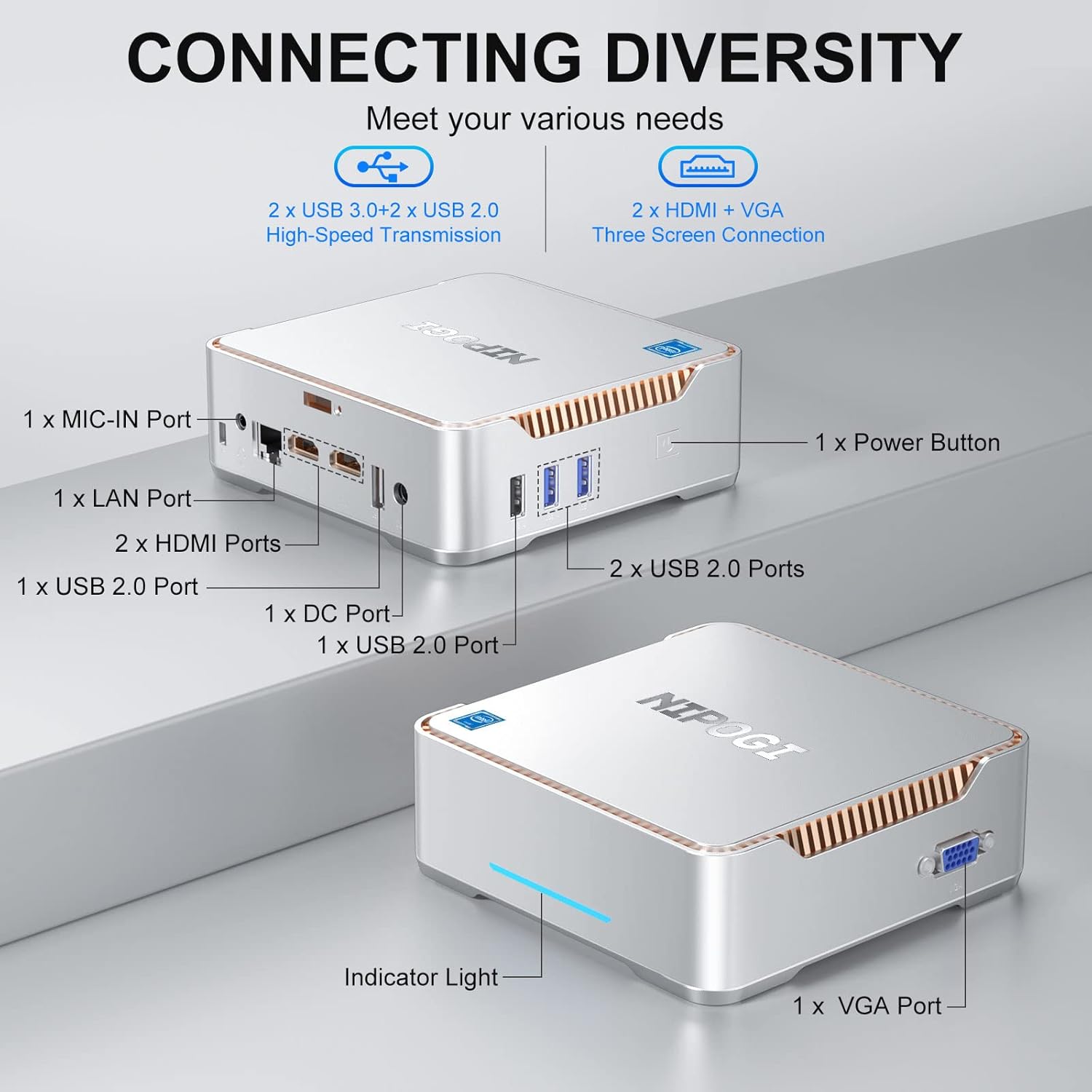
Image 2.2: Triple Display Support. This image demonstrates the Mini PC's capability to connect to and drive three separate monitors simultaneously, showcasing its multi-tasking potential for various applications.
3. Setup Guide
- Connect to Power: Plug the power adapter into the DC port on the Mini PC and then into a wall outlet.
- Connect to Display: Connect your monitor(s) to the Mini PC using HDMI or VGA cables. The device supports up to two HDMI displays and one VGA display simultaneously.
- Connect Peripherals: Connect your keyboard, mouse, and any other USB devices to the available USB ports.
- Network Connection: For a wired connection, plug an Ethernet cable into the LAN port. For wireless, ensure your Wi-Fi network is available during initial Windows setup.
- Power On: Press the power button on the front of the Mini PC. The indicator light will illuminate.
- Initial Windows Setup: Follow the on-screen instructions to complete the Windows 11 Pro setup, including language, region, network, and user account creation.
4. Operating Instructions
4.1 Power On/Off
- To Power On: Press the power button once.
- To Shut Down: Click the Windows Start button, then select Power > Shut down.
- To Restart: Click the Windows Start button, then select Power > Restart.
- To Sleep: Click the Windows Start button, then select Power > Sleep.
4.2 Windows 11 Pro Basics
Your Mini PC comes pre-installed with Windows 11 Pro. For detailed guidance on using Windows 11, please refer to Microsoft's official documentation and support resources.
- Start Menu: Access applications, settings, and power options.
- Taskbar: Pin frequently used applications and manage open windows.
- Settings: Customize your PC, manage devices, and configure network settings.
- File Explorer: Manage your files and folders.
4.3 Performance and Usage
The NiPoGi Mini PC GK3PRO is equipped with an Intel Celeron N5105 processor, offering efficient performance for daily computing tasks.
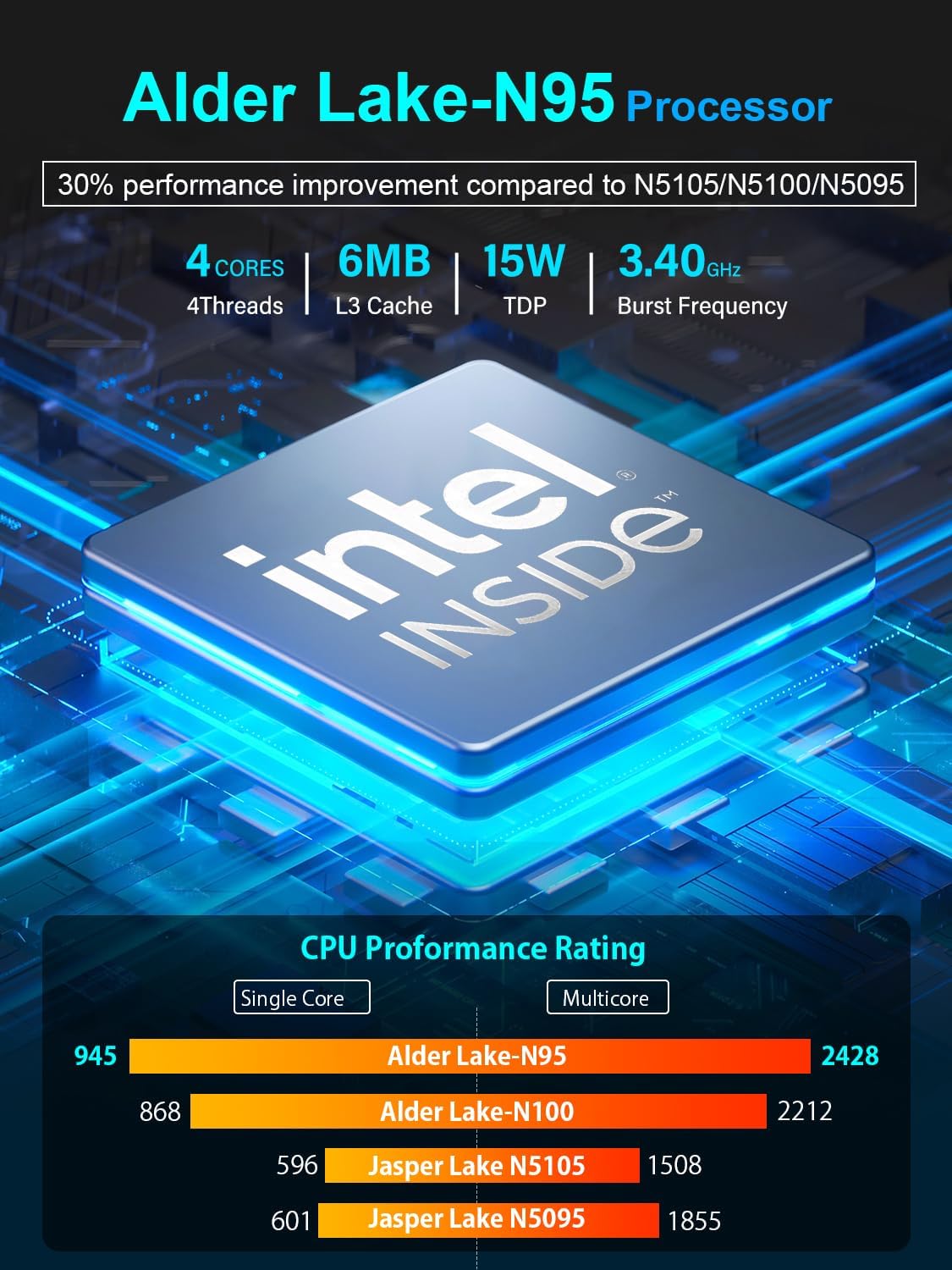
Image 4.1: Processor Performance Overview. This image provides an overview of the performance characteristics of modern Intel Celeron processors, such as the Alder Lake-N95, which features 4 cores, 6MB L3 Cache, 15W TDP, and up to 3.40GHz Burst Frequency. The accompanying bar chart illustrates performance comparisons within the Celeron family, showing improvements over earlier generations like the N5105, N5100, and N5095.
This Mini PC is suitable for various applications, including business, multimedia, and personal use.
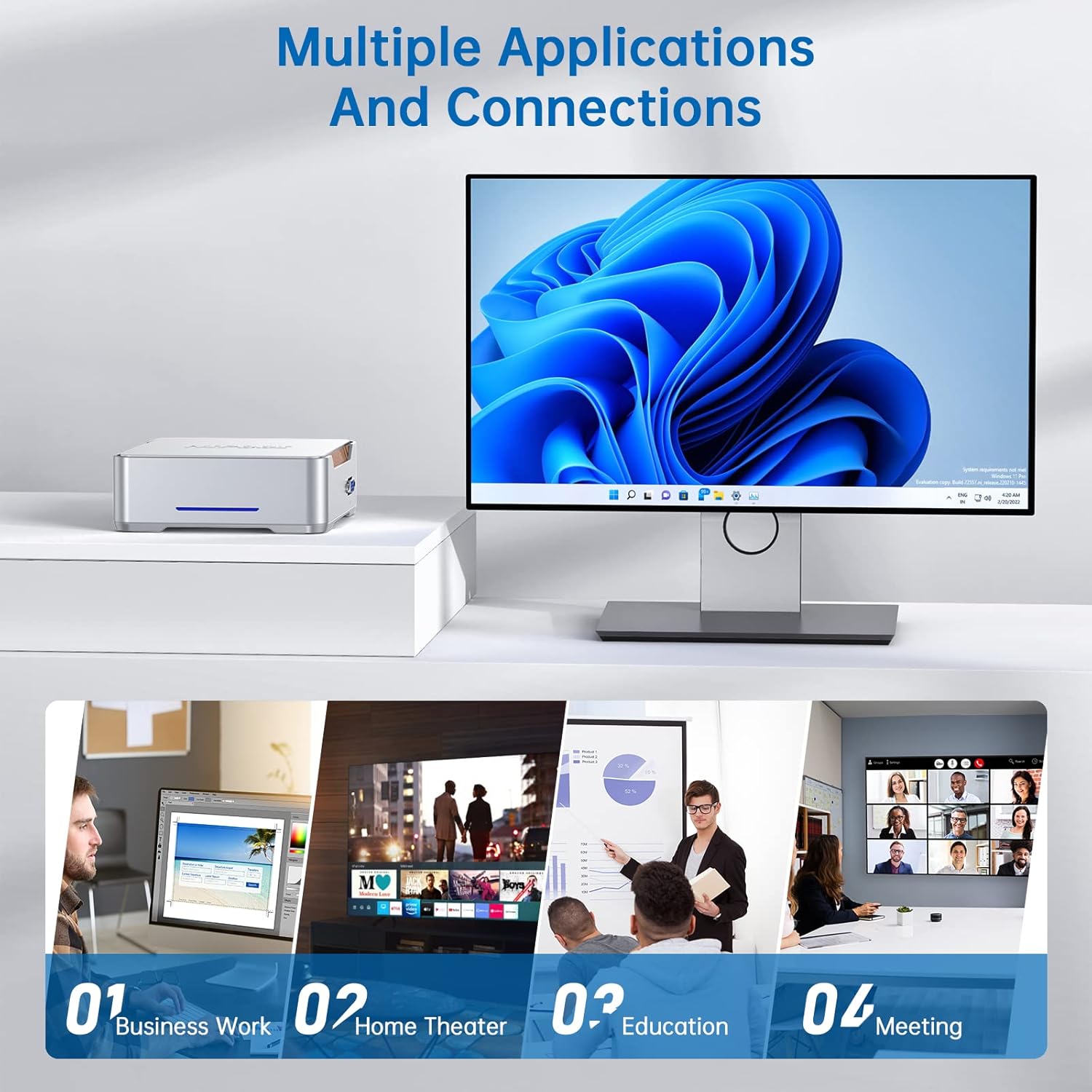
Image 4.2: Multiple Applications. This image illustrates the versatility of the Mini PC, showing it being used for business work, as a home theater PC, for educational purposes, and in meeting environments.

Image 4.3: 4K Display Compatibility. This image demonstrates the Mini PC's capability to output 4K resolution at 60Hz, suitable for high-definition streaming and media consumption from platforms like Hulu, Netflix, and YouTube.
5. Maintenance
5.1 General Care
- Keep the Mini PC in a clean, dry environment, away from direct sunlight and extreme temperatures.
- Ensure proper ventilation by not blocking the air vents.
- Clean the exterior with a soft, dry cloth. Avoid liquid cleaners.
- Regularly update Windows and drivers to ensure optimal performance and security.
5.2 Storage Expansion
The NiPoGi Mini PC GK3PRO allows for easy storage expansion up to 2TB. You can add a 2.5-inch SATA SSD/HDD or replace the existing M.2 SATA SSD.

Image 5.1: Storage Expansion. This diagram illustrates the process of expanding the Mini PC's storage. It shows the internal layout, indicating where to add a 2.5-inch SATA SSD/HDD for additional storage or how to access and replace the pre-installed M.2 SATA SSD.
- Add 2.5-inch SATA SSD/HDD: Open the bottom cover of the Mini PC. Locate the SATA interface and bay. Securely install your 2.5-inch drive.
- Replace M.2 SATA SSD: Carefully remove the existing M.2 SSD and install a new one. Ensure compatibility.
- Add a removable hard drive: External USB hard drives can be connected to any available USB port for additional storage.
The Mini PC is designed with a lower noise fan and features for energy saving and eco-friendliness.

Image 5.2: Eco-Friendly Design. This image highlights the design principles of the Mini PC, emphasizing its lower noise fan, reduced power consumption for extended service life, resistance to high and low temperatures, and overall energy-saving and eco-friendly operation.
6. Troubleshooting
- No Display Output:
- Ensure the monitor is powered on and the correct input source is selected.
- Check that HDMI/VGA cables are securely connected to both the Mini PC and the monitor.
- Try a different HDMI or VGA cable.
- Test with a different monitor if possible.
- Mini PC Does Not Power On:
- Verify the power adapter is correctly connected to the Mini PC and a working power outlet.
- Ensure the power outlet is functional.
- Try a different power outlet.
- No Internet Connection:
- For wired connection, check the Ethernet cable and router status.
- For Wi-Fi, ensure Wi-Fi is enabled in Windows settings and you are connected to the correct network with the correct password.
- Restart your router/modem and the Mini PC.
- Slow Performance:
- Close unnecessary applications running in the background.
- Check for Windows updates and driver updates.
- Ensure sufficient free space on the SSD.
- Run a disk cleanup and defragmentation (for HDD, not typically needed for SSD).
- Consider adding more RAM if you frequently run memory-intensive applications (though 12GB is generally sufficient for most tasks).
7. Specifications
| Brand | NiPoGi |
| Model Number | GK3PRO Mini PC |
| Operating System | Windows 11 Pro |
| Processor Brand | Intel |
| Processor Type | Celeron (N5105) |
| Processor Speed | 2.9 GHz |
| Number of Cores | 4 |
| RAM | 12 GB |
| Hard Drive Size | 256 GB |
| Hard Drive Technology | M.2 SSD |
| Graphics Coprocessor | Intel UHD Graphics |
| Resolution | 4K HD Pixels (4096 x 2304) |
| Connectivity Type | Ethernet, WiFi (2.4/5 GHz), Bluetooth (4.2), USB |
| Hardware Interface | Ethernet, HDMI (x2), USB 2.0 (x2), USB 3.0 (x2), VGA (x1) |
| Dimensions (L x W x H) | 14 x 14 x 4.5 cm |
| Weight | 780 grams |
8. Warranty and Support
For warranty information and technical support, please refer to the documentation included with your purchase or visit the official NiPoGi website.
- Warranty: Specific warranty terms and duration may vary by region and retailer. Please retain your proof of purchase.
- Technical Support: If you encounter issues not covered in the troubleshooting section, please contact NiPoGi customer support for assistance.


