1. Introduction
This manual provides important information regarding the installation, operation, and maintenance of your NewAir 15" Dual Zone Wine and Beverage Refrigerator. Please read these instructions thoroughly before using the appliance to ensure proper function and safety. Keep this manual for future reference.
Included Components:
- Wine & Beverage Refrigerator
- User Manual
- Warranty Card
- Customer Service Insert
3. Setup and Installation
3.1 Unpacking
Carefully remove all packaging materials. Inspect the appliance for any damage. Retain packaging materials for future transport if needed.
3.2 Placement
This unit can be installed as a freestanding appliance or built into cabinetry. Ensure adequate ventilation space around the unit, especially at the rear and sides, if freestanding. If built-in, ensure proper airflow as specified in the installation guide (not provided in this manual, refer to product documentation).
Avoid placing the unit in direct sunlight or near heat sources. The ambient temperature should be between 60°F (16°C) and 90°F (32°C).
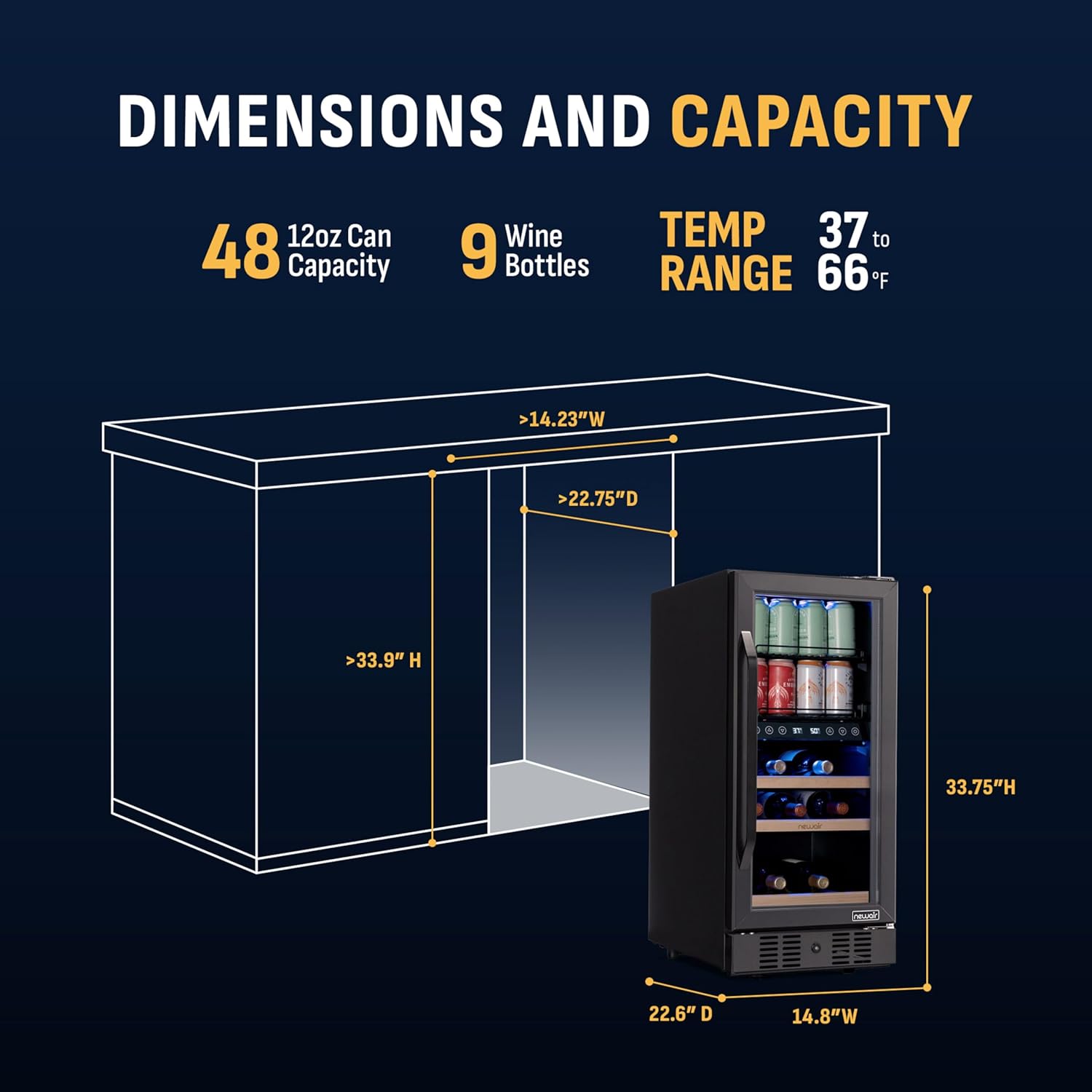
Image: Diagram showing the dimensions of the NewAir 15" Wine and Beverage Refrigerator, including its width, depth, and height, along with its capacity of 48 cans and 9 wine bottles, and a temperature range of 37°F to 66°F.
Product Dimensions: 24.25"D x 14.8"W x 33.75"H
3.3 Leveling
Ensure the appliance is level by adjusting the leveling legs at the bottom. A level unit prevents vibrations and ensures proper door sealing.
3.4 Electrical Connection
Connect the appliance to a dedicated, grounded 120V AC outlet. Do not use extension cords or adapters. Allow the unit to stand upright for at least 24 hours before plugging it in to allow compressor fluids to settle.
4. Operating Instructions
4.1 Control Panel
The control panel allows you to set and monitor temperatures for both zones and control the interior lighting.

Image: Close-up of the control panel on the NewAir 15" Wine and Beverage Refrigerator, showing buttons for Celsius/Fahrenheit switch, Zone 1 temperature adjustment (up/down), Temperature Display, Zone 2 temperature adjustment (up/down), and Light Brightness control.
- °C/°F Switch: Toggles the temperature display between Celsius and Fahrenheit.
- Zone 1 Temperature Adjustment: Use the up/down arrows to set the desired temperature for the upper zone (beverages).
- Zone 2 Temperature Adjustment: Use the up/down arrows to set the desired temperature for the lower zone (wine).
- Temperature Display: Shows the current set temperatures for each zone.
- Light Brightness: Controls the intensity of the interior LED lighting.
4.2 Dual Zone Operation
This refrigerator features two independent temperature zones. The upper zone is ideal for beverages, typically set between 37°F and 50°F. The lower zone is designed for wine, with a recommended range of 50°F to 66°F. Adjust each zone's temperature using the respective controls on the panel.
4.3 Loading and Storage
The unit includes SplitShelf configuration and beech wood wine racks. The SplitShelf allows for flexible storage, accommodating standard-sized cans on the half-shelf and taller bottles or cans in front. Ensure bottles and cans do not obstruct the door from closing properly.

Image: Interior view of the NewAir 15" Wine and Beverage Refrigerator showcasing the SplitShelf feature, with standard cans stacked on the half-shelf and taller bottles placed in front, demonstrating flexible storage.

Image: Close-up of the premium beech wood wine racks and metal can racks inside the NewAir 15" Wine and Beverage Refrigerator, highlighting organized storage for up to 48 cans and 9 wine bottles.
4.4 Door Features
The appliance features a triple-pane insulated glass door that protects contents from UV rays and maintains internal temperature. An airtight door seal further enhances temperature stability. The door is also lockable for security.

Image: Diagram illustrating the double-layer glass door of the NewAir 15" Wine and Beverage Refrigerator, showing how it protects beverages from airflow and harmful UV rays, with an emphasis on heat and UV prevention.
5. Maintenance
5.1 Cleaning
Always unplug the unit before cleaning. Clean the interior with a mild detergent and warm water. Wipe down the exterior with a soft cloth. Do not use abrasive cleaners or solvents. Clean the door gasket regularly to ensure a proper seal.
5.2 Defrosting
This appliance features an automatic defrost system. Frost buildup on the evaporator will melt and drain into a drip tray at the back of the unit, where it evaporates. No manual defrosting is typically required.
5.3 Power Outage
In case of a power outage, keep the door closed to maintain the internal temperature for as long as possible. The unit will resume operation automatically once power is restored.
9. Customer Support
For technical assistance, troubleshooting beyond this manual, or warranty inquiries, please contact NewAir Customer Service. Refer to the Customer Service Insert for contact details or visit the official NewAir website.
NewAir Website: www.newair.com


