
1. Introduction
This manual provides detailed instructions for the installation, operation, and maintenance of the YOJOCK PZEM-015 DC 0-200V 100A Shunt Battery Monitor. This multifunctional device is designed to accurately measure various electrical parameters in DC circuits, offering comprehensive monitoring capabilities for battery systems, solar setups, industrial applications, and automotive use.
The PZEM-015 features a clear STN-LCD display with a blue backlight, providing a 360-degree viewing angle for optimal readability in various lighting conditions. It integrates nine measurement functions into a single compact unit, ensuring efficient and stable performance.
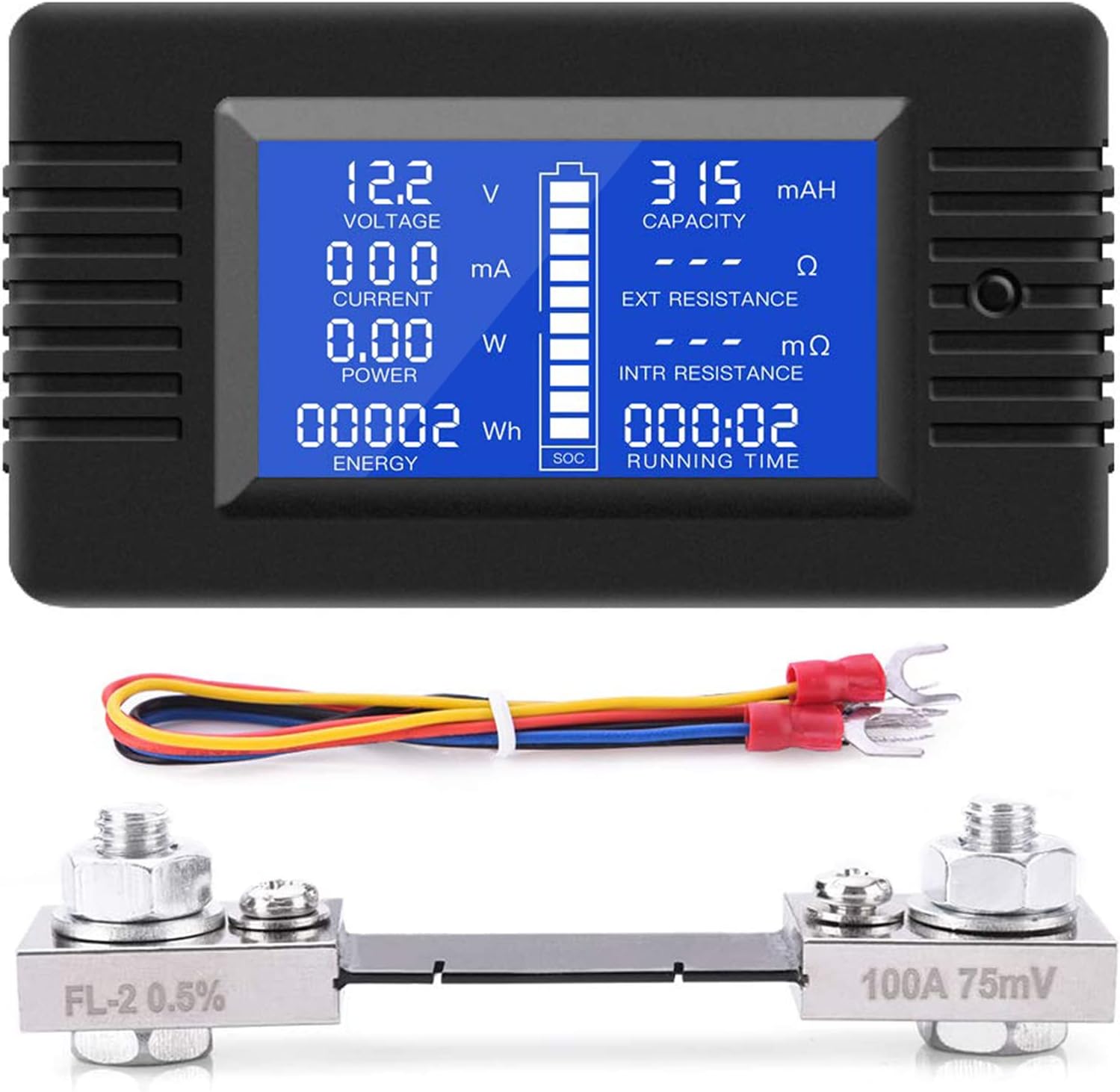
Image 1.1: YOJOCK PZEM-015 DC Battery Monitor with 100A Shunt.
2. Product Features
The YOJOCK PZEM-015 offers a comprehensive suite of monitoring functions:
- 9-in-1 Multifunctionality: Measures battery voltage, discharge current, discharge power, discharge impedance, internal resistance, capacity, energy consumption, State of Charge (SOC), and running time.
- Wide Measurement Range:
- Voltage: DC 0-200V
- Current: 0-100A
- Power: 0-20000W
- Discharge Impedance: 0-1000Ω
- Internal Resistance: 0-999mΩ
- Capacity: 0-1000Ah
- Energy: 0-9999kWh
- Running Time: 0-999h
- State of Charge (SOC): 0-100%
- Enhanced Visual Experience: 51 x 30 mm STN-LCD screen with blue backlight and 360° viewing angle for clear visibility day or night.
- High Precision Chip Control: Ensures efficient, stable, and reliable operation.
- Screw-Free Installation: Features push-in terminals for easy and convenient wire installation and removal without the need for screws.
- Certifications: FCC and CE certified.

Image 2.1: Overview of the nine measurement functions displayed on the monitor.
3. Package Contents
Please check the package contents upon receipt. The standard package includes:
- 1 x YOJOCK PZEM-015 DC Battery Monitor
- 1 x 100A Current Shunt
- 1 x Set of Connecting Wires
4. Setup and Installation
Careful installation is crucial for accurate readings and safe operation. Please follow these instructions strictly.
4.1 Wiring Diagram
The following diagram illustrates the correct wiring for the PZEM-015 monitor with the 100A shunt. Ensure all connections are secure and polarity is correct.
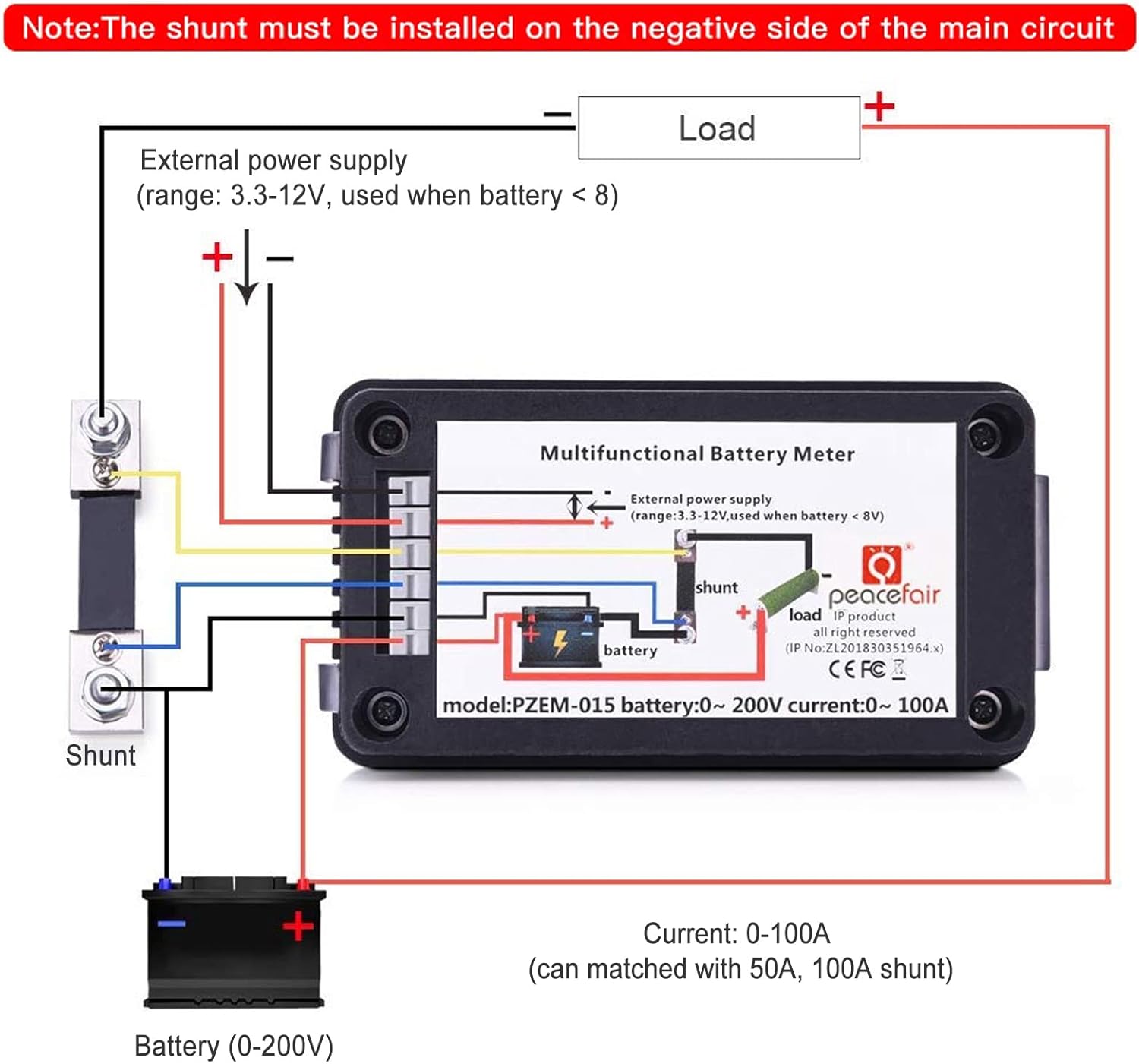
Image 4.1: Wiring diagram for the PZEM-015 monitor.
- Important Note: The shunt must be installed on the negative side of the main circuit.
- External Power Supply: If the battery voltage is less than 8V, an external power supply (range: 3.3-12V) is required for the monitor. Connect it to the designated external power supply terminals.
- Current Range: The device supports 0-100A current measurement and can be matched with 50A or 100A shunts.
4.2 Screw-Free Terminal Installation
The monitor features convenient push-in terminals for wire connections.

Image 4.2: Push-in terminal installation steps.
- Step 1: Gently press down on the terminal lever.
- Step 2: Insert the stripped wire end into the opening.
- Step 3: Release the lever to secure the wire. Ensure the wire is firmly held.
4.3 Application Examples
The PZEM-015 is versatile and can be used in various environments:

Image 4.3: Diverse applications of the DC battery monitor.
5. Operating Instructions
Once properly installed, the monitor will display real-time electrical parameters.
5.1 Display Overview
The LCD screen provides a clear readout of all measured values.

Image 5.1: PZEM-015 display showing various parameters.
- Voltage (V): DC 0-200V
- Current (A): 0-100A
- Power (W): 0-20000W
- Energy (Wh): 0-9999kWh
- Capacity (mAh): 0-1000Ah
- Impedance (Ω): 0-1000Ω
- Internal Resistance (mΩ): 0-999mΩ
- Running Time (hour): 0-999h
- Battery SOC (%): 0-100% (Each grid represents 10% of electricity)
5.2 Button Functionality
The single button on the device serves multiple purposes:
- Short Press: Toggles the backlight ON/OFF.
- Long Press (3 seconds): Resets the accumulated energy (Wh) and running time (h) values. This is useful for starting new measurement cycles.
6. Maintenance
To ensure the longevity and accuracy of your PZEM-015 monitor, follow these maintenance guidelines:
- Cleaning: Use a soft, dry cloth to clean the display and casing. Avoid abrasive cleaners or solvents.
- Storage: Store the device in a cool, dry place away from direct sunlight and extreme temperatures when not in use.
- Connections: Periodically check all wiring connections to ensure they remain secure.
7. Troubleshooting
If you encounter issues with your PZEM-015 monitor, refer to the following common problems and solutions:
- No Display/Power:
- Check all power connections.
- Ensure the battery voltage is within the operating range (0-200V).
- If battery voltage is below 8V, verify the external power supply (3.3-12V) is correctly connected and functioning.
- Incorrect Readings:
- Verify the wiring against the diagram in Section 4.1, especially the shunt placement on the negative side.
- Ensure the shunt is correctly rated for your current (100A for this model).
- Check for loose connections or damaged wires.
- Energy/Time Not Resetting:
- Ensure you are performing a long press (approximately 3 seconds) on the button to initiate the reset.
- Display Flickering:
- Check for stable power supply to the monitor.
- Ensure the operating environment is within specified temperature and humidity ranges.
8. Specifications
| Parameter | Value |
|---|---|
| Model Number | PZEM-015 |
| Voltage Measurement Range | DC 0-200V |
| Current Measurement Range | 0-100A |
| Power Measurement Range | 0-20000W |
| Energy Measurement Range | 0-9999kWh |
| Capacity Measurement Range | 0-1000Ah |
| Impedance Measurement Range | 0-1000Ω |
| Internal Resistance Measurement Range | 0-999mΩ |
| Running Time Range | 0-999h |
| State of Charge (SOC) | 0-100% |
| Display Type | STN-LCD with Blue Backlight |
| Display Dimensions | 51 x 30 mm |
| Certifications | CE, FCC |
| Power Source | Battery Powered (with external supply option for <8V) |
| Color | Black |
| Manufacturer | YOJOCK |
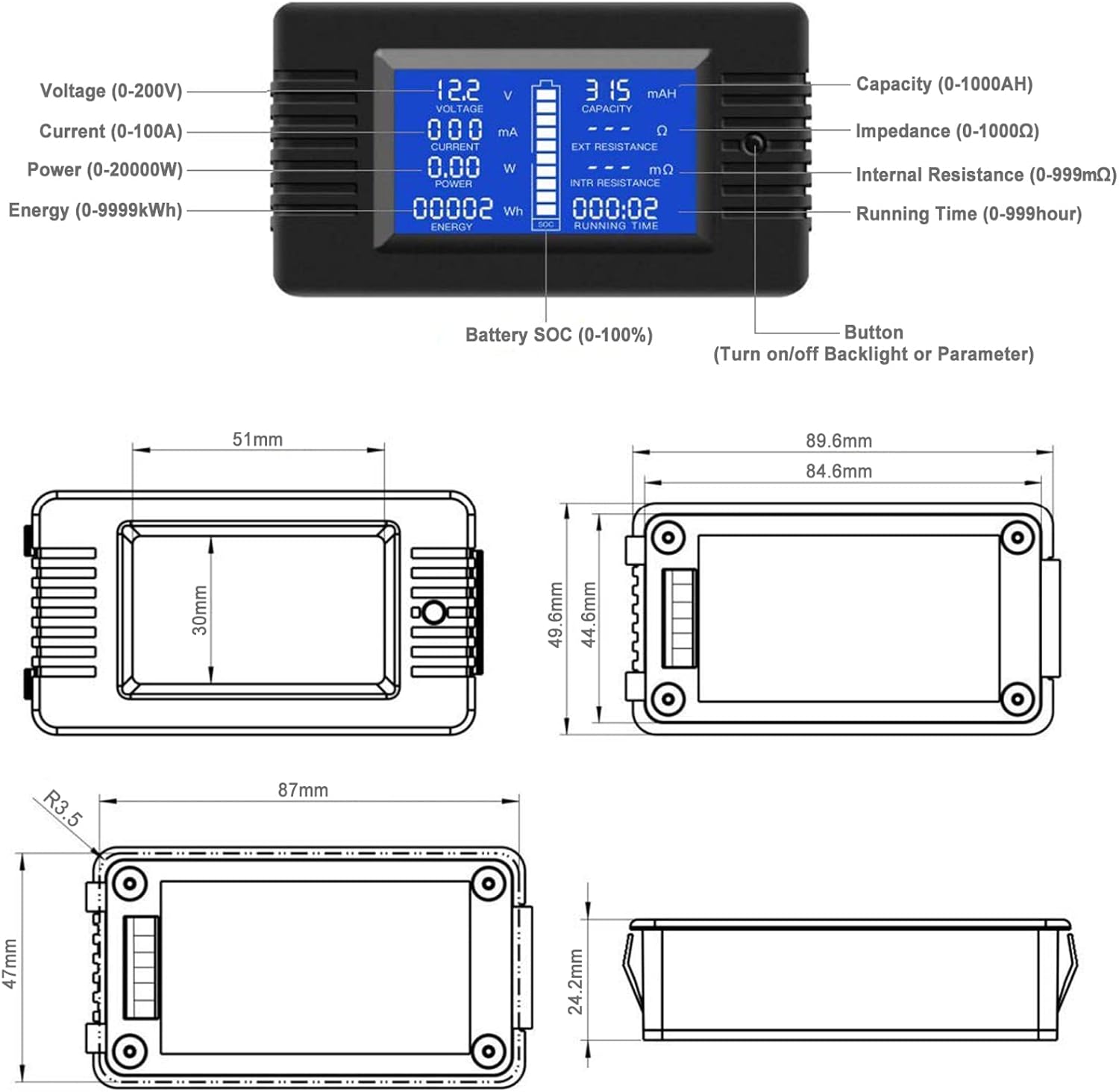
Image 8.1: Physical dimensions of the PZEM-015 monitor.
9. Safety Information
Please observe the following safety precautions:
- Electrical Safety: Always disconnect power before making or changing any wiring connections. Work with electricity carries inherent risks; if you are unsure, consult a qualified electrician.
- Rated Power: Do not exceed the rated voltage (200V DC) or current (100A) of the device. Overloading can cause damage to the monitor and connected equipment, and poses a fire hazard.
- Shunt Placement: Ensure the shunt is correctly installed on the negative side of the main circuit as per the wiring diagram. Incorrect placement can lead to inaccurate readings or damage.
- Environment: This module is suitable for indoor applications only. Do not use outdoors or in environments with high humidity, dust, or corrosive gases.
- Polarity: Pay close attention to polarity when connecting the device. Incorrect polarity can damage the unit.
10. Warranty and Support
For warranty information, technical support, or service inquiries, please contact your retailer or the manufacturer directly. Details regarding specific warranty periods and support procedures can typically be found on the product packaging or the manufacturer's official website.