
1. Product Overview
The MAIMEIMI 85mm GPS Speedometer is a versatile digital instrument designed for accurate speed measurement and display in various vehicles, including boats, marine vessels, and cars. It features a TFT screen for clear readability, IP67 waterproof rating, and supports multiple speed units. This manual provides essential information for proper installation, operation, and maintenance of your speedometer.

Figure 1: Front view of the MAIMEIMI 85mm GPS Speedometer display.
2. Key Features
- TFT Screen Display: Provides clear and detailed information.
- Wide Voltage Compatibility: Operates on 9-33V DC power.
- IP67 Waterproof Rating: Designed to withstand water immersion and anti-fogging.
- Multiple Speed Units: Switchable between km/h, mph, and knots.
- Comprehensive Data Display: Shows Speed Over Ground (SOG), Odometer (ODO), Trip Meter (TRIP), Course Over Ground (COG), and Battery Voltage.

Figure 2: Detailed explanation of the speedometer display elements.
3. Package Contents
Verify that all items are present in the package:
- 1 x MAIMEIMI GPS Speedometer
- 1 x GPS Antenna (3-meter cable length)
- 1 x Instruction Manual
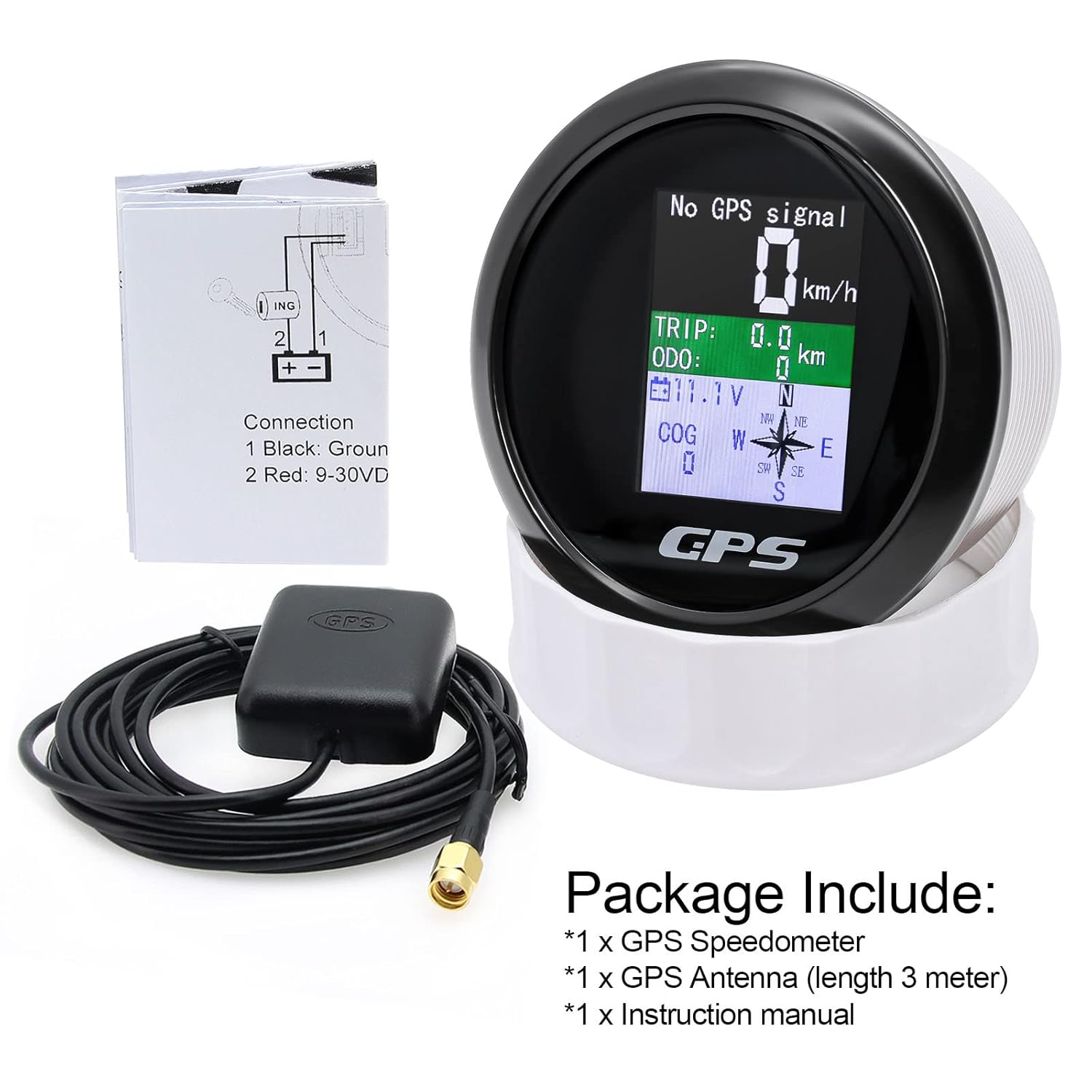
Figure 3: Contents included in the product package.
4. Setup and Installation
4.1 Dimensions
Before installation, ensure adequate space for the speedometer. The required mounting hole diameter is 85mm (3 3/8 inches), and the depth behind the panel should be at least 55mm (2 3/16 inches).

Figure 4: Front and rear dimensions of the speedometer.
4.2 Mounting Instructions
- Prepare the Panel: Using an 85mm (3 3/8") hole saw, cut a circular opening in your dashboard or mounting panel. Ensure there is at least 55mm (2 3/16") of clear space behind the panel for the gauge body.
- Insert the Gauge: Carefully insert the speedometer into the prepared hole from the front of the panel.
- Secure the Gauge: From the rear of the panel, attach and tighten the supplied retaining ring to secure the speedometer in place.

Figure 5: Step-by-step installation guide for mounting the speedometer.
4.3 Wiring Connection
Connect the speedometer to your vehicle's electrical system as follows:
- Black Wire: Connect to Ground (-)
- Red Wire: Connect to 9-33V DC power supply (+)
Ensure connections are secure and insulated to prevent short circuits.
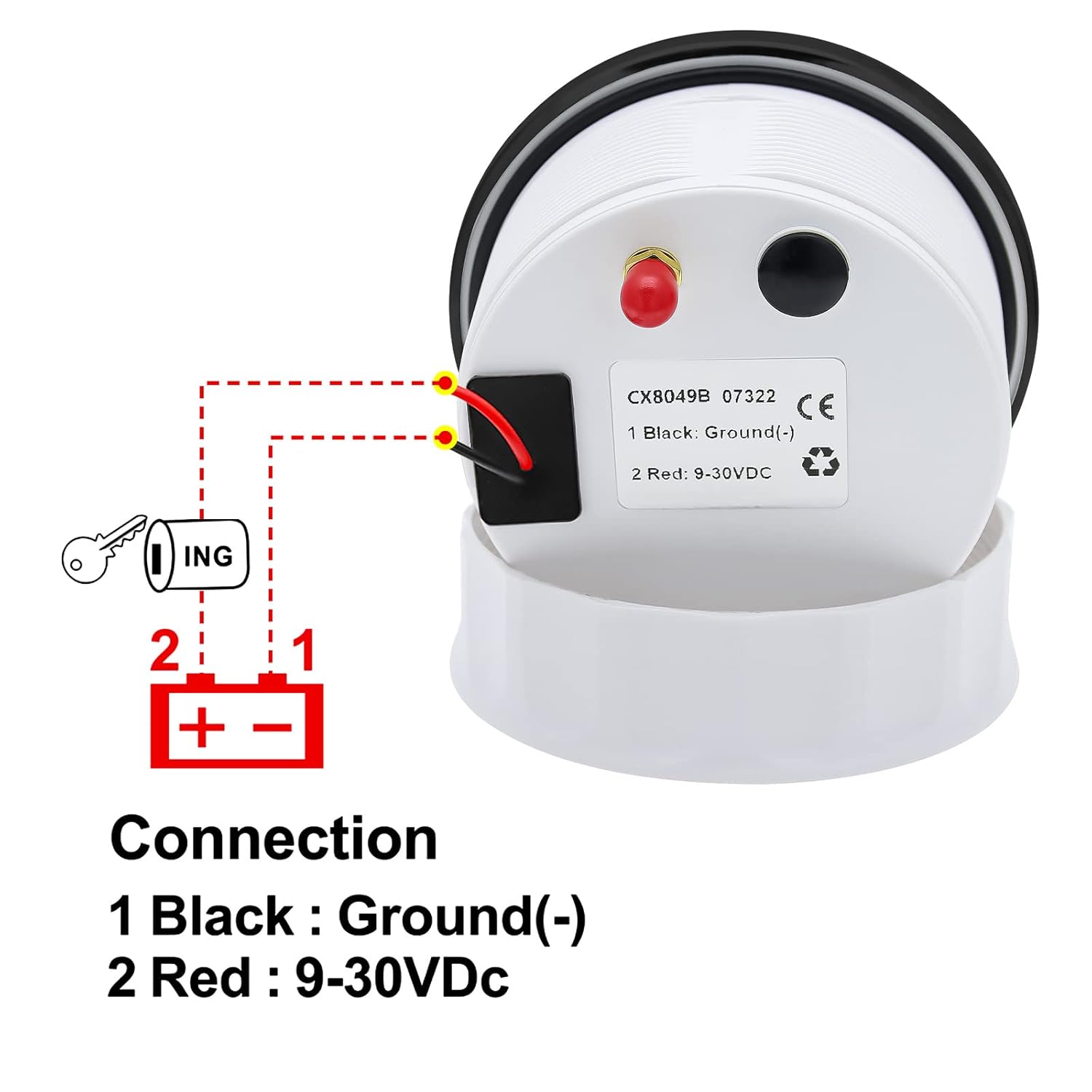
Figure 6: Wiring connection diagram for the speedometer.
4.4 GPS Antenna Placement
The GPS antenna is crucial for signal reception. For optimal performance:
- Mount the GPS antenna in a location with a clear, unobstructed view of the sky.
- Avoid placing the antenna directly under metal objects or inside enclosed compartments that could block satellite signals.
- The antenna typically comes with 3M double-sided tape for easy mounting.
Upon initial connection, the speedometer may take approximately 30 seconds to acquire a GPS signal. Subsequent signal acquisition will be faster under clear sky conditions.
5. Operating Instructions
5.1 Display Information
The TFT screen displays the following information:
- SOG (Speed Over Ground): Current speed, displayed in km/h, mph, or knots.
- ODO (Odometer): Total accumulated distance (0-999999km). This value can be adjusted via the back button.
- TRIP (Trip Meter): Distance traveled for the current trip (0-999.9km). This resets to zero when power is turned off.
- COG (Course Over Ground): Current direction of travel (Orientation Pointer).
- Battery Voltage: Real-time vehicle battery voltage (e.g., 13.2V).
5.2 Switching Speed Units
The speedometer supports three units of speed measurement: kilometers per hour (km/h), miles per hour (mph), and knots. To switch between these units:
- Locate the button on the back of the speedometer unit.
- Press this button to cycle through the available units (km/h, mph, knot). The selected unit will be saved automatically.

Figure 7: Illustration of how to switch between speed units using the back button.
5.3 Adjusting Odometer (ODO)
The Odometer (ODO) value can be adjusted using the back button. Refer to the detailed instructions in the included physical manual for specific steps on ODO adjustment, as this typically involves a sequence of button presses.
6. Maintenance
The MAIMEIMI GPS Speedometer is designed for durability and minimal maintenance.
- Waterproof Protection: The unit is IP67 waterproof, meaning it is protected against dust and can withstand immersion in water up to 1 meter for 30 minutes. This ensures normal operation even in wet marine environments.
- Cleaning: Clean the display and housing with a soft, damp cloth. Avoid abrasive cleaners or solvents that could damage the screen or finish.
- Connections: Periodically check all electrical connections to ensure they remain secure and free from corrosion.

Figure 8: Demonstration of the speedometer's IP67 waterproof capability.
7. Troubleshooting
- "No GPS Signal" Display: If the speedometer shows "No GPS signal," ensure the GPS antenna is properly connected and placed in a location with a clear view of the sky. It may take up to 30 seconds for initial signal acquisition.
- Display Readability in Sunlight: In very bright, direct sunlight, the TFT display may be challenging to read for some users. This is a characteristic of some display technologies. Consider adjusting the mounting angle or adding a small shade if persistent issues occur.
- Incorrect Speed Reading: Verify that the GPS antenna is securely connected and receiving a strong signal. Compare the reading with another GPS-enabled device if available.
- Power Issues: Check the wiring connections (red wire to 9-33V DC, black wire to ground) to ensure they are secure and receiving power within the specified voltage range.
8. Specifications
| Feature | Specification |
|---|---|
| Model | GPS Speedometer 85mm |
| Working Voltage | 9-33V DC |
| Mounting Hole Diameter | 85mm (3 3/8 inches) |
| Mounting Depth | 55mm (2 3/16 inches) |
| Waterproof Rating | IP67 |
| Display Type | TFT Screen Digital |
| Speed Units | km/h, mph, knots |
| Odometer Range | 0-999999km |
| Trip Meter Range | 0-999.9km |
| Material | Metal, Plastic |
| Product Dimensions (L x W x H) | 3.8 x 3.8 x 2.2 inches |
9. Warranty and Support
For warranty information, technical support, or any questions regarding your MAIMEIMI GPS Speedometer, please refer to the contact details provided with your purchase or visit the official MAIMEIMI store online. Keep your purchase receipt for warranty claims.


