
1. Introduction
Thank you for choosing the Sovmiku Dual-Lens Wireless Security Camera. This manual provides essential information for the proper setup, operation, and maintenance of your device. Please read it thoroughly before use and keep it for future reference.
This camera features 4-megapixel high-resolution video, a 10000mAh battery with solar charging capability, two-way audio, IP64 waterproofing, PIR human detection, and various night vision modes for comprehensive security.
2. Package Contents
Before proceeding with the installation, please verify that all items listed below are included in your package:
- Sovmiku Dual-Lens Wireless Security Camera (Model 2CQ1)
- Solar Panel
- Mounting Bracket
- USB Charging Cable
- Mounting Screws and Wall Plugs
- User Manual

Image: All components included in the Sovmiku Dual-Lens Wireless Security Camera package, laid out neatly.
Video: A detailed unboxing of the Sovmiku Dual-Lens Wireless Security Camera, showing all included accessories and components.
3. Setup
3.1 Initial Charging
Before first use, fully charge the camera using the provided USB cable. The 10000mAh battery ensures long-term operation, supplemented by the solar panel.
3.2 Mounting the Camera
Choose a suitable outdoor or indoor location for optimal surveillance. Ensure the solar panel receives adequate sunlight.

Image: Visual guide showing the easy installation process, including mounting the camera and connecting to the app.
3.3 App Installation and Connection
- Download the dedicated mobile application (e.g., Eseecloud or similar, as indicated by product packaging/manual) from your device's app store (iOS/Android).
- Create an account and log in.
- Follow the in-app instructions to add your camera. The camera supports 2.4G WiFi.
- Enable Bluetooth on your smartphone for initial setup if prompted.
Video: Demonstrates the initial setup process of the camera using Bluetooth via the mobile application.
Video: Illustrates the procedure for sharing camera access with other users through the app.
4. Operating Instructions
4.1 Dual-Lens Monitoring
The camera features two lenses for comprehensive surveillance. One lens provides a wide-angle fixed view, while the other offers pan, tilt, and zoom (PTZ) capabilities for detailed monitoring and automatic tracking.

Image: Demonstrates the dual-lens functionality, displaying two different camera views simultaneously on a single screen.

Image: Illustrates the 360-degree omnidirectional monitoring capability, showing how the dual lenses cover a wide area.
Video: Shows the dual security camera providing true 360-degree all-direction coverage, capturing multiple angles simultaneously.
Video: Features a 2K outdoor wireless dual-lens security camera with double PIR, highlighting its advanced detection capabilities.
4.2 Night Vision Modes
The camera offers multiple night vision modes to ensure clear visibility in low-light conditions:
- Infrared Mode: Provides clear black and white images in complete darkness.
- Full Color Mode: Utilizes built-in sensor lights to capture full-color video at night.
- Smart Mode: Automatically switches between infrared and color night vision based on detected motion.
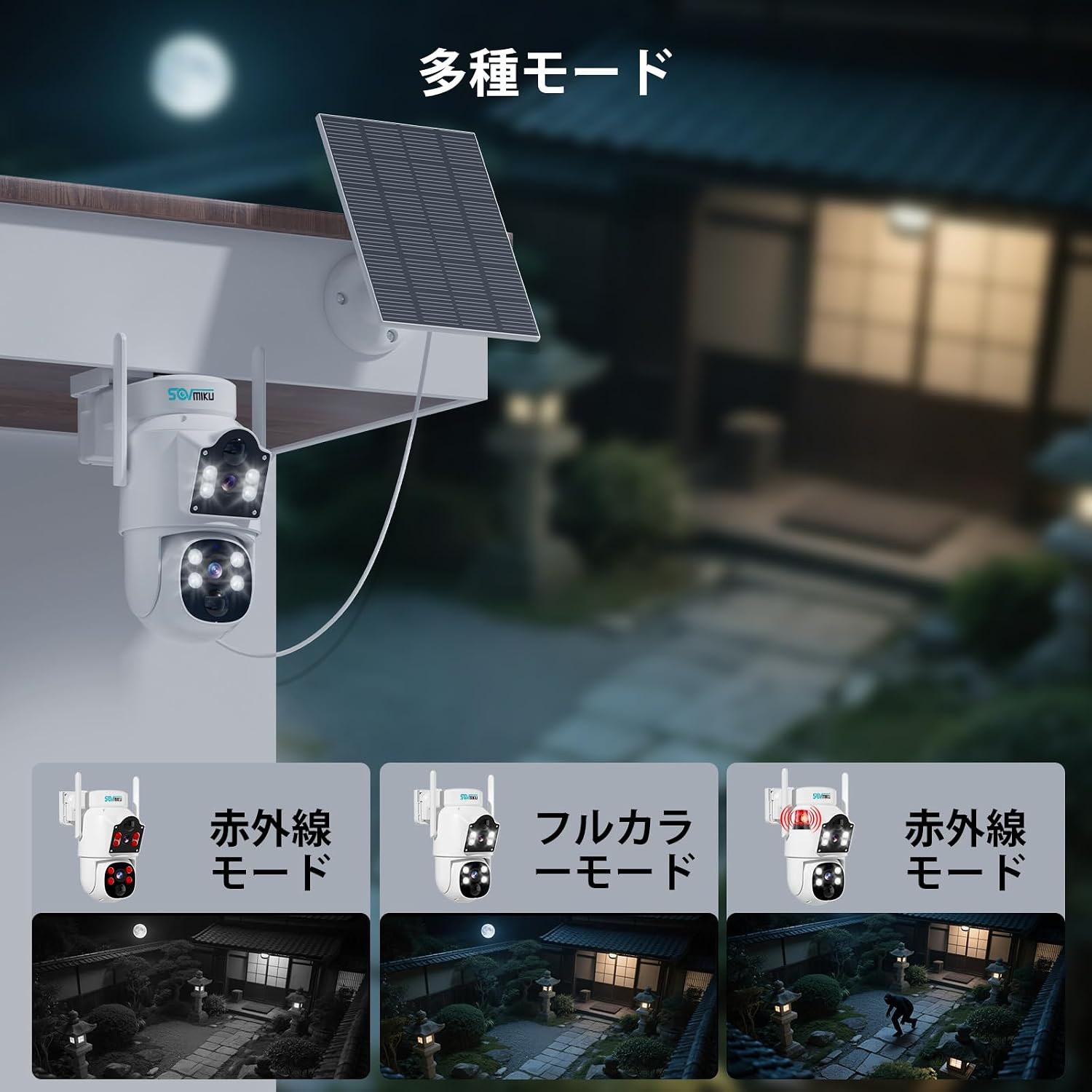
Image: Displays the three night vision modes (infrared, full color, smart) and their respective visual outputs.

Image: A visual comparison of the camera's infrared, full-color, and smart night vision modes, showing their effectiveness in different low-light scenarios.
4.3 Two-Way Audio
Communicate with visitors or deter intruders using the built-in microphone and speaker. This feature allows for real-time conversations through the app.

Image: Shows a user interacting with a delivery person via the camera's two-way audio feature on their smartphone.
4.4 Motion Detection & AI Tracking
The camera's PIR human detection function accurately identifies human movement and sends instant alerts to your smartphone. AI tracking ensures that detected subjects remain in view.

Image: Illustrates the AI human detection and automatic tracking feature, showing an alert on a smartphone when a person is detected.

Image: Shows the motion detection function in action, with a smartphone displaying an alert when a person is detected in the monitored area.

Image: Demonstrates the ability to set specific detection areas, allowing users to customize where motion alerts are triggered.
4.5 Storage Options
Recordings can be stored locally on an SD card (up to 128GB, sold separately) or securely in the cloud (subscription may be required).
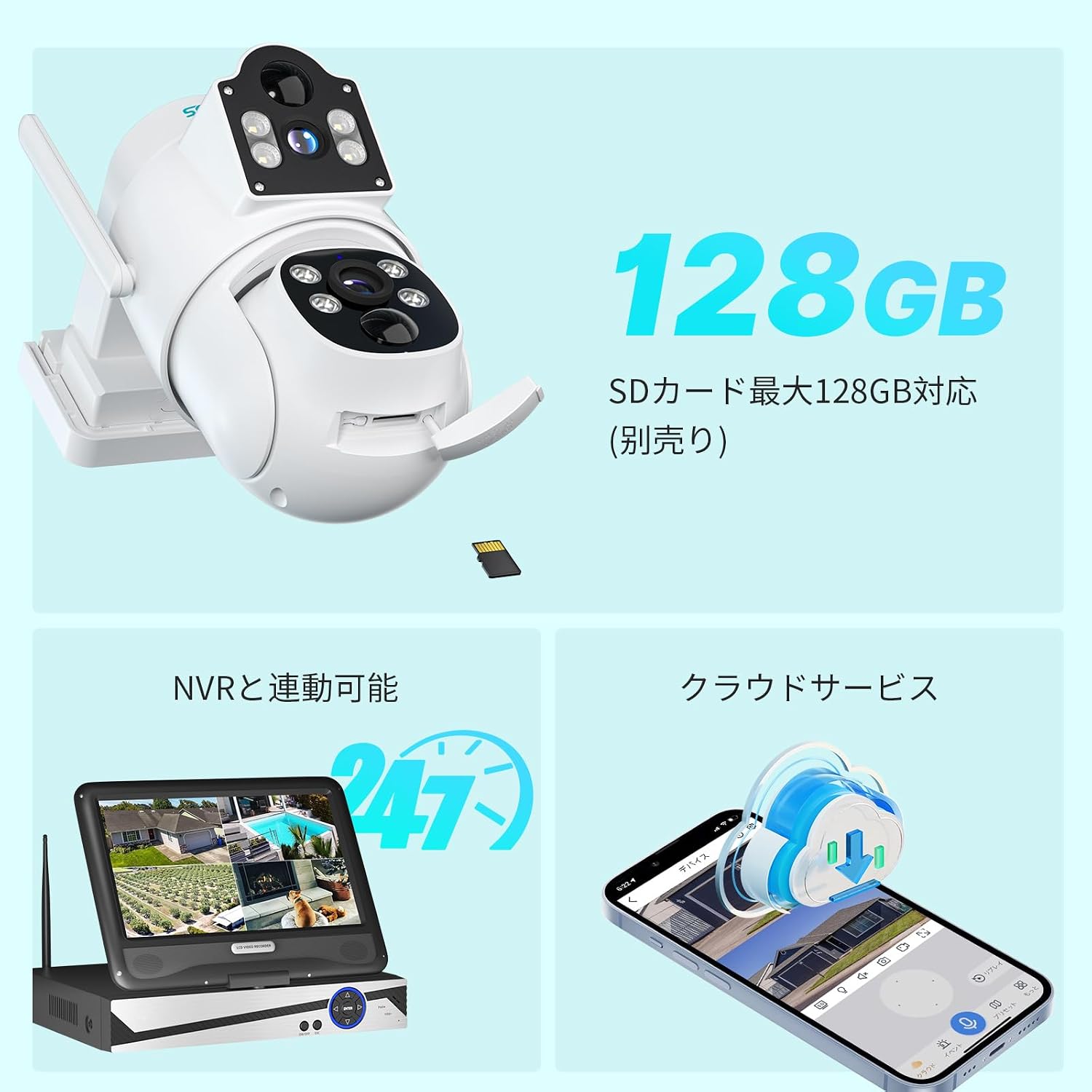
Image: Highlights the camera's compatibility with up to 128GB SD cards and cloud storage services.

Image: Shows the SD card slot on the camera and an icon representing cloud service integration.
5. Maintenance
5.1 Weather Resistance
The camera features an IP64 waterproof rating, protecting internal electronic components from rain and dust. This ensures reliable long-term use in outdoor environments.

Image: Illustrates the camera's IP66 waterproof and dustproof design, showing it operating stably in rain and snow.

Image: Highlights the IP66 waterproof and dustproof features, indicating suitability for various weather conditions and a wide operating temperature range.
5.2 Cleaning
Regularly wipe the camera lenses and housing with a soft, damp cloth to ensure clear image quality. Avoid using harsh chemicals.
6. Troubleshooting
- No Power: Ensure the camera is fully charged or the solar panel is receiving adequate sunlight. Check all cable connections.
- Cannot Connect to WiFi: Verify your WiFi network is 2.4G. Ensure the camera is within range of your router. Restart the camera and router.
- Poor Image Quality: Clean the camera lenses. Check your internet connection speed.
- Motion Detection Not Working: Ensure motion detection is enabled in the app and sensitivity settings are appropriate. Check the detection area settings.
For further assistance, please refer to the support section or contact customer service.
7. Specifications
| Feature | Detail |
|---|---|
| Video Capture Resolution | 1440p (4MP) |
| Color | Dual Dome Camera |
| Number of Items | 1 |
| Included Components | Camera body |
| Product Dimensions (LxWxH) | 9.3 x 9.5 x 15 cm |
| Water Resistance Level | Waterproof (IP64) |
| Product Model Number | 2CQ1 |
| Product Weight | 2.17 Kilograms |
| Battery Included | Yes |
| Battery Type | Alkaline (10000mAh) |
| Recommended Uses | Home Security, Night Vision |
| Connectivity Technology | Wireless (2.4G WiFi) |
| Special Features | Motion Sensor, Night Vision |
| Indoor/Outdoor Use | Outdoor |
| Compatible Devices | Smartphone (iOS/Android) |
| Power Source | Solar Powered |
| Mounting Type | Wall Mount |
8. Warranty and Support
8.1 Warranty Period
This product comes with a one-year free replacement service from the date of purchase.
8.2 Customer Support
Our dedicated support team is available to assist you with any product issues or inquiries. We offer prompt support through various channels:
- LINE: For quick text, voice, photo, and video explanations.
- Phone: Direct assistance for urgent matters.
- Email: For detailed inquiries and documentation.
Please do not hesitate to contact us if you encounter any problems or have questions about the product's operation. We are committed to providing a positive experience for our customers.

Image: Contact details for customer support, including email and various communication channels.
