
1. Product Overview
The ANCEL HD100 is a wireless diagnostic tool designed for both gasoline and diesel vehicles. It features a dual interface supporting OBDII 16-pin and Green 9-pin connections, enabling comprehensive diagnostics without the need for bulky cables. This compact and lightweight device connects via Bluetooth to your iOS or Android smartphone, providing access to various diagnostic functions including DPF regeneration and full system scans for heavy-duty trucks.

Image 1: The ANCEL HD100 Bluetooth Heavy Duty Truck Scanner, showing its compact design with both 9-pin and 16-pin connectors.
2. Package Contents
The ANCEL HD100 package includes the following items:
- HD100 Scan Tool
- Quick User Guide (EN+ES)
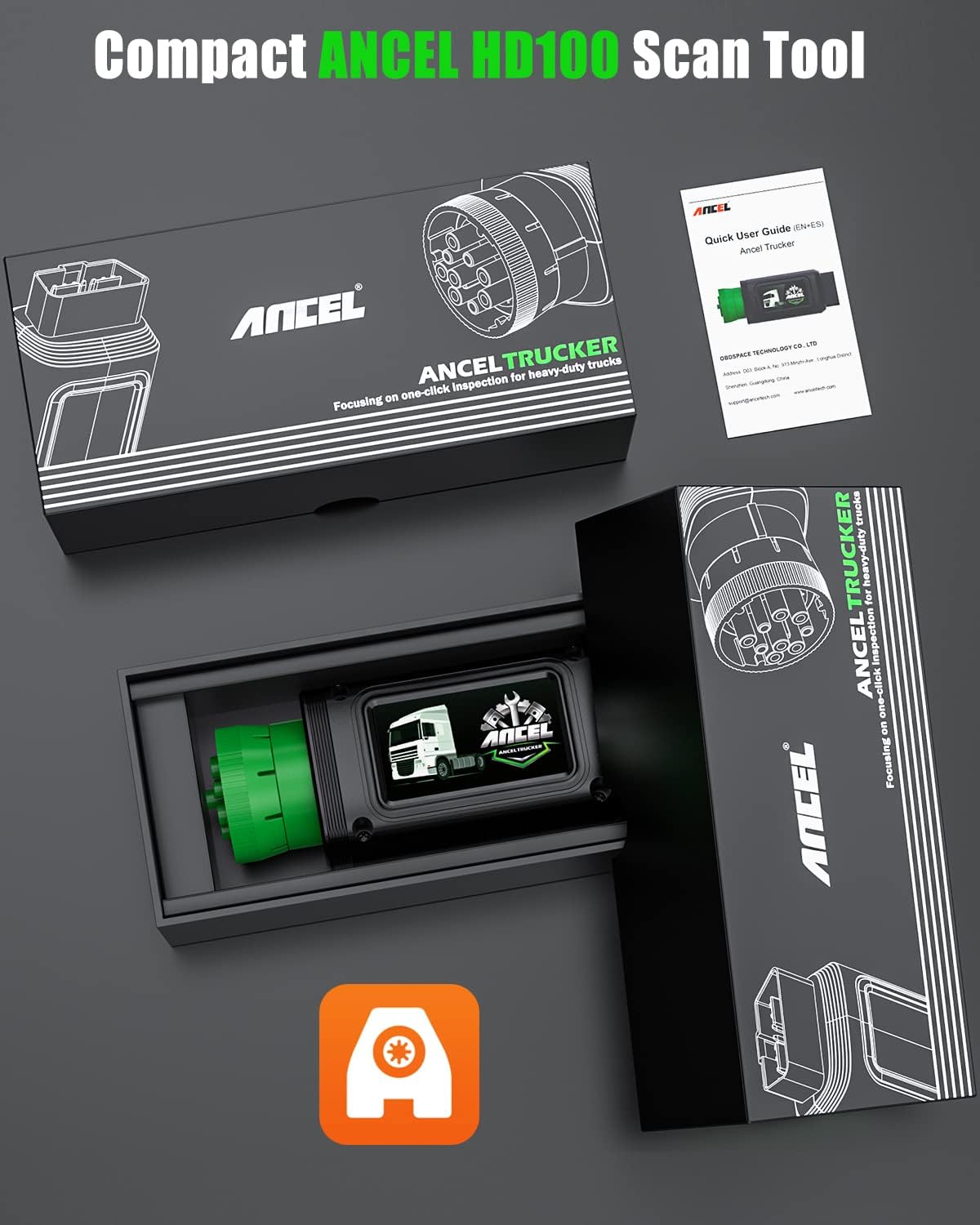
Image 2: Contents of the ANCEL HD100 package, showing the diagnostic tool and the quick user guide.
3. Setup Instructions
- Download the ANCEL TRUCKER App: Search for "Ancel Trucker" in the Apple App Store (for iOS 12.0 and above) or Google Play Store (for Android 5.0 and above) and download the application to your smartphone. Ensure your phone has at least 3GB of free space for optimal performance.
Note: The app is compatible with Apple and Android smartphones only, not tablets.
- Register and Log In: Open the Ancel Trucker app and follow the on-screen prompts to register a new account or log in with an existing one.
- Connect the Device to Vehicle: Locate the diagnostic port in your vehicle. The HD100 supports both OBDII 16-pin and Green 9-pin interfaces. Plug the appropriate connector of the HD100 into the vehicle's diagnostic port. The Green 9-pin port features a locking mechanism for stable communication.

Image 3: The ANCEL HD100 device illustrating its dual 9-pin and 16-pin connectivity options.
- Bluetooth Connection: Turn on your smartphone's Bluetooth and enable location services for accurate pairing. In the Ancel Trucker app, navigate to the device connection section and select the HD100 device (e.g., "OBD_ANCELXXXXXX") to establish a Bluetooth connection.
Note: For optimal Bluetooth pairing accuracy, the phone's location feature should be enabled.
- Firmware Upgrade (if prompted): If the app indicates that a firmware upgrade is needed, confirm the upgrade. This process may take approximately 5 minutes. Ensure a stable connection during the upgrade.
Video 1: Ancel HD100 New Technology Bluetooth Heavy Truck Scanner. This video demonstrates the unboxing, physical features, and initial setup process of the ANCEL HD100, including connecting to the app and performing a firmware update.
4. Operating Instructions
4.1. Full System Diagnostics for Heavy Duty Trucks
The HD100 allows you to read and clear fault codes from all electronic modules in commercial trucks, including the engine, ABS, transmission, and chassis. It also provides support for transmissions and ABS from manufacturers such as Allison, Bendix, Eaton, Wabco, and ZF.
- Read ECU Information: Access detailed information about the Electronic Control Unit.
- Read Fault Codes: Retrieve current and historical diagnostic trouble codes (DTCs).
- Erase Fault Codes: Clear stored fault codes from the vehicle's systems.
- Live Data: View real-time data streams from various sensors and components.

Image 4: The ANCEL Trucker app displaying options for full system diagnostics, including reading and clearing fault codes.
Video 2: ANCEL HD100 Read and Clear Diesel Codes. This video demonstrates how to navigate the app to read and clear diagnostic trouble codes for diesel engines.
4.2. DPF Regeneration and Reset
The HD100 supports OEM-level regeneration and reset functions specifically for Cummins and Caterpillar diesel engines. This feature helps maintain engine performance, improve fuel efficiency, and reduce downtime by facilitating passive regeneration.

Image 5: The ANCEL Trucker app interface showing DPF reset and regeneration features for Cummins and Caterpillar engines, including various parameters and status indicators.
Video 3: ANCEL HD100 for Cummins Professional DPF Tool. This short video highlights the DPF regeneration capabilities for Cummins engines using the ANCEL HD100.
4.3. Enhanced Full OBD2 Functions
For vehicles compliant with OBD2 protocols (most vehicles after 1996), the HD100 provides all 10 OBD2 modes. This includes:
- Reading and clearing generic diagnostic trouble codes (DTCs).
- Viewing freeze frame data.
- I/M Readiness status.
- O2 Sensor Test.
- On-Board Monitor Test.
- Component Test.
- Vehicle Information (VIN, CIN, CVN).
- DTC Lookup: Automatically displays the meaning of a code after reading.
The device also features a real-time battery voltage monitor, visible once you enter the diagnostic menu, allowing for quick checks of the battery's current state.

Image 6: The ANCEL Trucker app displaying advanced functions such as one-click feedback, lifetime upgrades, unlimited vehicle scanning, and real-time battery voltage display.
5. Compatibility
The ANCEL HD100 is designed for broad compatibility with various heavy-duty trucks and OBD2 compliant cars.
5.1. Heavy Duty Truck Compatibility
Supports standard diesel code reader protocols SAE J1939, SAE J1708, and ISO 27145.
- Supported Engines: Cummins, Caterpillar, Detroit, Paccar.
- Supported Transmissions & ABS: Allison, Bendix, Eaton, Wabco, ZF.
- Compatible Truck Brands: Freightliner, International, Kenworth, Mack, Peterbilt, Sterling, Western Star, Volvo.
- Off-Road Equipment: BobCat, Case, Caterpillar, John Deere, Komatsu, Terex, Volvo.

Image 7: A detailed compatibility chart for diesel OBD, listing supported heavy-duty trucks, engines, transmission and ABS systems, and off-road equipment.
5.2. OBD2 Car Compatibility
The HD100 OBD function works on most vehicles manufactured after 1996 that are compliant with OBD2 protocols, covering over 56 brands and 10,000+ vehicle models.
6. Specifications
| Feature | Detail |
|---|---|
| Brand | ANCEL |
| Model | HD100 |
| Item Weight | 8.4 ounces |
| Package Dimensions | 6.77 x 2.91 x 2.13 inches |
| Power Source | Vehicle Powered |
| Operating System | iOS, Android |
| Screen Size | 2 Inches (on device, app uses phone screen) |
| Connectivity | Bluetooth |
| Supported Protocols | SAE J1939, SAE J1708, ISO 27145, OBD2 |
| UPC | 704771873183 |
| Serial Number Example | HD10241202006386 (Refer to your device for actual S/N) |

Image 8: The rear view of the ANCEL HD100 device, displaying its serial number and regulatory markings.
7. Maintenance and Care
- Keep the device clean and free from dust and moisture.
- Store the device in a cool, dry place when not in use.
- Avoid dropping the device or subjecting it to strong impacts.
- Do not attempt to disassemble or repair the device yourself. Refer to authorized service personnel.
- Regularly check for app updates to ensure optimal performance and access to the latest features and vehicle compatibility.
8. Troubleshooting
If you encounter issues with your ANCEL HD100, consider the following common troubleshooting steps:
- Device Not Connecting via Bluetooth:
- Ensure Bluetooth is enabled on your smartphone.
- Verify that location services are turned on for the Ancel Trucker app.
- Confirm the HD100 is properly plugged into the vehicle's diagnostic port and receiving power.
- Restart the Ancel Trucker app and attempt to reconnect.
- Check your phone's Bluetooth settings to ensure the device is visible and not paired with another device.
- App Not Functioning Correctly:
- Ensure your smartphone's operating system (iOS 12.0+ or Android 5.0+) meets the minimum requirements.
- Check for available updates for the Ancel Trucker app in your app store.
- Clear the app's cache or reinstall the app if issues persist.
- Ensure sufficient storage space (at least 3GB recommended) on your phone.
- Unable to Read/Clear Codes or Perform DPF Regen:
- Verify the vehicle's ignition is on and the engine is stopped (for clearing codes).
- Confirm the vehicle's make, model, and year are supported for the specific function you are attempting.
- Ensure the device firmware is up to date.
- For DPF regeneration, ensure all preconditions (e.g., engine at idle, vehicle stopped) are met as specified by the app.
For further assistance, refer to the "Help description" section within the Ancel Trucker app or contact ANCEL customer support.
9. Warranty and Support
For warranty information, technical support, or service inquiries, please contact ANCEL customer support through their official website or the contact details provided in the Ancel Trucker app. Keep your purchase receipt and device serial number (found on the back of the device) handy when contacting support.
You can also visit the official ANCEL store for more information: ANCEL Store


