
1. Introduction
Thank you for choosing the HelloBaby HB6233 Baby Monitor. This device is designed to provide parents with peace of mind by offering a secure, private, and reliable way to monitor their baby. Featuring a 3.2-inch IPS color display, 2.4GHz digital wireless technology, and a range of useful functions, this monitor ensures you can always keep an eye and ear on your little one without relying on Wi-Fi.

The HelloBaby HB6233 Baby Monitor system, showing the camera unit and the portable parent unit with a 3.2-inch IPS display.
2. Product Features
- 3.2-inch IPS Color Display: Provides a clear and wide view of your baby.
- 2.4GHz Digital Wireless Technology: Ensures a secure, interference-free connection without Wi-Fi, offering enhanced privacy.
- HD Night Vision: Automatic infrared night vision allows for clear monitoring in low-light conditions or complete darkness.
- Two-Way Talk: Communicate with your baby remotely to soothe them with your voice.
- Temperature Sensor: Accurately monitors the room temperature around your baby, displayed on the parent unit.
- VOX Mode (Voice Operated Exchange): The display turns off to save power and activates automatically when sound is detected, alerting you to your baby's cries.
- Pan, Tilt, and Digital Zoom: Remotely adjust the camera's viewing angle (360-degree horizontal, 120-degree vertical) and zoom in for a closer look.
- Long Range: Up to 1000ft (300m) open space transmission range, allowing mobility around your home.
- Lullabies: Built-in lullabies to help soothe your baby to sleep.
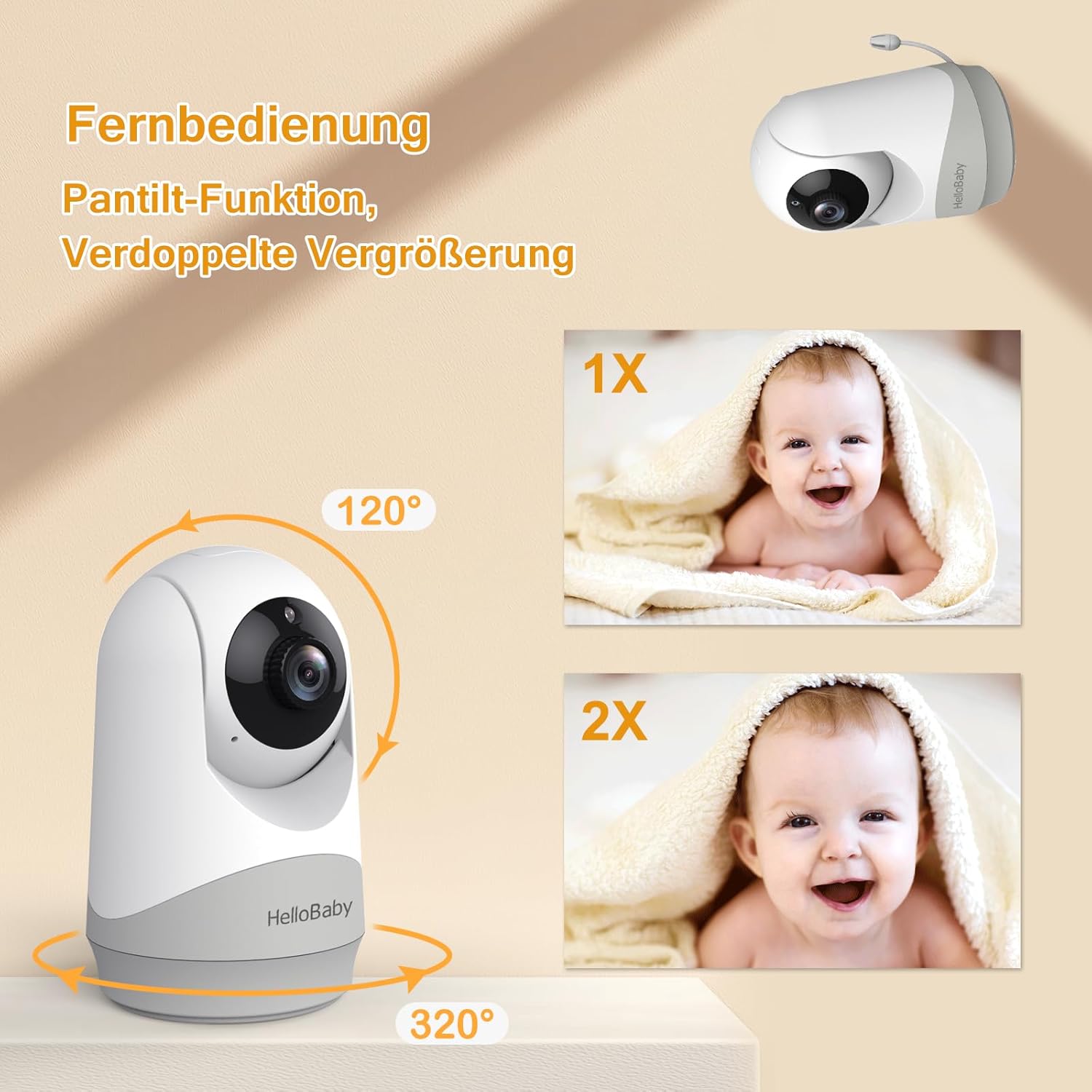
The camera unit offers remote pan (360 degrees) and tilt (120 degrees) functionality, along with digital zoom for detailed viewing.

Utilize the two-way talk feature to communicate with your baby through the monitor's parent unit.

Automatic night vision provides clear grayscale images of your baby, even in complete darkness, ensuring continuous monitoring.
3. What's in the Box
- Camera Unit (x1)
- Parent Unit (x1)
- Power Adapter (x2)
- User Manual (x1)
- Wall-Mounting Kit (x1)
4. Setup
The HelloBaby HB6233 Baby Monitor is designed for simple plug-and-play setup. No complex Wi-Fi configuration is required.
- Charge the Parent Unit: Before first use, fully charge the parent unit using one of the provided power adapters. The parent unit is powered by a rechargeable battery for portability.
- Power the Camera Unit: Connect the camera unit to a power outlet using the second power adapter.
- Placement: Place the camera unit in your baby's room, ensuring a clear view of the crib or play area. Use the included wall-mounting kit if desired. Position the camera at a safe distance from the baby and out of reach of children.
- Power On: Turn on both the parent unit and the camera unit. They will automatically pair.
For optimal performance, ensure both units are within the effective transmission range (up to 1000ft in open space) and away from large metal objects or other electronic devices that may cause interference.
5. Operating Instructions
The parent unit provides intuitive controls for managing your monitoring experience.
- Remote Pan/Tilt/Zoom: Use the directional arrows on the parent unit to remotely adjust the camera's horizontal (pan) and vertical (tilt) viewing angles. The zoom function allows you to get a closer look at your baby.
- Two-Way Talk: Press and hold the microphone button on the parent unit to speak to your baby through the camera's speaker. Release the button to hear your baby.
- VOX Mode: Activate VOX mode through the menu settings to conserve battery life. The screen will turn off, but the monitor will activate and alert you when sound is detected in the baby's room.
- Temperature Monitoring: The current room temperature is displayed on the parent unit screen, allowing you to ensure a comfortable environment for your baby.
- Lullabies: Access the menu to select and play built-in lullabies to help soothe your baby.
- Menu Options: The menu button provides access to various settings, including volume control, screen brightness, alarm settings, and more.
6. Maintenance
To ensure the longevity and optimal performance of your HelloBaby monitor, follow these maintenance guidelines:
- Cleaning: Use a soft, dry cloth to clean the surfaces of both the camera and parent units. Do not use abrasive cleaners or solvents.
- Battery Care: For the parent unit's rechargeable battery, avoid extreme temperatures and prolonged periods of non-use. Charge regularly to maintain battery health.
- Storage: If storing the monitor for an extended period, ensure both units are powered off and stored in a cool, dry place.
- Avoid Water: Keep both units away from water and moisture. This product is designed for indoor use only.
7. Troubleshooting
If you encounter any issues with your HelloBaby monitor, please refer to the following common solutions:
| Problem | Possible Solution |
|---|---|
| No image/sound on parent unit | Ensure both units are powered on and connected to power. Check if they are within range. Recharge the parent unit battery if low. |
| Poor image quality/interference | Move the parent unit closer to the camera unit. Avoid placing units near other electronic devices (microwaves, Wi-Fi routers) that may cause interference. Adjust the camera's position. |
| Camera not responding to pan/tilt controls | Ensure the camera unit is powered on and properly connected. Check the connection between the parent unit and camera. Restart both units. |
| VOX mode not activating | Check the VOX sensitivity settings in the parent unit's menu. Increase sensitivity if needed. |
| Short battery life on parent unit | Ensure the parent unit is fully charged. Reduce screen brightness or use VOX mode to conserve power. Battery life can vary with usage. |
8. Specifications
| Feature | Detail |
|---|---|
| Model Number | HB6233 |
| Display Size | 3.2 inches IPS Color Display |
| Wireless Technology | 2.4GHz FHSS Digital Wireless |
| Range | Up to 1000ft (open space) |
| Night Vision | Automatic Infrared |
| Two-Way Talk | Supported |
| Temperature Sensor | Included |
| VOX Mode | Supported |
| Pan/Tilt | 360-degree Pan, 120-degree Tilt |
| Zoom | Digital Zoom |
| Power Source | Battery Powered (Parent Unit), AC Powered (Camera Unit) |
| Included Components | Camera Unit, Parent Unit, 2 Power Adapters, User Manual, Wall-Mounting Kit |
| Product Dimensions | 5.35 x 3.62 x 6.92 inches |
| Item Weight | 1.36 pounds |
| UPC | 190282012102 |
9. Warranty and Support
HelloBaby is committed to providing high-quality products and excellent customer service. While specific warranty periods may vary by region, the company strives to offer reliable support for its products.
If you experience any issues or have questions regarding your HelloBaby HB6233 Baby Monitor, please contact HelloBaby customer support. You may also reach out to the authorized representatives in your region:
- Authorized European Representative: APEX CE SPECIALISTS GMBH
Contact: Wells
Email: info@apex-ce.com
Address: Habichtsweg 1, 41468 Neuss, Germany - Authorized UK Representative: APEX CE SPECIALISTS LIMITED
Contact: Wells
Email: info@apex-ce.com
Address: 89 Princess Street, M14 4HT, UK
Please retain your proof of purchase for any warranty claims or support inquiries.


