
Axis Communications 02342-001
User Manual: AXIS P1468-LE Compact Outdoor Camera
Model: 02342-001 | Brand: Axis Communications
Introduction
The AXIS P1468-LE is a robust, outdoor-ready network camera designed for advanced surveillance scenarios. It delivers excellent image quality and incorporates deep learning-based analytics at the edge, enhancing its capabilities for intelligent monitoring. This camera also features built-in cybersecurity measures to ensure secure operation. This manual provides essential information for the setup, operation, and maintenance of your AXIS P1468-LE camera.
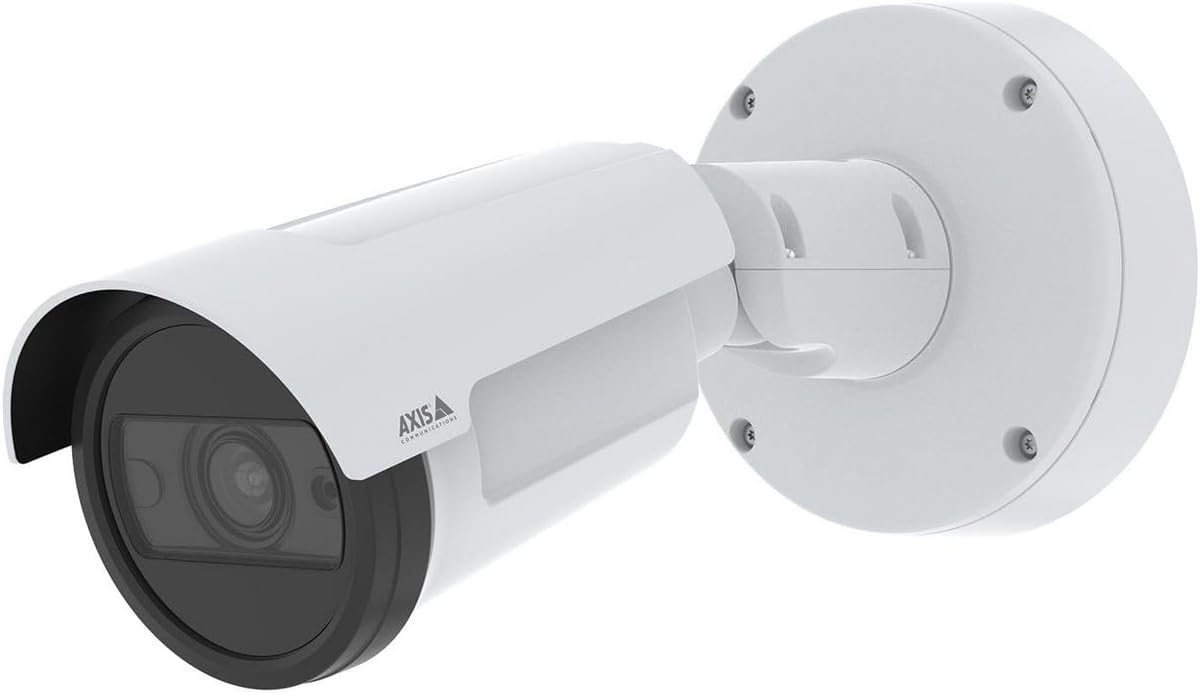
Figure 1: The AXIS P1468-LE Compact Outdoor Camera, showcasing its white cylindrical body, integrated sunshield, and wall-mount bracket. The camera features a dark lens housing and the Axis Communications logo on its side.
Setup
1. Package Contents
Before beginning installation, verify that all components are present:
- AXIS P1468-LE Network Camera
- Installation Guide
- Mounting Bracket and Hardware
- Drill Template
- Resistorx® T20 tool
2. Mounting the Camera
The AXIS P1468-LE is designed for wall or ceiling mounting. Ensure the mounting surface is strong enough to support the camera's weight and withstand environmental conditions.
- Select Location: Choose a location that provides the desired field of view and is within reach of network and power connections.
- Prepare Surface: Use the provided drill template to mark the drilling holes on the mounting surface.
- Install Bracket: Secure the mounting bracket using appropriate screws and anchors for your surface type.
- Attach Camera: Mount the camera body onto the bracket, ensuring it is securely fastened. Adjust the camera's angle for optimal viewing.
3. Network and Power Connection
Connect the camera to your network and power source. The camera supports Power over Ethernet (PoE) for simplified installation.
- Ethernet Cable: Connect a standard Ethernet cable from your network switch (preferably PoE-enabled) to the camera's Ethernet port.
- Power (Optional): If PoE is not used, connect a compatible power adapter (not included) to the camera's power input. Refer to specifications for voltage requirements.
4. Initial Configuration
After physical installation, access the camera's web interface for initial setup.
- Discover Camera: Use the AXIS IP Utility or AXIS Device Manager software to discover the camera on your network.
- Access Web Interface: Open a web browser and enter the camera's IP address.
- Set Root Password: For security, you will be prompted to set a new root password upon first access.
- Configure Settings: Follow the on-screen wizard to configure basic settings such as IP address, date/time, and video stream settings.
Operating the Camera
1. Live View and Recording
Access the camera's live view and manage recording settings through its web interface or a compatible Video Management Software (VMS).
- Live View: Navigate to the "Live View" tab to see the real-time video feed.
- Recording: Configure recording schedules, motion detection triggers, and storage locations (e.g., SD card, network storage) under the "Recordings" or "Events" section.
2. Advanced Features
The AXIS P1468-LE offers several advanced features for enhanced surveillance:
- Deep Learning Analytics: Utilize built-in analytics for object classification, motion detection, and other intelligent event triggers. Configure these under the "Applications" or "Analytics" menu.
- Cybersecurity Features: The camera includes features like signed firmware and secure boot to prevent unauthorized access and ensure system integrity. Regularly check for firmware updates to maintain security.
- IR Illumination: The integrated IR LEDs provide clear video in low-light or complete darkness. This feature is typically automatic but can be adjusted in video settings.
Maintenance
1. Cleaning the Camera
Regular cleaning ensures optimal image quality and extends the camera's lifespan.
- Lens: Gently wipe the lens with a soft, lint-free cloth moistened with a mild cleaning solution or lens cleaner. Avoid abrasive materials.
- Housing: Clean the camera housing with a damp cloth. Do not use strong detergents or solvents.
2. Firmware Updates
Keep the camera's firmware updated to benefit from the latest features, performance improvements, and security patches.
- Check for Updates: Visit the Axis Communications website or use AXIS Device Manager to check for available firmware updates for your model.
- Installation: Follow the instructions provided by Axis for safe firmware installation. Ensure a stable power supply during the update process.
Troubleshooting
| Problem | Possible Cause | Solution |
|---|---|---|
| No video feed | Power issue, network cable disconnected, incorrect IP address. | Check power supply/PoE, ensure Ethernet cable is securely connected, verify camera's IP address and network settings. |
| Poor image quality | Dirty lens, improper focus, low light conditions, incorrect video settings. | Clean the lens, adjust focus via web interface, ensure IR illumination is active in low light, check resolution and compression settings. |
| Cannot access web interface | Incorrect IP address, network connectivity issue, firewall blocking access. | Verify IP address, check network connection, temporarily disable firewall to test, reset camera to factory defaults if necessary. |
Specifications
| Feature | Detail |
|---|---|
| Brand | Axis Communications |
| Model Name | AXIS P1468-LE - Netzwerk-Überwachungskam |
| Item Model Number | 02342-001 |
| ASIN | B0BNZ1MW19 |
| Indoor/Outdoor Usage | Outdoor |
| Connectivity Technology | Wired |
| Connectivity Protocol | HomePlug |
| Controller Type | Iris |
| Mounting Type | Wall Mount |
| Color | White |
| Number of Items | 1 |
| Included Components | Camera/Accessories |
| Number of Channels | 4 |
| Wireless Communication Technology | Wi-Fi |
| Material | Metal |
| Wattage | 16 watts |
| Item Dimensions (LxWxH) | 19.69 x 19.69 x 11.02 inches |
| Batteries Required? | No |
| Item Weight | 1.5 Kilograms (3.3 pounds) |
| Zoom Type | Optical Zoom |
| Alert Type | Motion Only |
| Room Type | Office |
| Light Source Type | Infrared |
| Video Capture Format | MPEG-4 |
| Unit Count | 1.0 Count |
| Photo Sensor Technology | CMOS |
| International Protection Rating | IP66, IP67 |
| Control Method | App |
| Operating System | iOS |
| Manufacturer | AXIS - CAMERA |
| Date First Available | July 31, 2022 |
| Recommended Uses For Product | Surveillance |
| Special Feature | Mac, Netcam, PC, Wireless connectivit |
Warranty and Support
1. Product Warranty
Axis Communications products typically come with a limited hardware warranty. For specific warranty terms and conditions applicable to your AXIS P1468-LE camera, please refer to the warranty documentation included with your purchase or visit the official Axis Communications website.
2. Technical Support
For technical assistance, troubleshooting, or further inquiries regarding your AXIS P1468-LE camera, please contact Axis Communications support:
- Online Support: Visit the Axis Communications Support Portal for FAQs, documentation, and software downloads.
- Contact Information: Find regional contact details for phone or email support on the official Axis Communications website.
When contacting support, please have your camera's model number (02342-001) and serial number ready.
Related documents02342-001


Ask a question about this manual
Ask about setup, troubleshooting, compatibility, parts, safety, or missing instructions. Manuals+ will review the question and use this page’s manual context to help answer it.