
OnePlus CPH2451
OnePlus 11 5G Smartphone User Manual
Model: CPH2451
Introduction
The OnePlus 11 5G is a high-performance Android smartphone designed for an enhanced user experience. It features an upgraded Snapdragon 8 Gen 2 chipset, a powerful triple camera system co-developed with Hasselblad, a 120Hz Fluid Display, and 80W SUPERVOOC fast charging. This manual provides essential information for setting up, operating, maintaining, and troubleshooting your device.
Setup Guide
What's in the Box
- OnePlus SUPERVOOC Power Adapter
- Type-C Cable
- Quick Start Guide
- Welcome Letter
- Safety Information and Warranty Card
- SIM Tray Ejector
- USB Dongle (Type-A to Type-C)
Initial Setup
Before first use, ensure your device is fully charged. Insert your SIM card(s) using the provided SIM tray ejector. The OnePlus 11 5G supports two physical SIMs or one e-SIM and one physical SIM simultaneously. Power on the device by pressing and holding the power button.
For easy data transfer from an old phone, utilize the Google backup method. Back up your old phone to Google Drive, then upload from Google Drive to your new OnePlus 11 5G. This will automatically set up most of your applications, requiring only internet and email credentials to be re-entered.
Charging Your Device
The OnePlus 11 5G supports 80W SUPERVOOC fast charging. Using the provided power adapter and Type-C cable, your device can charge from 1% to 100% in approximately 27 minutes. For optimal battery health, avoid extreme temperatures during charging.
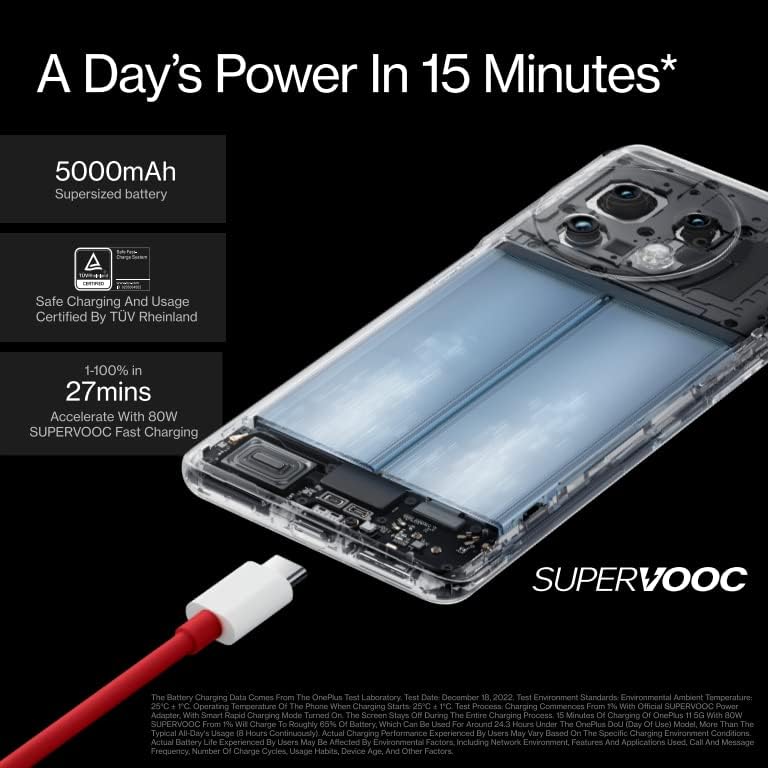
Image: The OnePlus 11 5G connected to its SUPERVOOC fast charger, illustrating the rapid charging capability.
Operating Your Device
Display and User Interface
The device features a stunning 6.7-inch 120Hz Fluid AMOLED display with LTPO 3.0 technology for variable refresh rates, ensuring smooth scrolling and an immersive cinematic viewing experience. It supports HDR10+, Dolby Vision, and Dolby Atmos for high-fidelity audio and visual content.
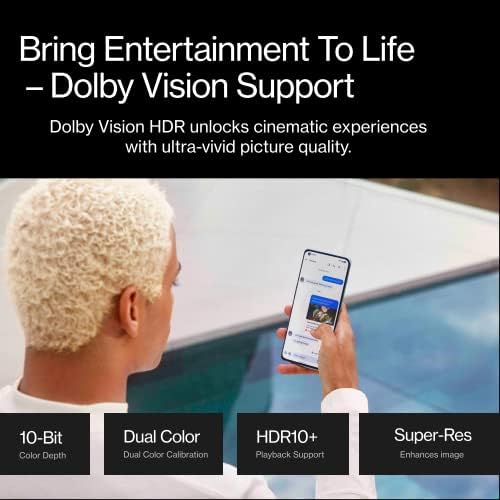
Image: A visual representation of the OnePlus 11 5G's display capabilities, highlighting Dolby Vision support for vivid picture quality.
Camera System
The OnePlus 11 5G is equipped with a powerful triple camera system co-developed with Hasselblad. This includes a 50MP main camera with OIS, a 48MP ultrawide camera (IMX581), and a 32MP telephoto camera (IMX709). This system is capable of producing professional-grade portraits and industry-leading color reproduction.
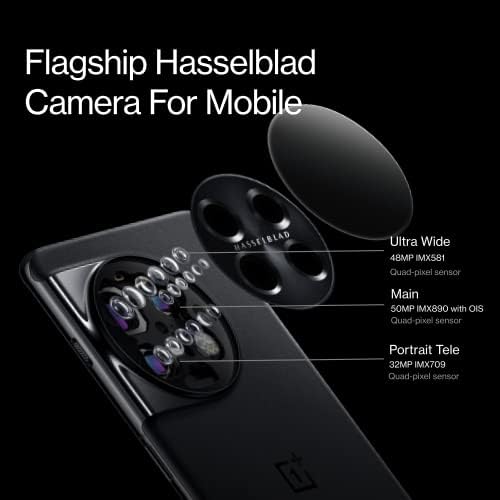
Image: An exploded diagram illustrating the components of the Flagship Hasselblad Camera for Mobile, detailing the Ultra Wide, Main, and Portrait Telephoto lenses and their respective sensor specifications.
Performance and Connectivity
Powered by the Qualcomm Snapdragon 8 Gen 2 chipset, the OnePlus 11 5G delivers improved gaming performance, energy efficiency, and image processing. It features up to 16GB of LPDDR5X RAM and UFS 4.0 storage for smooth multitasking and fast data access.
The device supports 5G and 4G LTE connectivity across various carriers, along with GPS, GLONASS, BDS, GALILEO, and QZSS for precise location services. Wireless features include Wi-Fi and Bluetooth.
Customizing Power Button Behavior
By default, pressing and holding the power button may activate the Google Voice Assistant. To change this to display the power off menu:
- Go to Settings.
- Navigate to Additional Settings.
- Select Power Button Menu.
- Choose the option to display the Power Menu instead of the Voice Assistant when pressing and holding the power button.
Lock Screen Clock Customization
If you prefer a different lock screen clock style:
- Go to Settings.
- Select Wallpapers & Style.
- Choose the Always-on Display menu option.
- From here, you can change the clock style. More options may be available via Google Play Store.
Android Auto Integration
The OnePlus 11 5G is compatible with Android Auto. To set it up in your car:
- Ensure your car is on and in park.
- Connect your phone to the car's USB port using a compatible cable.
- On your car's infotainment system, navigate to the Bluetooth pairing or Android Auto menu.
- On your phone, swipe down to access Bluetooth settings and select your car from available devices to pair.
- Confirm pairing on both your phone and car system.
Once connected, you can use Google Maps for navigation, make calls, and play audio through your car's system.
Maintenance
Battery Care
The 5000mAh battery features Battery Health Engine technology to improve its health and longevity. To maximize battery lifespan, avoid fully discharging the battery frequently and try to keep it charged between 20% and 80% when possible. The device also has settings to optimize charging speed and battery usage, including features that manage app permissions and usage for apps not recently used.
Software Updates
Regularly check for and install software updates to ensure your device has the latest features, security patches, and performance improvements. You can typically find update options in the device's settings under "About phone" or "System updates."
Cleaning Your Device
To clean your OnePlus 11 5G, use a soft, lint-free cloth. For stubborn smudges, slightly dampen the cloth with water or a screen cleaner designed for electronics. Avoid using harsh chemicals, abrasive materials, or excessive moisture, as these can damage the device.
Troubleshooting
Screen Protector Issues
If you experience issues with touch sensitivity, missed calls (screen not awakening), or typing errors after applying a third-party screen protector, it may be due to the protector interfering with the display's responsiveness. The OnePlus 11 5G often comes with a pre-installed screen protector. If you apply another one on top, it can cause these issues. Consider removing the third-party protector to see if performance improves.
General Troubleshooting Tips
- Restart Device: A simple restart can resolve many minor software glitches.
- Check Connectivity: For network issues, ensure your SIM card is properly inserted and that mobile data or Wi-Fi is enabled.
- Clear App Cache: If an app is misbehaving, try clearing its cache in the app settings.
- Factory Reset: As a last resort for persistent issues, you may consider a factory reset. Warning: This will erase all data on your device. Back up important information before proceeding.
Specifications
| Feature | Detail |
|---|---|
| Model Name | OnePlus 11 5G |
| Model Number | CPH2451 |
| Operating System | Android 13.0 |
| Processor | Qualcomm Snapdragon 8 Gen 2 |
| RAM | 16 GB |
| Storage Capacity | 256 GB (UFS 4.0) |
| Display Size | 6.7 Inches |
| Refresh Rate | 120 Hz (LTPO 3.0) |
| Battery Capacity | 5000 mAh |
| Charging Speed | 80W SUPERVOOC (1-100% in ~27 minutes) |
| Main Camera | 50MP (Hasselblad, OIS) |
| Ultrawide Camera | 48MP (IMX581) |
| Telephoto Camera | 32MP (IMX709) |
| Dimensions | 6.42 x 2.92 x 0.33 inches |
| Item Weight | 7.2 ounces (205 Grams) |
| Color | Titan Black |
| Connectivity | 5G, 4G LTE, Wi-Fi, Bluetooth, GPS |
| Special Features | HDR10+, Dolby Atmos, Dolby Vision, Cryo-Velocity Cooling System, 1hz Always-on-display |
Warranty and Support
Your OnePlus 11 5G comes with a warranty. Please refer to the included Safety Information and Warranty Card for detailed terms and conditions. For technical support, troubleshooting assistance, or service inquiries, please visit the official OnePlus support website or contact their customer service. Keep your purchase receipt and device's serial number handy for warranty claims.
For additional resources and community support, you may visit the OnePlus Store on Amazon.
Related documentsCPH2451


Ask a question about this manual
Ask about setup, troubleshooting, compatibility, parts, safety, or missing instructions. Manuals+ will review the question and use this page’s manual context to help answer it.