
Product Overview
The VIVO 26 inch Desk Converter, K Series (Model DESK-V026KF), is a height-adjustable sit-to-stand riser designed to transform your existing desk into an ergonomic workstation. This converter allows you to easily switch between sitting and standing positions throughout your workday, promoting better posture and increased productivity.
- Instant Active Standing: Provides on-demand standing to relieve muscle tension, reduce stress, and increase productivity.
- Space-Efficient Design: The top surface measures 25.6” x 15.7”, fitting easily into most workspaces. A synchronized keyboard tray (25.4” x 11.8”) ensures a comfortable setup.
- Durable Construction: Features a strong steel frame that resists scratches and supports up to 33 lbs on the desktop and 4.4 lbs on the keyboard tray.
- Smooth Height Adjustment: Utilizes a simple touch height locking mechanism with a lift assist for smooth transitions between 4.5” and 16.9” (vertical lift design).
- Minimal Assembly: The unit arrives nearly pre-assembled, requiring only the attachment of the keyboard tray.
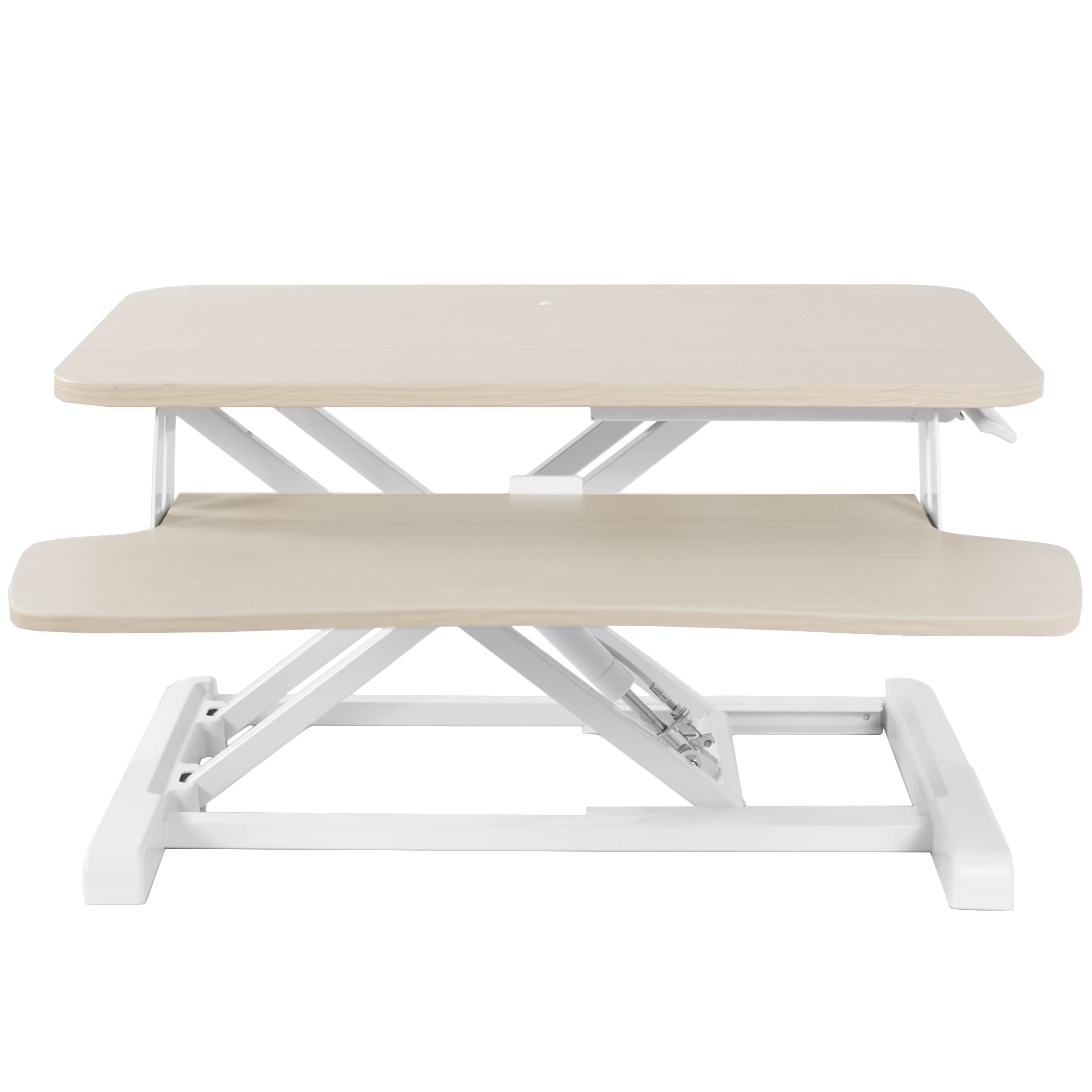
Figure 1: VIVO 26 inch Desk Converter (DESK-V026KF) in Light Wood.
Setup and Assembly
The VIVO 26 inch Desk Converter is designed for minimal assembly, allowing you to quickly integrate it into your workspace. Follow these steps to set up your new desk converter:
- Unpack the Unit: Carefully remove all components from the packaging. Ensure all parts listed in the included assembly instructions are present.
- Place on Existing Desk: Position the main riser unit on your existing desk in the desired location.
- Attach Keyboard Tray: Secure the keyboard tray to the main unit using the provided mounting hardware and hex tool. This typically involves aligning the tray with the pre-drilled holes and fastening with screws.
- Organize Cables: Route any monitor, keyboard, or mouse cables to prevent tangling during height adjustments.

Figure 2: The VIVO Desk Converter seamlessly integrates into an existing office setup.

Figure 3: The patented X-frame design provides stable vertical lift.
Operating Instructions
The VIVO Desk Converter features a pneumatic lift assist mechanism for smooth and effortless height adjustments. Always ensure the desktop is clear of obstructions before adjusting the height.
- To Raise the Desk: Locate the height adjustment lever, typically on the side of the desktop. Squeeze the lever and gently lift the desktop upwards. The pneumatic assist will help elevate the unit. Release the lever at your desired standing height.
- To Lower the Desk: Squeeze the height adjustment lever and gently push the desktop downwards. Guide the unit to your preferred sitting height and release the lever to lock it in place.
The adjustment range is from 4.5 inches (lowest sitting position) to 16.9 inches (highest standing position).

Figure 4: A user comfortably working at the VIVO Desk Converter in the standing position.

Figure 5: The converter easily lowers to a comfortable sitting position.
Maintenance
To ensure the longevity and optimal performance of your VIVO Desk Converter, follow these simple maintenance guidelines:
- Regular Cleaning: Wipe down the desktop and frame with a soft, damp cloth. Avoid harsh chemicals that may damage the finish.
- Check Connections: Periodically inspect all screws and connections to ensure they are tight. Re-tighten if necessary.
- Avoid Overloading: Do not exceed the maximum weight capacity of 33 lbs for the desktop and 4.4 lbs for the keyboard tray.
- Smooth Operation: If the lift mechanism feels stiff, ensure no debris is obstructing the moving parts. Do not apply lubricants unless specifically recommended by VIVO support.
Product Specifications
| Feature | Detail |
|---|---|
| Brand | VIVO |
| Model Number | DESK-V026KF |
| Color | Light Wood Top, White Frame |
| Material Type | Steel, Particle Board (Laminated) |
| Desktop Dimensions (W x D) | 25.6" x 15.7" |
| Keyboard Tray Dimensions (W x D) | 25.4" x 11.8" (11" in center) |
| Height Adjustment Range | 4.5" to 16.9" |
| Desktop Weight Capacity | 33 lbs |
| Keyboard Tray Weight Capacity | 4.4 lbs |
| Assembly Required | Yes (Minimal) |
| Special Feature | Adjustable Height, Keyboard Tray Included |
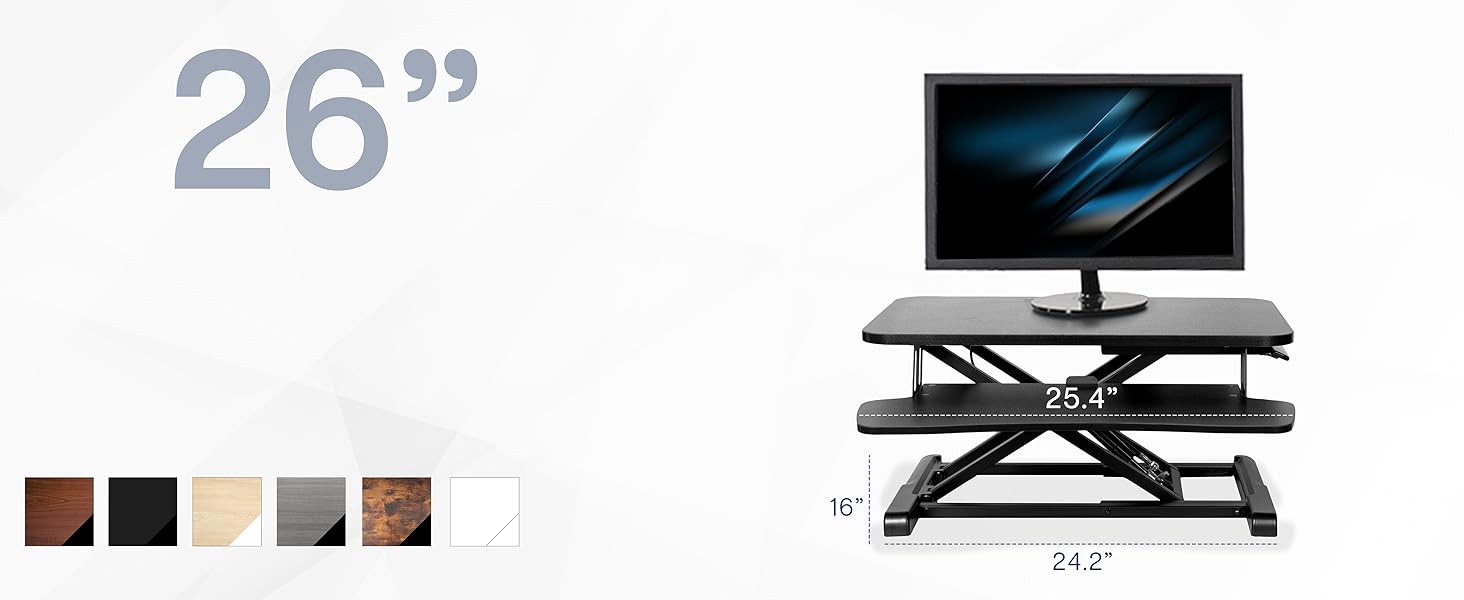
Figure 6: Detailed dimensions of the 26 inch VIVO Desk Converter.
Safety Information
Always prioritize safety when using your VIVO Desk Converter. Adhere to the following guidelines:
- Always follow the assembly instructions provided.
- Ensure the desk riser is securely placed on your existing desk and does not wobble or feel unstable.
- Do not exceed the weight limit of 33 lbs on the desktop and 4.4 lbs on the keyboard tray.
- Be cautious when adjusting the height, especially when the riser is at its maximum height of 16.9 inches.
- Keep hands and fingers clear of moving parts during height adjustments to prevent pinching.
Warranty and Support
The VIVO 26 inch Desk Converter comes with a Limited Warranty. For specific details regarding your warranty coverage, please refer to the documentation included with your product or visit the official VIVO website.
VIVO is a US-based company dedicated to providing high-quality ergonomic office solutions. Their customer and product support teams are readily available to assist with any questions or issues you may encounter.
Video 1: Learn more about the VIVO brand and their commitment to ergonomic solutions.