
WISCENT CAT6-1-100ft
WISCENT Cat 6 Ethernet Cable User Manual
Model: CAT6-1-100ft (16 ft White Variant)
Introduction
This manual provides essential information for the proper setup, operation, and maintenance of your WISCENT Cat 6 Ethernet Cable. Designed for reliable high-speed data transmission, this flat cable is ideal for wired home and office networks, connecting devices such as modems, routers, computers, and gaming consoles.
Package Contents
- 1 x WISCENT Cat 6 Slim Patch Cable (16 Feet, White)
- 1 x Package of Cable Clips
Setup Guide
The WISCENT Cat 6 Ethernet Cable is designed for simple plug-and-play connectivity. Follow these steps to establish a network connection:
- Identify the RJ45 ports on your network devices (e.g., router, modem, computer, game console).
- Gently insert one end of the Cat 6 Ethernet cable into an available RJ45 port on your first device until it clicks into place.
- Insert the other end of the cable into an available RJ45 port on your second device, ensuring a secure connection.
- Verify that the connection indicator lights on your devices (if present) illuminate, indicating a successful link.
- Utilize the included cable clips to neatly secure the flat cable along walls or under furniture, preventing tripping hazards and maintaining a clean installation.
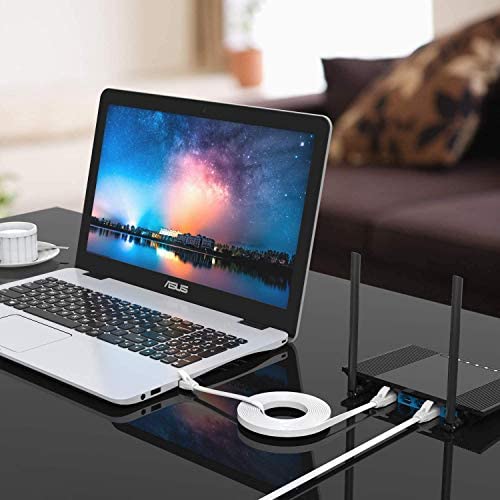
Image: A laptop connected to a Wi-Fi router using the flat white Cat 6 Ethernet cable, demonstrating a typical setup.
Operating Instructions
Once connected, the WISCENT Cat 6 Ethernet Cable facilitates high-speed data transfer between your networked devices. This cable supports speeds up to 250 MHz and is compliant with Power over Ethernet (PoE) and Voice over IP (VoIP) standards, making it suitable for a wide range of applications.
The flat design of the cable allows for discreet routing and installation, reducing clutter and improving aesthetics in your home or office environment. Its unshielded twisted pair (UTP) construction with bare copper wire and gold-plated RJ45 connectors ensures minimal noise and interference for a stable and reliable connection.

Image: Illustration of various devices compatible with the Cat 6 Ethernet cable, such as desktops, laptops, routers, monitoring systems, TV boxes, switch boxes, and modems.
Maintenance
The WISCENT Cat 6 Ethernet Cable requires minimal maintenance. To ensure optimal performance and longevity:
- Avoid Sharp Bends: While the flat design is flexible, avoid bending the cable at sharp angles, which can damage the internal conductors.
- Keep Connectors Clean: Periodically inspect the RJ45 connectors for dust or debris. Use a soft, dry cloth to gently clean them if necessary.
- Protect from Physical Damage: Ensure the cable is not pinched, stepped on, or exposed to heavy objects that could crush it.
- Store Properly: If storing the cable, coil it loosely to prevent kinks and tangles. The flat design helps in tangle-free storage.
Troubleshooting
If you experience issues with your network connection, consider the following:
| Problem | Possible Cause | Solution |
|---|---|---|
| No Network Connection | Cable not fully inserted; Damaged cable; Incorrect port. | Ensure both RJ45 connectors are fully seated and click into place. Try a different port on your device. Inspect the cable for visible damage; replace if necessary. |
| Slow Network Speed | Cable interference; Device limitations; Network congestion. | Ensure the cable is not running parallel to power lines or other sources of electromagnetic interference. Check your network device settings and internet service provider speed. This cable supports up to 250 MHz, ensure your devices are compatible. |
| Intermittent Connection | Loose connection; Cable damage; Faulty device port. | Reseat the cable firmly in both ports. Test the cable with another device or try a different cable to isolate the issue. If possible, try a different port on your device. |
Specifications
Detailed technical specifications for the WISCENT Cat 6 Ethernet Cable:
- Cable Type: CAT6 4-Pair UTP (Unshielded Twisted Pair)
- Outside Diameter: 5.8 ± 0.3 mm (0.23 ± 0.01 inch)
- Connector Type: RJ45
- Conductor Material: 100% Bare Copper
- Contact Plating: 50 Micron Gold Plated
- Conductor Gauge: 30 AWG
- Cable Performance: Up to 250 MHz
- Compliance: Power over Ethernet (PoE) and Voice over IP (VoIP) Compliant
- Color: White
- Length: 16 Feet
- Special Feature: Flat, Tangle-Free Design

Image: Cross-section diagram of the Cat 6 UTP cable, highlighting its unshielded twisted pair construction, ultra-durable PVB cover, and 100% bare copper wire.
Warranty and Support
For any questions, technical assistance, or support regarding your WISCENT Cat 6 Ethernet Cable, please refer to the contact information provided with your purchase or visit the official WISCENT website. Keep your purchase receipt for warranty claims, if applicable.
For further assistance, you may visit the WISCENT Store on Amazon: WISCENT Store.
Ask a question about this manual
Ask about setup, troubleshooting, compatibility, parts, safety, or missing instructions. Manuals+ will review the question and use this page’s manual context to help answer it.