
1. Introduction
The Meliconi Gumbody Personal 5+ is a dedicated universal remote control designed to replace your original Panasonic TV remote. It comes pre-programmed for immediate use with most Panasonic digital TVs, eliminating the need for complex setup codes. Its durable anti-shock rubber body provides enhanced protection against impacts and drops. This remote also includes a convenient learning function and direct access buttons for essential Smart TV features.

Image 1.1: Meliconi Gumbody Personal 5+ Remote Control.
2. Product Features
- Pre-programmed for Panasonic TVs: Ready to use out of the box with no programming required for most Panasonic models.
- Anti-shock Gumbody: Features a protective rubber casing to absorb impacts and prevent damage from accidental drops.
- Learn Function: Capable of acquiring signals from other remote controls, allowing you to control additional devices like soundbars or home audio systems.
- Direct Smart TV Access: Dedicated buttons for popular streaming platforms (e.g., Netflix, Prime Video) for quick access.
- Comprehensive Web Support: Access to key correspondence tables, full user manuals, video guides, and FAQs on the official website.
- Specialized Telephone Assistance: Dedicated technical support available.
3. Setup
3.1. Inserting Batteries
The remote control requires two (2) AAA 1.5V alkaline batteries (not included). To insert them:
- Open the battery compartment cover on the back of the remote control.
- Insert the two AAA batteries, ensuring the correct polarity (+ and -) as indicated inside the compartment.
- Close the battery compartment cover securely.
3.2. Initial Use (Pre-programmed)
The Meliconi Gumbody Personal 5+ is pre-programmed for Panasonic TVs and should work immediately upon battery insertion. No additional programming or code entry is typically required. Point the remote at your Panasonic TV and test the basic functions (Power, Volume, Channel). If all functions operate correctly, no further setup is needed.
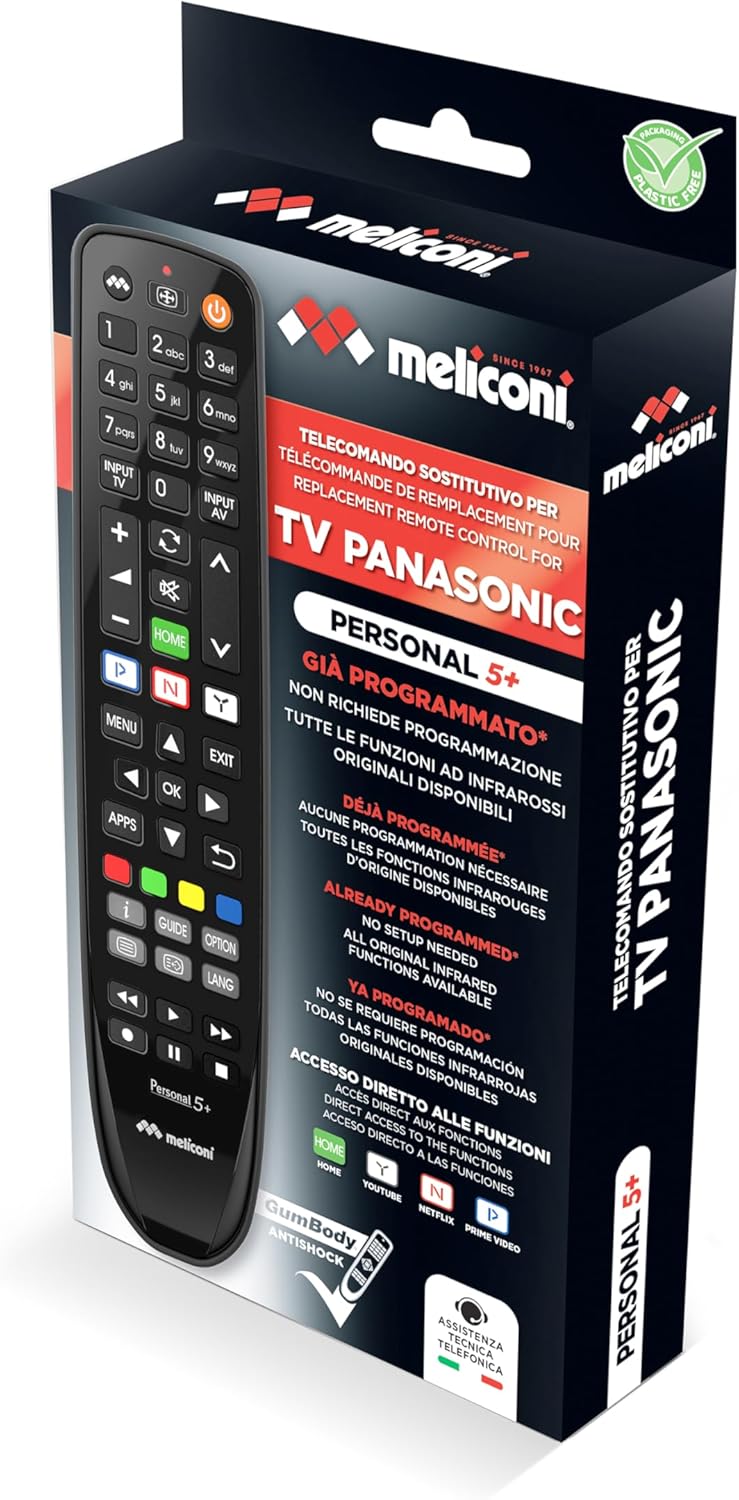
Image 3.1: Product packaging showing the remote control.
4. Operating Instructions
4.1. Basic TV Control
The remote control features standard buttons for common TV functions:
- Power Button (⏻): Turns the TV on or off.
- Volume Up/Down (VOL +/-): Adjusts the TV volume.
- Channel Up/Down (CH +/-): Changes TV channels.
- Number Buttons (0-9): For direct channel selection.
- Mute Button (🔇): Mutes or unmutes the TV sound.
- Input/Source (INPUT TV / INPUT AV): Selects the input source (HDMI, AV, etc.).
4.2. Smart TV Functions
The remote provides direct access to popular Smart TV applications:
- HOME Button: Accesses the TV's main Smart TV menu.
- Netflix Button: Launches the Netflix application directly.
- Prime Video Button: Launches the Amazon Prime Video application directly.
- YouTube Button: Launches the YouTube application directly.
4.3. Learn Function
The Learn function allows you to copy specific commands from another remote control (e.g., a soundbar remote) to your Meliconi Gumbody Personal 5+. This enables control of multiple devices with a single remote.
- Place the Meliconi remote and the original remote on a flat surface, facing each other, about 2-5 cm apart.
- Press and hold the LEARN button on the Meliconi remote until the LED indicator lights up steadily.
- Press the button on the Meliconi remote that you wish to program (e.g., a volume button). The LED will flash.
- Press and hold the corresponding button on the original remote (e.g., the original volume button). The Meliconi remote's LED will flash rapidly to confirm successful learning.
- Repeat steps 3 and 4 for any other buttons you wish to program.
- To exit Learn mode, press the LEARN button again. The LED will turn off.
For detailed instructions and troubleshooting for the Learn function, refer to the full manual available on the Meliconi website.

Image 4.1: Meliconi Gumbody Personal 5+ button layout and key features.
5. Maintenance
5.1. Battery Replacement
When the remote control's range decreases or buttons become unresponsive, it is time to replace the batteries. Follow the steps in Section 3.1 to replace the two AAA batteries. Always use new alkaline batteries for optimal performance.
5.2. Cleaning
To clean the remote control, use a soft, dry cloth. For stubborn dirt, slightly dampen the cloth with water or a mild, non-abrasive cleaner. Do not use harsh chemicals or immerse the remote in water.
5.3. Anti-shock Body
The remote control is equipped with an anti-shock rubber body (Gumbody) designed to protect it from minor drops and impacts. While this feature enhances durability, it does not guarantee immunity from all damage. Handle the remote with care.
6. Troubleshooting
- Remote not responding: Ensure batteries are correctly inserted and not depleted. Replace batteries if necessary. Check for any obstructions between the remote and the TV's infrared receiver.
- Specific buttons not working: If the remote is pre-programmed, some advanced functions might not be directly mapped. Refer to the online key correspondence tables on the Meliconi website (cme.it) to verify button assignments for your specific TV model.
- Learn function issues: Ensure the original remote has working batteries and is placed correctly facing the Meliconi remote. Repeat the learning process carefully.
- Reset to factory settings: If you encounter persistent issues, you can reset the remote to its factory pre-programmed state. Consult the full user manual on the Meliconi website for the specific reset procedure.
7. Specifications
| Brand | Meliconi |
| Model Name | Gumbody Personal 5+ |
| Compatible Devices | Panasonic Televisions |
| Connectivity Technology | Infrared |
| Number of Buttons | 20 |
| Maximum Range | 10 Meters |
| Batteries Required | 2 x AAA (Alkaline) |
| Special Feature | Universal, Anti-shock, Learn Function |
8. Warranty Information
This Meliconi product is covered by a 2-year warranty from the date of purchase. Please retain your proof of purchase for any warranty claims. The warranty covers manufacturing defects under normal use conditions. It does not cover damage caused by misuse, accidents, unauthorized modifications, or normal wear and tear.
9. Support and Resources
For further assistance, detailed manuals, key correspondence tables for specific TV models, video tutorials, and frequently asked questions, please visit the official Meliconi website:
Specialized telephone technical assistance is also available for direct support.
9.1. Product Video Overview
Video 9.1: An overview of Meliconi dedicated remote controls, highlighting features like ready-to-use functionality, anti-shock design, Smart TV access, learning function, and available support resources.


