Introduction
This manual provides detailed instructions for the installation, operation, and troubleshooting of your Geloo G4 2.2-inch Car HUD Display. This universal digital GPS speedometer offers essential driving information, including speed, satellite count, and driving direction, along with safety alerts for overspeeding and fatigue. Please read this manual thoroughly before use to ensure optimal performance and safety.
Package Contents
Please check the package for the following items:
- 1 × Geloo G4 HUD Display
- 1 × USB Cable
- 1 × Double-sided Tape
- 1 × Suction Cup Holder
- 1 × Instruction Manual
Product Features
High-Definition LCD Screen
The 2.2-inch high-definition display is clear, intuitive, compact, and exquisite. It offers 6 display interfaces that can be switched freely. The device automatically synchronizes power on/off with the engine ignition, effectively protecting the car battery.
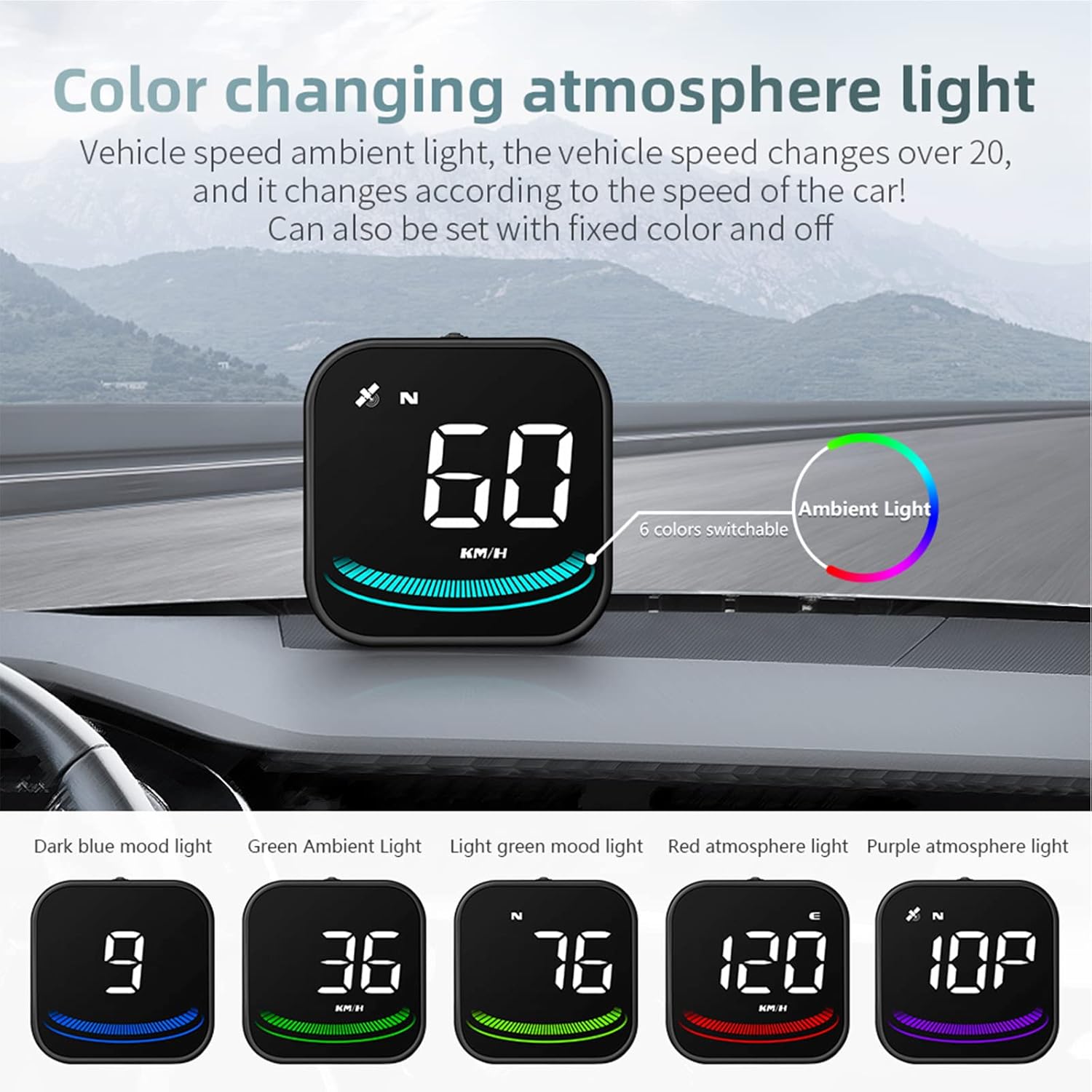
Image: Overview of the G4 display functions, including satellite icon, compass, speed, and ambient light with 6 color options.
Multi-functional Display
Practical functions include driving speed, number of satellites, and driving direction. Freely switch between KM/H and MPH units. This allows you to know key information for your journey and avoids the risk of drivers looking down at the dashboard.

Image: Different display modes available on the G4 HUD, showing various combinations of speed, unit, satellite count, compass, and ambient light.
Safety Alerts
Features an overspeed warning and fatigue driving reminder to ensure driver safety during long-distance driving. The default overspeed alert is set at 150 KM/H (or MPH), and the default fatigue driving time is 8 hours. These alerts help drivers maintain optimal condition on the road.
Automatic and Manual Brightness Adjustment
Brightness can be adjusted automatically according to the environment, providing visible backlight during the day and soft, non-dazzling illumination at night. The ambient light color changes according to vehicle speed, and can also be set to a fixed color or turned off.

Image: The G4 HUD display demonstrating adaptive sensitivity, showing clear visibility in bright daylight and soft illumination at night.

Image: The G4 HUD display featuring a color-changing ambient light that adapts to vehicle speed, with examples of various colors.
Plug and Play & Easy Installation
The device features a USB interface for plug-and-play operation. It comes with both a suction cup mount and an anti-slip mat, offering two installation methods. You can install it anywhere you desire in your car. It is compatible with all vehicles.

Image: The compact design of the G4 HUD display, illustrating how it can be placed on a car dashboard without obstructing the driver's view.

Image: Illustration of the non-destructive plug-and-play installation, showing the USB cable connected to a car's power source.
Setup
- Choose Placement: Select a suitable location on your dashboard that does not obstruct your view of the road. The compact design allows for flexible placement.
- Install Mount: Attach the suction cup holder to the windshield or use the double-sided tape to secure the device directly to the dashboard. Ensure the device is stable.
- Connect Power: Connect the provided USB cable to the Micro USB interface on the device. Plug the other end of the USB cable into your car's USB port or a cigarette lighter car charger port.
- Power On: The device will power on automatically when the engine is started.

Image: Detailed diagram of the G4 HUD display, highlighting its components and dimensions for proper setup.
Operating Instructions
- Automatic Power On/Off: The device will automatically turn on when your car's engine starts and turn off when the engine is shut down.
- Satellite Signal Acquisition: After powering on, the satellite icon will flash as the device searches for GPS satellites. Drive the car onto the road, and the display will function normally once the icon stops flashing and a stable signal is acquired.
- Switching Display Modes: Use the dial button (usually located on the side or back) to cycle through the 6 available display interfaces.
- Changing Speed Units: Refer to the device settings (accessed via the dial button) to switch between KM/H and MPH as your preferred speed unit.
- Overspeed Alarm: The device will sound an alarm if your vehicle speed exceeds the default setting (e.g., 150 KM/H). This threshold can typically be adjusted in the settings.
- Fatigue Driving Reminder: If you drive continuously for more than the default 4 hours, the device will issue a reminder. This duration can also be adjusted.
- Adjusting Brightness: The brightness adjusts automatically based on ambient light. Manual adjustment options may be available through the settings.
- Turning Off Buzzer: Press the dial button to the left for two seconds to turn off the buzzer. Repeat the action to turn it back on.
Maintenance
To ensure the longevity and optimal performance of your Geloo G4 HUD Display, follow these maintenance guidelines:
- Cleaning: Use a soft, dry cloth to clean the display screen and device body. Avoid using abrasive cleaners or solvents that could damage the surface.
- Temperature: Do not expose the device to extreme temperatures (hot or cold) for extended periods, as this can affect its electronic components.
- Moisture: Keep the device dry. Avoid contact with water or other liquids.
- Storage: If storing the device for a long time, disconnect it from power and keep it in a cool, dry place.
Troubleshooting
Here are solutions to common issues you might encounter:
1. Screen without display or power
Solution: Check if the USB cable is damaged. Replace the USB cable for testing. Avoid using a power supply with a voltage higher than 5V.
2. No vehicle speed displayed
Solution: After turning on the HUD, the satellite icon will start searching for satellites. Please drive the car onto the road. The display will work after the satellite icon stops flashing.
3. Inaccurate speed
Solution:
a. First, check if the speed unit is correct (KM/H or MPH). Please refer to the settings to switch the unit.
b. Car manufacturers usually make the dashboard speed 5-7% higher than the ECU. The international standard relies on satellite data. If your dashboard shows 100 and the device shows 105, you may need to change the default value in the device settings (e.g., to 102) to calibrate it.4. Driving direction display error
Solution: The direction can be displayed normally after the vehicle speed exceeds 5 KM/H.
5. Speed still displayed after the car stops
Solution: In locations like underground parking, tunnels, or under overpasses, there may be unstable satellite drift when there is an obstruction, causing the speed to be displayed inaccurately or temporarily after stopping.
6. Turn off the buzzer
Solution: Press the dial button to the left for two seconds to turn off the buzzer. Press it again to turn it on.
Specifications
| Feature | Specification |
|---|---|
| Brand | Geloo |
| Model | G4 |
| Manufacturer | UKAUTO |
| Item Model Number | G4 |
| Product Dimensions (L x W x H) | 10 x 7 x 8 cm |
| Item Weight | 140 g |
| Material | Plastic Glass |
| Display Size | 2.2 inches |
| Power Interface | USB |
| Speed Units | KM/H, MPH |
| Safety Alerts | Overspeed Warning, Fatigue Driving Reminder |
Warranty and Support
For warranty information and customer support, please refer to the documentation provided with your purchase or contact the retailer. Keep your proof of purchase for any warranty claims.


