
YEEHUNG FY-7112 4+64
YEEHUNG 12.3" Android 13 Car HD Touchscreen User Manual
Model: FY-7112 4+64
Product Overview
The YEEHUNG 12.3" Android 13 Car HD Touchscreen is designed to upgrade the infotainment system in compatible Mercedes Benz vehicles. This unit provides a modern interface with advanced features while retaining the functionality of your original car system. It supports wireless CarPlay and Android Auto, offers a high-resolution display, and integrates seamlessly with your vehicle's existing controls.

Figure 1: The YEEHUNG 12.3" Android 13 Car HD Touchscreen showcasing its intuitive CarPlay interface.
Compatible Models
This YEEHUNG Android Screen is compatible with the following Mercedes Benz models equipped with the NTG4.5/4.7 system:
- Mercedes 2012-2015 W204 C-Class
- Mercedes 2012-2015 W176 A-Class
- Mercedes 2012-2015 C117 CLA-Class
- Mercedes 2012-2015 W463 G-Class
- Mercedes 2012-2015 X156 GLA-Class
It is crucial to verify your car's NTG system version before installation. Refer to the visual guide below to identify your NTG version based on the UI and host panel of your original car.

Figure 2: Guide to identify your vehicle's NTG system version. Ensure your system is NTG 4.5 or 4.7 for compatibility.
Installation Guide
Careful installation is key to optimal performance. Please read these instructions thoroughly before beginning the installation process. It is recommended to watch available installation videos specific to your car model if possible.
1. Pre-Installation Check
- Verify your car's NTG system version (NTG4.5/4.7).
- Ensure all components listed in the package contents are present.
- Disconnect the car battery before starting any electrical work.
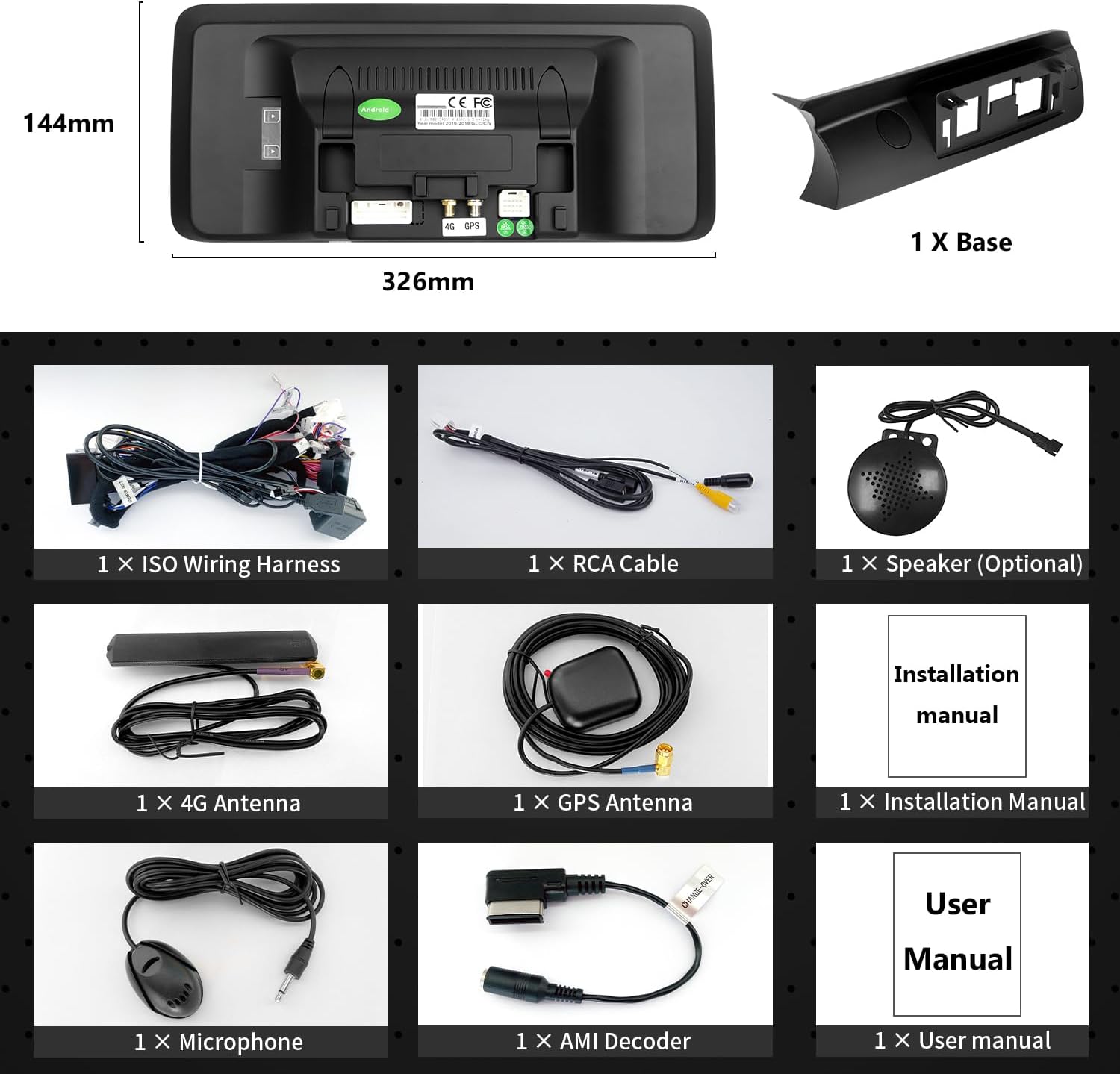
Figure 3: Included components for the YEEHUNG Android screen installation.
2. Physical Installation
The installation process involves removing the original display and head unit, connecting the new wiring harness, and mounting the new screen. For W176, C117, X117, W463, X156 models, no additional mounting bracket is needed, allowing for direct installation.

Figure 4: Visual comparison of the dashboard before and after installing the YEEHUNG Android screen.

Figure 5: Certain Mercedes Benz models (W176, C117, X117, W463, X156) do not require a separate mounting bracket for installation.
After connecting all cables and installing the device, ensure all original cables are stowed neatly to prevent interference or damage. Power on the Android device to test all functions before reinstalling covers and panels.
3. Audio Connection (Crucial for NTG4.5/4.7)
If your NTG4.5/4.7 system does not have an AUX menu, you must activate it to get Android sound. You will need to connect the audio output from the new unit to your car's AUX input. This can be done via an AMI cable or by using the Audio out on the ISO cable to interface with the car's AUX jack, depending on your car's interface type.


Figure 6: Options for connecting audio output to your car's AUX input.
For NTG4.5/4.7 systems, the automatic switching AUX function needs to be set up. Follow these steps:
- Access the original car's audio menu.
- Set the position of the AUDIO icon to '2'.
- Set the position of the AUX icon to '8'.
- In the Factory Settings of the Android unit, navigate to 'AUX Switching Modes' and select 'Automatic'.

Figure 7: Steps for setting up the automatic AUX switching function for NTG4.5/4.7 systems.
Additionally, ensure the AUX Activate option is checked in the Android unit's settings, and the correct CAN Protocol (e.g., BC_Protocol_type_4.5) and Car Display settings are selected.


Figure 8: Essential settings for AUX activation, CAN Protocol, and Car Display.
Operating Instructions
The YEEHUNG Android screen offers a wide range of functions to enhance your driving experience.
Wireless CarPlay & Android Auto
Connect your iPhone or Android smartphone wirelessly to access navigation, music, messages, and more directly on the 12.3" HD touchscreen. The system supports wireless mirror link for screen mirroring.

Figure 9: Overview of Wireless CarPlay and Android Auto features.
Internet Connectivity & Apps
The unit features a built-in SIM card slot for 4G network access and supports 2.4G/5G Wi-Fi. This allows for online voice control, downloading multiple applications from Google Play, streaming music, and watching videos directly on the screen.

Figure 10: High-speed internet access enables various online applications.
Retained Original Car Features
The YEEHUNG Android Screen upgrade retains all factory features, including the original car knob, steering wheel controls, radio, amplifier, rear-view camera, and reverse trajectory. It supports dual system switching (NTG 5.0/5.1) and allows the original CD player to be used normally.

Figure 11: The unit integrates seamlessly with and retains original vehicle functionalities.
Other Functions
- Bluetooth 5.0: For music streaming and hands-free calls during navigation.
- Split-Screen: Run two applications simultaneously for multitasking.
- USB Ports: Support for external storage and connectivity.
- Camera Support: Compatible with both factory and aftermarket cameras (CVBS / AHD format input).
Maintenance
To ensure the longevity and optimal performance of your YEEHUNG Android Touchscreen, follow these maintenance guidelines:
- Cleaning: Use a soft, lint-free cloth to clean the screen. For stubborn smudges, lightly dampen the cloth with water or a screen-safe cleaner. Avoid abrasive materials or harsh chemicals.
- Software Updates: Periodically check for software updates provided by YEEHUNG to ensure you have the latest features and bug fixes. Follow the on-screen instructions for updates.
- Environmental Conditions: Avoid exposing the unit to extreme temperatures, direct sunlight for prolonged periods, or excessive moisture.
- Cable Management: Ensure all cables remain securely connected and are not pinched or strained, especially after initial installation.
Troubleshooting
This section addresses common issues you might encounter. If you experience problems not covered here, please contact customer support.
No Sound from Android System
- AUX Activation: Ensure your original NTG4.5/4.7 system's AUX menu is activated. If not, follow the "Audio Connection" steps in the Installation Guide to enable it and set up automatic AUX switching.
- Audio Cable Connection: Verify that the audio output from the Android unit is correctly connected to your car's AUX input (via AMI cable or ISO cable's Audio out).
- OEM Bluetooth Interference: If you have an older 30-pin Apple plug wired into your glovebox or center console, unplug it from the OEM wiring harness. This cable can impede AUX sound through the Android unit.
Reverse Camera Not Working
- Check all camera connections to ensure they are secure.
- Verify that the camera input settings in the Android unit are correctly configured for your specific camera type (factory or aftermarket, CVBS/AHD).
Unit Does Not Power On / Screen Blank
- Confirm all power cables are securely connected.
- Check the car's fuse box for any blown fuses related to the infotainment system.
- Ensure the unit is properly seated and all connectors are fully engaged.
Difficulty Fitting Unit Back into Console
- Cable Management: The new wiring harness can be bulky. Carefully manage and stow all wires behind the head unit to allow for proper seating. Use zip ties or electrical tape to bundle cables neatly.
- Ensure no cables are pinched or obstructing the unit's path.
OEM Bluetooth / Microphone Not Working
- The unit uses its own microphone for phone calls. You may need to disconnect the OEM Bluetooth system to avoid conflicts and ensure the Android unit's microphone is utilized.
Specifications
| Feature | Detail |
|---|---|
| Model Number | FY-7112 4+64 |
| Operating System | Android 13 |
| Display Size | 12.3 Inches |
| Display Resolution | 1920x720 |
| Processor | Snapdragon 662 8-core |
| RAM | 4GB |
| Storage | 64GB |
| Connectivity | Bluetooth 5.0, USB, Wi-Fi (2.4G/5G), 4G Network (via SIM slot) |
| Special Features | HD Display Screen, Touchscreen, Wireless CarPlay & Android Auto, Mirror Link, Split-Screen, Online Voice Control |
| Compatible Devices | iPhone, Android phones |
| Item Weight | 6.07 pounds |
| Product Dimensions | 12.83 x 0.98 x 5.67 inches |
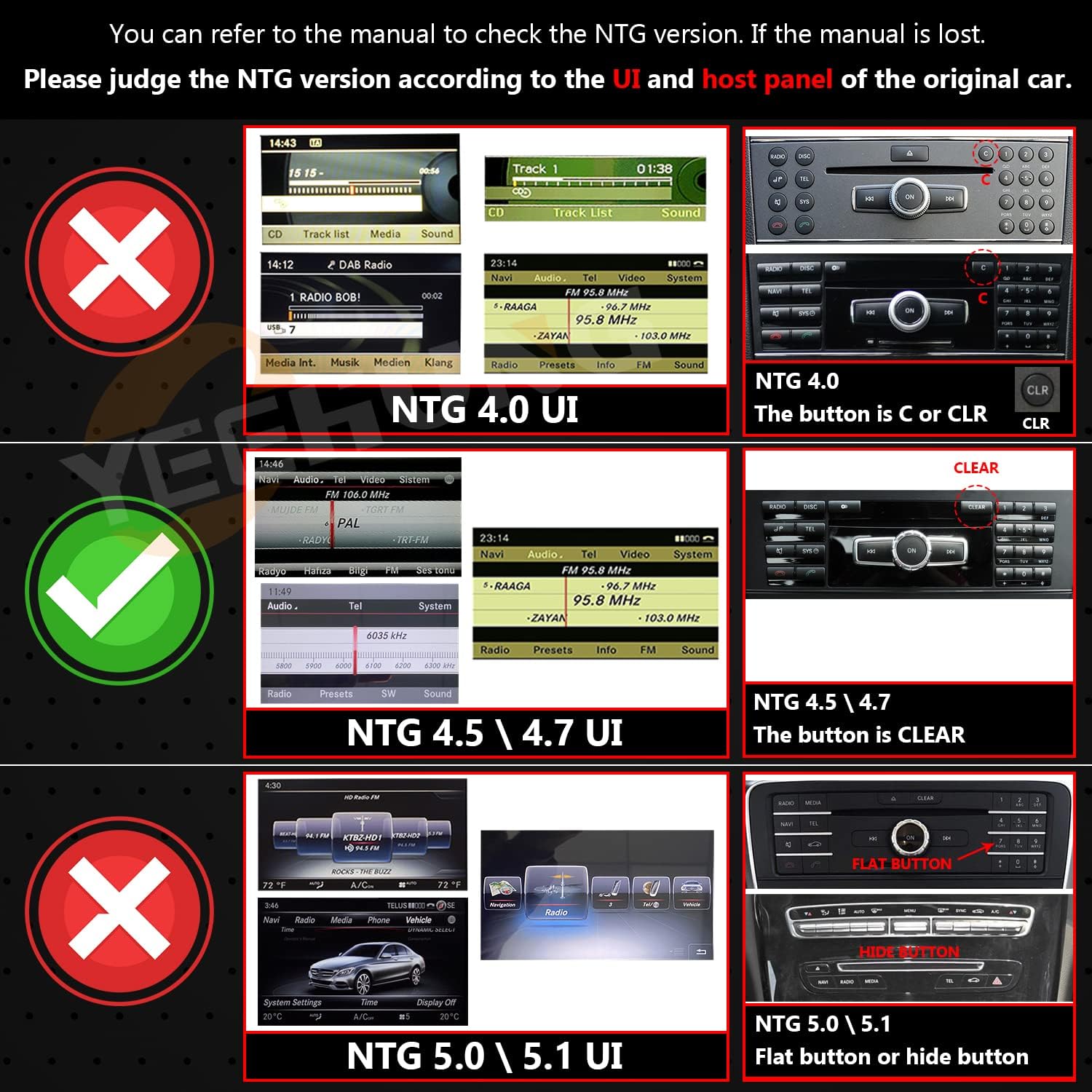
Figure 12: Key hardware specifications of the YEEHUNG Android screen.
Warranty and Support
Warranty Information
YEEHUNG offers the following warranty terms for this product:
- Within 1 Month: Free returns according to Amazon rules. Contact Amazon Buyer Services for returns.
- Within 12 Months (After 1 Month): Free warranty service for non-human damage. Customer is responsible for the cost of shipping the product back and forth within the U.S.
- After 1 Year: Repair service is available. In addition to postage costs within the U.S., additional parts replacement and labor costs will apply.
Customer Support
For any issues, questions, or assistance with installation and setup, please contact YEEHUNG customer service. Many users have reported excellent and responsive support, with prompt replies within 24 hours. When contacting support, clearly describe your problem to facilitate a quick resolution.
If you are unsure about compatibility or installation for your specific car model, it is recommended to send a photo of your car's dashboard and the model year to customer service for verification.
Ask a question about this manual
Ask about setup, troubleshooting, compatibility, parts, safety, or missing instructions. Manuals+ will review the question and use this page’s manual context to help answer it.