
Metzler MT4.0
Metzler MT4.0 Wireless Doorbell Signal Converter Kit Instruction Manual
Model: MT4.0 | Brand: Metzler
1. Introduction
This instruction manual provides comprehensive guidance for the installation, operation, and maintenance of your Metzler MT4.0 Wireless Doorbell Signal Converter Kit. Please read this manual thoroughly before using the product to ensure correct setup and optimal performance. Keep this manual for future reference.
1.1 Product Overview
The Metzler MT4.0 Wireless Doorbell Signal Converter Kit is designed to extend the reach of your existing doorbell system. It converts the signal from your current doorbell into a wireless signal, which is then transmitted to a plug-in receiver. This allows you to hear your doorbell in various locations throughout your home or garden, ensuring you never miss a visitor.
1.2 Key Features
- Universal Compatibility: Integrates with electronic, electromechanical, and mechanical doorbell systems.
- Digital Code System: Automatic adaptation for interference-free signal transmission.
- Extended Range: Up to 300 meters (open field) between transmitter and receiver.
- Customizable Melodies: Choose from 52 polyphonic melodies.
- Adjustable Volume: 4 levels of volume control.
- Visual Notification: LED signal for additional notification.
- Scalability: Easily pair multiple receivers with one or more transmitters.
2. Safety Instructions
Please observe the following safety precautions to prevent damage to the device or injury to yourself:
- Do not expose the device to rain or moisture.
- Do not open the casing of the transmitter or receiver. There are no user-serviceable parts inside.
- Ensure the power supply for the transmitter matches the specified voltage range (AC/DC: 5-24V, AC, 50Hz / 6-32V DC 3V).
- When installing the transmitter, ensure the power is disconnected from your existing doorbell system to avoid electrical shock.
- Keep the device away from direct heat sources and strong magnetic fields.
- Dispose of batteries according to local regulations.
3. Package Contents
Verify that all items are present in your package:
- 1x Metzler MT4.0 Wireless Transmitter (for integration into existing doorbell)
- 1x Metzler Wireless Plug-in Receiver
- 1x User Manual (this document)

Image 3.1: The Metzler MT4.0 Wireless Doorbell Signal Converter Kit, showing the plug-in receiver and the compact wireless transmitter.
4. Product Components
4.1 Wireless Transmitter (MT4.0)
The transmitter is a small module designed to be integrated into your existing doorbell system. It converts the electrical signal from your doorbell into a wireless radio signal.

Image 4.1: Detailed view of the Metzler MT4.0 Wireless Transmitter, showing its dimensions, power input cables, and LED indicator. The image also displays the internal battery compartment and jumper settings for AC/DC or battery operation.
Key features of the transmitter:
- Power Input: Red and black wires for connection to the doorbell's power supply.
- LED Indicator: A small LED light (blue or red) indicates operation.
- Jumper Settings: Internal jumpers allow selection between AC/DC power input or internal battery operation (CR-2032).
- Dimensions: Approximately 30.5 x 65 x 15 mm.
4.2 Wireless Plug-in Receiver
The receiver plugs into a standard electrical outlet and produces an audible chime and visual LED signal when it receives a signal from the transmitter.

Image 4.2: Front view of the Metzler Wireless Plug-in Receiver, showing the central LED ring, volume control button (left), and melody selection button (right).
Key features of the receiver:
- Plug-in Design: Connects directly to a wall outlet.
- LED Signal: Central LED ring illuminates upon receiving a signal.
- Volume Control Button: Adjusts the chime volume.
- Melody Selection Button: Cycles through the available chime melodies.
5. Setup & Installation
Follow these steps to install and set up your Metzler MT4.0 Wireless Doorbell Signal Converter Kit.
5.1 Transmitter Installation
The MT4.0 transmitter can be powered either by your existing doorbell's AC/DC power supply or by an internal CR-2032 battery. Ensure the correct jumper setting is selected before installation.
5.1.1 Powering the Transmitter via Existing Doorbell (AC/DC)
- Disconnect Power: Before starting, turn off the main power supply to your existing doorbell system at the circuit breaker to prevent electrical shock.
- Access Doorbell Chime: Open your existing doorbell chime unit to access its internal wiring.
- Set Jumper: Locate the jumper on the MT4.0 transmitter circuit board. Set it to the "AC/DC" position.
- Connect Wires: Connect the red and black wires from the MT4.0 transmitter in parallel to the power terminals of your existing doorbell chime. It is crucial to connect them in parallel, not in series. Refer to Image 5.1 for a visual guide.
- Mount Transmitter: Secure the transmitter inside the doorbell chime unit, ensuring it does not interfere with moving parts or wiring.
- Restore Power: Close the doorbell chime unit and restore power at the circuit breaker.

Image 5.1: Diagram illustrating the correct parallel wiring of the Metzler MT4.0 transmitter inside an existing doorbell chime unit. The jumper setting for AC/DC power is also visible.
Important Note: The provided diagram in some packages may incorrectly show a series connection. Always connect the transmitter in parallel to your existing doorbell's power supply.
5.1.2 Powering the Transmitter via Internal Battery (CR-2032)
- Access Battery Compartment: Open the transmitter casing.
- Insert Battery: Insert a CR-2032 lithium battery into the designated slot, observing polarity.
- Set Jumper: Locate the jumper on the MT4.0 transmitter circuit board. Set it to the "VBAT" position for battery operation.
- Close Casing: Securely close the transmitter casing.
- Test: Briefly connect the two wire ends (red and black) to simulate a doorbell press. The transmitter's LED should light up.
Note: When using battery power, do not connect the transmitter to an external power source.
5.2 Receiver Setup
- Plug In: Insert the wireless plug-in receiver into a standard electrical outlet in your desired location.
- Placement: Choose a central location or an area where you frequently need to hear the doorbell. The receiver can be moved to different outlets as needed.
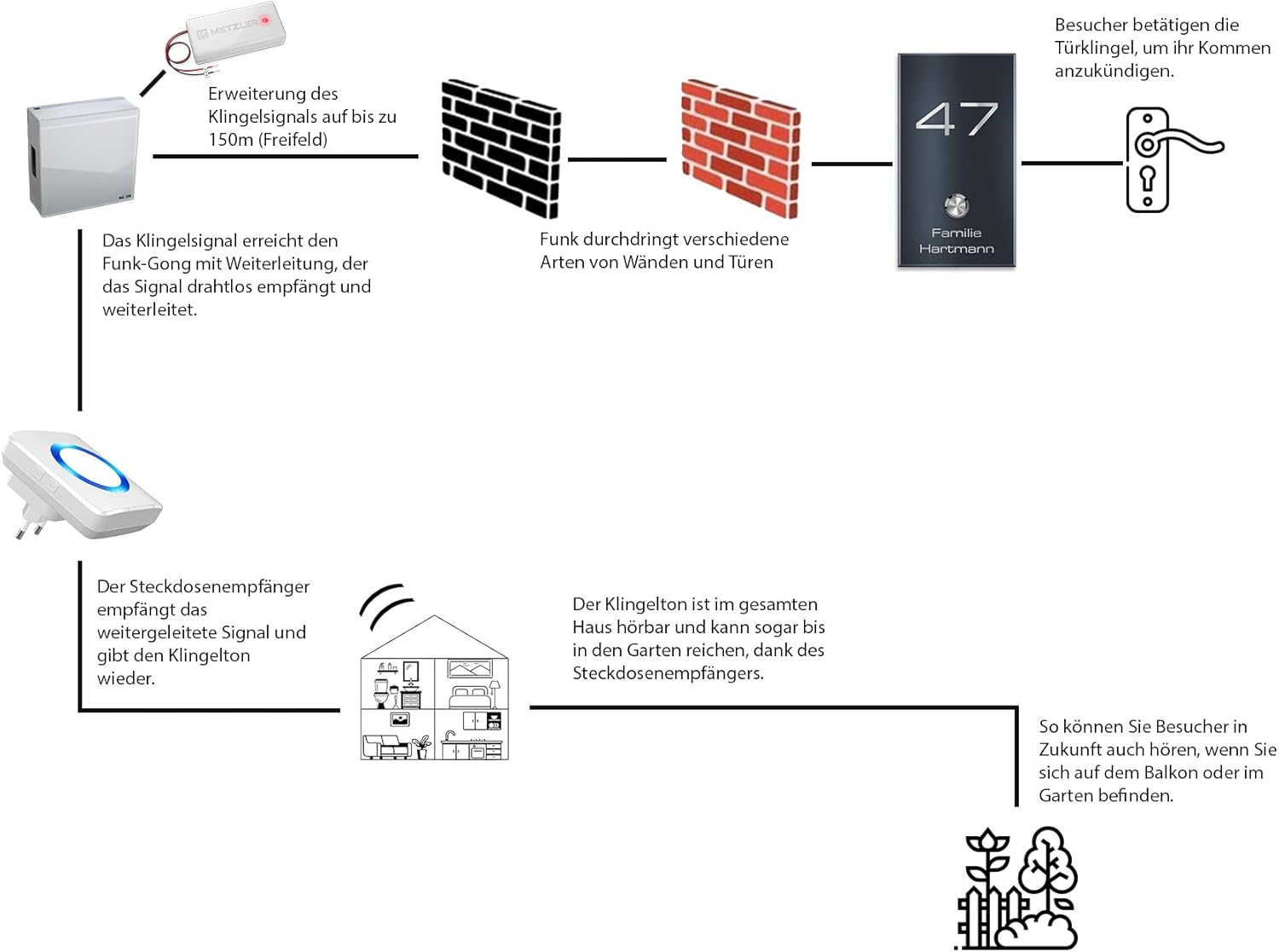
Image 5.2: Diagram illustrating the signal flow of the Metzler wireless doorbell system. A visitor presses the doorbell, the signal is transmitted wirelessly through walls, and the plug-in receiver plays the chime, audible throughout the house and garden.
5.3 Pairing the Transmitter and Receiver
The transmitter and receiver should be paired for proper operation. If they are not paired out of the box, or if you wish to change the melody, follow these steps:
- Select Melody: On the receiver, press the melody selection button (musical note icon) repeatedly until you hear your desired chime.
- Enter Pairing Mode: Press and hold the volume control button (speaker icon) on the receiver for approximately 3-5 seconds until the LED ring flashes rapidly. This indicates pairing mode.
- Activate Transmitter: Within 5 seconds of the receiver entering pairing mode, activate the transmitter. If connected to an existing doorbell, press your doorbell button. If using battery power, briefly connect the red and black wires.
- Confirmation: The receiver will chime once and the LED ring will stop flashing, indicating successful pairing.
- Test: Press your doorbell button again to confirm the receiver chimes.
Note: Each time you change the melody, you must re-pair the transmitter and receiver for the new melody to be saved.
6. Operating Instructions
6.1 Adjusting Volume
To adjust the volume of the receiver:
- Press the volume control button (speaker icon) on the side of the receiver.
- Each press will cycle through the 4 available volume levels (from silent to loud). Select the desired level.
6.2 Changing Melodies
To change the chime melody:
- Press the melody selection button (musical note icon) on the side of the receiver.
- Each press will cycle through the 52 available polyphonic melodies. Listen to the options and stop when you hear your preferred melody.
- After selecting a new melody, you must re-pair the transmitter and receiver (refer to Section 5.3) for the new melody to be saved and used.
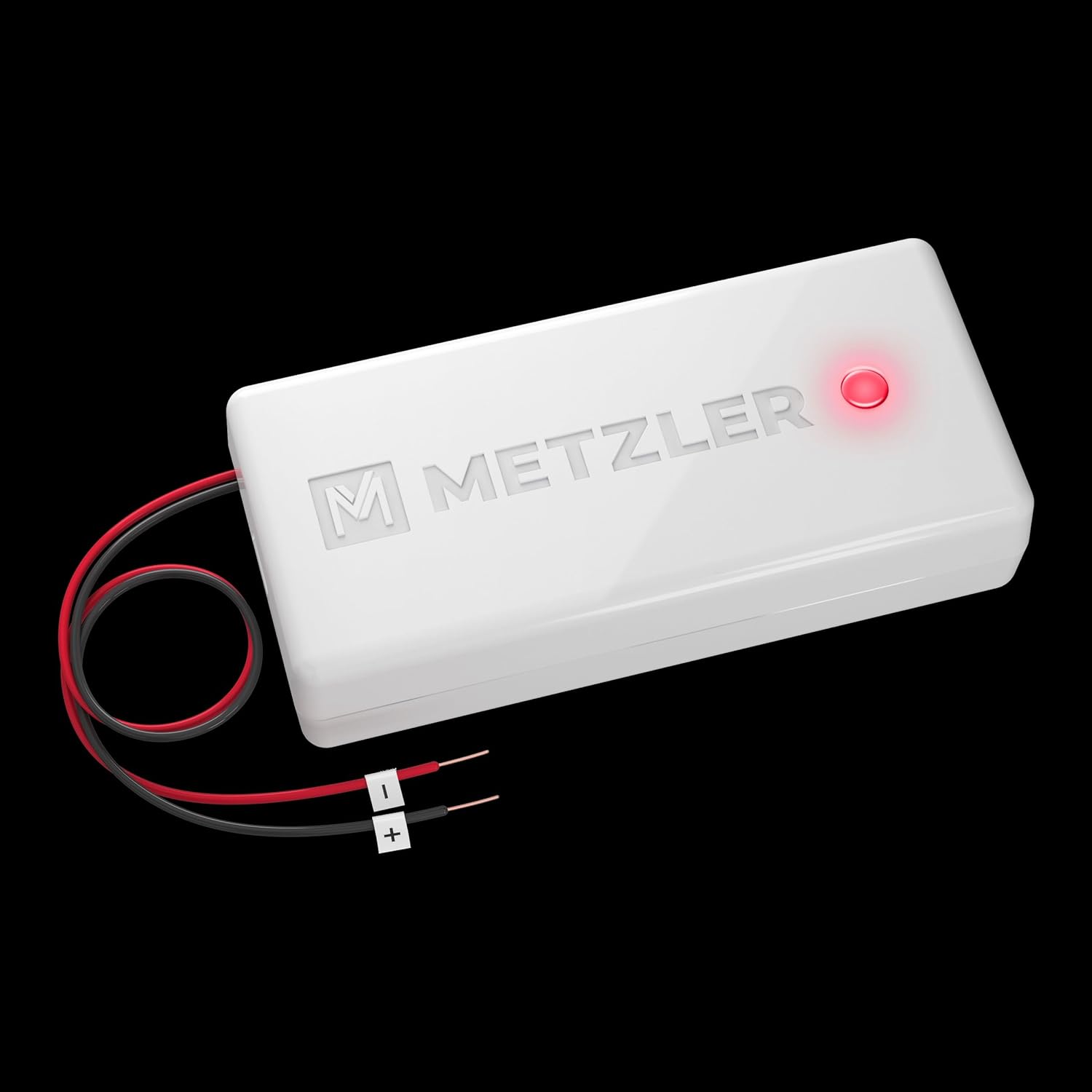
Image 6.1: Visual representation of the receiver's user-defined experience, highlighting the variety of melodies, adjustable volume, visual LED notification, and flexible installation options.
7. Maintenance
The Metzler MT4.0 Wireless Doorbell Signal Converter Kit requires minimal maintenance.
- Cleaning: Wipe the receiver and transmitter with a soft, dry cloth. Do not use abrasive cleaners or solvents.
- Battery Replacement (Transmitter): If the transmitter is battery-powered and stops working, replace the CR-2032 battery. Ensure correct polarity.
- Environmental Conditions: Ensure the devices are kept in a dry environment and away from extreme temperatures.
8. Troubleshooting
If you encounter issues with your Metzler MT4.0 kit, refer to the following common problems and solutions:
| Problem | Possible Cause | Solution |
|---|---|---|
| Receiver does not chime when doorbell is pressed. |
|
|
| Short range or intermittent signal. |
|
|
| Receiver LED flashes but no sound. | Volume is set to silent. | Increase volume using the volume button (Section 6.1). |
9. Specifications
| Feature | Detail |
|---|---|
| Model | MT4.0 (Full Model Number: AMZ-MT4.0_WA878-AC) |
| Brand | Metzler |
| Transmitter Power Supply | AC/DC: 5-24V, AC, 50Hz / 6-32V DC 3V (via doorbell wiring) or 1x CR-2032 battery |
| Receiver Power Supply | Standard AC Wall Outlet (Plug-in) |
| Wireless Range | Up to 300 meters (open field) |
| Melodies | 52 polyphonic options |
| Volume Levels | 4 adjustable levels |
| Special Features | LED display/signal, Digital Code System |
| Transmitter Dimensions | Approx. 30.5 x 65 x 15 mm |
| Product Dimensions (Receiver) | Approx. 7.5 x 3 x 8.5 cm |
| Indoor/Outdoor Use | Indoor (Receiver), Indoor (Transmitter, integrated into existing doorbell) |
10. Warranty & Support
Information regarding specific warranty terms and customer support for the Metzler MT4.0 Wireless Doorbell Signal Converter Kit is not available in the provided product data. Please refer to the product packaging or the manufacturer's official website for the most up-to-date warranty information and support contacts.
Related documentsMT4.0


Ask a question about this manual
Ask about setup, troubleshooting, compatibility, parts, safety, or missing instructions. Manuals+ will review the question and use this page’s manual context to help answer it.