
LENCENT 636DV
LENCENT Universal Travel Adapter Instruction Manual
Brand: LENCENT | Model: 636DV
1. Introduction
The LENCENT Universal Travel Adapter is a versatile and compact charging solution designed for global travelers. Featuring GaN III technology, it provides efficient and fast charging for a wide range of devices across over 200 countries. This manual provides essential information for safe and effective use of your adapter.
Key Features:
- Universal Compatibility: Works in over 200 countries with interchangeable UK, US, EU, and AUS plugs.
- 65W PD Fast Charging: Equipped with GaN III technology for rapid charging of laptops, smartphones, and other USB-powered devices.
- Multiple Ports: Includes 2 USB-A ports and 3 USB-C ports for simultaneous charging of up to 5 devices.
- Compact & Portable: Lightweight design (226g) for easy portability.
- Advanced Safety: Features integrated double 10A fuse for overload protection and a safety valve.
- AUTO-ID Technology: Intelligently identifies connected devices to deliver optimal charging current.

Figure 1: Front view of the LENCENT Universal Travel Adapter, highlighting its multiple charging ports and GaN III technology.
2. Setup and Plug Selection
The LENCENT Universal Travel Adapter features retractable pins for various international plug types. To select the appropriate plug for your region, use the sliders on the side of the adapter.
Selecting a Plug Type:
- Identify the Region: Determine the plug type required for your travel destination (e.g., EU, UK, USA/AUS).
- Slide the Lever: Locate the corresponding slider on the side of the adapter (labeled EU, UK, USA/AUS). Slide the lever to extend the correct pins.
- Retract Other Plugs: Ensure that only the required plug pins are extended. Other pins should be fully retracted for safe operation. To retract a plug, press the release button on the side of the adapter and push the pins back in.

Figure 2: Overview of the adapter's international plug compatibility, including EU (Type C), UK (Type G), US (Type A), and AUS (Type I) standards.

Figure 3: The universal AC socket on the adapter, designed to accept various plug types from over 200 countries.
3. Operating Instructions
Once the correct plug type is extended, insert the adapter into the wall outlet. You can then connect your devices to the adapter's various ports.
Charging Devices:
- USB-C Ports (C1, C2, C3): Use the USB-C ports for fast charging compatible devices such as laptops (up to 65W on C1), tablets, and modern smartphones.
- USB-A Ports (A1, A2): Use the USB-A ports for charging devices that utilize standard USB cables, such as older smartphones, power banks, and other accessories.
- AC Socket: The universal AC socket allows you to plug in appliances directly into the adapter.
The AUTO-ID technology will automatically detect your device's power requirements and deliver the optimal charging current for efficient and safe charging.

Figure 4: The adapter providing 65W USB-C fast charging to a laptop, demonstrating its high-power delivery.
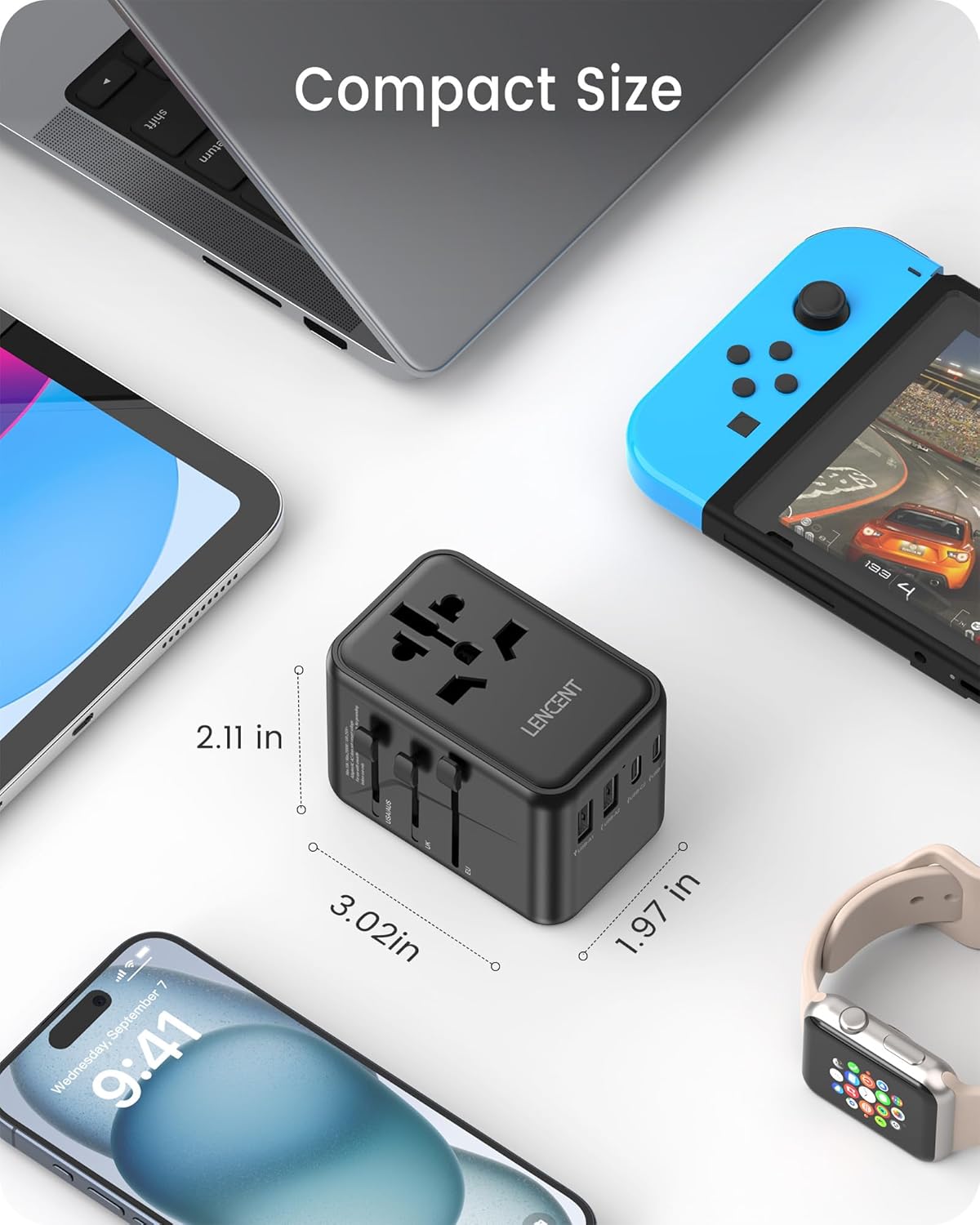
Figure 5: The compact size of the adapter, shown alongside a smartphone, tablet, and gaming console, illustrating its portability.
Video 1: Demonstrates the LENCENT 65W universal travel adapter in use, showcasing its multiple USB ports and fast charging capabilities for various devices.
4. Maintenance
To ensure the longevity and optimal performance of your LENCENT Universal Travel Adapter, follow these maintenance guidelines:
- Cleaning: Disconnect the adapter from the power outlet and all devices before cleaning. Use a dry, soft cloth to wipe the surface. Do not use liquid cleaners or aerosols.
- Storage: When not in use, retract all plug pins and store the adapter in a cool, dry place, away from direct sunlight and moisture.
- Inspection: Periodically inspect the adapter for any signs of damage, such as frayed cables, bent pins, or cracks in the casing. Do not use if damaged.
5. Troubleshooting
If you encounter issues with your LENCENT Universal Travel Adapter, refer to the following common problems and solutions:
| Problem | Possible Cause | Solution |
|---|---|---|
| No power output from adapter. | Adapter not properly plugged in; wall outlet is not active; internal fuse blown. | Ensure adapter is fully inserted into a live outlet. Check the wall outlet with another device. If the adapter has a replaceable fuse, check and replace it if necessary (refer to safety warnings). |
| Device not charging or charging slowly. | Incorrect cable; device not compatible with fast charging; multiple high-power devices connected; adapter overloaded. | Use a certified charging cable. Ensure your device supports PD/QC fast charging for optimal speed. Disconnect some devices if charging multiple simultaneously. Check total output limits. |
| Adapter feels warm during use. | Normal operation, especially during fast charging; excessive load. | A slight warmth is normal. If it becomes excessively hot, disconnect immediately and reduce the number of connected devices. Ensure proper ventilation. |
| Plug pins do not extend or retract. | Mechanism jammed; debris. | Ensure the release button is fully pressed. Gently try to extend/retract the pins. Do not force. Check for any obstructions. |

Figure 6: Detail of the adapter's dual 10A fuses, providing essential overload protection.
6. Specifications
| Feature | Detail |
|---|---|
| Product Dimensions | 2.8 x 2.13 x 2.09 inches (7.1 x 5.4 x 5.3 cm) |
| Item Weight | 8 ounces (226 grams) |
| Model Number | 636DV |
| Input Voltage | 100-250 Volts AC, 50/60Hz |
| Max Power Rating | 2500W Max at 250V, 1000W Max at 100V |
| USB-C1 Output | 65W Max (PD 3.0, QC4+, PPS) |
| USB-C2/C3 Output | 15W Max (shared) |
| USB-A1/A2 Output | 12W Max (shared) |
| Total USB Output | 65W Max |
| Fuse Rating | 10A Max |
| Manufacturer | LENCENT Technology Co.,Ltd. |
| Country of Origin | China |
7. Important Safety Warnings
WARNING: This adapter is NOT a voltage converter.
- It does not convert voltage. Ensure your device is compatible with the local voltage (100-250V) before plugging it into the adapter.
- Do not use with high-power appliances that exceed the adapter's maximum power rating (2500W Max at 250V, 1000W Max at 100V), especially for hair dryers, electric shavers, or hair straighteners, unless they are dual voltage.
- For indoor use only. Do not expose to liquids or extreme temperatures.
- Keep out of reach of children.
- Do not disassemble or modify the adapter.
- Always ensure the correct plug pins are extended and securely locked before inserting into an outlet.
8. Warranty and Support
For warranty information, technical support, or customer service inquiries, please refer to the official LENCENT website or contact their customer support directly. Keep your purchase receipt for warranty claims.
Official LENCENT Store: LENCENT Store on Amazon
Related documents636DV


Ask a question about this manual
Ask about setup, troubleshooting, compatibility, parts, safety, or missing instructions. Manuals+ will review the question and use this page’s manual context to help answer it.