
1. Product Overview
The BYL BESTISAN SK01 is a portable wireless karaoke speaker system designed for home and outdoor entertainment. It features dual wireless microphones and offers high-quality stereo sound.

Image: The BYL BESTISAN SK01 speaker with its two accompanying wireless microphones.
Key features include:
- Portable Design: Equipped with a swivel handle and strap for easy transport, making it suitable for various activities.
- Dual Wireless Microphones: Two handheld wireless microphones provide freedom of movement with a working range of up to 100ft.
- HD Stereo Sound: A 30W output power with a 4-inch woofer delivers clear and strong audio. Independent Treble/Bass adjustment allows for sound customization.
- Long Battery Life: A 2500mAh high-capacity lithium rechargeable battery provides up to 6 hours of continuous use.
- Multiple Connectivity Options: Supports Bluetooth, USB, Optical, Coaxial, and 3.5mm auxiliary input for connection to various devices like Smart TVs, smartphones, tablets, PCs, DVDs, and CDs.
2. What's in the Box
Upon unboxing, please ensure all the following items are present:
- Portable Karaoke Speaker (SK01)
- 2 Wireless Microphones
3. Setup Instructions
Follow these steps to set up your BYL BESTISAN SK01 Karaoke Speaker System:
- Charge the Speaker and Microphones: Before first use, fully charge the speaker and both wireless microphones using the provided charging cables.
- Power On: Turn on the karaoke speaker and both wireless microphones. They will automatically connect to each other.
- Connect to Audio Source:
- Bluetooth Connection: Activate Bluetooth on your smartphone, tablet, or other device. Search for "SK01" in the list of available devices and select it to pair.
- Wired Connection: For devices without Bluetooth, or for a more stable connection, use the appropriate cable (USB, Optical, Coaxial, or 3.5mm auxiliary) to connect your audio source to the speaker. Select the corresponding input mode on the speaker.

Image: Rear view of the SK01 speaker showing various input ports (Bluetooth, AUX IN, AUX OUT, USB, Optical, Coaxial) and control buttons.
Important Tip:
Before singing, ensure the microphones and speaker are successfully paired. To avoid harsh feedback, do not place the microphone too close to the speaker after pairing.
4. Operating Instructions
Once set up, operating your karaoke system is straightforward:
- Adjust Volume: Use the volume buttons on the speaker to increase or decrease the overall sound output.
- Switch Functions (Mode): Press the 'Mode' button on the speaker to cycle through different input sources (Bluetooth, USB, Optical, Coaxial, AUX).
- Microphone Usage: Hold the microphone comfortably and speak or sing into the top mesh area. Ensure the microphone is powered on.
- Treble/Bass Adjustment: Utilize the independent Treble/Bass controls on the speaker to fine-tune the audio to your preference.

Image: Individuals using the BYL BESTISAN SK01 karaoke system for entertainment.
For a visual demonstration of the product, please refer to the official seller video below:
Video: Official product video demonstrating the SK01 Portable Karaoke speaker in use.
5. Maintenance
Proper maintenance ensures the longevity and optimal performance of your karaoke system:
- Cleaning: Use a soft, dry cloth to wipe down the speaker and microphones. Avoid using abrasive cleaners or liquids that could damage the electronics.
- Battery Care: To preserve battery life, avoid fully discharging the speaker and microphones frequently. Recharge them regularly, especially if they will not be used for an extended period.
- Storage: Store the system in a cool, dry place away from direct sunlight and extreme temperatures.
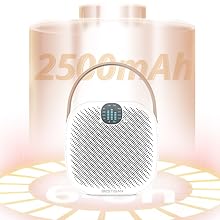
Image: The SK01 speaker highlighting its 2500mAh battery capacity.
6. Troubleshooting
If you encounter any issues, refer to the following common troubleshooting tips:
- No Sound from Speaker:
- Ensure the speaker is powered on and charged.
- Check the volume level on both the speaker and your connected audio source.
- Verify that the correct input mode is selected on the speaker.
- If using Bluetooth, ensure the device is properly paired and within range.
- Microphone Not Working:
- Ensure the microphone is powered on and charged.
- Confirm that the microphone is paired with the speaker.
- Check the microphone's battery level.
- Harsh Sound/Feedback:
- Do not place the microphone too close to the speaker. Maintain a reasonable distance to prevent audio feedback.
- Reduce the microphone volume if necessary.
- Bluetooth Connectivity Issues:
- Turn off and on both the speaker and your Bluetooth device.
- Delete "SK01" from your device's Bluetooth history and attempt to re-pair.
- Ensure no other devices are interfering with the Bluetooth signal.
7. Specifications
Detailed technical specifications for the BYL BESTISAN SK01 Karaoke Speaker System:
| Feature | Specification |
|---|---|
| Brand | BYL |
| Model Number | SK01 |
| Item Dimensions (L x W x H) | 5.31 x 6.81 x 7.08 inches |
| Connectivity Technology | Bluetooth |
| Color | White |
| Compatible Devices | Smartphone, Tablet, PC, Smart TV, DVD, CD |
| Mounting Type | Tabletop |
| Power Source | Battery Powered |
| Connector Type | Aux |
| Number of Channels | 2 |
| Audio Input | Bluetooth, USB, Optical, Coaxial, 3.5mm auxiliary input, Microphone |
| Frequency Response | 932.5 MHz |
| Output Wattage | 30 Watts |
| Built-In Media | Portable Karaoke Speaker, Microphone |

Image: Diagram illustrating the 4-inch large woofer for enhanced sound quality.
8. Warranty and Support
Your BYL BESTISAN SK01 Karaoke Speaker System comes with a 1-year warranty from the date of purchase.
For technical support, warranty claims, or any other inquiries, please contact BYL customer service. Refer to the product packaging or the official BYL website for the most current contact information.