
Introduction
This manual provides instructions for the safe and efficient use of your Kastar BL-5B Battery and Smart LCD Charger. This product is designed to charge compatible BL-5B batteries and offers a USB output for charging other devices. Please read this manual thoroughly before use and retain it for future reference.

Image: Kastar BL-5B Battery and Smart LCD Charger, showing both components.
Safety Information
To ensure safe operation and prevent damage, please observe the following warnings:
- Do not dispose of batteries in a fire as they may explode.
- Do not disassemble or modify the battery.
- Do not short-circuit the battery terminals. Accidental short-circuiting can occur when a metallic object (such as a coin, clip, or pen) causes direct connection of the positive (+) and negative (-) terminals.
- Do not expose the battery to liquid or subject it to strong mechanical shocks.
- Do not expose to high temperatures (above 140°F / 60°C).
- To reduce the risk of electric shock, do not remove the cover or back of the charger. Refer servicing to qualified service personnel only.

Image: The BL-5B battery showing safety warning labels.
Package Contents
Verify that all items are present in your package:
- 1 x Kastar BL-5B Lithium-Ion Battery
- 1 x Kastar Smart LCD Charger
Setup
- Identify Battery Polarity: The Kastar smart charger automatically recognizes the positive and negative terminals of the battery. You do not need to worry about specific contact placement for polarity. Ensure the battery's contacts align with the charger's pins.
- Insert Battery into Charger: Gently slide the BL-5B battery into the adjustable pins of the charger. The pins will adapt to fit the battery's contact points. Ensure a secure connection.
- Connect Charger to Power: Fold out the US plug from the charger and insert it into a standard AC 100-240V wall outlet. The LCD screen on the charger will illuminate, indicating it is powered on.
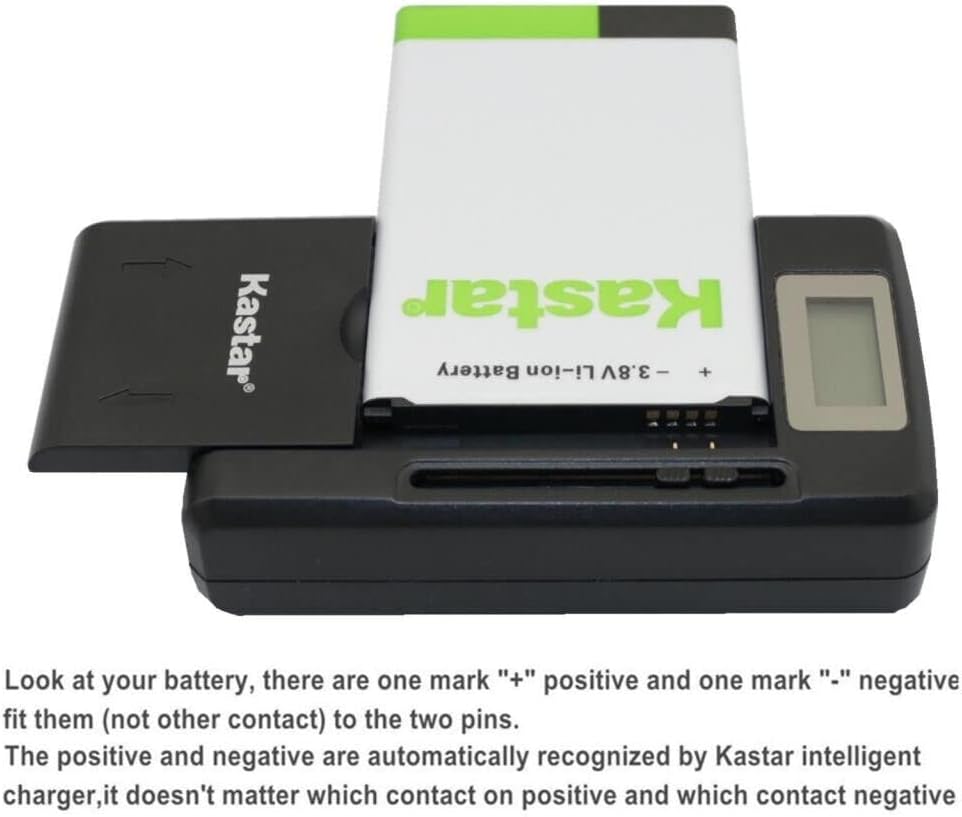
Image: A BL-5B battery being inserted into the charger, highlighting the positive and negative marks on the battery and the charger's adjustable pins.

Image: The Kastar charger with a battery fully inserted, demonstrating the adjustable nature of the charging pins and the range of battery sizes it can accommodate.

Image: The Kastar smart charger with its integrated US plug inserted into a wall power outlet.
Operating Instructions
- Charging the BL-5B Battery: Once the battery is correctly inserted and the charger is plugged into a power outlet, the LCD screen will display the charging status. The indicator will show progress in increments of 25%, 50%, 75%, and 100%. When the LCD screen shows 100%, the battery is fully charged.
- Using the USB Charging Function: The charger includes a high-speed USB output port. You can connect a USB cable from your smartphone or other USB-powered device to this port to charge it. This function can be used simultaneously with battery charging.

Image: The Kastar smart charger's LCD display indicating the battery charging status, showing a full charge.

Image: The Kastar smart charger connected to a smartphone via a USB cable, demonstrating its capability to charge external devices.
Maintenance
- Keep the charger and battery clean and dry. Use a soft, dry cloth for cleaning.
- Store the product in a cool, dry place away from direct sunlight and extreme temperatures.
- Avoid dropping or subjecting the charger and battery to severe impacts.
- When not in use for extended periods, store the battery with a partial charge (around 50%) to prolong its lifespan.
Troubleshooting
- Battery not charging:
- Ensure the charger is securely plugged into a working power outlet.
- Verify the battery is correctly inserted and its contacts are aligned with the charger's pins.
- Check if the battery is damaged or excessively old.
- Charger LCD not illuminating:
- Confirm the power outlet is functional.
- Ensure the charger's plug is fully inserted.
- Slow charging:
- Ensure the charger is connected directly to a wall outlet, not a power strip or extension cord that might reduce power.
- The charging speed can vary based on the battery's condition and ambient temperature.
Specifications
| Component | Specification |
|---|---|
| Battery Type | Lithium-Ion |
| Battery Voltage | 3.7V |
| Battery Capacity | 890mAh |
| Charger Input | AC 100-240V |
| Charger Output | DC 4.2V, 800mA |
| USB Output | DC 5.2V, 1300mA |
| Certifications | UL, CE, FCC |
| Model Number | MCH-1B-BL5B-D |
Warranty and Support
For warranty information or technical support, please contact Kastar customer service. Refer to the product packaging or the Kastar official website for contact details.