
IndeeLift PPU
IndeeLift PPU Patient Lift Instruction Manual
Model: PPU
1. Introduction
The IndeeLift People Picker Upper (PPU) is a personal floor lift designed to assist individuals in rising from the floor to a normal chair height. This device facilitates standing or transferring with minimal effort, making it ideal for fall recovery, exercise, therapy, gardening, or assisting with pets. It is engineered to enhance independence and provide peace of mind for users and caregivers alike.
Key features include:
- Lifts individuals weighing up to 400 lbs to a seated height of 21 inches.
- Designed for both self-operation and assisted use by caregivers.
- Equipped with adjustable and removable rise-assist handles for leverage and easy transfers.
- Features a wired remote for convenient control.
- Powered by a Lithium-ion battery with an automatic charger.
- Compact design for use in various indoor spaces.
2. Safety Information
Important Safety Precautions:
- Ensure the user's weight does not exceed the maximum capacity of 400 lbs.
- Always use the PPU on hard, stable floor surfaces. Avoid soft or uneven surfaces.
- Properly assemble and use the device according to the instructions provided.
- Consider using the device with a caregiver, especially during initial uses or if the user has limited mobility or cognitive impairment.
- Keep hands and loose clothing clear of moving parts during operation.
- Do not attempt to modify the device in any way.
- Ensure the safety belt is properly secured before lifting.
3. Components and Parts
Familiarize yourself with the various components of your IndeeLift PPU:

Figure 3.1: IndeeLift PPU Components Diagram
This diagram illustrates the key parts of the PPU, including the transport handles, wired remote, safety belt, belt stowage, battery charger power cord, rechargeable battery, rise-assist handles, lower belt anchor points, and mounting ramp seat.
- Transport Handles (R & L): Located at the top, used for maneuvering the lift.
- Wired Remote: Handheld control for operating the lift's up/down movement.
- Safety Belt: Provides added security during the lifting process.
- Belt Stowage: Convenient storage for the safety belt when not in use.
- Battery Charger Power Cord: Connects the charger to a power outlet.
- Rechargeable Battery: Powers the lift's motor.
- Rise-Assist Handles (R & L): Provide leverage for standing and can swing away or be removed for transfers.
- Lower Belt Anchor Points (R & L): Points where the safety belt attaches.
- Mounting Ramp Seat: The platform on which the user positions themselves for lifting.
4. Setup
The IndeeLift PPU is largely pre-assembled. Upon receiving your unit, perform the following initial setup steps:
- Unpacking: Carefully remove the PPU from its packaging. Retain packaging for future transport or storage if needed.
- Initial Charge: Connect the battery charger power cord to the unit and plug it into a standard electrical outlet. Allow the battery to fully charge before first use. The charging indicator will typically show when charging is complete.
- Handle Installation: Ensure the rise-assist handles are securely attached. They can be adjusted or removed as needed for specific transfer situations.
- Safety Belt Check: Verify that the safety belt is present and can be properly attached to the lower belt anchor points.
- Functionality Test: Before a person uses the lift, perform a test run using the wired remote to raise and lower the seat to its full range of motion. Ensure smooth operation.
5. Operating Instructions
The IndeeLift PPU can be operated independently by the user or with the assistance of a caregiver.
5.1. Self-Operation
For independent use, the individual can maneuver themselves onto the PPU's seat from a fallen position. Once positioned, they can use the wired remote to raise themselves to a desired height, whether to stand up or transfer to a chair or wheelchair.

Figure 5.1: User seated on the PPU, preparing to lift.
This image shows an individual seated on the PPU's platform, demonstrating the initial position for self-lifting.

Figure 5.2: User utilizing the PPU to transition to a standing position.
This image depicts a user in the process of standing up with the aid of the PPU, highlighting the rise-assist handles.
5.2. Assisted Operation
Caregivers can use the PPU to safely lift and transfer individuals, reducing the risk of injury to both the patient and the caregiver. The caregiver guides the user onto the seat and operates the lift using the wired remote.

Figure 5.3: Assisted vs. Self-Operation Overview.
This image visually distinguishes between assisted operation, where a caregiver helps, and self-operation, where the user controls the lift independently.
5.3. General Operation Steps:
- Positioning: Guide the user to position themselves onto the PPU's seat. Ensure they are centered and stable.
- Secure Safety Belt: Fasten the safety belt securely around the user and attach it to the lower belt anchor points.
- Operate Lift: Using the wired remote, press the 'UP' button to slowly raise the seat. Monitor the user's comfort and stability.
- Utilize Handles: Encourage the user to use the rise-assist handles for additional support and leverage as they ascend.
- Transfer/Stand: Once the desired height is reached (seated height for transfer or standing height for standing), assist the user in transferring to a chair or standing independently. The rise-assist handles can be swung away or removed to facilitate direct transfers to wheelchairs.
- Lowering: To lower the seat, press the 'DOWN' button on the wired remote.
Note: No official product videos were available for embedding based on the provided data.
6. Maintenance
Proper maintenance ensures the longevity and safe operation of your IndeeLift PPU.
- Cleaning: Wipe clean the surfaces of the PPU with a damp cloth. Avoid abrasive cleaners or solvents that could damage the finish. Ensure the device is dry before storage or next use.
- Battery Care: Regularly charge the Lithium-ion battery. Do not allow the battery to fully discharge for extended periods. Store the unit with a partial charge if not in use for a long time.
- Inspection: Periodically inspect all moving parts, cables, and connections for any signs of wear, damage, or looseness. Ensure the safety belt is not frayed or damaged.
- Storage: Store the PPU in a dry, clean environment away from extreme temperatures.
7. Troubleshooting
If you encounter issues with your IndeeLift PPU, refer to the following common troubleshooting steps:
| Problem | Possible Cause | Solution |
|---|---|---|
| Lift does not operate | Battery is low or uncharged; Power cord not connected; Remote control issue. | Charge the battery fully. Ensure power cord is securely plugged in. Check remote control cable for damage. |
| Lift operates slowly or with difficulty | Low battery; Exceeding weight capacity; Obstruction in mechanism. | Recharge battery. Ensure user weight is within 400 lbs limit. Check for any obstructions around the lifting mechanism. |
| Unusual noises during operation | Loose components; Need for lubrication; Internal mechanical issue. | Inspect for loose screws or parts. If noises persist, discontinue use and contact customer support. |
| Safety belt does not secure properly | Belt twisted or damaged; Anchor points obstructed. | Untwist or replace damaged belt. Clear any obstructions from anchor points. |
If the problem persists after attempting these solutions, please contact IndeeLift customer support for further assistance.
8. Specifications
| Feature | Detail |
|---|---|
| Brand | IndeeLift |
| Model Name | PPU |
| Product Dimensions | 18"D x 23"W x 45"H |
| Item Weight | 65 pounds |
| Maximum Weight Recommendation | 400 Pounds |
| Lifting Height (Seat) | Up to 21 inches (seated height) |
| Power Source | Lithium-ion battery with automatic charger |
| Special Feature | Adjustable Rise-Assist Handles |
| Surface Recommendation | Hard Floor |
| Indoor/Outdoor Usage | Indoor |
| Included Components | Heavy-Duty lift unit |
| Product Care Instructions | Wipe Clean |
| Date First Available | November 29, 2022 |
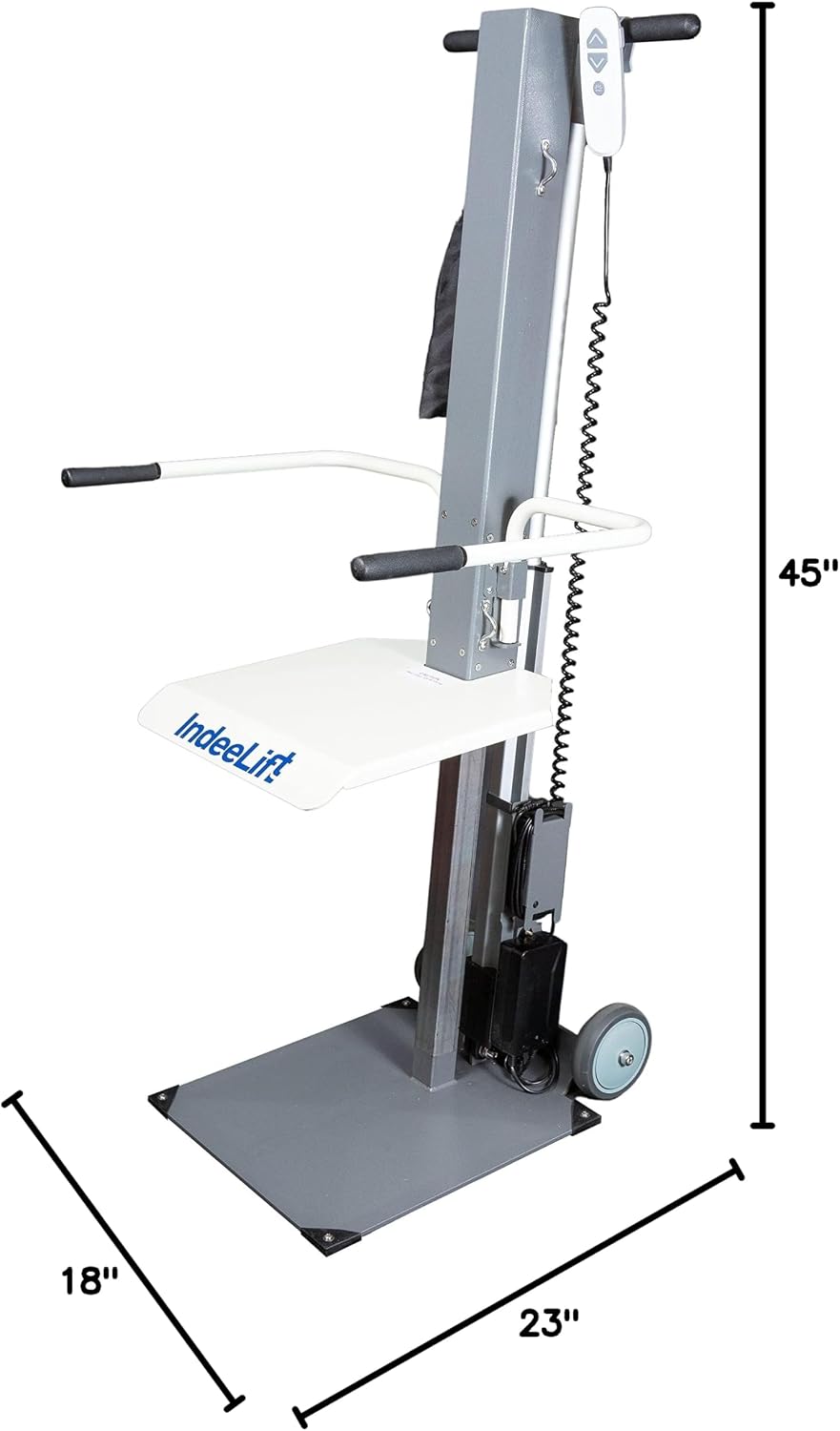
Figure 8.1: IndeeLift PPU with labeled dimensions.
This image provides a visual representation of the PPU's dimensions: 18 inches deep, 23 inches wide, and 45 inches high.
9. Warranty & Support
For warranty information, please refer to the documentation included with your purchase or visit the official IndeeLift website. IndeeLift Inc. is the manufacturer of this product.
For customer support, technical assistance, or to inquire about replacement parts, please contact IndeeLift Inc. directly. Contact information can typically be found on the manufacturer's website or on your purchase receipt.
The product is eligible for 30-day easy returns. Protection plans are also available for purchase separately to extend coverage beyond the standard warranty.
Related documentsPPU


Ask a question about this manual
Ask about setup, troubleshooting, compatibility, parts, safety, or missing instructions. Manuals+ will review the question and use this page’s manual context to help answer it.