1. Introduction
The Gardena Household Water System 5600 SilentComfort is designed for efficient and quiet distribution of utility water from sources such as wells or cisterns. This system automatically supplies water to your home and garden, featuring innovative low-noise pumping technology, a 25-liter water tank, and integrated dry-running protection. Control and monitoring are facilitated via a user-friendly LCD display and a Bluetooth app.
2. Safety Information
- Read this manual thoroughly before installation and operation.
- Ensure the power supply matches the specifications on the product label.
- Do not operate the pump with damaged cables or if the unit itself is damaged.
- Always disconnect the power supply before performing any maintenance or cleaning.
- Protect the pump from frost. Drain all water from the system before freezing temperatures.
- This appliance is not intended for use by persons (including children) with reduced physical, sensory or mental capabilities, or lack of experience and knowledge, unless they have been given supervision or instruction.
3. Package Contents
Verify that all components are present in the package:
- Gardena Household Water System 5600 SilentComfort unit
- Integrated filter
- Check valve
- Instruction Manual
4. Setup
4.1 Placement
Place the water system on a stable, level surface in a dry, frost-free location. Ensure adequate ventilation around the unit. The water-cooled multi-stage technology ensures very quiet operation, allowing for flexible placement within your utility area.

Image: The Gardena Household Water System 5600 SilentComfort installed on a shelf in a utility room, connected to plumbing and a garden hose.
4.2 Water Connections
Connect the suction hose from your water source (well, cistern) to the inlet port of the pump. Ensure all connections are airtight to prevent air ingress, which can affect pump performance. Connect the pressure hose to your household or garden distribution system.
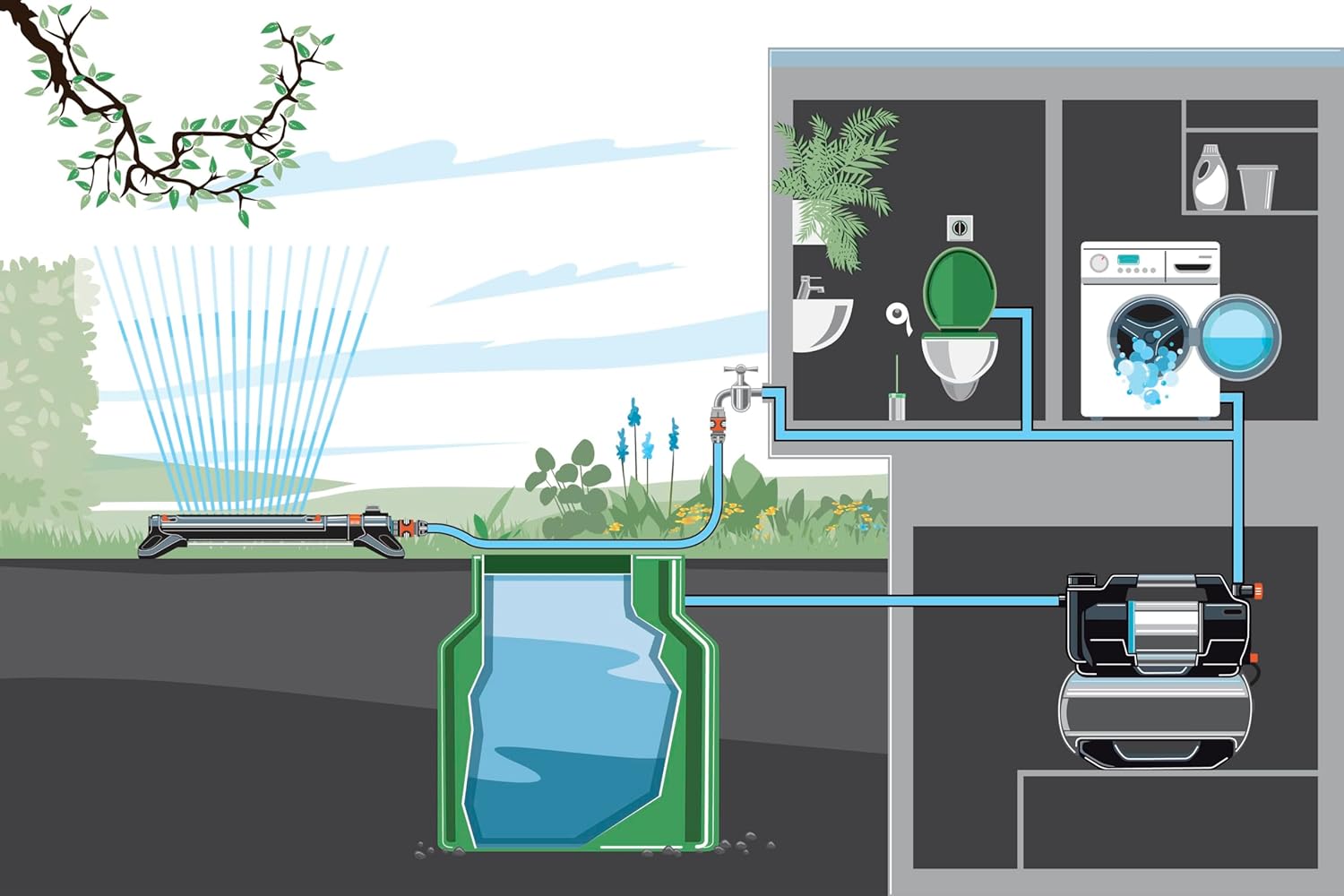
Image: Diagram illustrating the connection of the Gardena water system to a cistern for garden irrigation and household water supply (toilet, washing machine).
4.3 Priming the Pump
Before initial operation, the pump must be filled with water. Open the filling cap and pour water into the pump housing until it is full. Close the cap securely. The self-suction capability can withstand an 8-meter depth, secured by a check valve.

Image: A person pouring water into the top inlet of the Gardena Household Water System to prime the pump.
4.4 Electrical Connection
Connect the power cable to a suitable electrical outlet. Ensure the outlet is properly grounded and protected by a residual current device (RCD).
4.5 Securing the Unit
For permanent installation, the unit can be secured to its mounting surface using appropriate fasteners through the designated holes in the base. This helps prevent movement and reduces vibration.

Image: Close-up of hands using a wrench to tighten a bolt, securing the base of the Gardena Household Water System to a surface.
5. Operating Instructions
5.1 Powering On/Off
Once connected and primed, switch on the main power switch. The pump will automatically turn on and off depending on water demand, thanks to its integrated pressure switch and 25L water tank.
5.2 LCD Display and Controls
The LCD display provides real-time information on pump status and water needs. User-friendly buttons allow for easy activation and adjustment of settings.
5.3 Bluetooth App Control
Download the Gardena Bluetooth app to your smartphone (iOS or Android) to control and monitor the system remotely. The app allows you to:
- Set and save irrigation plans (e.g., for holiday irrigation).
- Activate the smart PowerBoost function for maximum pressure and stable flow during high water demand.
- Monitor system status and receive alerts.
- In combination with an optional sensor, irrigation can be based on soil humidity.

Image: A person standing near the Gardena Household Water System, looking at a smartphone, demonstrating Bluetooth app control.
5.4 Sensor Connection (Optional)
If using an optional Gardena sensor (e.g., soil moisture sensor), connect it to the designated port on the pump. This enables intelligent irrigation based on actual ground humidity.

Image: A close-up of hands connecting a small cable, likely for a sensor, to a port on the side of the Gardena Household Water System.
6. Maintenance
6.1 Cleaning the Filter
The system includes a built-in filter to protect the pump from debris. Regularly check and clean the filter to ensure optimal performance. Refer to the specific instructions in the full manual for filter access and cleaning procedures.
6.2 Draining for Winterization
Before the first frost, completely drain all water from the pump and connected hoses to prevent damage. Use the water drain screw for easy emptying.

Image: A person opening a drain plug on the Gardena Household Water System, allowing water to flow into a bucket.
6.3 Pressure Container
The special membrane in the pressure container makes it maintenance-free for at least 5 years. Air filling or diaphragm exchange is not required during this period.
7. Troubleshooting
If you encounter issues with your Gardena Household Water System, consult the following common problems and solutions:
- Pump does not start: Check power connection, ensure the pump is primed, and verify no air is in the suction line.
- Low pressure/flow: Inspect for blockages in the filter or hoses, check for leaks in the suction line, and ensure the water source is sufficient.
- Pump runs continuously: This may indicate a leak in the system or a faulty pressure switch. Check all connections and plumbing.
- Dry running protection activated: If the pump runs dry, it will automatically shut off. Refill the pump with water and check the water source.
- Unusual noise: Ensure the pump is securely mounted and not vibrating against other objects. Check for air in the system.
For more detailed troubleshooting, refer to the comprehensive manual or contact Gardena customer support.
8. Specifications
| Feature | Specification |
|---|---|
| Model Number | 9067-20 |
| Max Capacity | 5600 Liters Per Hour |
| Water Tank Volume | 25 Liters |
| Max Suction Depth | 8 meters |
| Power Source | AC/DC |
| Product Dimensions | 57.5 x 28.5 x 58 cm |
| Item Weight | 21.8 kg |
| Material | Metal |
| Control | LCD Display, Bluetooth App |
9. Warranty and Support
GARDENA products are manufactured to high-quality standards and come with a manufacturer's warranty. Please refer to the warranty card included with your product for specific terms and conditions. For technical support, spare parts, or service inquiries, please visit the official GARDENA website or contact your local GARDENA service center. Keep your proof of purchase for warranty claims.


