
Introduction
This manual provides detailed instructions for the assembly, operation, maintenance, and troubleshooting of your GreenForest L Shaped Gaming Desk with Power Outlets. Please read all instructions carefully before assembly and use to ensure safe and optimal performance of your desk.
Safety Information
- Always assemble the desk according to the provided instructions.
- Use proper lifting techniques to avoid injury during assembly and relocation.
- Do not overload the desk. The maximum weight recommendation is 100 pounds (45.3 kg).
- Keep electrical devices and cords away from the edges to prevent them from falling and causing injury or damage.
- Always unplug electrical devices from the built-in power outlets when not in use or during cleaning.
- Ensure all connections are secure before using the power outlets.
Setup
The GreenForest L Shaped Gaming Desk is designed for straightforward assembly. It is recommended to have two people for certain steps to ensure stability and ease of construction.
Package Contents
Verify that all components are present before beginning assembly. Refer to the included parts list in your packaging. If any parts are missing or damaged, please contact customer support.
Assembly Steps
- Unpack Components: Carefully remove all parts from the packaging and lay them out on a clean, soft surface to prevent scratches.
- Assemble Frame: Connect the metal frame components using the provided screws and tools. Ensure all connections are finger-tight initially.
- Attach Desktop Panels: Place the engineered wood desktop panels onto the assembled frame. Secure them with the designated screws.
- Install Monitor Stand: Attach the monitor stand to the main desktop section.
- Install Power Outlets: Carefully insert the recessed power strip into its designated slot on the desktop and secure it.
- Attach Accessories: Install the headphone hook and cup holder to your preferred side of the desk. These are reversible for left or right installation.
- Final Tightening: Once all components are in place, systematically tighten all screws using the provided tools. Do not overtighten.
Reversible L-Shape Configuration: The L-shaped design allows for the longer desktop section to be configured on either the left or right side to suit your space requirements. This flexibility is determined during the frame assembly process.
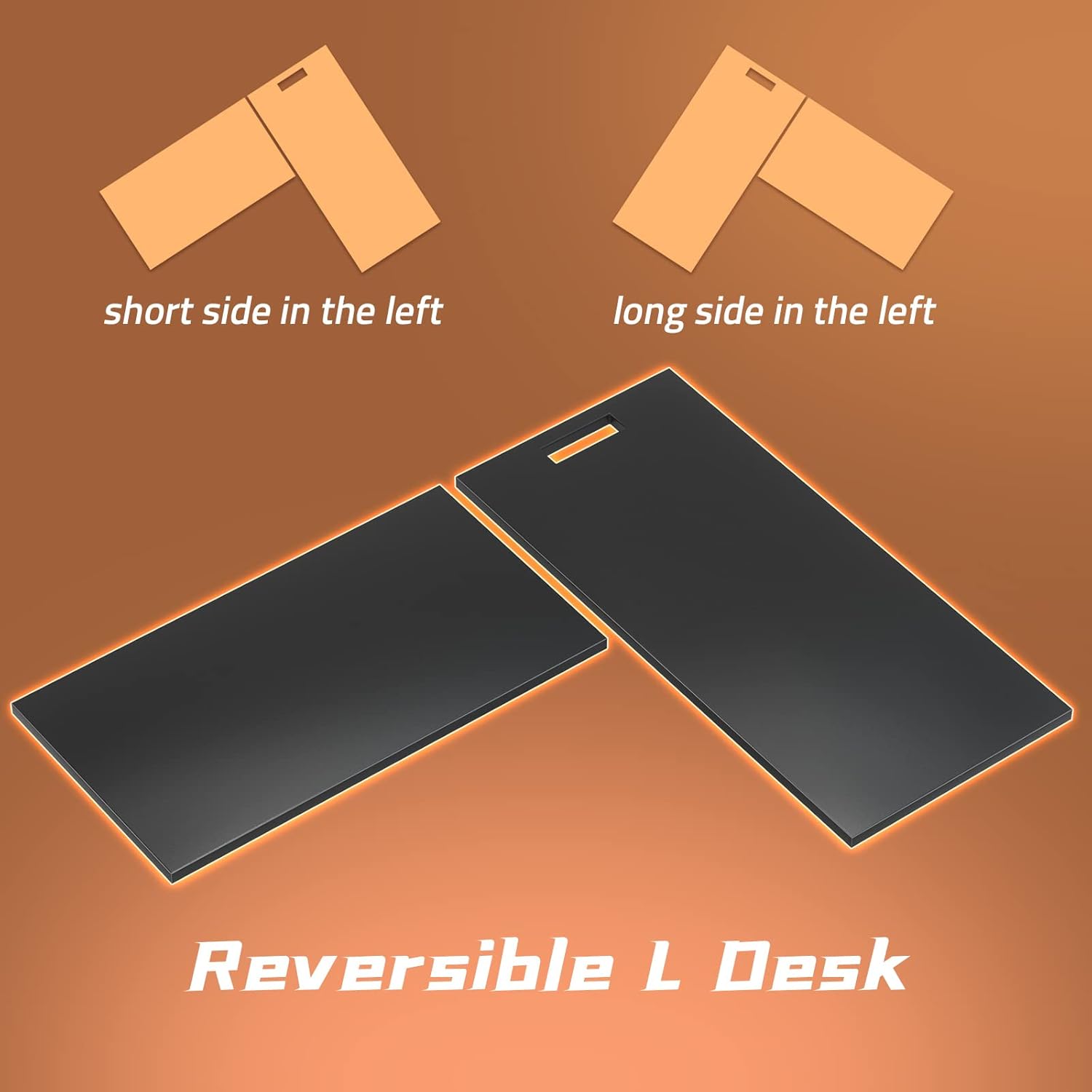
The desk can be assembled with the long side on either the left or right.

Desk dimensions for planning your space.
Operating Instructions
Built-in Power Outlets and USB Ports
The desk features a recessed power strip with 3 standard AC outlets (125V/12A) and 3 USB ports (5V/2A) for convenient charging of electronic devices. The power cord is 6.5 feet long.
- Connect the desk's main power cord to a wall outlet.
- Plug your devices into the available AC outlets or USB ports.
- Ensure devices are compatible with the provided voltage and amperage.

Recessed power strip for convenient device charging.
Monitor Stand
The integrated monitor stand elevates your display to an ergonomic height, promoting better posture and reducing strain on your neck and back.

Monitor stand helps maintain proper sitting posture.
Headphone Hook and Cup Holder
The desk includes a headphone hook and a cup holder, which can be installed on either the left or right side of the desk. These accessories help keep your workspace organized and your beverages secure.

Headphone hook and cup holder for organization.
Maintenance
Regular maintenance will help prolong the life and appearance of your GreenForest L Shaped Gaming Desk.
- Cleaning: Wipe the desktop and metal frame with a soft, damp cloth. Avoid using harsh chemicals or abrasive cleaners, as these can damage the finish.
- Spills: Immediately wipe up any spills to prevent staining or damage to the engineered wood surface.
- Tighten Fasteners: Periodically check and tighten all screws and fasteners to ensure the desk remains stable.
- Electrical Components: Ensure the power outlets and USB ports are free from dust and debris. Do not attempt to disassemble or repair the electrical components yourself.
Troubleshooting
If you encounter any issues with your desk, refer to the following common problems and solutions:
- Desk Instability:
Solution: Check all screws and bolts to ensure they are securely tightened. Ensure the desk is placed on a level surface. The desk features anti-slip and noise-free pads on the legs for stability. - Power Outlets Not Working:
Solution: Verify that the desk's main power cord is securely plugged into a functional wall outlet. Check if the devices you are trying to charge are properly connected to the power strip. Test the wall outlet with another device to confirm it is supplying power. - Damaged Components:
Solution: If any part of the desk is damaged during shipping or assembly, do not proceed with assembly or use. Contact customer support for replacement parts.
Specifications
| Feature | Detail |
|---|---|
| Brand | GreenForest |
| Model Number | SPEAR-S-SH-BK |
| Product Dimensions (D x W x H) | 18.9"D x 50.4"W x 29.5"H |
| Color | Black |
| Material | Engineered Wood (Top), Metal (Base) |
| Special Feature | Reversible L-Shape, Built-in Power Outlets (3 AC, 3 USB), Monitor Stand, Headphone Hook, Cup Holder |
| Power Outlets | 3 AC Outlets (125V/12A) |
| USB Ports | 3 USB Ports (5V/2A) |
| Power Cord Length | 6.5 feet |
| Item Weight | 43.1 Pounds (19.55 kg) |
| Maximum Weight Recommendation | 100 Pounds (45.3 kg) |
| Assembly Required | Yes |
Product Overview
The GreenForest L Shaped Gaming Desk is designed to optimize your workspace with its versatile features. Below is a visual representation of the desk in a typical setup.

Overall view of the GreenForest L Shaped Gaming Desk.

The desk integrated into a home office setup.
Product Video
Watch this video for a visual overview of the GreenForest L Shaped Computer Desk with Power Outlet, highlighting its features and reversible design.
Official product video showcasing the GreenForest L Shaped Computer Desk.
Warranty & Support
Warranty Information
This GreenForest L Shaped Gaming Desk comes with a Limited Warranty. Please refer to the warranty card included in your product packaging for specific terms, conditions, and duration of coverage. The warranty typically covers manufacturing defects under normal use.
Customer Support
For any questions, assistance with assembly, troubleshooting, or warranty claims, please contact GreenForest customer support. Contact information can typically be found on the product packaging, the warranty card, or the official GreenForest website.
When contacting support, please have your model number (SPEAR-S-SH-BK) and purchase information readily available.