
MOOKEENONE 72+A045900000
MOOKEENONE Telephone Ringer User Manual
Model: 72+A045900000
1. Introduction
Thank you for choosing the MOOKEENONE Telephone Ringer. This device is designed to amplify your telephone's ringing volume and provide a visual flashing light indicator for incoming calls. It is particularly useful in noisy environments or for individuals with hearing impairments.
Please read this manual carefully before installation and operation to ensure proper use and longevity of your device.
2. Product Features
- High/Low ring volume switches for adjustable sound.
- Increases telephone ringer volume in loud environments.
- Assists hearing-impaired individuals in recognizing incoming calls.
- Integrated flashing light to indicate calls, useful in quiet settings or for visual alerts.
- Durable plastic construction.
- Compact size: 97mm x 58mm x 25mm.
- White color with a rear hole design for easy hanging.
3. Package Contents
Upon unpacking, please ensure all items are present and in good condition:
- 1 x MOOKEENONE Telephone Ringer
4. Setup and Installation
Follow these steps to properly install your telephone ringer:
-
Identify Ports: Locate the two telephone ports on the back of the ringer unit. One is for the incoming telephone line, and the other is for connecting your telephone.
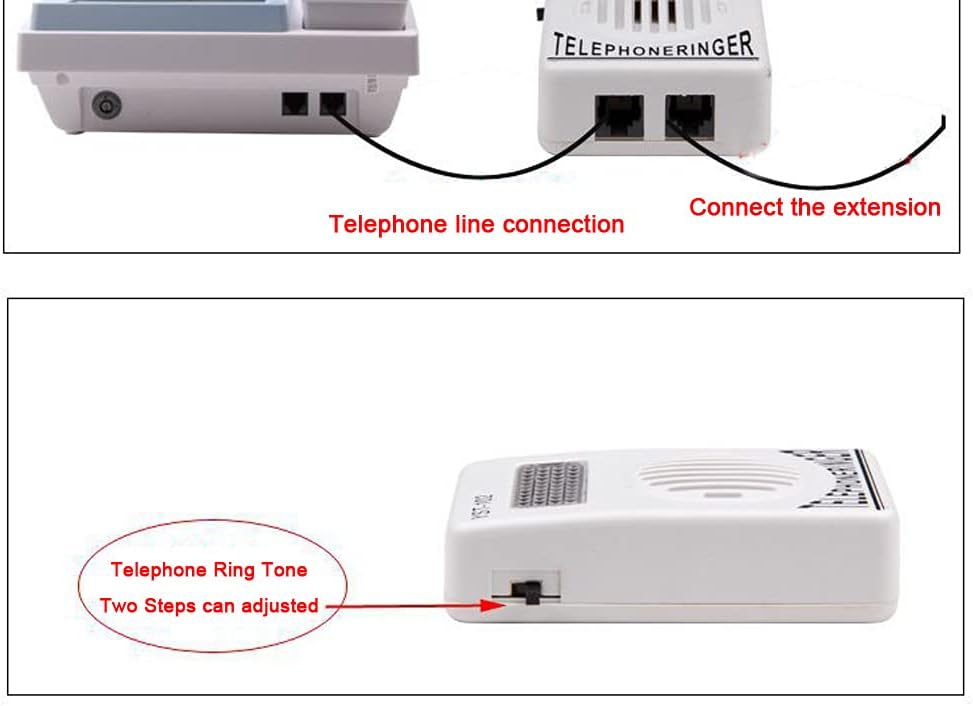
Figure 4.1: Connection Diagram. This image illustrates how to connect the telephone line to the ringer and then connect your telephone to the ringer's extension port.
- Connect Incoming Line: Connect the telephone line (from your wall jack) to the "C/O ring" input jack on the ringer.
- Connect Telephone: Connect your telephone's cord to the "Telephone" output jack on the ringer.
-
Adjust Volume: On the side of the ringer, locate the High/Low switch. Select your desired ring volume level.

Figure 4.2: Volume Adjustment Switch. This image shows the side of the ringer unit with the two-position switch for adjusting the ring tone volume between high and low settings.
-
Mounting (Optional): The ringer features a rear hole design for hanging. You can mount it on a wall or other suitable surface using a screw (not included) if desired.
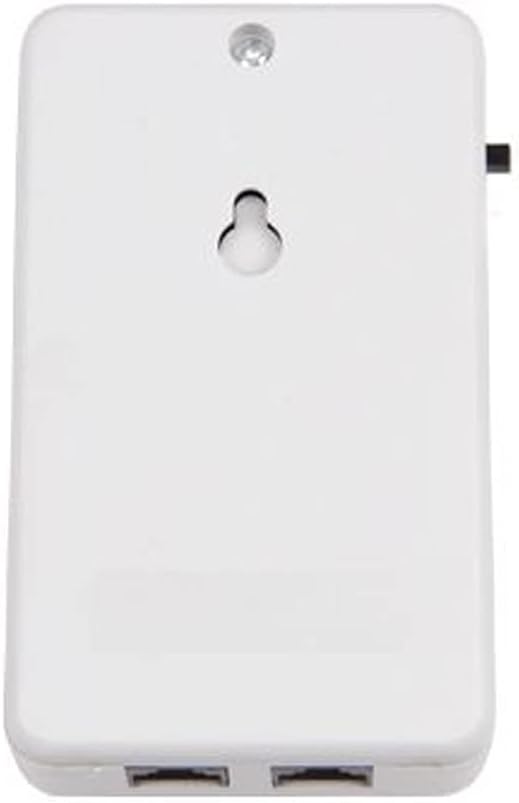
Figure 4.3: Rear Hanging Hole. This image displays the back of the telephone ringer, highlighting the keyhole-shaped slot designed for wall mounting.
5. Operating Instructions
Once installed, the MOOKEENONE Telephone Ringer operates automatically:
- When an incoming call is detected, the ringer will produce an amplified sound according to the selected High/Low setting.
- Simultaneously, the integrated strobe light on the top of the unit will flash, providing a visual alert.
- The device does not require external power; it draws power directly from the telephone line.

Figure 5.1: MOOKEENONE Telephone Ringer. This image shows the overall design of the white telephone ringer unit, featuring the speaker grille and the clear strobe light cover on top.
6. Care and Maintenance
To ensure the longevity and optimal performance of your MOOKEENONE Telephone Ringer, follow these simple maintenance guidelines:
- Cleaning: Wipe the unit with a soft, dry cloth. Do not use liquid cleaners, aerosols, or harsh chemicals, as these may damage the surface or internal components.
- Environment: Keep the ringer in a dry place, away from direct sunlight, excessive heat, and moisture.
- Handling: Avoid dropping the unit or subjecting it to strong impacts.
7. Troubleshooting
If you encounter any issues with your telephone ringer, please refer to the following common problems and solutions:
| Problem | Possible Cause | Solution |
|---|---|---|
| No ring sound or flashing light. |
|
|
| Ring sound is too low. | Volume switch set to "Low". | Set the volume switch on the side of the unit to "High". |
| Flashing light not working. |
|
|
8. Specifications
| Brand | MOOKEENONE |
| Model Number | 72+A045900000 |
| Material | Plastic |
| Dimensions (L x W x H) | 97mm x 58mm x 25mm (approx. 10cm x 6cm x 2.6cm) |
| Color | White |
| Power Source | Telephone Line Powered (No external power required) |
| Features | Adjustable High/Low Ringer Volume, Flashing Strobe Light, Wall Mountable |

Figure 8.1: Product Dimensions. This image provides a visual representation of the telephone ringer's approximate dimensions: 10cm in length, 6cm in width, and 2.6cm in height.
9. Warranty and Support
Information regarding warranty and specific support contacts is not available in the provided product details. For any issues or inquiries, please refer to your point of purchase or the seller's contact information.
Please note that product specifications and appearance may vary slightly due to continuous product improvement. Images and descriptions in this manual are for reference only.
Ask a question about this manual
Ask about setup, troubleshooting, compatibility, parts, safety, or missing instructions. Manuals+ will review the question and use this page’s manual context to help answer it.