
1. Safety Information
Always read and understand all safety warnings, instructions, illustrations, and specifications provided with this power tool. Failure to follow all instructions listed below may result in electric shock, fire, and/or serious injury.
General Power Tool Safety Warnings
- Work Area Safety: Keep work area clean and well lit. Cluttered or dark areas invite accidents. Do not operate power tools in explosive atmospheres, such as in the presence of flammable liquids, gases or dust. Power tools create sparks which may ignite the dust or fumes.
- Electrical Safety: Power tool plugs must match the outlet. Never modify the plug in any way. Do not use any adapter plugs with earthed (grounded) power tools. Unmodified plugs and matching outlets will reduce risk of electric shock.
- Personal Safety: Stay alert, watch what you are doing and use common sense when operating a power tool. Do not use a power tool while you are tired or under the influence of drugs, alcohol or medication. A moment of inattention while operating power tools may result in serious personal injury.
- Tool Use and Care: Do not force the power tool. Use the correct power tool for your application. The correct power tool will do the job better and safer at the rate for which it was designed. Disconnect the plug from the power source and/or remove the battery pack, if detachable, from the power tool before making any adjustments, changing accessories, or storing power tools.
2. Product Overview
The HiKOKI DV18DC is an 18V cordless hammer drill driver designed for heavy-duty applications, offering high power and advanced features for efficient and safe operation.

Figure 2.1: HiKOKI DV18DC Hammer Drill Driver with included accessories: two batteries, a rapid charger, and a side handle.
Key Features:
- Strong and High Power: Optimized motor specifications and strengthened inverter circuit enable continuous tightening of structural screws, which were previously difficult, more than 6 times compared to conventional models.
- Compact Body: Head length of 190mm. Overall dimensions (with BSL36A18X battery): Length 190mm x Height 269mm x Width 70mm.
- Adjustable Side Handle: Features an 11-step angle adjustable side handle for optimal positioning in various work environments. The shortened length improves maneuverability.
- Reactive Force Control (RFC) Function: Equipped with a gyro sensor that automatically stops the motor when a specified angle is detected, mitigating excessive tool swing.
- 22-Stage Clutch: Allows for easy adjustment of tightening torque to suit different tasks.
- Keyless Chuck: Gripping diameter of 13mm for quick and easy bit changes.
3. What's in the Box
Your HiKOKI DV18DC package includes the following items:
- HiKOKI DV18DC Hammer Drill Driver Unit
- Battery (BSL36A18X) x 2
- Rapid Charger (with cooling function)
- Carrying Case
- Battery Cover x 2
- Side Handle
Figure 3.1: All standard accessories included with the DV18DC model.
4. Setup
4.1 Charging the Battery
- Connect the rapid charger to a suitable power outlet.
- Insert the BSL36A18X battery pack into the charger. Ensure it clicks into place.
- The charger's indicator light will show the charging status. Refer to the charger's specific manual for detailed light indications.
- Once fully charged, remove the battery from the charger.
4.2 Attaching the Battery
- Align the charged battery pack with the battery slot on the drill handle.
- Slide the battery into the slot until it locks securely with a click.
- To remove, press the battery release button(s) and slide the battery out.
4.3 Attaching the Side Handle
The side handle provides additional control and stability, especially during heavy-duty tasks.
- Loosen the side handle clamp by rotating it counter-clockwise.
- Slide the handle onto the front of the drill body, behind the chuck.
- Adjust the handle to your desired angle (11 positions available) and position for comfortable and secure grip.
- Tighten the clamp by rotating it clockwise until the handle is firmly secured.

Figure 4.1: Adjusting and attaching the side handle for optimal grip and control.
5. Operating Instructions
5.1 Selecting Mode and Torque
- Drilling Mode: Rotate the mode selector ring to the drill icon for standard drilling operations.
- Hammer Drilling Mode: Rotate the mode selector ring to the hammer icon for drilling into masonry or concrete.
- Screwdriving Mode: Rotate the mode selector ring to the screw icon. Adjust the torque clutch ring (22 stages available) to the desired setting. Lower numbers are for smaller screws and softer materials, higher numbers for larger screws and harder materials.
5.2 Inserting and Removing Bits
- To insert a bit, rotate the chuck counter-clockwise until the jaws are open wide enough.
- Insert the bit fully into the chuck.
- Rotate the chuck clockwise to tighten the jaws securely around the bit. Ensure the bit is centered and firmly gripped.
- To remove a bit, rotate the chuck counter-clockwise to loosen the jaws and pull the bit out.
5.3 Reactive Force Control (RFC) Function
The RFC function enhances safety by automatically stopping the motor if the tool experiences sudden, excessive rotation (kickback) during operation. This is detected by an internal gyro sensor.

Figure 5.1: RFC function automatically stops the motor to prevent excessive tool swing.
Note: The RFC function may not activate under all working conditions or circumstances. Always maintain a firm grip on the tool and ensure it does not swing excessively. If the operator changes posture suddenly during operation, RFC may activate.
6. Maintenance
6.1 General Cleaning
- Always disconnect the battery pack before cleaning.
- Wipe the tool's exterior with a soft, damp cloth. Do not use harsh chemicals or abrasive cleaners.
- Keep ventilation openings clear of dust and debris to prevent overheating. Use compressed air if necessary.
6.2 Battery Care
- Store batteries in a cool, dry place away from direct sunlight and extreme temperatures.
- Do not store fully discharged batteries for extended periods. Charge them periodically to maintain battery health.
- Avoid dropping or subjecting batteries to impact.
6.3 Storage
- When not in use, store the drill driver and its accessories in the provided carrying case to protect them from dust and damage.
- Store the tool in a secure location out of reach of children.
7. Troubleshooting
If you encounter issues with your HiKOKI DV18DC, refer to the following common problems and solutions:
| Problem | Possible Cause | Solution |
|---|---|---|
| Tool does not start | Battery not charged or improperly inserted. | Ensure battery is fully charged and securely inserted. |
| Reduced power or performance | Low battery charge; incorrect mode/torque setting; dull bit. | Recharge battery; adjust mode/torque; replace or sharpen bit. |
| Tool stops unexpectedly (RFC activation) | Sudden kickback detected; operator posture change. | Re-evaluate working conditions; maintain firm grip; adjust posture carefully. |
| Chuck not holding bit securely | Chuck not tightened sufficiently; bit shank is dirty or damaged. | Tighten chuck firmly; clean or replace bit. |
If the problem persists after trying these solutions, please contact HiKOKI customer support or an authorized service center.
8. Specifications
| Feature | Specification |
|---|---|
| Brand | HiKOKI |
| Model Number | DV18DC |
| Product Dimensions | 22.9 x 6 x 12.2 cm (Length x Width x Height) |
| Weight | 6.83 Kilograms |
| Color | Green, Black, White (Customizable with color plates) |
| Power Source | Battery Powered |
| Voltage | 18 Volts |
| Battery Type | Lithium Ion (BSL36A18X) |
| Max Rotational Speed | 2000 RPM |
| Max Chuck Size | 13 mm |
| Max Mortar Drilling Capacity | 20 mm |
| Max Wood Screw Capacity | φ12 x 100 mm |
| Clutch Settings | 22 stages |
| Side Handle Adjustment | 11 angles |
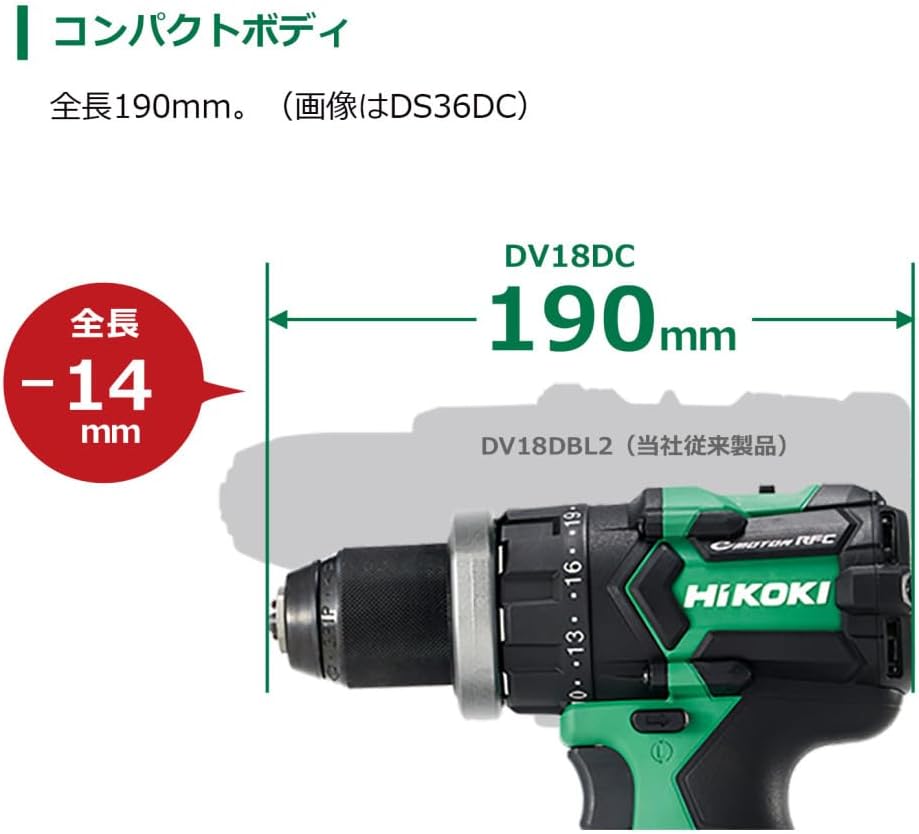
Figure 8.1: Compact body design with a head length of 190mm.

Figure 8.2: Performance comparison showing DV18DC's superior continuous tightening capability.
9. Warranty and Support
HiKOKI products are manufactured to the highest quality standards. For warranty information, please refer to the warranty card included with your product or visit the official HiKOKI website.
For technical support, service, or spare parts, please contact your local HiKOKI authorized dealer or customer service center. Ensure you have your product model number (DV18DC) and purchase details ready when contacting support.
You can also customize your tool's appearance with optional color plates (sold separately).

Figure 9.1: Optional color plates for personalizing your DV18DC.


