1. Introduction
This manual provides detailed instructions for the installation, operation, and maintenance of your BTF-LIGHTING FCOB Addressable WS2811 IC CCT COB LED Strip. This high-density, flexible LED strip offers tunable white light from 3000K to 6000K with a high Color Rendering Index (CRI) of 90+, and features addressable control for dynamic lighting effects. Please read this manual thoroughly before use to ensure proper and safe operation.
2. Package Contents
Verify that all items listed below are included in your package:
- 1x FCOB Addressable WS2811 IC CCT COB LED Strip (16.4FT / 5M)
- 1x 3PIN Male Connector
- 3x Fixed Clips
Note: A power supply and controller are NOT included and must be purchased separately.

Image: Contents of the BTF-LIGHTING FCOB LED Strip package, showing the coiled LED strip, a 3-pin male connector, and three fixed clips.
3. Safety Information
- Voltage: This LED strip operates on DC24V. Connecting it to an incorrect voltage (e.g., 12V or AC power) will damage the strip and may pose a safety hazard. Always verify your power supply output before connecting.
- Indoor Use Only: This product has an IP30 rating, meaning it is non-waterproof and intended for indoor use only. Avoid exposure to moisture or outdoor elements.
- Heat Dissipation: While designed for good heat dissipation, ensure adequate airflow around the strip, especially when installed in enclosed spaces, to prevent overheating and prolong lifespan.
- Cutting: Only cut the LED strip at designated cut marks to avoid damaging the circuit.
- Children and Pets: Keep the LED strip and all components out of reach of children and pets.
4. Setup and Installation
4.1 Components Overview

Image: Detailed view of the LED strip highlighting cut marks, the data direction indicator, the WS2811 IC chip (which controls 48 LEDs), and the strong double-sided adhesive backing.
4.2 Installation Steps
- Plan Your Layout: Determine the desired length and path for your LED strip. Ensure the surface is clean, dry, and smooth for optimal adhesive performance.
- Cut (if necessary): The LED strip can be cut at designated cut marks, which are spaced approximately 3.26 inches (83mm) apart. Use sharp scissors to ensure a clean cut.
- Connectors: The strip features 3PIN connectors on both ends (one male, one female) for easy connection to a controller or for linking multiple strips in series.
- Adhesion: Peel off the protective backing from the double-sided tape on the back of the LED strip. Carefully press the strip onto the desired surface, ensuring firm contact along its entire length. Use the provided fixed clips for additional security, especially on vertical or uneven surfaces.
- Wiring: Connect the LED strip to a compatible DC24V power supply and an addressable LED controller (e.g., K1000C, SP530E, or other DIY controllers). Ensure the data direction (indicated by an arrow on the strip) is correctly aligned with your controller's output.

Image: A person installing the LED strip, demonstrating the use of the strong double-sided adhesive and a fixed clip for secure mounting.
4.3 Wiring Diagram
The following diagram illustrates a typical wiring setup for the FCOB Addressable LED Strip with a controller and power supply.

Image: A wiring diagram detailing how to connect the LED strip. It shows an AC 110-220V input leading to a 24V power supply, which then connects to an SP530E controller. The controller's output is connected to the LED strip, indicating the 10mm width and 82.5mm cut interval.

Image: A parallel connection diagram illustrating how to connect multiple FCOB WS2811 IC CCT LED strips. It shows an AC 110-220V input to a power supply, which then feeds into an SP530E WiFi Alexa Bluetooth Controller. A signal amplifier is used to extend the signal to several LED strips connected in parallel, along with an RB2 RF Remote and BanlanX Bluetooth APP Control for operation.
5. Operating Instructions
5.1 Powering On
Once properly wired to a DC24V power supply and a compatible controller, power on the system. The LED strip should illuminate according to the controller's default settings.
5.2 Tunable White Light (CCT)
This FCOB LED strip allows for tunable white light, ranging from warm white (3000K) to cool white (6000K). Use your compatible controller to adjust the color temperature to your preference. The high CRI 90+ ensures accurate color rendering.
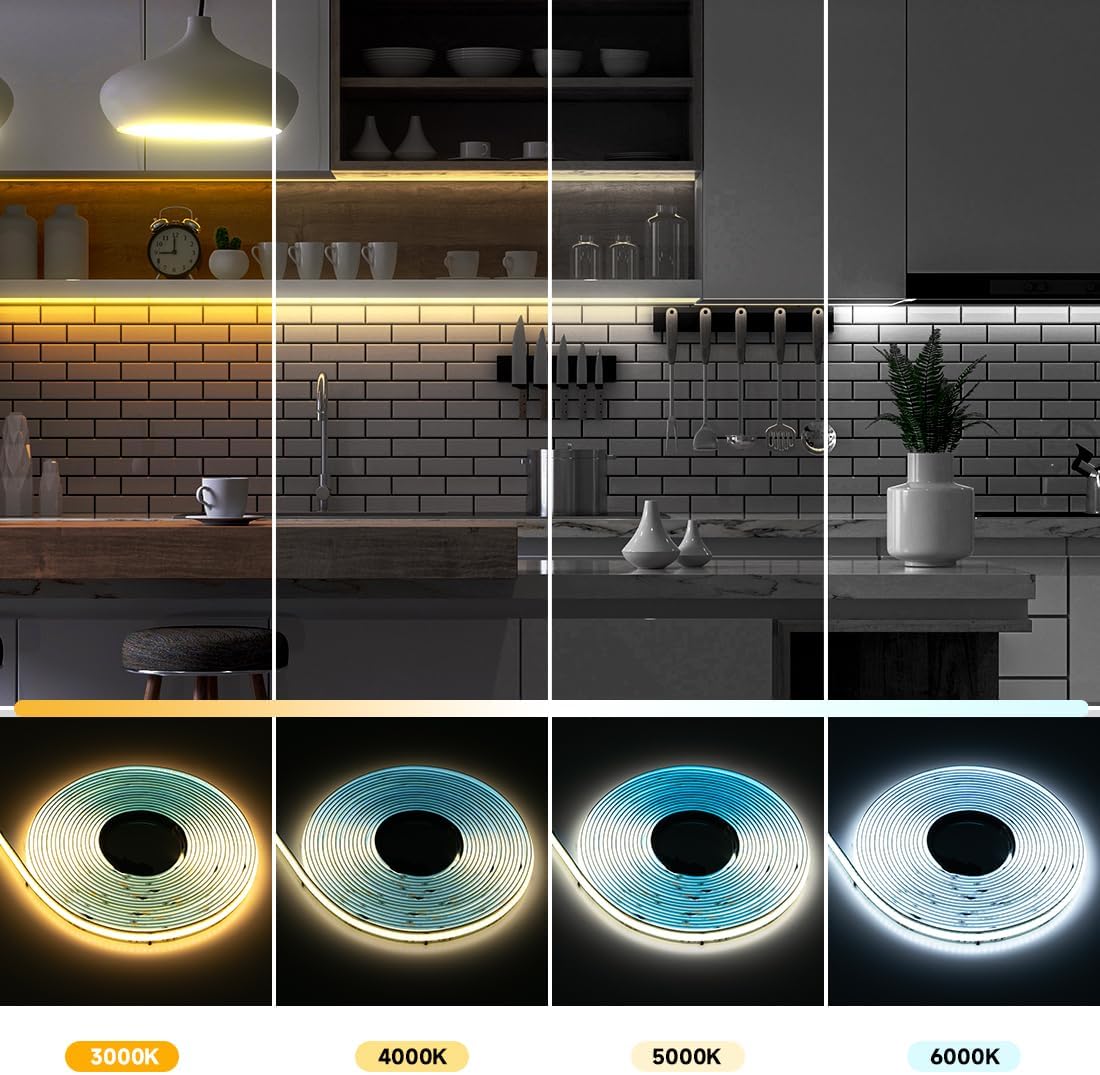
Image: A visual representation of the tunable white light feature, showing the LED strip emitting light at 3000K (warm), 4000K (natural), 5000K (cool), and 6000K (daylight) color temperatures.
5.3 Addressable Control and Chasing Effects
The integrated WS2811 IC chip allows for individual control of groups of 48 LEDs, enabling dynamic chasing effects, static colors, and various special lighting patterns. Refer to your controller's manual for specific programming and effect selection instructions. Compatible with programmable controllers like K1000C and other DIY controllers.

Image: A kitchen setting showcasing the dynamic 'Chasing Lighting Effects' possible with the FCOB LED strip, illustrating how light can move and change along the strip.
5.4 Dimmable Functionality
The LED strip is fully dimmable. Adjust the brightness level using your compatible controller to create the desired ambiance.

Image: An illustration of the dimmable functionality, showing a room's lighting transitioning from 10% to 100% brightness, highlighting the versatility of the LED strip.
5.5 Uniform Illumination
The FCOB (Flexible Chip on Board) technology provides a high-density, uniform light output without visible hot spots, offering a smooth and continuous glow compared to traditional SMD LED strips.

Image: A comparison demonstrating the superior uniformity of light from an FCOB CCT IC LED strip versus a traditional SMD LED strip, with the FCOB strip showing no visible individual LED dots.
5.6 Product Video
Video: This video demonstrates the Flexible Chip on Board (FCOB) technology, the WS2811 IC chip controlling 48 LEDs, the tunable white light capabilities (CCT), and various color chasing effects of the BTF-LIGHTING LED strip.
6. Maintenance
- Cleaning: Ensure the LED strip is powered off before cleaning. Gently wipe the surface with a soft, dry cloth. Do not use abrasive cleaners or solvents.
- Inspection: Periodically check the connections and the adhesive for any signs of wear or loosening. Re-secure with clips if necessary.
- Heat: Ensure the strip is not covered by materials that could trap heat, as this can reduce its lifespan.
7. Troubleshooting
- No Light:
- Check if the power supply is correctly connected and providing DC24V.
- Ensure the controller is properly connected to both the power supply and the LED strip.
- Verify the data direction arrow on the LED strip aligns with the controller's output.
- Confirm the controller is powered on and set to an active mode.
- Inconsistent or Flickering Light:
- Check all connections for looseness or poor contact.
- Ensure the power supply is sufficient for the length of the LED strip being used.
- Verify the controller settings are appropriate for the strip type (WS2811 IC).
- Incorrect Color Temperature:
- Adjust the CCT settings on your controller.
- Ensure your controller is compatible with CCT tunable white strips.
If issues persist, consult the manual for your specific LED controller or contact BTF-LIGHTING customer support.
8. Specifications
| Feature | Detail |
|---|---|
| Model Number | FCOB5M24VWS2811CCTIP30 |
| LED Type | FCOB Addressable WS2811 IC CCT COB LED |
| LED Density | 576 LEDs/meter (288 Warm White + 288 Cool White) |
| IC Chips | 12 ICs/meter (1 WS2811 IC controls 48 LEDs) |
| Length | 16.4 Feet (5 Meters) |
| Voltage | DC24V |
| Wattage | 80 Watts (Maximum Compatible) |
| Color Temperature | Tunable 3000K-6000K |
| CRI | 90+ |
| Ingress Protection (IP) Rating | IP30 (Non-waterproof, Indoor Use Only) |
| Strip Width | 10mm |
| Cut Mark Interval | 3.26 inches (83mm) |
| Average Life | 65,000 Hours |
| Control Method | Requires external controller (e.g., Remote, WiFi Alexa, Bluetooth APP) |
9. Warranty and Support
For warranty information or technical support, please contact BTF-LIGHTING directly through their official channels or the retailer where the product was purchased. Keep your purchase receipt as proof of purchase.


