
ALPOWL YS104
ALPOWL Mini Karaoke Machine User Manual
Model: YS104
1. Introduction
This user manual provides detailed instructions for the ALPOWL Mini Karaoke Machine, Model YS104. This portable Bluetooth speaker with a retro radio appearance is designed for home parties, outdoor, and indoor use, offering features like one-click original sound cancellation and multiple voice effects. Please read this manual thoroughly before operation to ensure proper use and maintenance.
2. Safety Information
- Do not expose the device to water or excessive moisture.
- Avoid extreme temperatures.
- Do not disassemble or attempt to repair the device yourself. Refer to qualified service personnel.
- Use only the provided charging cable.
- Keep out of reach of small children.
- Ensure proper ventilation when in use.
3. Package Contents
Please check the box for the following items:
- 1 x ALPOWL Mini Karaoke Machine (Model YS104)
- 1 x Wireless Microphone
- 1 x Charging Cable
- 1 x User Manual

Image: Contents of the ALPOWL Mini Karaoke Machine package, including the speaker, wireless microphone, charging cable, and user manual.
4. Product Overview
Familiarize yourself with the main components of your ALPOWL Mini Karaoke Machine.
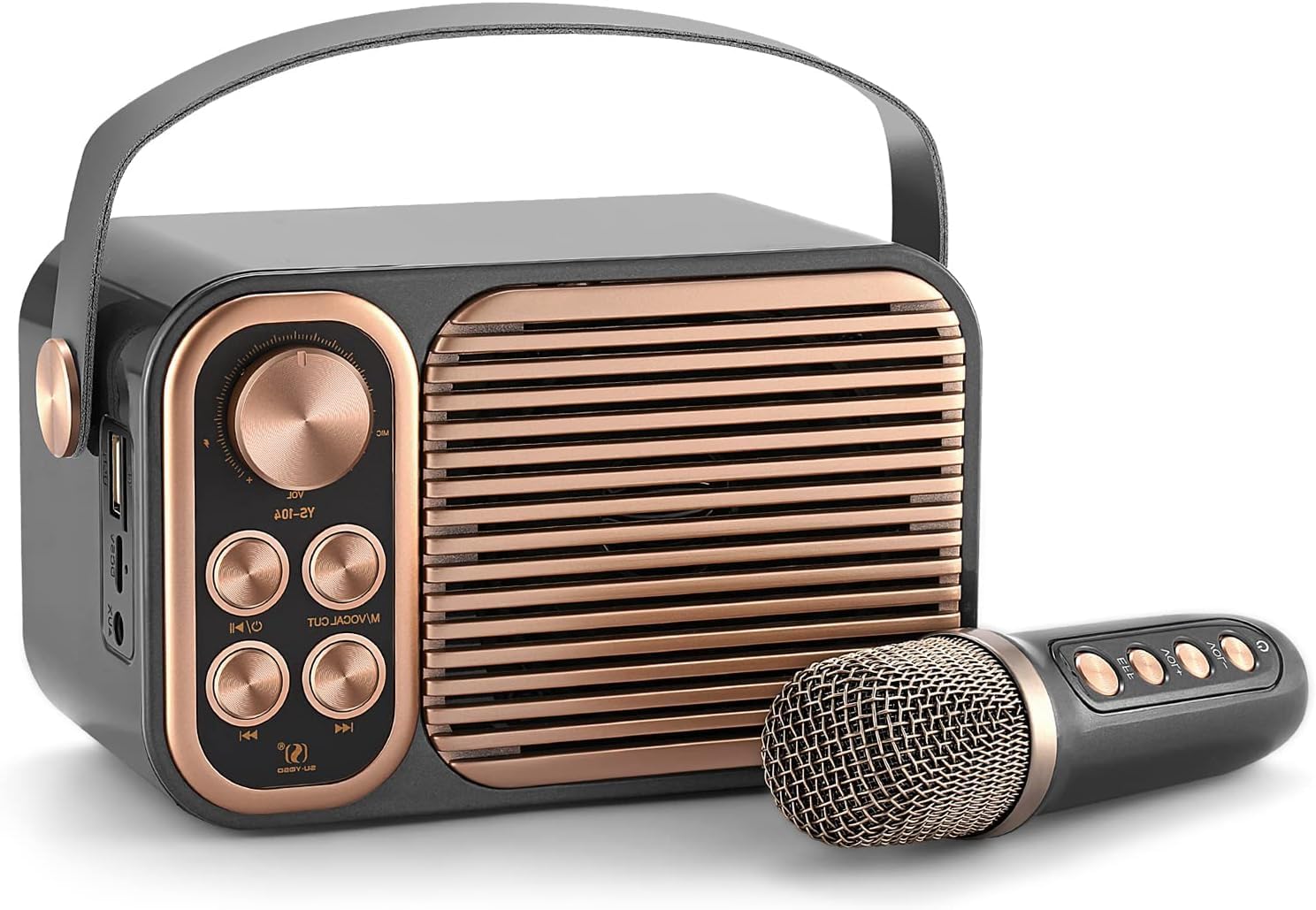
Image: Front view of the ALPOWL Mini Karaoke Machine and its accompanying wireless microphone.

Image: Detailed diagram of the control panel on the karaoke machine and the buttons on the wireless microphone, indicating their functions.
Main Unit Controls:
- VOL Knob: Adjusts the overall volume.
- M/VOCAL CUT Button: Long press to eliminate original vocals from a song.
- C/I Button: (Function not explicitly detailed, likely mode switch or similar)
- Power/Start Button: Turns the device on/off.
- Previous Track Button: Skips to the previous song.
- Next Track Button: Skips to the next song.
Microphone Controls:
- EFF Button: Cycles through sound effects.
- VOL+ Button: Increases microphone volume.
- VOL- Button: Decreases microphone volume.
- Power Button: Turns the microphone on/off.
5. Setup
5.1 Charging the Device
Before first use, fully charge the karaoke machine and the wireless microphone. Connect the provided charging cable to the charging port on the device and a suitable USB power adapter (not included). The battery indicator will show charging status.
Image: The karaoke machine is shown with an overlay indicating its 6-hour long battery life, suggesting portability and extended use.
5.2 Powering On/Off
To power on the karaoke machine, long press the Power/Start button on the main unit. To power off, long press the same button. For the microphone, long press its dedicated Power button.
6. Operating Instructions
6.1 Bluetooth Connection
The ALPOWL Mini Karaoke Machine uses Bluetooth 5.0 for wireless connection.
- Turn on the karaoke machine. It will automatically enter Bluetooth pairing mode.
- On your smartphone, tablet, or other Bluetooth-enabled device, search for "YS104" in the Bluetooth settings.
- Select "YS104" to pair. A confirmation sound will indicate a successful connection.

Image: The karaoke machine demonstrating various connectivity options such as Bluetooth for phones and tablets, TF card, AUX input, microphone input, and USB.
6.2 One-Click Original Sound Elimination
To remove the original vocals from a song and sing along to the instrumental track:
- While music is playing, long press the M/VOCAL CUT button on the main unit.
- The original singer's voice will be suppressed, leaving the accompaniment.
- Long press the button again to restore the original vocals.

Image: A close-up view highlighting the "M/VOCAL CUT" button on the karaoke machine, demonstrating its function for eliminating original sound.
6.3 Voice Effects
The wireless microphone features multiple voice effects to enhance your karaoke experience:
- Press the EFF button on the microphone to cycle through the available voice effects: Man, Lady, Kid, and Monster.
- Select the desired effect for a fun vocal transformation.

Image: A family enjoying karaoke, with icons illustrating the various voice changer effects available on the microphone, including Baby, Monster, Female, Male, Original, and Karaoke.
6.4 Adjusting Volume
- Main Unit Volume: Rotate the VOL knob on the main unit to adjust the overall speaker volume.
- Microphone Volume: Use the VOL+ and VOL- buttons on the microphone to increase or decrease the microphone's output volume.
6.5 TWS Function (True Wireless Stereo)
If you have two ALPOWL Mini Karaoke Machines, you can pair them together for a true wireless stereo sound experience.

Image: An illustration demonstrating the True Wireless Stereo (TWS) function, where two ALPOWL karaoke machines are paired to provide surround sound from a single audio source like a smartphone or TV.
6.6 Video Demonstration
Video: A demonstration of the ALPOWL Mini Karaoke Machine's sound and voice effects. This video shows the device in operation, highlighting its audio capabilities and various sound modes.
7. Maintenance
- Cleaning: Wipe the device with a soft, dry cloth. Do not use abrasive cleaners or solvents.
- Storage: Store the karaoke machine in a cool, dry place away from direct sunlight and extreme temperatures.
- Battery Care: To prolong battery life, avoid fully discharging the battery frequently. Charge it regularly, even if not in use for extended periods.
8. Troubleshooting
| Problem | Possible Cause | Solution |
|---|---|---|
| Device does not power on. | Low battery. | Charge the device fully. |
| No sound from speaker. | Volume too low; Not connected via Bluetooth/AUX. | Increase volume; Ensure proper Bluetooth pairing or AUX connection. |
| Microphone not working. | Microphone off; Low microphone battery; Microphone volume too low. | Turn on microphone; Charge microphone; Increase microphone volume. |
| Bluetooth pairing failed. | Device too far; Interference; Incorrect pairing procedure. | Move device closer; Turn off other Bluetooth devices; Refer to Bluetooth connection steps. |
9. Specifications
| Feature | Detail |
|---|---|
| Model Number | YS104 |
| Brand | ALPOWL |
| Connectivity Technology | Bluetooth |
| Power Source | Battery Powered |
| Output Wattage | 10 Watts |
| Item Weight | 1.56 pounds (0.71 Kilograms) |
| Product Dimensions (L x W x H) | 6.69 x 3.94 x 5.71 inches |
| Battery Capacity | 2400mAh (Karaoke Speaker) |
| Battery Duration | Up to 6 hours |
| UPC | 767504320781 |

Image: An exploded view illustrating the internal components of the speaker, emphasizing its sound quality features like SSQVP EXTREME, HIFI Sound Quality, and 3D Surround Sound.
10. Warranty and Support
ALPOWL offers a half-year free replacement warranty for this product. For any questions or issues, please refer to the page tutorial, enclosed instructions, or contact our customer service team. We are available 7*24 online and will reply within 24 hours.
For further assistance, please visit the official ALPOWL store: ALPOWL Store on Amazon
Related documentsYS104

Ask a question about this manual
Ask about setup, troubleshooting, compatibility, parts, safety, or missing instructions. Manuals+ will review the question and use this page’s manual context to help answer it.