
1. Introduction
The VIHELM SW-7500A is a portable, multi-functional gas analyzer designed to detect four critical gases simultaneously: Oxygen (O2), Hydrogen Sulfide (H2S), Carbon Monoxide (CO), and Combustible Gas (LEL). This device is engineered to provide real-time monitoring and alarming for potential gas hazards in various industrial and domestic environments, ensuring user safety.
This instruction manual provides essential information for the proper setup, operation, maintenance, and troubleshooting of your SW-7500A gas analyzer. Please read this manual thoroughly before using the device to ensure safe and effective operation.
2. Safety Information
Always adhere to the following safety guidelines to prevent injury or damage to the device:
- Read and understand all instructions in this manual before operation.
- Do not attempt to repair or modify the device. Refer all servicing to qualified personnel.
- Ensure the device is regularly calibrated according to manufacturer recommendations to maintain accuracy.
- Operate the device within the specified temperature and humidity ranges to avoid malfunction.
- Protect the device from severe impacts, drops, and exposure to water or corrosive substances.
- Do not block the gas inlet or sensor openings during operation.
- Dispose of the battery and device according to local regulations.
3. Package Contents
Verify that all items are present in the package:
- VIHELM SW-7500A 4-in-1 Gas Analyzer x 1
- USB Type-C Charging Cable x 1
- User Manual x 1
4. Product Overview
The SW-7500A features a robust design with an intuitive interface for easy operation and clear data visualization.
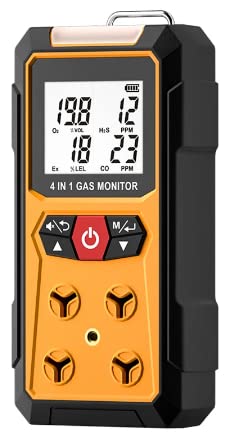
Figure 4.1: Front view of the VIHELM SW-7500A Gas Analyzer, showing the display and control buttons.
4.1. Components
- LCD Display: Shows real-time gas concentrations, battery status, and other operational information.
- Control Buttons: Power button (red), navigation/mode buttons (black arrows).
- Gas Inlet/Sensor Openings: Located on the front and sides for gas sampling.
- Audible Alarm: Speaker for sound alerts.
- Visual Alarm: LED indicators for visual alerts.
- Vibration Motor: Provides tactile alerts.
- Charging Port: USB Type-C port for recharging the internal battery.
- Belt Clip/Lanyard Loop: For convenient carrying.
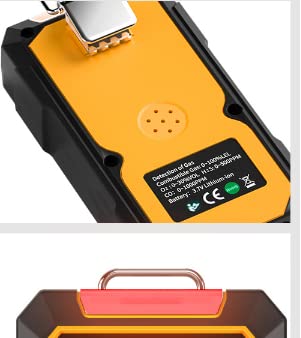
Figure 4.2: Back view of the gas analyzer with product label details and a top view showing the integrated handle/clip.
4.2. Display Information
The LCD display provides real-time readings for each detected gas, along with battery status and other indicators. The main screen typically shows:
- O2: Oxygen concentration in %VOL.
- H2S: Hydrogen Sulfide concentration in PPM.
- CO: Carbon Monoxide concentration in PPM.
- LEL: Combustible gas concentration in %LEL.
- Battery Indicator: Shows current battery level.
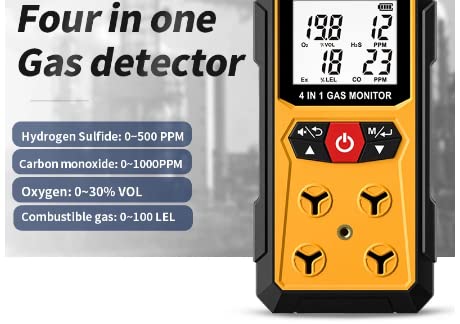
Figure 4.3: Display showing gas readings and typical detection ranges for Hydrogen Sulfide, Carbon Monoxide, Oxygen, and Combustible gas.
5. Setup
5.1. Charging the Device
Before initial use, fully charge the device. The SW-7500A is equipped with a DC 3.7V 1800mAh lithium battery.
- Locate the USB Type-C charging port on the side of the device.
- Connect the provided USB Type-C cable to the device and the other end to a compatible USB power adapter (DC 5V 1A recommended).
- The battery indicator on the LCD display will show charging status. Allow the device to charge until the battery icon indicates a full charge.
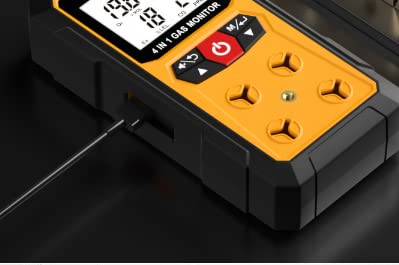
Figure 5.1: The USB Type-C charging port located on the side of the device.
5.2. Initial Power-On
After charging, the device is ready for use.
- Press and hold the red power button (labeled with a power symbol) for a few seconds until the display illuminates.
- The device will perform a self-test and warm-up sequence. During this time, gas readings may fluctuate.
- Once the self-test is complete, the device will enter normal monitoring mode, displaying real-time gas concentrations.
6. Operating Instructions
6.1. Power On/Off
- Power On: Press and hold the red power button until the device powers on.
- Power Off: Press and hold the red power button until the device powers off. Confirm shutdown if prompted.
6.2. Gas Monitoring
Once powered on and warmed up, the SW-7500A continuously monitors the ambient air for the four specified gases. The response time for detection is typically less than 30 seconds.
- Ensure the device is positioned in an area where gas detection is required, with sensor openings unobstructed.
- Monitor the LCD display for real-time gas concentration readings.
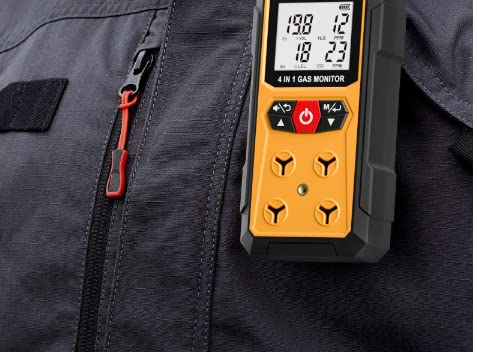
Figure 6.1: The gas analyzer can be conveniently clipped to clothing for personal monitoring.
6.3. Alarm Functions
The device is equipped with multiple alarm mechanisms to alert users to hazardous gas levels:
- Audible Alarm: An 85-decibel sound alarm (at 30 cm distance) will activate.
- Visual Alarm: Bright light-emitting diodes (LEDs) will flash.
- Vibration Alarm: The device will vibrate to provide a tactile alert.
Alarms are triggered when gas concentrations exceed predefined low or high alarm points. The LCD display will also indicate an over-set limit condition.
6.4. Navigating Menus and Settings
Use the black navigation/mode buttons (left and right arrows) to access and adjust device settings, such as alarm thresholds, calibration modes, and historical data (if available). Refer to the on-screen prompts for specific menu navigation.
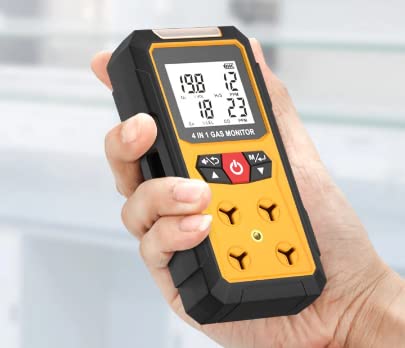
Figure 6.2: The compact design allows for comfortable handheld operation.
7. Maintenance
7.1. Calibration
Regular calibration is crucial for maintaining the accuracy and reliability of the gas analyzer. The frequency of calibration depends on usage, environmental conditions, and regulatory requirements. Consult local safety standards and manufacturer guidelines for recommended calibration intervals.
- Perform zero calibration in fresh air (free of target gases).
- Perform span calibration using certified calibration gases at known concentrations.
- Refer to the device's menu for specific calibration procedures.
7.2. Cleaning
Keep the device clean to ensure proper operation and sensor performance.
- Wipe the exterior of the device with a soft, damp cloth.
- Do not use abrasive cleaners, solvents, or immerse the device in water.
- Ensure sensor openings are free from dust and debris.
7.3. Battery Care
To prolong battery life:
- Charge the device fully before storage if it will not be used for an extended period.
- Avoid completely draining the battery frequently.
- Store the device in a cool, dry place.
The sensor life is approximately 2 years, after which replacement may be necessary for continued accuracy.
8. Troubleshooting
| Problem | Possible Cause | Solution |
|---|---|---|
| Device does not power on | Low battery; device malfunction. | Charge the device fully. If problem persists, contact support. |
| Inaccurate gas readings | Needs calibration; sensor obstruction; sensor end-of-life. | Perform calibration. Clean sensor openings. Consider sensor replacement if old. |
| Alarm not activating | Gas levels below alarm threshold; alarm settings incorrect; device malfunction. | Verify gas levels. Check alarm settings in the menu. Contact support if necessary. |
| Display shows "Low Battery" | Battery level is critically low. | Charge the device immediately. |
9. Specifications
Detailed technical specifications for the VIHELM SW-7500A Gas Analyzer:
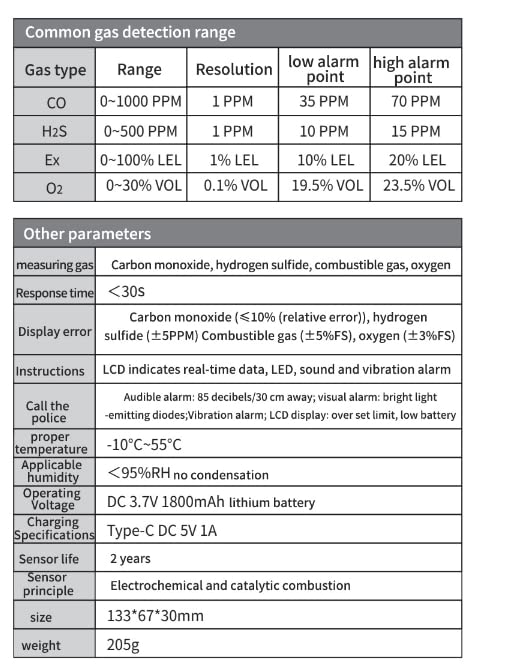
Figure 9.1: Comprehensive table of gas detection ranges, alarm points, and other device parameters.
| Common Gas Detection Range | |||||
|---|---|---|---|---|---|
| Gas Type | Range | Resolution | Low Alarm Point | High Alarm Point | |
| CO | 0~1000 PPM | 1 PPM | 35 PPM | 70 PPM | |
| H2S | 0~500 PPM | 1 PPM | 10 PPM | 15 PPM | |
| Ex (Combustible Gas) | 0~100% LEL | 1% LEL | 10% LEL | 20% LEL | |
| O2 | 0~30% VOL | 0.1% VOL | 19.5% VOL | 23.5% VOL | |
| Other Parameters | |
|---|---|
| Measuring Gas | Carbon monoxide, hydrogen sulfide, combustible gas, oxygen |
| Response Time | <30s |
| Display Error | Carbon monoxide (≤10% (relative error)), hydrogen sulfide (±5PPM) Combustible gas (±5%FS), oxygen (±3%FS) |
| Instructions (Alarm) | LCD indicates real-time data, LED, sound and vibration alarm |
| Audible Alarm Level | 85 decibels / 30 cm away |
| Visual Alarm | Bright light-emitting diodes |
| Vibration Alarm | Vibration alarm |
| LCD Display Indications | Over set limit, low battery |
| Operating Temperature | -10°C ~ 55°C |
| Applicable Humidity | <95% RH no condensation |
| Operating Voltage | DC 3.7V 1800mAh lithium battery |
| Charging Specifications | Type-C DC 5V 1A |
| Sensor Life | 2 years |
| Sensor Principle | Electrochemical and catalytic combustion |
| Size | 133*67*30mm |
| Weight | 205g |

Figure 9.2: Examples of environments where the VIHELM SW-7500A Gas Analyzer can be utilized for safety monitoring.
10. Warranty and Support
VIHELM products are manufactured to high-quality standards. For information regarding warranty coverage, technical support, or service, please refer to the warranty card included with your product or contact VIHELM customer service directly. Please have your model number (SW-7500A) and purchase information ready when contacting support.
For the latest information and support resources, please visit the official VIHELM website (website address not provided in input).