
DEERC HC805
DEERC HC805 Mini RC Boat User Manual
Model: HC805 (CADE4-HC805)
1. Introduction
Thank you for purchasing the DEERC HC805 Mini RC Boat. This remote control boat is designed for exciting water competitive games and tumbling stunts, suitable for use in pools and bathtubs. It operates on a 2.4GHz frequency, ensuring stable control. Please read this manual thoroughly before operation to ensure proper use and maintenance.

Figure 1.1: DEERC HC805 Mini RC Boat with its remote control and water game accessories.

Figure 1.2: The boat features two propellers and double motors for efficient propulsion.
2. Package Contents
Ensure all items listed below are present in your package:
- 1 x DEERC HC805 Mini RC Boat
- 1 x 2.4GHz Remote Control
- 2 x Water Balls
- 1 x Ball-Push Part (attachment for boat)
- 1 x USB Charging Cable
- 1 x User Manual (this document)

Figure 2.1: Illustration of the complete package contents.
3. Components Overview
3.1. RC Boat
- Propellers: Located at the rear, responsible for propulsion.
- Water Sensor Switch: Ensures the boat only operates when in water, enhancing safety.
- Charging Port: For connecting the USB charging cable.
- Battery Compartment: Houses the boat's internal battery.
- Ball-Push Attachment Point: For attaching the water ball accessory.

Figure 3.1: Key features on the underside of the RC Boat.
3.2. Remote Control
- Left Joystick: Controls forward/backward movement.
- Right Joystick: Controls left/right steering.
- Tumbling Stunt Button: Activates 360° tumbling stunts.
- Steering Angle Switch Button: Adjusts the boat's turning angle for flexible steering.
- Power Indicator Light: Shows remote control status and low battery warning for the boat.
- Battery Compartment: For installing remote control batteries (not included, typically AA).
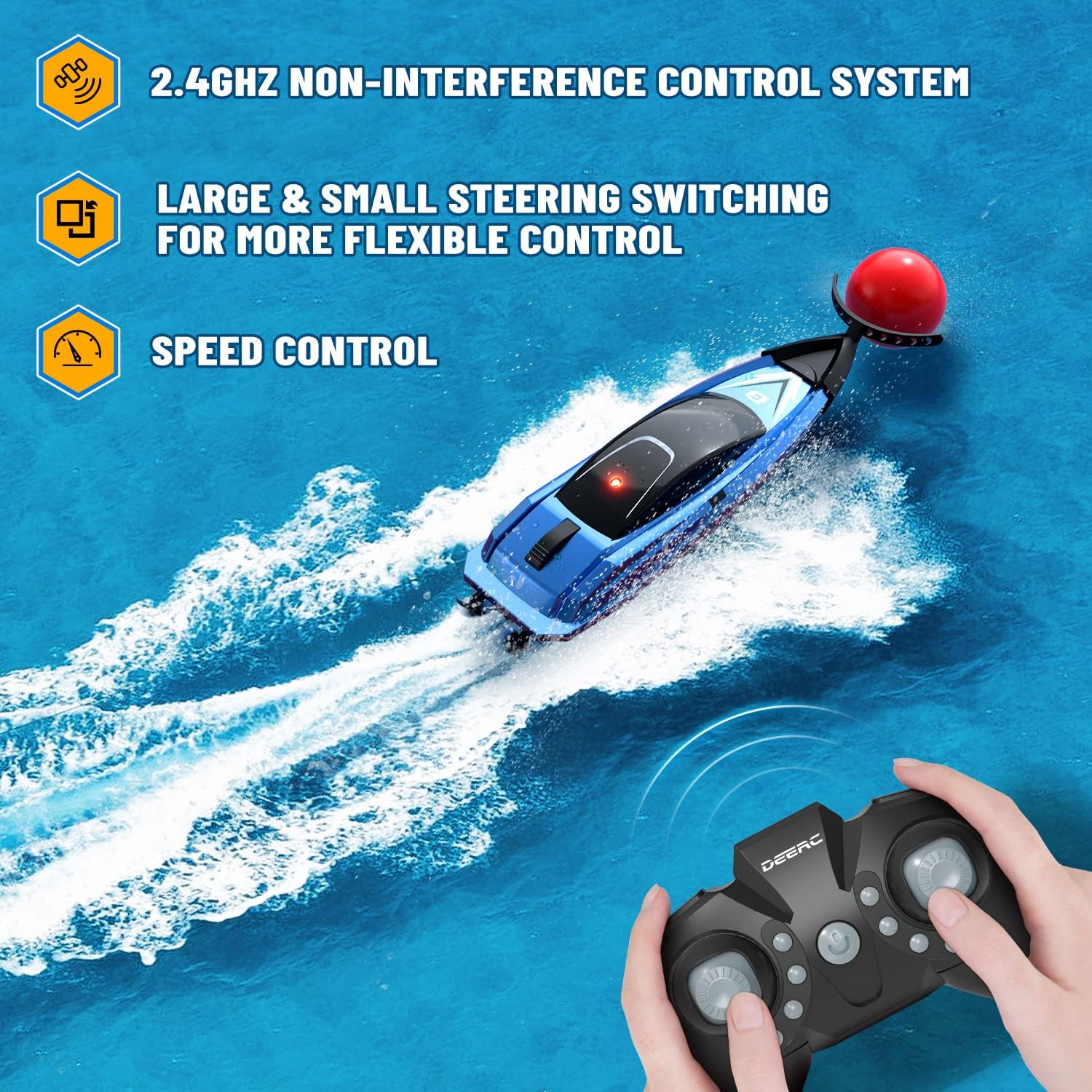
Figure 3.2: Remote Control layout and features.
4. Setup
4.1. Charging the RC Boat Battery
- Locate the charging port on the boat.
- Connect the USB charging cable to the boat's charging port.
- Plug the other end of the USB cable into a USB power adapter (e.g., computer USB port, wall charger).
- The indicator light on the USB cable will show charging status (e.g., red light on during charging, off when fully charged).
- Charging typically takes approximately 40 minutes. Do not overcharge.
Note: The boat has overcharge protection to prevent battery damage.
4.2. Installing Remote Control Batteries
- Open the battery compartment cover on the back of the remote control.
- Insert 2 x AAA batteries (not included) into the compartment, ensuring correct polarity (+/-).
- Close the battery compartment cover securely.
5. Operating Instructions
5.1. Powering On and Pairing
- Ensure the boat battery is charged and remote control batteries are installed.
- Place the boat in water. The boat is equipped with a water sensor and will only activate when submerged.
- Turn on the remote control. The indicator light on the remote will flash.
- Once the boat is in water and the remote is on, they will automatically pair. The remote's indicator light will become solid when pairing is successful.
Important: The boat's motor will not operate out of water for safety reasons.
5.2. Basic Controls
- Forward: Push the left joystick forward.
- Backward: Pull the left joystick backward.
- Turn Left: Push the right joystick left.
- Turn Right: Push the right joystick right.
5.3. Special Features
5.3.1. Tumbling Stunts (360° Flip)
Press the Tumbling Stunt button on the top right of the remote control. The boat will perform a 360° roll forward, adding dynamic fun to your play.

Figure 5.1: The boat executing a tumbling stunt.
5.3.2. Flexible Steering / Steering Angle Switching
Use the Steering Angle Switch button on the remote to adjust the boat's turning sensitivity. This allows for more precise and flexible control, especially in confined spaces like bathtubs or small pools.
5.3.3. Water Competitive Game (Water Soccer)
Attach the ball-push part to the front of the boat. Use the boat to push the included water balls around in a pool or bathtub. This feature allows for competitive play with one or multiple boats.

Figure 5.2: Engaging in the water ball game.

Figure 5.3: The boat is suitable for various water environments.
5.4. Low Battery Warning
When the boat's battery is low, the indicator light on the remote control will begin to flash. This signals that it's time to bring the boat back for recharging.
6. Safety Precautions
- Always operate the boat in clear water, free from debris or obstacles.
- Do not operate the boat in saltwater.
- Keep fingers, hair, and loose clothing away from the propellers when the boat is in operation.
- Do not touch the propellers immediately after use as they may be warm.
- Supervise children during operation. Recommended age is 8 years and up.
- Do not disassemble or modify the boat or remote control.
- Ensure the charging port cover is securely closed before placing the boat in water.
- If the boat is not in use, remove it from the water and turn off the remote control.
- Do not expose the boat or remote control to extreme temperatures.
7. Maintenance
- After each use, gently wipe the boat dry with a soft cloth.
- Ensure no water remains in the battery compartment or charging port area.
- Store the boat and remote control in a cool, dry place away from direct sunlight.
- If not using for an extended period, remove batteries from the remote control.
- Regularly check the propellers for any tangled debris (e.g., hair, string) and carefully remove it.
8. Troubleshooting
| Problem | Possible Cause | Solution |
|---|---|---|
| Boat does not move in water. |
|
|
| Remote control indicator light flashes continuously. |
|
|
| Boat moves erratically or turns on its own. |
|
|
| Short operating time. |
|
|
9. Specifications
| Feature | Detail |
|---|---|
| Model Number | CADE4-HC805 |
| Product Dimensions | 10.49 x 3.2 x 2.21 cm (4.13 x 1.26 x 0.87 inches) |
| Item Weight | 160 g |
| Material Type | Plastic |
| Control Frequency | 2.4GHz |
| Recommended Age | 8 years and up |
| Special Features | Water Sensor Switch, Low-Battery Reminder, Overcharge Protection, 360° Tumbling Stunts, Flexible Steering, Water Competitive Game |

Figure 9.1: Dimensions of the DEERC HC805 Mini RC Boat.
10. Warranty and Support
For warranty information or technical support, please contact DEERC customer service directly. Refer to the contact information provided on the product packaging or the official DEERC website.
Website: www.deerc.com (Please note: This is an example link. Verify the official DEERC support website for accurate information.)
Ask a question about this manual
Ask about setup, troubleshooting, compatibility, parts, safety, or missing instructions. Manuals+ will review the question and use this page’s manual context to help answer it.