
1. Introduction
Thank you for purchasing the ASHATA Portable MP3 Player. This device is designed to provide high-fidelity lossless sound playback in a compact and portable form factor, ideal for various activities such as running, business, and travel. This manual will guide you through the setup, operation, and maintenance of your new MP3 player.
2. Product Features
- HiFi Lossless Sound: Experience superior audio quality with lossless decoding.
- Expandable Storage: Supports memory cards up to 64GB (not included) for extensive music libraries.
- Compact and Portable: Lightweight design suitable for on-the-go use.
- Long Battery Life: Designed for extended playback, allowing prolonged immersion in music.
- Versatile Use: Perfect for listening to music, audiobooks, or other audio content during various activities.
3. Package Contents
Please check the package carefully to ensure all items are present:
- 1 x ASHATA MP3 Player
- 1 x USB Cable
Note: Memory card is not included and must be purchased separately.
4. Product Overview and Controls
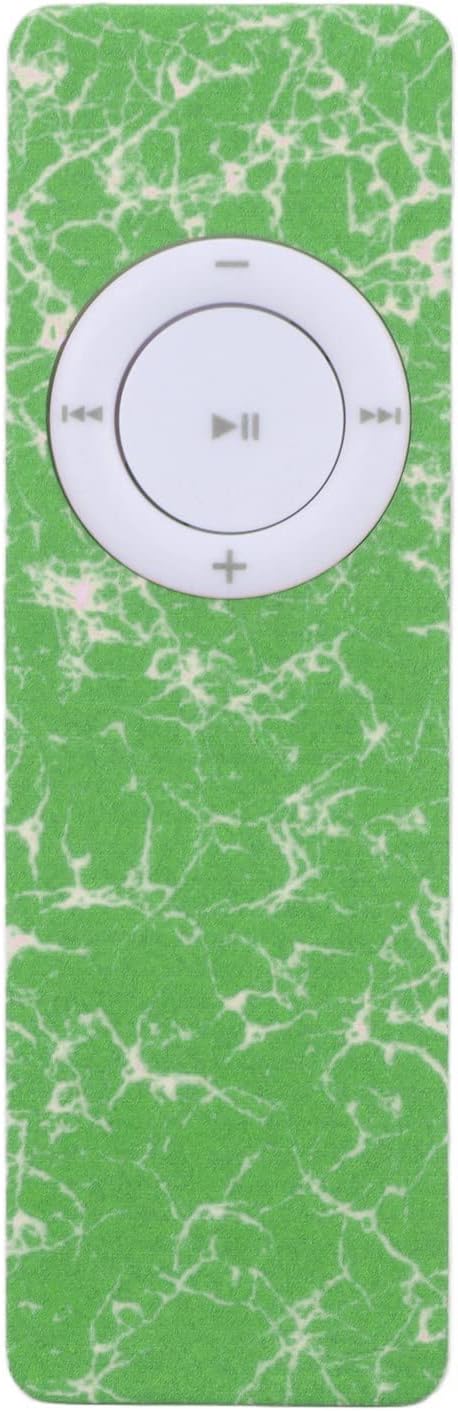
Figure 4.1: Front view of the ASHATA MP3 Player, showcasing its green marbled design and central white control panel with play/pause, skip, and volume buttons.

Figure 4.2: Side view of the MP3 player, highlighting the micro USB charging port and the memory card slot for expandable storage.

Figure 4.3: Back view of the MP3 player, featuring the integrated speaker and the 'on/off' slide switch.
Control Buttons:
- Play/Pause Button (▶⏸): Located at the center of the control panel. Press once to play, press again to pause.
- Previous Track (◀◀): Press to go to the beginning of the current track or to the previous track.
- Next Track (▶▶): Press to skip to the next track.
- Volume Up (+): Press to increase the playback volume.
- Volume Down (-): Press to decrease the playback volume.
- Power Switch: Slide to 'on' to power on the device, slide to 'off' to power off.
5. Setup
5.1 Charging the Device
Before first use, fully charge your MP3 player. Connect the provided USB cable to the MP3 player's USB port and the other end to a USB power adapter (not included) or a computer's USB port.
- A charging indicator light (if present) will typically illuminate during charging and turn off or change color when fully charged.
- Charging time may vary.
5.2 Inserting a Memory Card
The ASHATA MP3 Player requires a memory card (MicroSD/TF card) to store music files. It supports cards up to 64GB.
- Locate the memory card slot on the side of the MP3 player (refer to Figure 4.2).
- Gently insert the memory card into the slot with the gold contacts facing down (or as indicated by a small icon next to the slot) until it clicks into place.
- To remove the memory card, gently push it inwards until it clicks, then release, and it will spring out.
5.3 Transferring Music Files
To transfer music files to your MP3 player:
- Ensure a memory card is inserted into the MP3 player.
- Connect the MP3 player to your computer using the provided USB cable.
- The MP3 player should appear as a removable disk drive on your computer.
- Open the drive and drag and drop your desired MP3 audio files into the memory card's folder.
- Once files are transferred, safely eject the removable disk from your computer before disconnecting the USB cable.
6. Operating Instructions
6.1 Powering On/Off
- To power on, slide the 'on/off' switch (located on the back) to the 'on' position.
- To power off, slide the 'on/off' switch to the 'off' position.
6.2 Playing Music
- Ensure the device is powered on and a memory card with music files is inserted.
- Press the central Play/Pause button (▶⏸) to begin playback.
- Press the Play/Pause button again to pause playback.
6.3 Adjusting Volume
- Press the '+' button to increase the volume.
- Press the '-' button to decrease the volume.
6.4 Skipping Tracks
- Press the '▶▶' button to skip to the next track.
- Press the '◀◀' button to go to the previous track. A quick press will go to the beginning of the current track; a second quick press will go to the previous track.
7. Maintenance
- Cleaning: Use a soft, dry cloth to clean the surface of the MP3 player. Do not use liquid cleaners or aerosols.
- Storage: Store the device in a cool, dry place away from direct sunlight and extreme temperatures.
- Battery Care: To prolong battery life, avoid fully discharging the battery frequently. Charge the device regularly, even if not in use for extended periods.
- Water Exposure: This device is not waterproof. Avoid exposure to water or high humidity.
- Handling: Handle the device with care to prevent drops or impacts that could damage internal components.
8. Troubleshooting
| Problem | Possible Cause | Solution |
|---|---|---|
| Device does not power on. | Battery is depleted. Power switch is off. | Charge the device using the USB cable. Slide the power switch to 'on'. |
| No music plays. | No memory card inserted. No music files on memory card. Volume is too low. Files are not in supported format (MP3). | Insert a memory card. Transfer MP3 files to the memory card. Increase volume using the '+' button. Ensure files are MP3 format. |
| Computer does not recognize the device. | Loose USB connection. Driver issue (rare). | Ensure USB cable is securely connected to both the device and the computer. Try a different USB port or cable. Restart computer. |
| Poor sound quality. | Low quality audio files. Speaker obstruction. | Use higher quality MP3 files. Ensure the speaker grille is clean and unobstructed. |
9. Specifications
| Feature | Detail |
|---|---|
| Model Name | ASHATAsqfcknze5h-11 |
| Brand | ASHATA |
| Connectivity Technology | USB |
| Memory Storage Capacity | Supports up to 64GB (Memory Card not included) |
| Built-in Battery | 180mAh Lithium Battery |
| Supported Audio Formats | MP3 |
| Compatible Devices | Laptop (for file transfer) |
| Package Dimensions | 13.31 x 7.59 x 1.19 cm |
| Item Weight | 23 g |
10. Warranty and Support
Specific warranty information for this product is not provided in the available data. For warranty claims or technical support, please contact the seller or manufacturer directly through the platform where the product was purchased.
You can visit the ASHATA Store for more information: ASHATA Store on Amazon