
EMOS P5660SH
EMOS P5660SH 2-in-1 Socket Thermostat and Timer Instruction Manual
Model: P5660SH
1. Introduction
The EMOS P5660SH 2-in-1 Socket Thermostat and Timer is designed for efficient control of heating and cooling appliances. This device combines thermostat and timer functionalities, allowing for precise temperature regulation and scheduled operation of various electrical systems. It is suitable for applications such as radiators, electric heaters, air conditioners, aquarium lighting, and terrarium heating, contributing to energy cost savings and enhanced comfort.
2. Safety Information
Please read and understand all safety instructions before using the device. Failure to follow these instructions may result in electric shock, fire, or personal injury.
- Ensure the device is correctly plugged into a grounded electrical outlet.
- Do not exceed the maximum load capacity of 16A / 3680W.
- Do not immerse the device in water or expose it to excessive moisture.
- Do not open or attempt to repair the device yourself. Refer all servicing to qualified personnel.
- Keep out of reach of children.
- Unplug the device from the wall socket before cleaning.
3. Package Contents
Verify that all components are present in the package:
- 1 x EMOS P5660SH 2-in-1 Socket Thermostat and Timer
- 1 x Instruction Manual (this document)
4. Product Overview
The EMOS P5660SH features a clear digital display and intuitive buttons for easy operation and programming. Below are images illustrating the device and its key features.

Figure 1: Front view of the EMOS P5660SH, showing the digital display with current room temperature, program number, and time. Buttons for TIME, PROG, BOOST, MODE, and +/- are visible below the display, with the power socket at the bottom.

Figure 2: Overview of key product features. This image highlights the temperature setting range (5-40°C), operating voltage (230V~), combined thermostat and timer functionality, and energy-saving capabilities.

Figure 3: Details of the multifunction socket. This image shows the maximum load capacity (16A, 3680W), heating and cooling modes, backlit display, and the inclusion of a 1x 3V CR2032 backup battery.
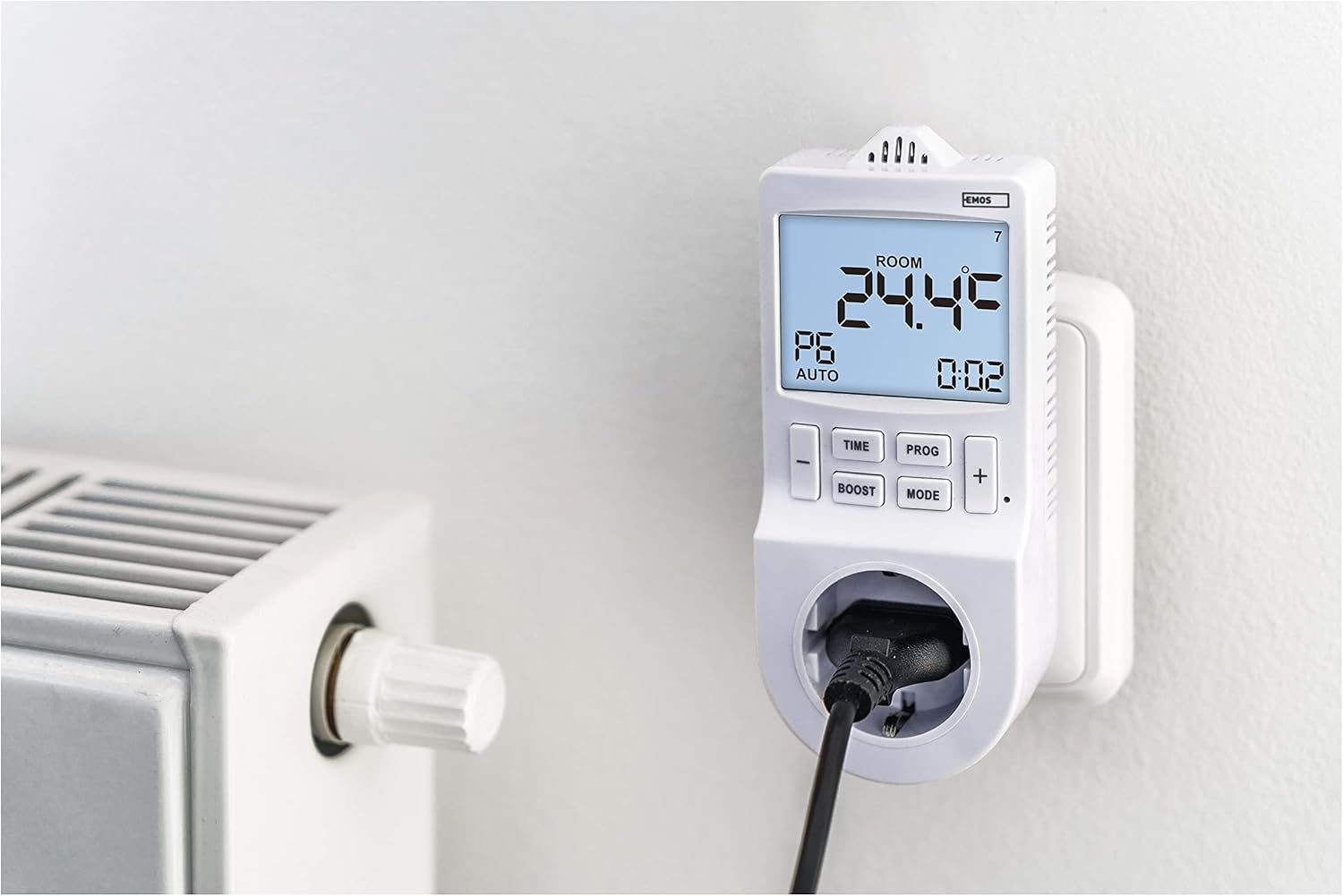
Figure 4: The EMOS P5660SH in use, plugged into a wall socket with an electric radiator connected. This demonstrates its application for controlling heating systems.
5. Setup
- Initial Power-Up: Plug the EMOS P5660SH into a standard 230V AC wall socket. The display will illuminate.
- Battery Installation (if not pre-installed): The device uses a CR2032 button cell battery for memory backup. If the display is blank or settings are lost after unplugging, install or replace the battery. Refer to the "Maintenance" section for details.
- Setting Current Time:
- Press and hold the TIME button until the hour digit flashes.
- Use the + or - buttons to adjust the hour.
- Press TIME again to move to minutes, then adjust with + or -.
- Press TIME again to set the day of the week (1-7, Monday-Sunday).
- Press TIME once more to confirm and exit time setting.
6. Operating Modes
The device offers two primary operating modes: Thermostat Mode and Timer Mode. Switch between modes using the MODE button.
6.1. Thermostat Mode
In Thermostat Mode, the device controls connected heating or cooling appliances based on the ambient temperature and your set temperature. It supports an adjustable temperature variance (hysteresis) for precise control.
- Heating Function: When the room temperature falls below the set temperature, the connected appliance (e.g., heater) will turn on.
- Cooling Function: When the room temperature rises above the set temperature, the connected appliance (e.g., air conditioner) will turn on.
- To set the desired temperature, press the + or - buttons. The display will show the set temperature briefly, then return to the current room temperature.
6.2. Timer Mode
In Timer Mode, the device functions as a programmable timer, switching the connected appliance on or off at specified times, independent of temperature. This is ideal for pool filtering, aquarium lighting, or holiday lighting.
- The timer function allows for up to 24 pre-programmed switching operations per day.
- Minimum switching duration is 1 minute.
7. Programming
The EMOS P5660SH allows for extensive programming to automate your climate control or appliance scheduling.
7.1. Setting Daily Programs (PROG)
The device supports up to 6 temperature changes per day (time programs) in Thermostat Mode, or 24 switching operations in Timer Mode.
- Press and hold the PROG button to enter programming mode. The display will show "P1" (Program 1).
- Use + or - to select the program number (P1-P6 for thermostat, P1-P24 for timer).
- Press PROG to set the start time for the selected program (hour then minute). Adjust with + or -.
- Press PROG to set the desired temperature (Thermostat Mode) or ON/OFF state (Timer Mode) for this program.
- Repeat for all desired programs. Press PROG repeatedly to cycle through settings or exit programming mode.
7.2. BOOST Function
The BOOST function allows for a temporary override of the current program, providing a quick burst of heating or cooling for a set duration. Press the BOOST button to activate and adjust its duration if applicable.
7.3. COUNTDOWN Function
The COUNTDOWN function enables you to set a specific time period after which the connected appliance will switch on or off. Consult the detailed manual for specific steps to set the countdown timer.
7.4. Summer Time Shift
The device includes a feature for adjusting to daylight saving time (summer time). Refer to the detailed manual for instructions on how to activate or deactivate this function.
8. Maintenance
The EMOS P5660SH requires minimal maintenance. The primary maintenance task is the replacement of the backup battery.
8.1. Backup Battery Replacement
The device uses one CR2032 button cell battery to retain programmed settings during power outages or when unplugged. If settings are frequently lost, the battery may need replacement.
- Unplug the device from the wall socket.
- Locate the battery compartment, usually on the back or side of the unit.
- Open the compartment cover.
- Remove the old CR2032 battery.
- Insert a new CR2032 battery with the correct polarity (+ side up).
- Close the battery compartment cover securely.
- Plug the device back into the wall socket. You may need to reset the current time and date.
Note: Dispose of old batteries responsibly according to local regulations.
9. Troubleshooting
If you encounter issues with your EMOS P5660SH, refer to the following common problems and solutions:
| Problem | Possible Cause | Solution |
|---|---|---|
| Device display is blank. | No power or faulty unit. | Ensure the device is securely plugged into a live wall socket. Check the wall socket with another appliance. If still blank, the unit may be faulty. |
| Settings are lost after unplugging or power outage. | Backup battery is dead or missing. | Replace the CR2032 backup battery. Refer to Section 8.1. |
| Connected appliance does not turn on/off as programmed. | Incorrect programming, wrong mode, or appliance issue. |
|
| Difficulty with configuration/programming. | Complexity of programming steps. | Carefully re-read Section 7 "Programming". Practice setting a simple program first. If issues persist, contact customer support. |
10. Specifications
| Feature | Detail |
|---|---|
| Model Number | P5660SH |
| Type | 2-in-1 Socket Thermostat and Timer |
| Power Source | Electrical (230V AC) |
| Voltage | 230 Volt |
| Max. Switching Current | 16 (4) A |
| Max. Load | 3680 W |
| Temperature Control Type | Digital |
| Temperature Setting Range | 5-40°C |
| Programmable Settings | Up to 6 temperature changes/day (thermostat), 24 switching operations/day (timer) |
| Minimum Switching Duration | 1 minute |
| Special Features | Programmable, Temperature Display, Backlit Display, BOOST, COUNTDOWN, Summer Time Ready |
| Backup Battery | 1 x CR2032 button cell (included) |
| Color | White |
| Dimensions (Package) | 20.8 x 9.8 x 9 cm; 280 g |
| Specific Use | Air conditioner, Electric baseboard heating, Infrared heating, Aquarium, Terrarium |
11. Warranty and Support
EMOS products are designed for reliability and performance. For warranty information, technical support, or service inquiries, please refer to the official EMOS website or contact your local EMOS distributor. Keep your purchase receipt as proof of purchase.
Related documentsP5660SH


Ask a question about this manual
Ask about setup, troubleshooting, compatibility, parts, safety, or missing instructions. Manuals+ will review the question and use this page’s manual context to help answer it.