
Rettru XD-64GB
Rettru XD Security Camera User Manual
Model: XD-64GB
1. Product Overview
The Rettru XD Security Camera is a compact, versatile surveillance device designed for indoor and outdoor use. It offers high-definition video recording, night vision capabilities, and smart motion detection. With both Wi-Fi and offline hotspot modes, it provides flexible monitoring options. The camera comes equipped with a 64GB SD card for local storage and supports optional cloud backup.

Image: The Rettru XD Security Camera, demonstrating its small, discreet form factor.
2. What's Included
Your Rettru XD Security Camera package includes the following components:
- 1 x Rettru XD Wireless Security Camera
- 1 x 64GB SD Card (pre-installed or separate)
- 1 x USB Charging Cable
- 1 x Mounting Base
- 1 x SD Card Reader
- 1 x Reset Tool
- 1 x User Manual (this document)

Image: Components included with the Rettru XD Security Camera, highlighting the camera and the 64GB SD card.
3. Product Features
- Super Compact Size: Designed for discreet placement in various environments such as home security, office, baby monitoring, pet monitoring, and vehicle surveillance.
- Wired and Wireless Operation: Provides 24/7 protection when plugged into a power source. Offers approximately 90 minutes of wireless use on battery power.
- Wi-Fi Remote Viewing: Allows live monitoring of your home, pets, or office from your smartphone. Supports 2.4GHz Wi-Fi networks only.
- Works Without Wi-Fi (Hotspot Mode): Functions as a hotspot camera for areas without Wi-Fi access. Connect directly to your phone for live viewing and playback, supporting continuous recording and motion detection.
- HD Video & Night Vision: Captures clear, high-definition video day and night. Infrared (IR) night vision enables monitoring in low-light conditions.
- Smart Motion Alerts: Sends instant notifications to your phone upon detecting movement. Detection zones can be customized to focus on specific areas.
- Local & Cloud Storage: Videos are securely stored on the included 64GB SD card. Optional cloud backup service is available for additional security and accessibility.
4. Setup Guide
4.1 Initial Charging
Before first use, fully charge the camera. Connect the camera to a USB power adapter (not included) or a computer USB port using the provided USB charging cable. The charging indicator light will show the charging status.
4.2 Inserting the SD Card
Locate the SD card slot on the camera. Gently insert the included 64GB SD card into the slot until it clicks into place. Ensure the card is inserted in the correct orientation.
4.3 App Download and Installation
To utilize the camera's full features, download the official companion application to your smartphone. Scan the QR code provided in the quick start guide (if applicable) or search for the app name in your device's app store. Follow the on-screen instructions to complete the installation.
4.4 Connecting to Wi-Fi
- Ensure your smartphone is connected to a 2.4GHz Wi-Fi network.
- Open the installed application and create an account or log in.
- Follow the in-app instructions to add a new device. This typically involves powering on the camera and scanning a QR code displayed on your phone with the camera's lens, or connecting to the camera's temporary Wi-Fi hotspot.
- Once connected, the camera will link to your home Wi-Fi network.

Image: Visual representation of the Wi-Fi remote viewing setup, showing connectivity between phone, router, and camera.
5. Operating Instructions
5.1 Live View
Open the companion app on your smartphone. Select your camera from the device list to access the live video feed. You can view real-time footage from anywhere with an internet connection.
5.2 Recording and Playback
The camera automatically records footage to the inserted SD card based on your settings (e.g., continuous recording, motion-triggered recording). To view recorded videos, navigate to the playback section within the app. You can browse by date and time to review past events.
5.3 Offline Mode (Hotspot)
For areas without Wi-Fi, the camera can create its own local Wi-Fi hotspot. Connect your smartphone directly to this hotspot (usually named after the camera's model or serial number). This allows for local live viewing and playback without an internet connection. Note that remote viewing is not possible in this mode.
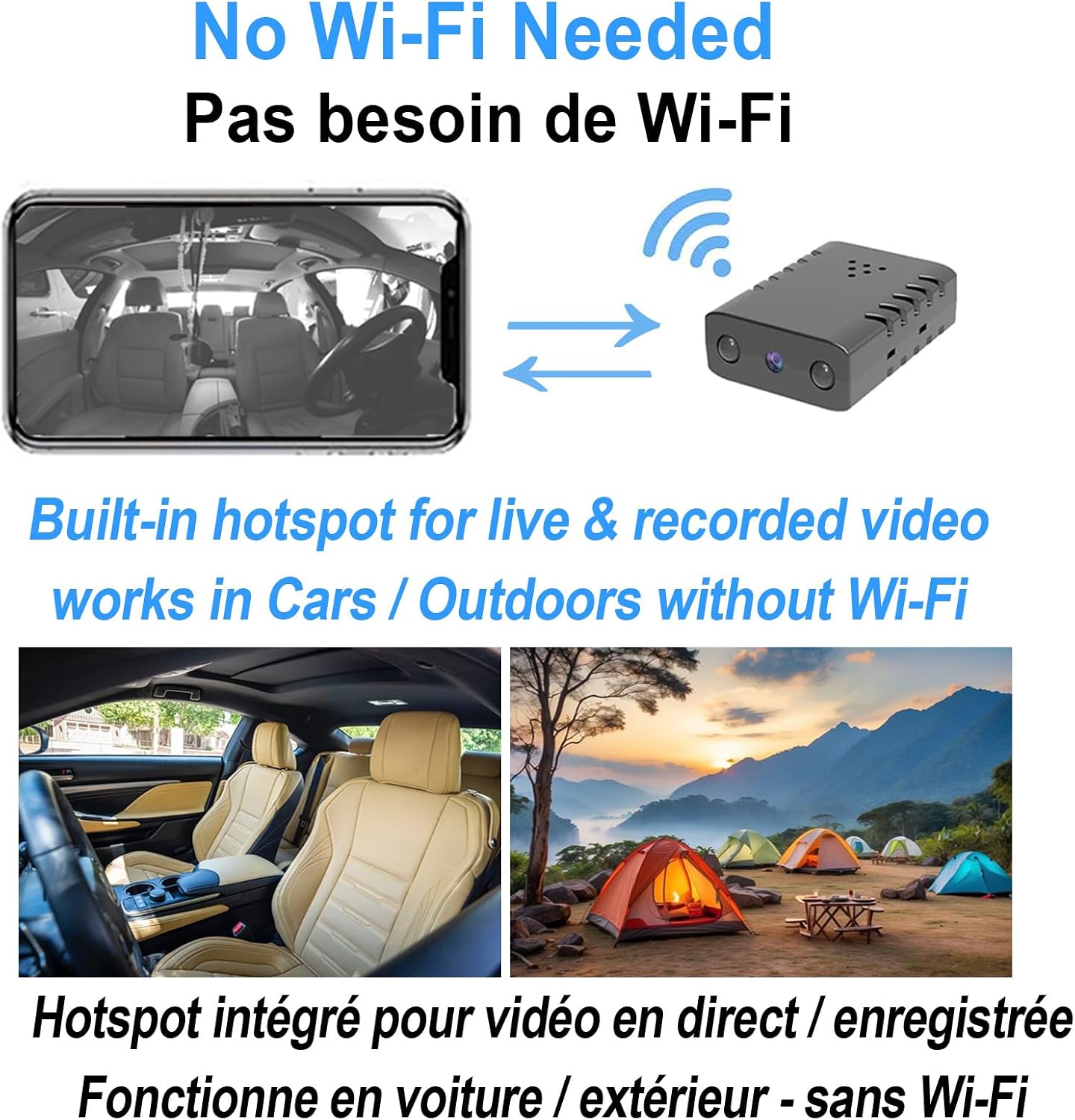
Image: Illustration of the camera's hotspot mode, enabling direct connection for use in cars or outdoors without external Wi-Fi.
6. Motion Detection and Alerts
The Rettru XD Security Camera features intelligent motion detection. When movement is detected within the camera's field of view, it can trigger recording and send instant push notifications to your smartphone.
6.1 Customizing Detection Zones
Within the app settings, you can define specific areas within the camera's view where motion detection should be active. This helps reduce false alarms from irrelevant movements outside critical zones.
6.2 Alert Sensitivity
Adjust the motion detection sensitivity level in the app to fine-tune how easily the camera triggers an alert. Higher sensitivity detects smaller movements, while lower sensitivity requires more significant motion.

Image: Demonstration of motion detection, showing how the camera identifies movement and sends alerts to your phone.
7. Storage Options
7.1 Local Storage (SD Card)
The camera comes with a 64GB SD card, providing ample space for recorded video footage. The storage capacity can hold up to 16 days of video footage, depending on recording settings and activity levels. The SD card reader is included for easy access to files on a computer.
7.2 Cloud Storage (Optional)
For enhanced security and accessibility, an optional cloud backup service is available. This service provides an alternative storage solution, protecting your footage even if the physical SD card is damaged or removed. Refer to the app for details on subscribing to cloud storage.

Image: Visual representation of the 64GB SD card for local storage and the cloud icon for optional cloud storage.
8. Maintenance
- Cleaning: Use a soft, dry cloth to clean the camera lens and body. Avoid using liquid cleaners or abrasive materials.
- Firmware Updates: Regularly check the companion app for available firmware updates. Keeping the firmware updated ensures optimal performance and security.
- Battery Care: For prolonged battery life, avoid extreme temperatures. If storing the camera for an extended period, charge it to about 50% before storage.
- SD Card Management: Periodically format the SD card through the app to maintain its performance and prevent data corruption. Back up important footage before formatting.
9. Troubleshooting
| Problem | Possible Cause | Solution |
|---|---|---|
| Camera not connecting to Wi-Fi. | Incorrect Wi-Fi password; camera too far from router; 5GHz Wi-Fi network used; app/firmware issues. |
|
| Poor video quality or unclear images. | Dirty lens; insufficient lighting; network bandwidth issues. |
|
| Battery drains quickly. | Frequent motion detection; continuous recording; cold environment. |
|
| SD card not recording or recognized. | Incorrectly inserted; corrupted card; full storage. |
|
10. Specifications
| Feature | Detail |
|---|---|
| Model Name | XD-64GB |
| Video Capture Resolution | 1080p |
| Colour | Black |
| Connectivity Technology | Wireless (Wi-Fi) |
| Wireless Communication | Wi-Fi (2.4GHz only) |
| Power Source | Battery Powered (1 Lithium Ion battery included) |
| Battery Life (Wireless) | Approx. 90 minutes |
| Special Features | HD Resolution, Local Recording (64GB SD Card), Motion Sensor, Night Vision, Portable |
| Night Vision Range | 8 Centimeters |
| Frame Rate | 30 frames per second |
| Storage | 64GB SD Card (included), Optional Cloud Storage |
| Mounting Type | Tabletop Mount |
| Installation Type | Freestanding |
| Material | Plastic |
| Item Weight | 80 g |
| Parcel Dimensions | 8.5 x 8 x 4.7 cm |
| Recommended Uses | Baby Monitoring, Indoor Security, Pet Monitoring |
| Indoor/Outdoor Usage | Indoor |
| Compatible Devices | Smartphone (Android controller type mentioned) |
11. Warranty and Support
11.1 Warranty Information
The Rettru XD Security Camera comes with a 12-month warranty from the date of purchase. This warranty covers manufacturing defects and malfunctions under normal use. Please retain your proof of purchase for warranty claims.
11.2 Customer Support
For technical assistance, troubleshooting, or warranty inquiries, please contact Rettru customer support. Refer to the contact information provided on the product packaging or the official Rettru website. When contacting support, please have your product model number (XD-64GB) and purchase details ready.
12. Important Safety Information
- Do not expose the camera to extreme temperatures, direct sunlight, or moisture.
- Use only the provided charging cable.
- Keep the camera and its accessories out of reach of children.
- Do not attempt to disassemble or modify the camera. This will void the warranty.
- Ensure proper ventilation when the camera is in operation, especially if plugged in for extended periods.
Related documentsXD-64GB

Ask a question about this manual
Ask about setup, troubleshooting, compatibility, parts, safety, or missing instructions. Manuals+ will review the question and use this page’s manual context to help answer it.