
SUNPOW MD04, MD08
SUNPOW Metal Detector MD04 & Pinpointer MD08 User Manual
Model: MD04 (Metal Detector), MD08 (Pinpointer)
Brand: SUNPOW
1. Introduction
Welcome to the SUNPOW Metal Detector MD04 and Pinpointer MD08 user manual. This guide provides detailed instructions for the assembly, operation, maintenance, and troubleshooting of your new metal detecting equipment. Please read this manual thoroughly before using the devices to ensure safe and effective operation.
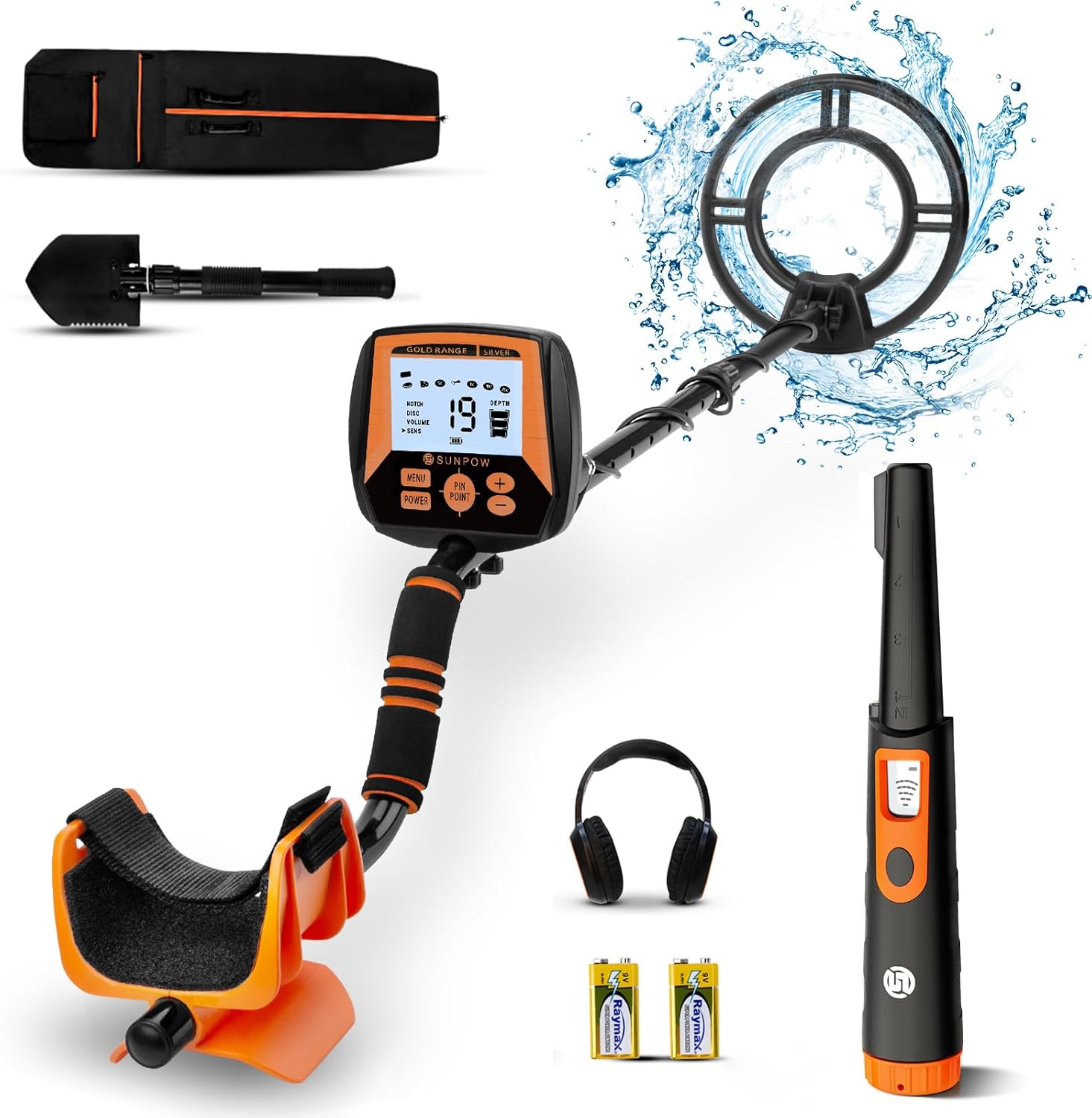
Image 1.1: The complete SUNPOW MD04 Metal Detector and MD08 Pinpointer kit, including the main detector unit, pinpointer, headphones, shovel, and carrying bag.
2. Safety Information
- Always obtain permission before metal detecting on private property.
- Be aware of local laws and regulations regarding metal detecting.
- Avoid detecting in areas with known underground utilities (e.g., power lines, gas pipes).
- Exercise caution when digging to avoid injury or damage to property.
- Keep batteries out of reach of children and dispose of them properly.
- Do not expose the devices to extreme temperatures or direct sunlight for prolonged periods.
- The MD04 search coil and MD08 pinpointer are waterproof, but the control box of the MD04 is not. Do not submerge the MD04 control box.
3. Package Contents
Upon opening your package, please verify that all the following items are included:
- SUNPOW MD04 Metal Detector (Main Unit with Search Coil)
- SUNPOW MD08 Pinpointer
- Headphones
- Folding Shovel
- Carrying Bag
- User Manual (this document)
- Batteries (quantity as specified on packaging, typically for initial use)

Image 3.1: An overview of the items typically included in the SUNPOW metal detector kit, showing the main detector, pinpointer, and accessories.
4. Product Overview
4.1 SUNPOW MD04 Metal Detector
The MD04 metal detector is designed for high accuracy and deep detection, featuring a DSP chip for enhanced sensitivity and anti-interference capabilities.

Image 4.1.1: Detailed view of the MD04's intuitive LCD display, highlighting the Menu Indicator, Target Digital, Target ID, Coin Depth Indicator, Low Battery Indicator, and control buttons (Menu, Power, Pinpoint, Increase, Decrease).
- Control Box: Houses the LCD display and control buttons.
- Search Coil: The waterproof coil that detects metal objects.
- Adjustable Stem: Allows for comfortable height adjustment.
- Armrest: Provides support during use.
- DSP Chip: Integrated for improved detection depth and accuracy.

Image 4.1.2: Visual representation of the upgraded DSP chip, indicating its role in enhancing detection accuracy and depth by 30%.
4.2 SUNPOW MD08 Pinpointer
The MD08 pinpointer is a fully waterproof, handheld device designed for precise location of targets found by the main detector.

Image 4.2.1: Annotated diagram of the MD08 pinpointer, showing its LED Screen, Battery Cover, LED Flashlight, and One Touch Switch, along with features like Portable Chain Buckle, 360° Scan, and Pinpoint Tip.
- 360° Detection: Allows for all-around scanning.
- LCD Screen: Displays signal strength and other information.
- LED Flashlight: Assists in low-light conditions.
- Multiple Alert Modes: Buzzer, Vibration, and Sound.
- Waterproof Design: Fully submersible.

Image 4.2.2: The SUNPOW MD08 Pinpointer shown with its protective holster, lanyard, and a 9V battery, ready for use.
5. Setup
5.1 Assembling the MD04 Metal Detector
- Attach the search coil to the lower stem using the provided bolt and nut. Ensure it is securely fastened but do not overtighten.
- Connect the lower stem to the middle stem, and then connect the middle stem to the upper stem (which has the control box and armrest).
- Wrap the search coil cable neatly around the stem, ensuring it is not tangled, and plug the connector into the port on the control box.
- Adjust the stem length to a comfortable height that allows the search coil to be parallel to the ground when standing upright. Secure the adjustment locks.
- Insert the required batteries into the battery compartment located on the control box. Ensure correct polarity.
5.2 Installing Batteries for MD08 Pinpointer
- Unscrew the battery cap at the end of the pinpointer.
- Insert a 9V battery, observing the correct polarity (+/-).
- Screw the battery cap back on tightly to ensure the waterproof seal is maintained.
6. Operating the MD04 Metal Detector
6.1 Power On/Off
Press and hold the POWER button to turn the detector on or off.
6.2 Operating Modes
The MD04 offers several detection modes to suit different searching conditions and target preferences. Use the MENU button to cycle through modes and the + / - buttons to adjust settings within each mode.
- ALL METAL Mode: Detects all types of metal objects. This mode offers the deepest detection depth.
- DISC (Discrimination) Mode: Allows you to eliminate certain types of metal from detection, such as iron, to focus on more valuable targets.
- NOTCH Mode: Similar to DISC, but allows you to selectively "notch out" specific ranges of metal conductivity.
- PINPOINT Mode: Press the PINPOINT button to activate. This mode helps to precisely locate the exact position of a detected target before digging. The detector will emit a continuous tone that increases in pitch and volume as you get closer to the target.
6.3 Sensitivity Adjustment (SENS)
Adjust the sensitivity using the + / - buttons in the menu. Higher sensitivity increases detection depth but may also increase false signals in mineralized ground. Start with a moderate sensitivity and adjust as needed.
6.4 Volume Adjustment (VOLUME)
Adjust the audio volume of the detector using the + / - buttons in the menu.
6.5 Target Identification and Depth
The LCD display provides visual cues for target identification (Target ID) and estimated depth (Coin Depth Indicator). Different target IDs correspond to different types of metal.

Image 6.5.1: A visual comparison illustrating the MD04's enhanced detection depth of up to 10 inches compared to other detectors, showing various buried objects at different depths.
7. Operating the MD08 Pinpointer
7.1 Power On/Off
Press the one-touch switch button to turn the pinpointer on. Press and hold the button to turn it off.
7.2 Detection and Alert Modes
The MD08 pinpointer offers 360-degree detection and provides multiple alert types when metal is detected.

Image 7.2.1: Icons representing the four types of reflections/alerts provided by the MD08 pinpointer: Sound, Vibration, Light (LED), and Screen (LCD display for signal strength).
- Buzzer: Emits an audible "Beep Beep" sound.
- Vibration: The device will vibrate.
- Sound: An audible tone.
- LCD Screen: The signal strength will be displayed on the LCD screen, increasing as you get closer to the target. The LED light will also strobe.
7.3 Pinpointing Technique
Once the main detector has identified a target area, use the MD08 pinpointer to narrow down the exact location. Move the tip of the pinpointer slowly over the area. The alerts will intensify as you approach the target.

Image 7.3.1: Illustration of the MD08 pinpointer's high depth detection capability, showing it locating objects up to 4.5 inches underground with its 360° all-around scan.
8. Maintenance
- Cleaning: After each use, wipe down the detector and pinpointer with a damp cloth. Avoid using abrasive cleaners or solvents.
- Storage: Store the devices in a cool, dry place when not in use. If storing for extended periods, remove all batteries to prevent leakage.
- Coil Care: The MD04 search coil is waterproof and can be rinsed with fresh water. Ensure the cable connection to the control box is dry before re-connecting.
- Pinpointer Care: The MD08 pinpointer is fully waterproof and can be rinsed. Ensure the battery cap is tightly sealed before exposing to water.
9. Troubleshooting
| Problem | Possible Cause | Solution |
|---|---|---|
| Detector not powering on. | Low or dead batteries; incorrect battery polarity. | Replace batteries; check battery orientation. |
| Excessive false signals (MD04). | High sensitivity setting; highly mineralized ground; electromagnetic interference. | Reduce sensitivity; try a different detection mode (DISC/NOTCH); move away from power lines or other electronics. |
| No detection or weak detection. | Low batteries; sensitivity too low; search coil not properly connected. | Replace batteries; increase sensitivity; ensure search coil cable is securely plugged in. |
| Pinpointer not detecting. | Low or dead battery; pinpointer not turned on. | Replace 9V battery; press the power button to activate. |
10. Specifications
| Feature | Specification |
|---|---|
| Brand | SUNPOW |
| MD04 Model Number | OTMD04 |
| MD08 Model Number | OTMD08 |
| MD04 Detection Depth | Up to 10 inches (in All Metal mode) |
| MD08 Detection Depth | Up to 4.5 inches (for quarter coin) |
| MD04 Modes | Pinpoint, Disc, Notch, All Metal, Volume |
| MD08 Alert Modes | Buzzer, Vibration, Sound, LCD Screen (signal strength) |
| MD04 Search Coil Waterproof Rating | Yes (Control box is not waterproof) |
| MD08 Pinpointer Waterproof Rating | Fully Waterproof (IP68) |
| Display Type | LCD |
| Power Source | Battery Powered |
| Material | Metal |
| Extended Length (MD04) | 47.2 Inches |
| Adjustable Length (MD04) | Yes |
11. Warranty and Support
For warranty information and customer support, please refer to the warranty card included with your product or visit the official SUNPOW website. If you encounter any issues not covered in this manual, please contact SUNPOW customer service for assistance.
You can also visit the SUNPOW Store on Amazon for more information and product details: SUNPOW Store.
Related documentsMD04, MD08


Ask a question about this manual
Ask about setup, troubleshooting, compatibility, parts, safety, or missing instructions. Manuals+ will review the question and use this page’s manual context to help answer it.