
1. Product Overview
The SmallRig COB Video Light Control Panel (Model 3980) is designed to provide remote and precise control over compatible SmallRig COB video lights. This external control panel enhances usability, especially when lights are positioned in hard-to-reach locations. It features a 2-inch LCD screen for real-time parameter display and intuitive controls for various light settings.
Compatibility: This control panel is exclusively compatible with SmallRig RC 350D, RC 350B, RC 450D, RC 450B, and RC220 PRO COB video lights.
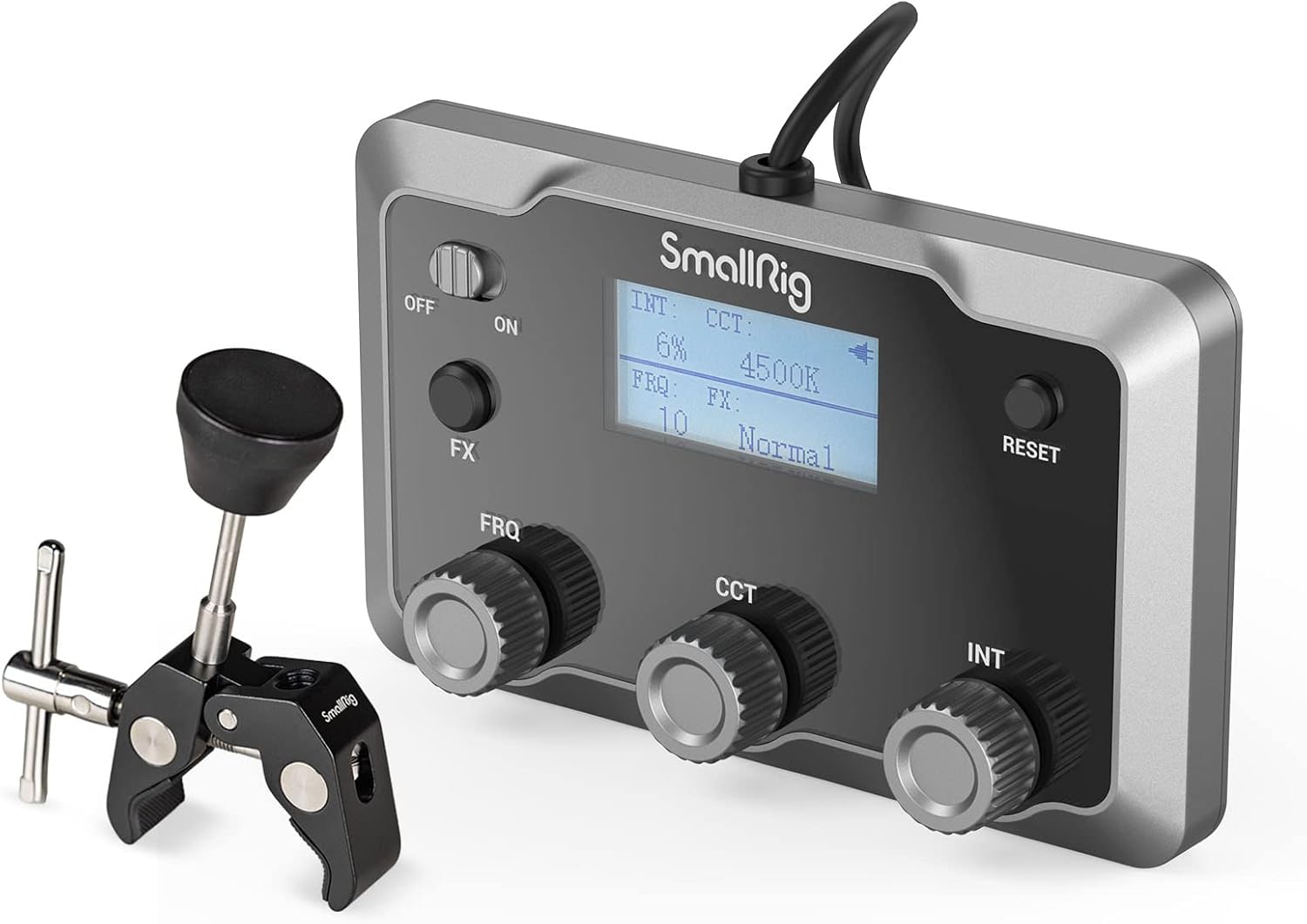
Image: SmallRig COB Video Light Control Panel with its included magic arm.
2. Package Contents
- Control Panel × 1
- Magic Arm × 1
- User Manual × 1

Image: The control panel, magic arm, and connection cable included in the box.
3. Setup Instructions
- Install the Magic Arm: Secure the magic arm onto a light stand or other suitable mounting point using its crab clamp. Ensure it is firmly attached.
- Connect the Control Panel: Connect the 3-meter anti-drop connection cable from the control panel to the compatible SmallRig COB light. The cable uses a mini XLR connector with a lock for secure attachment.
- Mount the Control Panel: Attach the control panel to the magic arm. The magic arm allows for flexible positioning of the control panel for easy access.
- Initial Firmware Upgrade: Upon first use, the device may initiate a firmware upgrade. Allow this process to complete without interruption.

Image: Visual guide demonstrating the installation of the magic arm and control panel.
4. Operating Instructions
The control panel features a 2-inch LCD display and several control knobs and buttons for adjusting light parameters.

Image: Front view of the control panel highlighting the ON/OFF switch, FX button, Frequency (FRQ) knob, Color Temperature (CCT) knob, Brightness (INT) knob, and Reset button.
4.1. Controls and Display
- ON/OFF Switch: Located on the left side, use this to power the control panel on or off.
- FX Button: Toggles through various built-in special effects.
- FRQ Knob (Frequency Regulation): Adjusts the frequency of special effects.
- CCT Knob (Color Temperature Adjustment): Modifies the color temperature of the light (for bi-color versions of compatible lights).
- INT Knob (Brightness Adjustment): Controls the light intensity from 0% to 100%.
- RESET Button: Used for resetting settings or activating silent working mode.
- 2-inch LCD Display: Shows real-time light parameters including intensity (INT), color temperature (CCT), frequency (FRQ), and current special effect (FX).

Image: A hand adjusting a knob on the control panel, with the LCD screen clearly visible showing light parameters.
4.2. Special Effects and Frequency
Press the FX button to cycle through available special effects. Use the FRQ knob to adjust the frequency or speed of the selected effect. The change range for frequency is typically 1 to 10.

Image: Visual representation of special effects like Flash, Paparazzi, Lightning, Party, Faulty Bulb, TV, Flame, Fireworks, and Breath, with the control panel in use.
4.3. Silent Working Mode
To activate the silent working mode, press the RESET button three times consecutively. In this mode, the fan of the connected COB light will turn off, and the light will operate at an output power of 60W. This is useful for situations requiring minimal noise.

Image: Illustration of the RESET button and the concept of silent working mode with the fan off and 60W output.
4.4. Power Off Procedure
When finished using the RC 350/RC 450 series lights, ensure to turn off both the switch on the COB light itself and the ON/OFF switch on the control panel.
5. Maintenance
To ensure the longevity and optimal performance of your SmallRig COB Video Light Control Panel, follow these maintenance guidelines:
- Cleaning: Use a soft, dry cloth to clean the control panel. Avoid using abrasive cleaners, solvents, or strong chemicals, as these can damage the surface or internal components.
- Storage: Store the control panel in a cool, dry place away from direct sunlight and extreme temperatures. If storing for extended periods, ensure it is disconnected from any power source.
- Handling: Handle the device with care to prevent drops or impacts, which could damage the internal electronics or the LCD screen.
- Cable Care: Avoid bending or twisting the connection cable excessively. Always grasp the connector, not the cable, when plugging or unplugging.
6. Troubleshooting
If you encounter issues with your control panel, consider the following:
- No Power/Display:
- Ensure the ON/OFF switch is in the 'ON' position.
- Verify that the connection cable is securely attached to both the control panel and the COB light.
- Confirm that the compatible COB light is powered on and functioning correctly.
- Unresponsive Controls:
- Check for any loose connections.
- Try restarting both the control panel and the COB light.
- If the issue persists, a firmware update might be required (refer to the initial setup note).
- Firmware Update Issues: If an initial firmware update fails or gets stuck, ensure a stable power supply and try restarting the device. If problems continue, contact SmallRig customer support.
For further assistance, please refer to the contact information in the Support section.
7. Specifications
| Feature | Detail |
|---|---|
| Model Number | 3980 |
| Product Dimensions | 4.72 x 2.76 x 1.18 inches (170.0 × 78.0 × 20.0mm) |
| Item Weight | 6.6 ounces (170g) |
| Control Panel Power Supply | 5V=0.1A |
| Connectivity Technology | Wired (Mini XLR) |
| Display | 2-inch LCD Screen |
| Compatible Lights | SmallRig RC 350D/B, RC 450D/B, RC220 PRO |

Image: The control panel displaying compatibility with SmallRig RC350B (ID: 3965), RC350D (ID: 3960), RC450B (ID: 3975), and RC450D (ID: 3970).
8. Warranty and Support
SmallRig products are designed and manufactured to high-quality standards. For warranty information, please refer to the warranty card included with your product or visit the official SmallRig website.
If you require technical support, have questions about product operation, or need assistance with troubleshooting, please contact SmallRig customer service through their official channels:
- Website: www.smallrig.com
- Email: Refer to the contact section on the SmallRig website.
- Phone: Refer to the contact section on the SmallRig website.
Please have your product model number (3980) and purchase details ready when contacting support.


