
1. Introduction
Thank you for choosing the GHB Baby Monitor Charger. This manual provides essential information for the safe and proper operation, maintenance, and troubleshooting of your charger. Please read this manual thoroughly before use and retain it for future reference.
This charger is specifically designed for use with GHB baby monitor models VB601, VB603, and VB607.
2. Product Overview
The GHB Baby Monitor Charger is a power adapter designed to supply electrical power to compatible GHB baby monitor units. It ensures your baby monitor remains powered and operational, providing continuous monitoring.
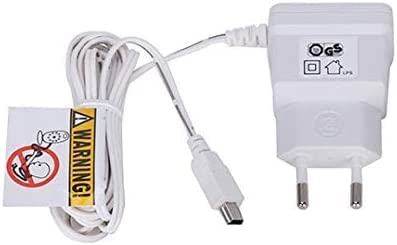
Image 1: GHB Baby Monitor Charger. This image shows the compact design of the charger, featuring its power plug and connector cable.
The package includes one (1) GHB Baby Monitor Charger.

Image 2: Example of a GHB Baby Monitor Camera Unit. This charger is compatible with models such as VB601, VB603, and VB607.
3. Safety Information
To ensure safe operation and prevent damage, please observe the following safety precautions:
- Use only with specified models: This charger is designed exclusively for GHB baby monitor models VB601, VB603, and VB607. Using it with incompatible devices may cause damage or malfunction.
- Indoor use only: This product is intended for indoor use. Do not expose it to rain, moisture, or extreme temperatures.
- Avoid water: The charger is not water-resistant. Keep it away from liquids and do not operate with wet hands.
- Proper ventilation: Ensure the charger is placed in a well-ventilated area to prevent overheating. Do not cover it with cloths or other materials.
- Handle with care: Do not drop, disassemble, or attempt to repair the charger. Refer all servicing to qualified personnel.
- Power source: Connect the charger only to a power outlet that matches the voltage and current ratings specified on the charger.
- Cable integrity: Regularly inspect the power cord for any damage. Do not use if the cord is frayed or damaged.
- Keep out of reach of children: Ensure the charger and its cable are positioned where they cannot be reached or pulled by infants or young children.
4. Setup
Follow these steps to set up your GHB Baby Monitor Charger:
- Unpack: Carefully remove the charger from its packaging.
- Identify connection port: Locate the power input port on your GHB baby monitor unit (VB601, VB603, or VB607). This is typically a small circular port.
- Connect to monitor: Insert the small connector end of the charger cable firmly into the power input port of your baby monitor unit.
- Connect to power outlet: Plug the larger end of the charger (the power adapter) into a standard electrical wall outlet.
- Verify power: Once connected, your baby monitor should power on or begin charging its internal battery. Refer to your baby monitor's manual for specific power indicators.
5. Operating Instructions
Using the GHB Baby Monitor Charger is straightforward:
- Charging: When the charger is connected to both the baby monitor and a power outlet, it will automatically begin charging the monitor's battery or providing direct power if the battery is fully charged or absent.
- Continuous Power: For continuous operation, keep the charger plugged into both the monitor and the power outlet.
- Disconnecting: To disconnect, first unplug the charger from the wall outlet, then gently remove the connector from the baby monitor. Avoid pulling the cable itself.
6. Maintenance
Proper maintenance ensures the longevity and reliable performance of your charger:
- Cleaning: Disconnect the charger from the power outlet and the baby monitor before cleaning. Use a soft, dry cloth to wipe the surface. Do not use liquid cleaners or abrasive materials.
- Storage: When not in use, store the charger in a cool, dry place, away from direct sunlight and extreme temperatures. Avoid tightly winding the cable to prevent damage.
- Inspection: Periodically check the charger cable and connectors for any signs of wear, cuts, or damage. If damage is observed, discontinue use and replace the charger.
7. Troubleshooting
If you encounter issues with your GHB Baby Monitor Charger, refer to the following common problems and solutions:
| Problem | Possible Cause | Solution |
|---|---|---|
| Monitor not powering on/charging |
|
|
| Slow charging |
|
|
If the problem persists after trying these solutions, please contact customer support.
8. Specifications
- Brand: GHB
- Model: VB60X (Compatible with VB601, VB603, VB607)
- Product Type: Charger / Power Adapter
- Dimensions: Approximately 8.7 x 6.8 x 2.9 cm (Package dimensions)
- Weight: Approximately 60 grams (Item weight)
- Components Included: 1x Charger
- Water Resistance Level: Not water resistant
- Connectivity: Wired (for power delivery)
9. Warranty and Support
For warranty information and customer support, please refer to the documentation provided with your original GHB baby monitor purchase or visit the official GHB website. Keep your purchase receipt as proof of purchase for warranty claims.
For technical assistance or inquiries, please contact GHB customer service through their official channels.

