
1. Safety Instructions
Please read all safety instructions carefully before operating the DATOUBOSS Pure Sine Wave Power Inverter. Failure to follow these instructions may result in electric shock, fire, or serious injury.
- Ventilation: Ensure the inverter is installed in a well-ventilated area. Do not block the ventilation openings.
- Dry Environment: Keep the inverter away from water, rain, and moisture.
- Proper Connection: Connect the inverter only to a 48V DC power source. Incorrect voltage can damage the unit. Ensure correct polarity (+ to + and - to -).
- Overload Protection: Do not exceed the rated power of the inverter (2000W continuous, 4000W peak). Overloading can cause damage and fire.
- Flammable Materials: Do not operate the inverter near flammable materials or gases.
- Children and Pets: Keep the inverter out of reach of children and pets.
- Servicing: Do not attempt to disassemble or repair the inverter yourself. Refer all servicing to qualified personnel.
- Grounding: Ensure the inverter is properly grounded according to local electrical codes.
2. Package Contents
Verify that all items are present in your package:
- DATOUBOSS Pure Sine Wave Power Inverter (2000W 48V)
- Remote Control
- Battery Connection Cables (Red and Black)
- User Manual

Image: The DATOUBOSS Pure Sine Wave Power Inverter, remote control, and battery connection cables as they appear in the package.
3. Product Overview
The DATOUBOSS Pure Sine Wave Power Inverter converts 48V DC battery power to 100V AC household power, allowing you to operate various AC appliances from your vehicle, RV, boat, or off-grid solar system. It features a pure sine wave output, which is ideal for sensitive electronics, and includes multiple protection functions for safe and reliable operation. The integrated LCD display provides real-time operational status, and a remote control offers convenient power management.

Image: Front and back view of the DATOUBOSS Pure Sine Wave Power Inverter, highlighting its compact design and connection ports.
Video: An unboxing and overview of the DATOUBOSS Pure Sine Wave Power Inverter, showing its components and initial setup.
4. Setup
4.1 Connecting to a 48V DC Power Source
- Ensure the inverter is turned off.
- Connect the red battery cable to the positive (+) terminal of your 48V battery bank and the positive (+) terminal on the inverter.
- Connect the black battery cable to the negative (-) terminal of your 48V battery bank and the negative (-) terminal on the inverter.
- Ensure all connections are tight and secure to prevent loose connections and sparking.

Image: Rear panel of the inverter, illustrating the positive (+) and negative (-) battery connection terminals and cooling fans.
4.2 Frequency Switching (50Hz/60Hz)
The inverter supports both 50Hz and 60Hz output frequencies. To switch the frequency:
- Turn off the inverter and disconnect it from the power source.
- Carefully open the inverter casing to access the internal circuit board.
- Locate the frequency switch on the circuit board.
- Adjust the switch to your desired frequency (50Hz or 60Hz).
- Close the inverter casing securely before reconnecting power.
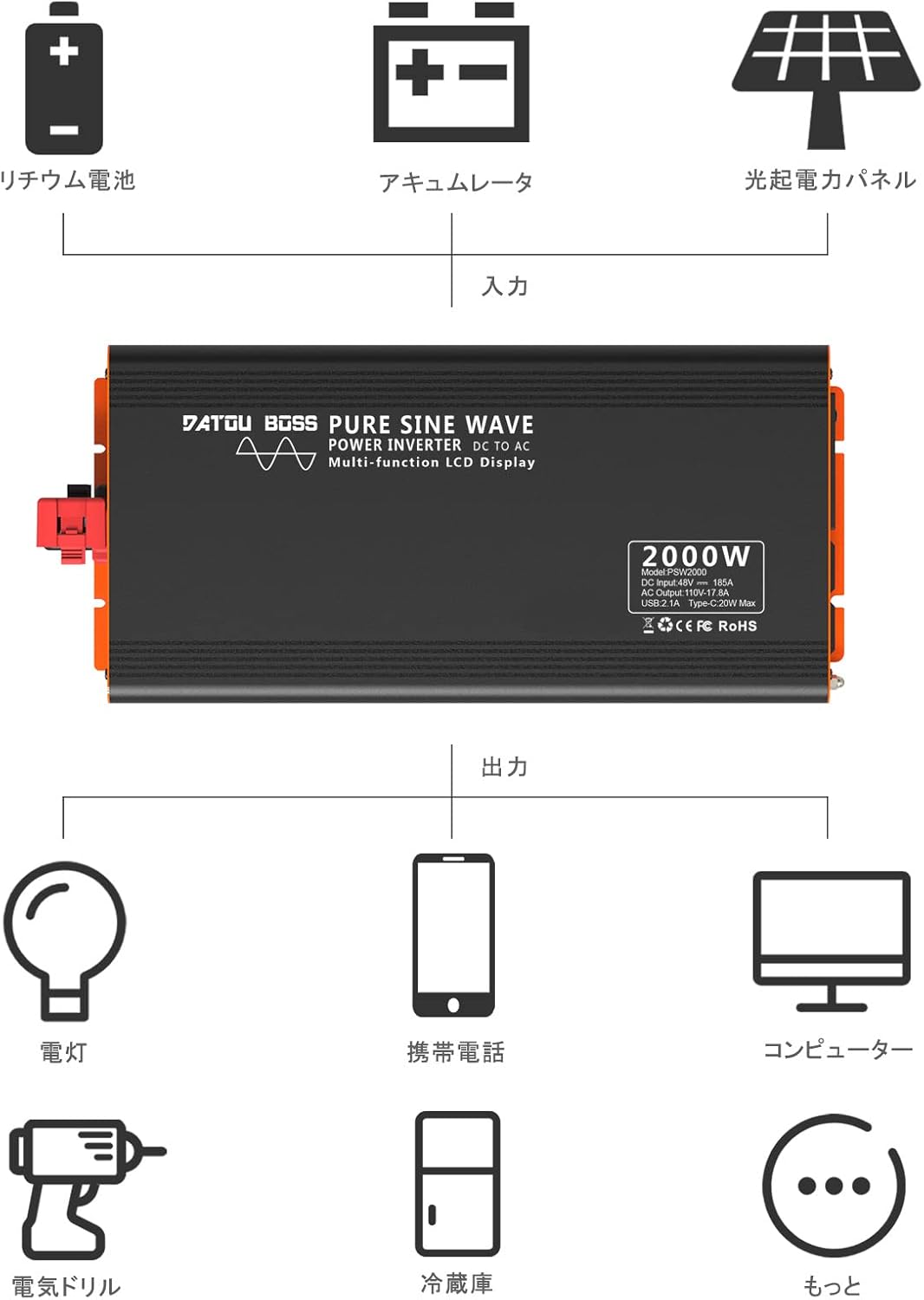
Image: A diagram indicating the location of the frequency switch inside the inverter, which can be set to 50Hz or 60Hz.
4.3 Remote Control Pairing
If the remote control does not operate the inverter, it may need to be paired:
- Long-press the ON button on the inverter. A small red dot will flash on the inverter's display.
- Point the remote control towards the inverter and press the ON button on the remote.
- The inverter and remote control are now paired.
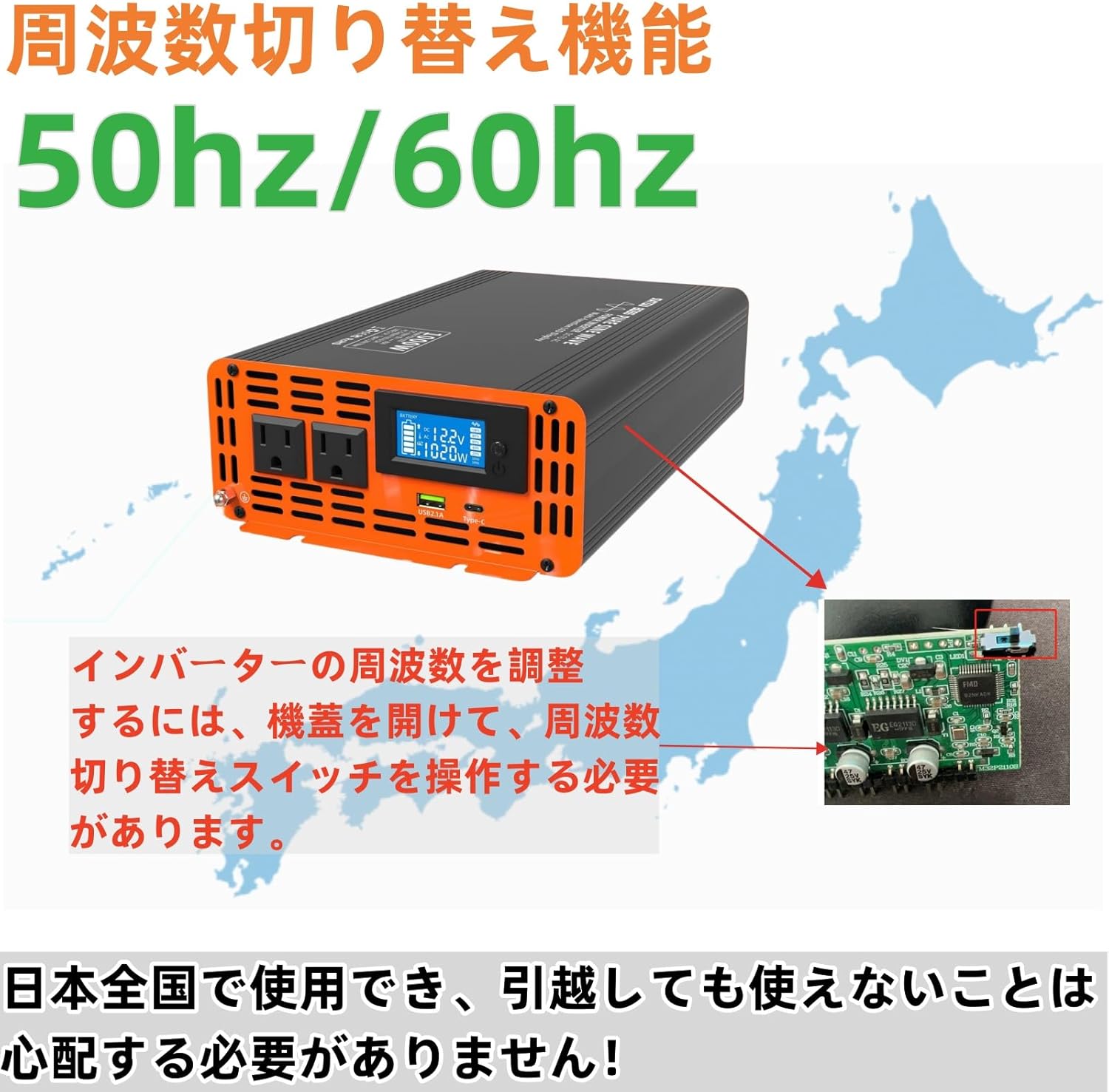
Image: Visual guide for pairing the remote control with the inverter, showing the steps to activate pairing mode and confirm connection.
5. Operating Instructions
5.1 Powering On/Off
- After connecting the battery cables, press the power button on the inverter to turn it on. The LCD display will illuminate.
- To turn off the inverter, press the power button again.
- Alternatively, use the remote control's ON/OFF buttons for convenience.
5.2 Understanding the LCD Display
The multi-functional LCD display provides critical information about the inverter's operation:
- Input Voltage: Displays the DC voltage from your battery bank.
- Output Voltage: Shows the AC output voltage (e.g., 100V).
- Power Display: Indicates the current power consumption of connected appliances in Watts.
- Battery Power: Visual representation of the battery charge level.
- Frequency Display: Shows the output frequency (50Hz or 60Hz).
- Waveform Display: Illustrates the pure sine wave output.
- Temperature Display: Shows the internal temperature of the inverter.
- Overload Protection Indicator: Will display if an overload occurs.

Image: A detailed view of the LCD screen, displaying input voltage, output power, battery level, and other operational data.
5.3 Connecting AC Appliances
- Plug your AC appliances into the output sockets on the inverter.
- Ensure the total power consumption of all connected appliances does not exceed the inverter's rated power (2000W).
- For optimal performance and safety, avoid running appliances that draw close to the maximum power for extended periods.
Video: Demonstration of the inverter powering various household appliances, including a fan, TV, hair dryer, and blender, showcasing its versatility.
6. Features
- High-Performance Pure Sine Wave Output: Provides stable and clean power suitable for a wide range of electrical products and precision instruments. Utilizes MCU microprocessor control with SPWM technology to deliver 100% pure sine wave power. Conversion efficiency exceeds 90%.
- Multiple Circuit Protection: Equipped with comprehensive safety features including input low voltage alarm, overvoltage protection, overload protection, low voltage protection, overheat protection, and short circuit protection. These safeguards ensure the complete protection of your connected circuits and devices. The waveform THD is ≤3%.
- LCD Liquid Crystal Display: Features a multi-functional LCD display that shows input voltage, temperature, battery power, frequency, output voltage, waveform, and power. It also indicates overload protection status. Includes remote control functionality for convenient operation.
- Ultra-Quiet & High Durability: Designed to minimize noise for a quiet operating environment while ensuring safety. The body is made of high-quality materials for durability. Two built-in cooling fans provide excellent heat dissipation. The fans activate automatically based on product temperature, extending the product's lifespan.
- Wide Application: Suitable for various applications including home appliances (e.g., vacuum cleaners), kitchen appliances (e.g., coffee makers), home entertainment electronics (e.g., audio systems), office equipment (e.g., computers), industrial equipment (e.g., cloud servers), and power tools (e.g., electric drills).

Image: A visual representation of the inverter's multi-protection system, including overvoltage, overload, overheat, and short circuit safeguards.
Image: An illustration demonstrating the wide range of applications for the inverter, from powering lights and phones to computers and electric drills, connected to a battery or solar panel setup.
7. Maintenance
To ensure the longevity and optimal performance of your DATOUBOSS Pure Sine Wave Power Inverter, follow these maintenance guidelines:
- Keep Clean: Regularly clean the exterior of the inverter with a dry, soft cloth. Do not use liquid cleaners or solvents.
- Check Connections: Periodically inspect all electrical connections (battery cables, AC plugs) to ensure they are tight and free from corrosion. Loose connections can lead to overheating and power loss.
- Ventilation: Ensure the cooling fans and ventilation openings are free from dust and debris. Blocked vents can lead to overheating.
- Storage: If storing the inverter for an extended period, disconnect it from the battery and store it in a cool, dry place.
8. Troubleshooting
If you encounter issues with your inverter, refer to the following common problems and solutions:
| Problem | Possible Cause | Solution |
|---|---|---|
| No AC Output / Inverter not turning on |
|
|
| Overheat Alarm |
|
|
| Remote Control Not Working |
|
|
| Abnormal Noise |
|
|
9. Specifications
| Feature | Specification |
|---|---|
| Input Voltage | DC 48V |
| Output Voltage | AC 100V |
| Rated Power | 2000W |
| Peak Power | 4000W |
| Output Waveform | Pure Sine Wave |
| Output Frequency | 50Hz / 60Hz (Switchable) |
| Overheat Protection | 80℃ ± 5℃ |
| Cooling Method | Built-in Cooling Fans |
| Waveform THD | ≤3% |
| Conversion Efficiency | ≥90% |
| Product Dimensions | 36 x 17.3 x 7.6 cm |
| Product Weight | 4.5 kg |
| Included Accessories | Inverter, Remote Control |
10. Warranty & Support
DATOUBOSS products are designed and manufactured to the highest quality standards. For warranty information, technical support, or service inquiries, please contact the DATOUBOSS customer service team through your purchase platform or the official DATOUBOSS website.
Please retain your proof of purchase for any warranty claims.


