
1. Product Overview
The VirtuFit Etappe 2.0i Indoor Cycle is designed for home fitness enthusiasts, offering a robust and interactive training experience. This spin bike features a heavy flywheel, multiple resistance levels, and compatibility with popular fitness applications to enhance your workouts.

Figure 1: Front-side view of the VirtuFit Etappe 2.0i Indoor Cycle.

Figure 2: Side view of the VirtuFit Etappe 2.0i Indoor Cycle, highlighting its sturdy frame.
2. Important Safety Information
Before using the VirtuFit Etappe 2.0i Indoor Cycle, please read and understand all safety instructions. Failure to follow these instructions may result in injury or damage to the equipment.
- Consult a physician before starting any new exercise program.
- Keep children and pets away from the equipment during use.
- Place the cycle on a flat, stable surface with adequate clearance around it.
- Ensure all bolts and nuts are securely tightened before each use.
- Wear appropriate athletic footwear and clothing.
- Do not exceed the maximum user weight of 140 kg.
- Stop exercising immediately if you feel faint, dizzy, or experience pain.
- Regularly inspect the equipment for wear and tear. Do not use if damaged.
3. Package Contents
Verify that all components are present before assembly:
- Main frame
- Handlebar assembly
- Seat post and saddle
- Pedals (left and right)
- Front and rear stabilizers
- Console/Display unit
- Tablet holder
- Water bottle holder
- Assembly tools and hardware
- User manual
4. Assembly and Setup
Follow these steps to assemble your VirtuFit Etappe 2.0i Indoor Cycle:
- Attach Stabilizers: Secure the front and rear stabilizers to the main frame using the provided bolts and washers. Ensure they are firmly attached for stability.
- Install Pedals: Identify the left (L) and right (R) pedals. The left pedal screws counter-clockwise, and the right pedal screws clockwise. Tighten them securely to the crank arms.
- Assemble Seat Post and Saddle: Insert the seat post into the main frame. Adjust the height using the quick-release lever. Attach the deluxe saddle to the seat post, then adjust its horizontal position using the L-bolts for optimal comfort.
- Mount Handlebar Assembly: Slide the handlebar post into the main frame. Adjust the height and secure it with the adjustment knob. Attach the multi-grip handlebar to the post.
- Connect Console: Connect the console cables to the main frame. Mount the console onto the handlebar assembly. Place the tablet holder and water bottle holder as desired.
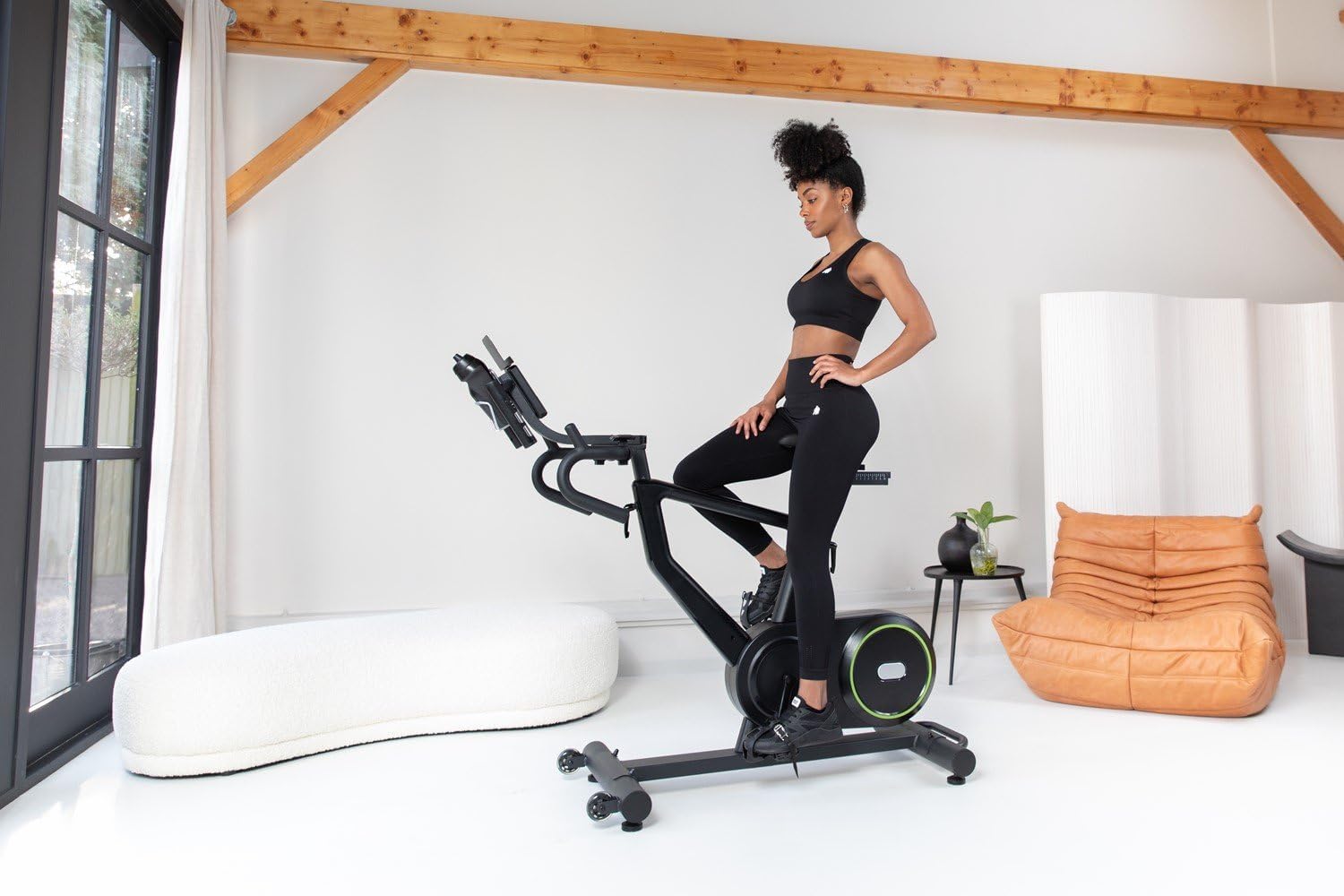
Figure 3: Adjusting the seat height for a comfortable riding position.

Figure 4: Adjusting the handlebar height to suit user preference.
5. Operating Instructions
The VirtuFit Etappe 2.0i offers various training options and adjustments for a personalized workout.
5.1 Console Functions
The clear LED console displays key workout data:
- Time: Duration of your workout.
- Distance: Total distance covered.
- RPM: Revolutions per minute.
- Watt: Power output in watts.
- Speed: Current speed.
- Average Speed: Average speed during the workout.
- Calories: Estimated calories burned.
- Pulse: Heart rate (requires compatible 5 kHz heart rate monitor, not included).
- Gear: Current resistance level.
Use the console buttons (START, STOP, RESET, ENTER, +/-) to navigate menus, select programs, and adjust settings.

Figure 5: Detailed view of the LED console with various workout metrics.

Figure 6: Handlebar controls for adjusting resistance levels during a workout.
5.2 Resistance Levels and Programs
The cycle features 24 resistance levels and 13 pre-programmed training programs. You can manually adjust resistance or select a program for varied intensity.
5.3 App Compatibility
The Etappe 2.0i is compatible with popular training applications such as Zwift, Kinomap, and Fitshow. Connect your tablet or smartphone to the cycle to access interactive workouts, scenic routes, and structured training plans.

Figure 7: Tablet mounted on the console, displaying the Kinomap application.

Figure 8: User engaged in an interactive workout using a fitness application on the tablet holder.
5.4 Video Demonstration
Video 1: This video demonstrates the key features of the VirtuFit Etappe 2.0i Indoor Cycle, including seat and handlebar adjustments, console display, and compatibility with fitness apps like Kinomap and Zwift. It also highlights the 24 resistance levels and various workout programs.
6. Maintenance
Regular maintenance ensures the longevity and safe operation of your indoor cycle.
- Cleaning: Wipe down the cycle with a damp cloth after each use to remove sweat and dust. Avoid abrasive cleaners.
- Inspection: Periodically check all bolts, nuts, and moving parts for tightness and wear. Tighten any loose fasteners.
- Lubrication: Apply a small amount of silicone-based lubricant to moving parts (e.g., seat post, handlebar post) if they become stiff.
- Storage: Store the cycle in a dry, cool place away from direct sunlight and extreme temperatures.
7. Troubleshooting
Refer to this section for solutions to common issues:
| Problem | Possible Cause | Solution |
|---|---|---|
| Console not displaying data | Loose cable connection; Console batteries low/dead | Check all cable connections; Replace console batteries. |
| Resistance not changing | Resistance mechanism issue; Console not registering input | Ensure resistance knob/buttons are functioning; Check internal connections. |
| Unstable during use | Uneven surface; Loose stabilizers/feet | Adjust leveling feet; Tighten stabilizer bolts. |
| Squeaking or grinding noise | Loose parts; Lack of lubrication; Internal friction | Inspect and tighten all bolts; Lubricate moving parts; Contact customer support if noise persists. |
8. Specifications
- Model Name: Etappe 2.0i
- Item Model Number: VFSPINBIKE-E2.0i
- Brand: VirtuFit
- Color: Matte Black
- Main Material: Metal
- Product Dimensions (L x W x H): 132 x 115 x 52 cm
- Item Weight: 22 Kilograms
- Max User Weight: 140 kg
- Flywheel Weight: 22 kg
- Resistance Mechanism: Adjustable Magnetic Resistance (24 levels)
- Power Source: Pedal operated (non-electric)
- Special Features: Calorie counter, Speedometer, Distance monitor, Heart rate monitor (5 kHz compatible), Tablet holder, Water bottle holder
- Recommended Use: Indoor
- App Compatibility: Zwift, Kinomap, Fitshow
9. Warranty and Support
For warranty information, technical support, or to order replacement parts, please refer to the VirtuFit official website or contact your retailer. Keep your proof of purchase for warranty claims.


