
1. Introduction
This instruction manual provides detailed guidance for the use and maintenance of your new CONTROL INN remote control. This remote is designed for seamless compatibility with various Kaiser Ksr amplified speaker models, offering convenient control over your audio experience. Please read this manual thoroughly before operating the device.
Compatible Speaker Models: Afa-5715bk, Afa-5708bk, Msa-7515, Ksw-5015, Msa-9015sup, Msa-6915bt, Vkk-82, Vkk-8820.
2. Package Contents
- 1 x CONTROL INN Remote Control
- 1 x Button Cell Battery (pre-installed or included separately)
3. Setup
3.1 Battery Installation
The remote control uses one button cell battery (type CR2025 or similar, included). If the battery is not pre-installed or needs replacement, follow these steps:
- Locate the battery compartment on the back of the remote control.
- Slide open the battery cover or use a small coin to twist it open, depending on the design.
- Insert the button cell battery with the positive (+) side facing upwards.
- Close the battery compartment securely.
3.2 Initial Use
This remote control does not require programming. Once the battery is correctly installed, it is ready for use. Simply point the remote control towards your compatible Kaiser Ksr speaker and press the desired function button.
4. Operating Instructions
Familiarize yourself with the buttons on your remote control. Below is a general overview of common button functions. Specific functionality may vary slightly depending on your speaker model.
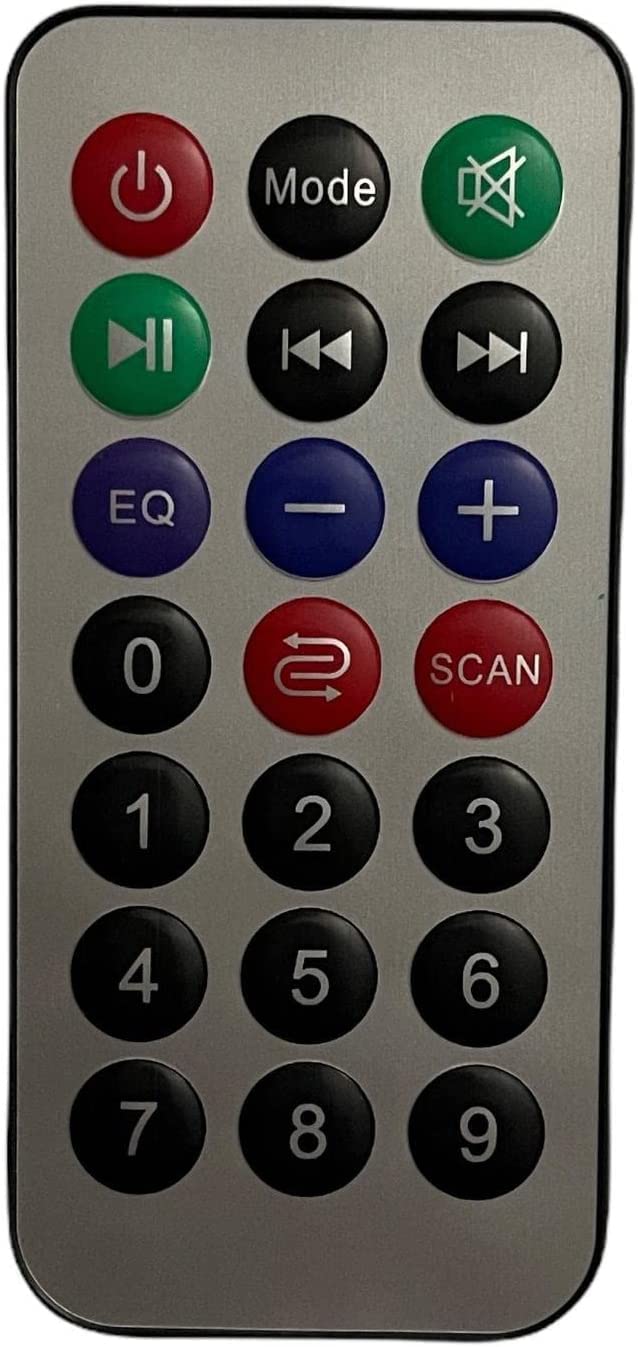
Image 1: Overview of the CONTROL INN Remote Control. This image displays the remote control with its various buttons, including power, mode, volume, track controls, EQ, scan, and numeric keys.
- Power (⏻): Turns the speaker on or off.
- Play/Pause (⏸️): Starts or pauses audio playback.
- Mode: Switches between different input modes (e.g., Bluetooth, USB, SD card, FM radio).
- EQ: Cycles through equalizer presets to adjust sound profiles.
- Volume Down (-): Decreases the speaker volume.
- Volume Up (+): Increases the speaker volume.
- Previous Track (⏮️): Skips to the beginning of the current track or the previous track.
- Next Track (⏭️): Skips to the next track.
- Mute (🔇): Mutes or unmutes the speaker audio.
- Numeric Buttons (0-9): Used for direct track selection, FM radio frequency input, or other specific functions depending on the speaker model.
- Repeat (↻): Toggles repeat modes (e.g., repeat one, repeat all).
- Scan: Initiates an automatic scan for FM radio stations.
Ensure a clear line of sight between the remote control and the speaker's infrared receiver for optimal performance.
5. Maintenance
5.1 Cleaning
To clean the remote control, use a soft, dry cloth. Do not use liquid cleaners, abrasive pads, or chemical solvents, as these may damage the surface or internal components.
5.2 Battery Replacement
Replace the battery when the remote control's range decreases significantly or it stops responding. Refer to section 3.1 for battery installation instructions. Dispose of used batteries responsibly according to local regulations.
5.3 Storage
Store the remote control in a cool, dry place away from direct sunlight, high temperatures, and excessive humidity. If storing for an extended period, it is recommended to remove the battery to prevent leakage.
6. Troubleshooting
| Problem | Possible Cause | Solution |
|---|---|---|
| Remote control not responding. | Dead or incorrectly installed battery. Obstruction between remote and speaker. Remote out of range. | Check battery installation and replace if necessary. Ensure a clear line of sight to the speaker's IR receiver. Move closer to the speaker (within 6 meters). |
| Short operating range. | Weak battery. Interference. | Replace the battery. Ensure no strong light sources or other IR devices are interfering. |
| Specific buttons not working. | Button malfunction. Speaker model incompatibility for that specific function. | Ensure the remote is compatible with your speaker model. Some advanced functions might not be supported by all speaker models. Try replacing the battery. |
7. Specifications
- Brand: CONTROL INN
- Connectivity Technology: Infrared
- Special Feature: Lightweight
- Included Components: Remote control, 1x Button Cell Battery
- Product Weight: 200 Grams
- Maximum Range: 6 Meters
- Control Method: Remote Control
- Input Human Interface: Buttons
- Compatible Devices: MP3 Player (refer to compatible speaker models in Introduction)
- Exterior Material: Plastic
8. Warranty and Support
For warranty information and customer support, please refer to the documentation provided with your purchase or contact the seller directly. CONTROL INN is committed to providing quality products and assistance.
You can also visit the CONTROL INN store on Amazon for more product information.

